> ## Documentation Index
> Fetch the complete documentation index at: https://vaquill.ai/docs/llms.txt
> Use this file to discover all available pages before exploring further.
# Compliance Check
> Run a document against major regulatory frameworks and get a clause-by-clause gap analysis with remediation steps
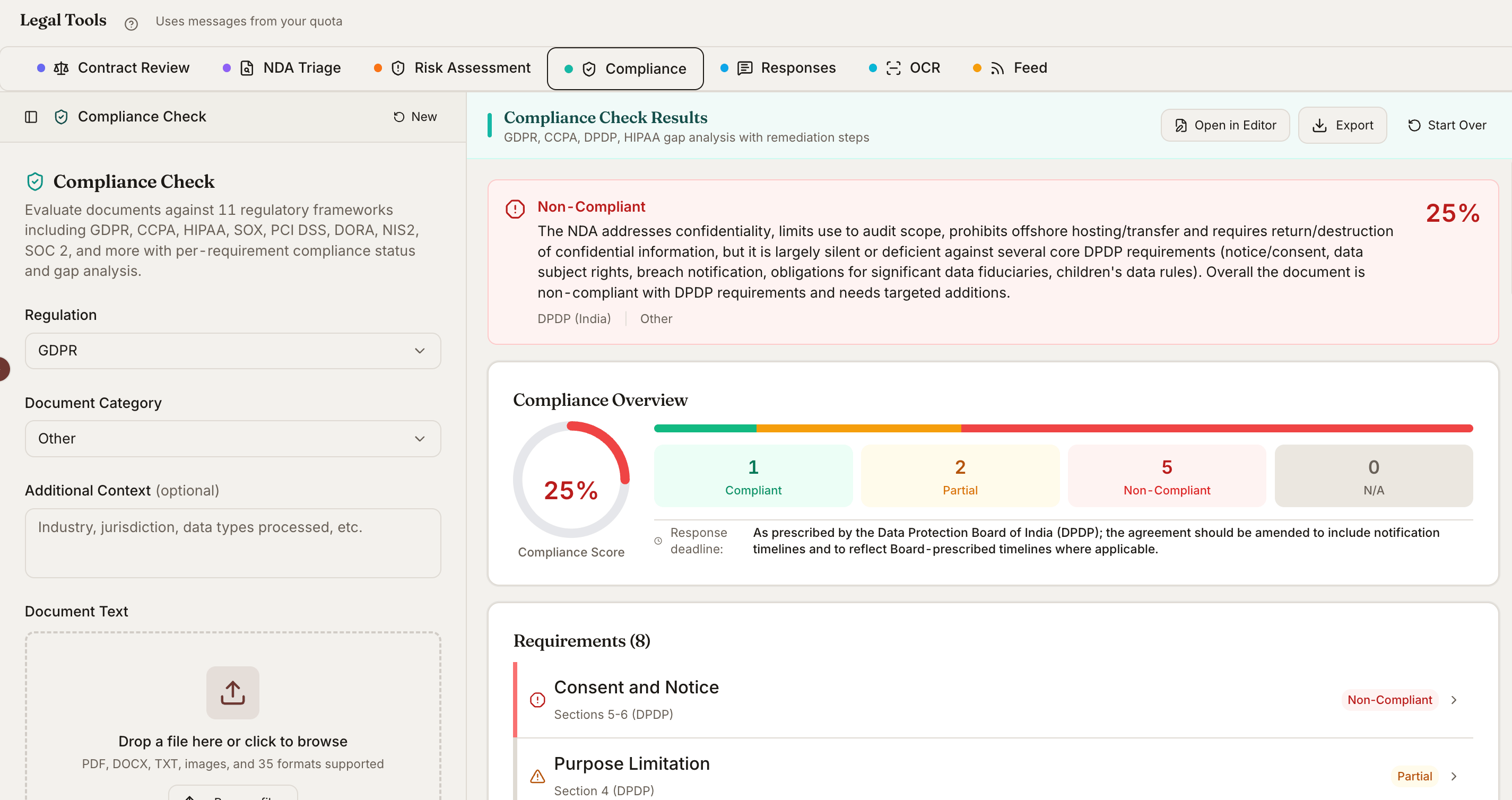
Compliance Check scans privacy policies, vendor agreements, data processing addenda, breach response plans, and other regulated documents against the regulatory frameworks you select. It returns a requirement-by-requirement scorecard, identifies gaps, and drafts remediation language you can use.
 ## Supported Frameworks
### United States
| Framework | Coverage |
| --------------- | --------------------------------------- |
| **HIPAA** | Health information privacy and security |
| **CCPA / CPRA** | California consumer privacy |
| **SOX** | Sarbanes-Oxley financial controls |
| **PCI DSS** | Payment card data security |
| **SOC 2** | Service organization controls |
### Europe and United Kingdom
| Framework | Coverage |
| ----------- | ------------------------------------- |
| **GDPR** | EU General Data Protection Regulation |
| **UK GDPR** | United Kingdom data protection |
| **DORA** | EU digital operational resilience |
| **NIS2** | EU cybersecurity directive |
Select one framework or run a multi-framework scan in a single pass.
## What It Produces
For each requirement in the framework, you get:
* A **status**: Compliant, Partially Compliant, Non-Compliant, or Not Applicable
* The **clause** in your document that addresses (or fails to address) the requirement
* A short **explanation** of why the status was assigned
* A **remediation action** if the requirement is not fully met
* A **priority** rating (Critical, High, Medium, Low) and an estimated effort to fix
## Document Types It Handles
* Privacy policies and notices
* Data Processing Agreements (DPAs)
* Terms of service and end-user agreements
* Vendor and subprocessor contracts
* Breach response plans and incident playbooks
* Consent forms and cookie notices
* Information security policies
* Employee handbooks (privacy and security sections)
The tool automatically categorizes the document type before scoring, so it applies the right subset of requirements.
## How To Run It
Drop the file into a conversation, or pick a document already attached to your matter.
Select **Compliance Check** from the tools menu, or type *"run a compliance check"* in chat.
Choose a single framework for focused review or scan against multiple frameworks in one pass.
The tool auto-detects (privacy policy, DPA, vendor contract, etc.). Override if the classification is wrong.
Drill into each requirement to see the matched clause, regulatory text, and suggested fix.
Larger documents are processed in sections so every clause gets a focused review rather than a high-level pass.
## Ready-to-run prompt
Run **Compliance Check** on the attached Data Processing Agreement.
Score it against both **GDPR** and **CCPA / CPRA** in a single pass.
For every requirement:
1. Quote the exact clause in the DPA that addresses it (or note that it is missing).
2. Rate: Compliant, Partially Compliant, Non-Compliant, or Not Applicable.
3. Where Partially or Non-Compliant, draft a one- to two-sentence replacement clause.
4. Assign a priority: Critical, High, Medium, Low.
End with a one-page negotiation memo: top three things to push back on before signing, top three nice-to-haves, and a go/no-go recommendation for an in-house counsel reviewing this vendor.
## Reading the Scorecard
Each row in the scorecard maps one requirement to one section of your document. Click into a row to see:
* The **exact text** in your document that was matched
* The **regulatory text** of the requirement
* Whether the language meets the standard, falls short, or is missing
* The **suggested fix** with drafted replacement language where applicable
## Remediation Plan
The scorecard rolls up into a remediation plan grouped by priority:
| Priority | What It Means | Typical Examples |
| ------------ | ------------------------------------------------------------- | ------------------------------------------------------------------ |
| **Critical** | Missing or unlawful provisions that create immediate exposure | No lawful basis for processing, missing breach notification clause |
| **High** | Significant gaps that regulators or counterparties will flag | Vague data subject rights, no subprocessor list |
| **Medium** | Best-practice items that strengthen the document | Granular consent options, retention specifics |
| **Low** | Polish and clarity improvements | Defined-term cleanup, plain-language rewrites |
Each item has an estimated effort and a deadline suggestion so you can sequence the work.
## Export
* **Word memo** - Full scorecard with drafted remediation language, ready to share with the client or in-house team
* **PDF report** - Read-only version for stakeholders and audit files
* **Spreadsheet** - Tracker format for working through fixes in a team
## Tips
**Run before vendor onboarding.** Score a counterparty's DPA before signing to surface negotiation points while you still have leverage.
**Re-run after edits.** Upload the revised version to see which gaps closed and which are still open - keeps a clean audit trail of what was negotiated.
**Pair with Risk Assessment.** Tie compliance gaps to your matter's overall risk register so business stakeholders see the legal exposure in their language.
## Related
Clause-level review with redlines and firm playbooks.
5x5 severity-likelihood scoring for legal risks.
Ask any question about an uploaded document with sourced answers.
The saved playbook this tool runs under the hood.
## Supported Frameworks
### United States
| Framework | Coverage |
| --------------- | --------------------------------------- |
| **HIPAA** | Health information privacy and security |
| **CCPA / CPRA** | California consumer privacy |
| **SOX** | Sarbanes-Oxley financial controls |
| **PCI DSS** | Payment card data security |
| **SOC 2** | Service organization controls |
### Europe and United Kingdom
| Framework | Coverage |
| ----------- | ------------------------------------- |
| **GDPR** | EU General Data Protection Regulation |
| **UK GDPR** | United Kingdom data protection |
| **DORA** | EU digital operational resilience |
| **NIS2** | EU cybersecurity directive |
Select one framework or run a multi-framework scan in a single pass.
## What It Produces
For each requirement in the framework, you get:
* A **status**: Compliant, Partially Compliant, Non-Compliant, or Not Applicable
* The **clause** in your document that addresses (or fails to address) the requirement
* A short **explanation** of why the status was assigned
* A **remediation action** if the requirement is not fully met
* A **priority** rating (Critical, High, Medium, Low) and an estimated effort to fix
## Document Types It Handles
* Privacy policies and notices
* Data Processing Agreements (DPAs)
* Terms of service and end-user agreements
* Vendor and subprocessor contracts
* Breach response plans and incident playbooks
* Consent forms and cookie notices
* Information security policies
* Employee handbooks (privacy and security sections)
The tool automatically categorizes the document type before scoring, so it applies the right subset of requirements.
## How To Run It
Drop the file into a conversation, or pick a document already attached to your matter.
Select **Compliance Check** from the tools menu, or type *"run a compliance check"* in chat.
Choose a single framework for focused review or scan against multiple frameworks in one pass.
The tool auto-detects (privacy policy, DPA, vendor contract, etc.). Override if the classification is wrong.
Drill into each requirement to see the matched clause, regulatory text, and suggested fix.
Larger documents are processed in sections so every clause gets a focused review rather than a high-level pass.
## Ready-to-run prompt
Run **Compliance Check** on the attached Data Processing Agreement.
Score it against both **GDPR** and **CCPA / CPRA** in a single pass.
For every requirement:
1. Quote the exact clause in the DPA that addresses it (or note that it is missing).
2. Rate: Compliant, Partially Compliant, Non-Compliant, or Not Applicable.
3. Where Partially or Non-Compliant, draft a one- to two-sentence replacement clause.
4. Assign a priority: Critical, High, Medium, Low.
End with a one-page negotiation memo: top three things to push back on before signing, top three nice-to-haves, and a go/no-go recommendation for an in-house counsel reviewing this vendor.
## Reading the Scorecard
Each row in the scorecard maps one requirement to one section of your document. Click into a row to see:
* The **exact text** in your document that was matched
* The **regulatory text** of the requirement
* Whether the language meets the standard, falls short, or is missing
* The **suggested fix** with drafted replacement language where applicable
## Remediation Plan
The scorecard rolls up into a remediation plan grouped by priority:
| Priority | What It Means | Typical Examples |
| ------------ | ------------------------------------------------------------- | ------------------------------------------------------------------ |
| **Critical** | Missing or unlawful provisions that create immediate exposure | No lawful basis for processing, missing breach notification clause |
| **High** | Significant gaps that regulators or counterparties will flag | Vague data subject rights, no subprocessor list |
| **Medium** | Best-practice items that strengthen the document | Granular consent options, retention specifics |
| **Low** | Polish and clarity improvements | Defined-term cleanup, plain-language rewrites |
Each item has an estimated effort and a deadline suggestion so you can sequence the work.
## Export
* **Word memo** - Full scorecard with drafted remediation language, ready to share with the client or in-house team
* **PDF report** - Read-only version for stakeholders and audit files
* **Spreadsheet** - Tracker format for working through fixes in a team
## Tips
**Run before vendor onboarding.** Score a counterparty's DPA before signing to surface negotiation points while you still have leverage.
**Re-run after edits.** Upload the revised version to see which gaps closed and which are still open - keeps a clean audit trail of what was negotiated.
**Pair with Risk Assessment.** Tie compliance gaps to your matter's overall risk register so business stakeholders see the legal exposure in their language.
## Related
Clause-level review with redlines and firm playbooks.
5x5 severity-likelihood scoring for legal risks.
Ask any question about an uploaded document with sourced answers.
The saved playbook this tool runs under the hood.