> ## Documentation Index
> Fetch the complete documentation index at: https://vaquill.ai/docs/llms.txt
> Use this file to discover all available pages before exploring further.
# Deep Research Mode
> Multi-hop reasoning for cross-document analysis and comparative legal questions
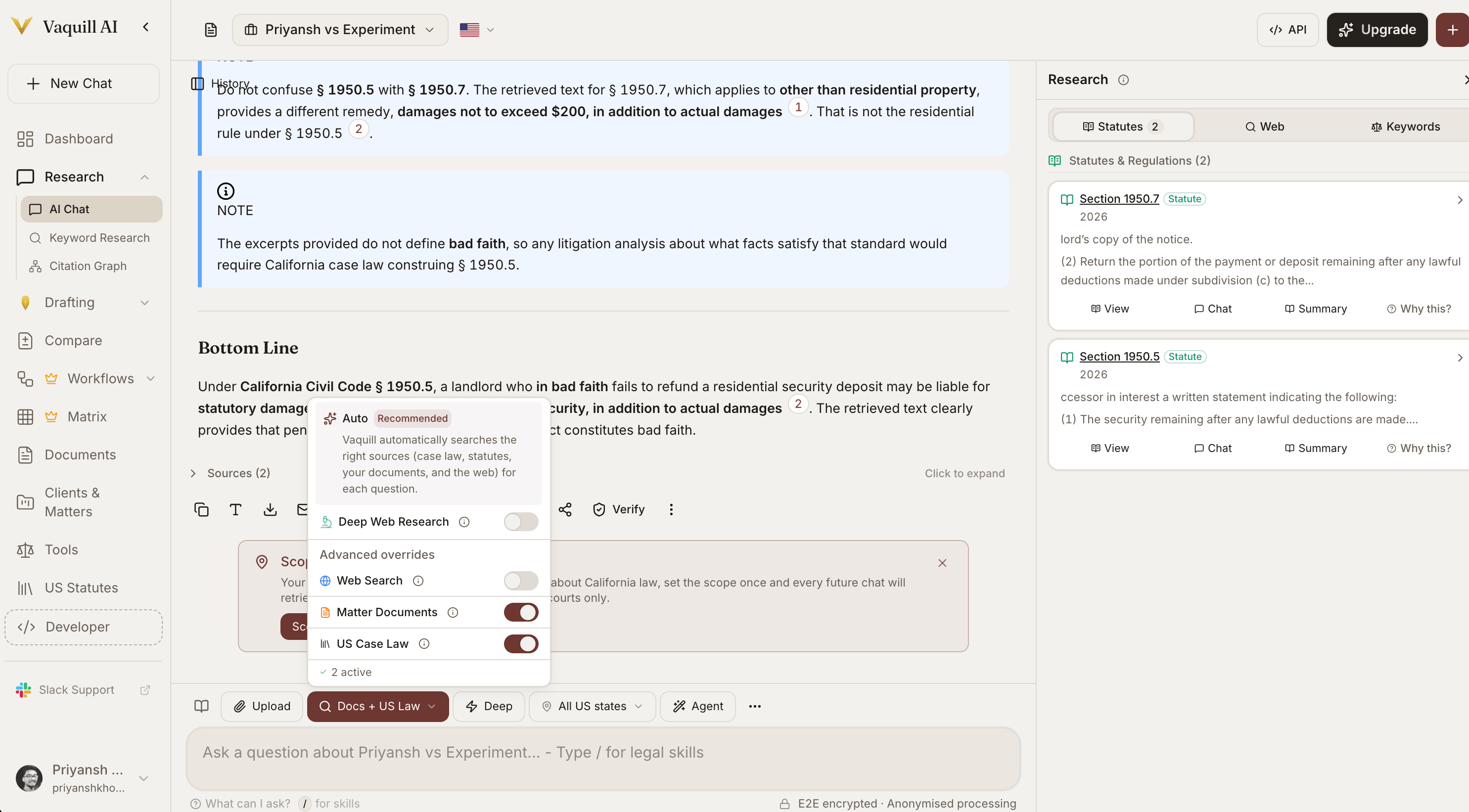
Deep Research Mode is built for the questions that take an associate a full afternoon - the ones where you need to read multiple cases, cross-reference statutes, and synthesize a position. It runs an iterative research loop that drafts an answer, identifies what is missing, runs follow-up searches, and refines.
 ## When To Use It
Use Deep Research for questions that need more than one pass:
* *"Compare how the Second and Ninth Circuits have treated implied warranty disclaimers in software licenses"*
* *"Walk me through the elements of promissory estoppel in California and identify which our facts satisfy"*
* *"What is the current status of personal jurisdiction over foreign defendants after the recent Supreme Court decisions?"*
* *"Analyze this complaint and tell me which causes of action are strongest given the case law"*
For simpler questions ("what does Section 230 say?"), standard mode is faster and cheaper.
## How It Works
When Deep Research is on, the system:
Reads your question and generates an initial research plan.
Runs the first round of searches across your documents, case law, and statutes.
Produces a preliminary answer from the retrieved sources.
Reviews the draft for missing authorities, weak reasoning, and counter-arguments.
Generates targeted queries for the gaps; repeats up to three rounds.
Returns a final answer with every source cited and verification badges applied.
```mermaid theme={"theme":"github-dark"}
flowchart TD
Q[Your question] --> P[Research plan]
P --> R1[Round 1 search]
R1 --> D1[Draft answer]
D1 --> G1{Gaps found?}
G1 -->|Yes| R2[Round 2: targeted follow-ups]
R2 --> D2[Refined draft]
D2 --> G2{Gaps found?}
G2 -->|Yes| R3[Round 3: final follow-ups]
R3 --> D3[Final draft]
G1 -->|No| V[Claim-level verification]
G2 -->|No| V
D3 --> V
V --> A[Final synthesis with citations]
```
## Higher Retrieval Limits
Deep Research pulls a larger pool of candidate sources before narrowing down - so the model can compare more authorities and pick the best ones rather than working with the first few that match.
| Setting | Standard Mode | Deep Research |
| --------------------------- | ---------------- | -------------------- |
| Candidate sources per query | Standard pool | Expanded pool |
| Follow-up queries | None | Up to 3 rounds |
| Cross-document synthesis | Single pass | Iterative |
| Best for | Direct questions | Comparative analysis |
## Gap Analysis Between Rounds
After each round, the system asks itself: *"What is this draft missing? Are there counter-authorities? Is there a temporal issue? Are the cases still good law?"* The follow-up queries it generates are aimed at those gaps, not just at re-searching the original question.
You can see the intermediate reasoning steps in the response - what was searched, what was found, and what was decided.
## Hallucination Guard
Each round runs through claim-level verification before the answer is returned. If the model writes a sentence that is not actually supported by the retrieved sources, the system flags it and re-runs that section. See [Answer Verification](/docs/guides/answer-verification) for how this works.
## When To Turn It Off
* Quick lookups ("what is the citation for Marbury v. Madison?")
* Drafting tasks that do not need research ("draft me an NDA")
* Conversational follow-ups inside an existing thread
Deep Research is slower and burns more credits per question than standard mode. Reserve it for the questions where the depth genuinely pays off - comparative analysis, unsettled doctrine, fact-driven motion practice.
Deep Research is slower and more expensive per question. Use it where the depth pays off.
## How To Enable
Click the **Deep Research** toggle in the chat composer. The toggle saves per matter, so if you turn it on for a litigation matter, it stays on while you work in that workspace.
## Tips
**Be specific about jurisdiction.** "California state courts" produces a tighter answer than "California". For federal questions, name the circuit.
**Anchor to your facts.** Paste the key facts of your matter into the question; Deep Research will tie the analysis directly to them instead of returning a textbook summary.
**Run inside a matter.** When the matter has documents uploaded (complaint, contracts, deposition transcripts), Deep Research pulls from them alongside the public corpus.
## Deep Research prompt
Run a deep research analysis on the following question for our matter.
**Question:** \[Insert your question - e.g., "Does our client's social media monitoring program of remote employees survive an intrusion upon seclusion claim under California law?"]
**Our facts:** \[Paste the 3-5 key facts]
Do these steps in order:
1. Identify the controlling law and jurisdiction (state, circuit, statutory framework).
2. Pull the leading cases - both supporting and contra - from the controlling jurisdiction, then from persuasive jurisdictions.
3. For each case, give the holding, the key facts, and how it compares to ours.
4. Surface any counter-authorities or unfavorable cases the other side would cite.
5. Apply the law to our facts and give a likelihood assessment (Strong / Moderate / Weak / Untested).
6. Flag any unsettled questions, recent Supreme Court grants of cert, or pending legislation that could change the analysis.
7. Cite-check every authority via the Citation Graph and flag anything overruled, questioned, or superseded.
Return a memo-quality output: **Issue, Short Answer, Discussion (with subheadings), Conclusion**. Every factual claim must carry a Vaquill source citation.
## Related
Tool-using research with web search and URL fetching.
How claims are checked against sources at every round.
Confirm cited cases are still good law before relying on them.
## When To Use It
Use Deep Research for questions that need more than one pass:
* *"Compare how the Second and Ninth Circuits have treated implied warranty disclaimers in software licenses"*
* *"Walk me through the elements of promissory estoppel in California and identify which our facts satisfy"*
* *"What is the current status of personal jurisdiction over foreign defendants after the recent Supreme Court decisions?"*
* *"Analyze this complaint and tell me which causes of action are strongest given the case law"*
For simpler questions ("what does Section 230 say?"), standard mode is faster and cheaper.
## How It Works
When Deep Research is on, the system:
Reads your question and generates an initial research plan.
Runs the first round of searches across your documents, case law, and statutes.
Produces a preliminary answer from the retrieved sources.
Reviews the draft for missing authorities, weak reasoning, and counter-arguments.
Generates targeted queries for the gaps; repeats up to three rounds.
Returns a final answer with every source cited and verification badges applied.
```mermaid theme={"theme":"github-dark"}
flowchart TD
Q[Your question] --> P[Research plan]
P --> R1[Round 1 search]
R1 --> D1[Draft answer]
D1 --> G1{Gaps found?}
G1 -->|Yes| R2[Round 2: targeted follow-ups]
R2 --> D2[Refined draft]
D2 --> G2{Gaps found?}
G2 -->|Yes| R3[Round 3: final follow-ups]
R3 --> D3[Final draft]
G1 -->|No| V[Claim-level verification]
G2 -->|No| V
D3 --> V
V --> A[Final synthesis with citations]
```
## Higher Retrieval Limits
Deep Research pulls a larger pool of candidate sources before narrowing down - so the model can compare more authorities and pick the best ones rather than working with the first few that match.
| Setting | Standard Mode | Deep Research |
| --------------------------- | ---------------- | -------------------- |
| Candidate sources per query | Standard pool | Expanded pool |
| Follow-up queries | None | Up to 3 rounds |
| Cross-document synthesis | Single pass | Iterative |
| Best for | Direct questions | Comparative analysis |
## Gap Analysis Between Rounds
After each round, the system asks itself: *"What is this draft missing? Are there counter-authorities? Is there a temporal issue? Are the cases still good law?"* The follow-up queries it generates are aimed at those gaps, not just at re-searching the original question.
You can see the intermediate reasoning steps in the response - what was searched, what was found, and what was decided.
## Hallucination Guard
Each round runs through claim-level verification before the answer is returned. If the model writes a sentence that is not actually supported by the retrieved sources, the system flags it and re-runs that section. See [Answer Verification](/docs/guides/answer-verification) for how this works.
## When To Turn It Off
* Quick lookups ("what is the citation for Marbury v. Madison?")
* Drafting tasks that do not need research ("draft me an NDA")
* Conversational follow-ups inside an existing thread
Deep Research is slower and burns more credits per question than standard mode. Reserve it for the questions where the depth genuinely pays off - comparative analysis, unsettled doctrine, fact-driven motion practice.
Deep Research is slower and more expensive per question. Use it where the depth pays off.
## How To Enable
Click the **Deep Research** toggle in the chat composer. The toggle saves per matter, so if you turn it on for a litigation matter, it stays on while you work in that workspace.
## Tips
**Be specific about jurisdiction.** "California state courts" produces a tighter answer than "California". For federal questions, name the circuit.
**Anchor to your facts.** Paste the key facts of your matter into the question; Deep Research will tie the analysis directly to them instead of returning a textbook summary.
**Run inside a matter.** When the matter has documents uploaded (complaint, contracts, deposition transcripts), Deep Research pulls from them alongside the public corpus.
## Deep Research prompt
Run a deep research analysis on the following question for our matter.
**Question:** \[Insert your question - e.g., "Does our client's social media monitoring program of remote employees survive an intrusion upon seclusion claim under California law?"]
**Our facts:** \[Paste the 3-5 key facts]
Do these steps in order:
1. Identify the controlling law and jurisdiction (state, circuit, statutory framework).
2. Pull the leading cases - both supporting and contra - from the controlling jurisdiction, then from persuasive jurisdictions.
3. For each case, give the holding, the key facts, and how it compares to ours.
4. Surface any counter-authorities or unfavorable cases the other side would cite.
5. Apply the law to our facts and give a likelihood assessment (Strong / Moderate / Weak / Untested).
6. Flag any unsettled questions, recent Supreme Court grants of cert, or pending legislation that could change the analysis.
7. Cite-check every authority via the Citation Graph and flag anything overruled, questioned, or superseded.
Return a memo-quality output: **Issue, Short Answer, Discussion (with subheadings), Conclusion**. Every factual claim must carry a Vaquill source citation.
## Related
Tool-using research with web search and URL fetching.
How claims are checked against sources at every round.
Confirm cited cases are still good law before relying on them.