> ## Documentation Index
> Fetch the complete documentation index at: https://vaquill.ai/docs/llms.txt
> Use this file to discover all available pages before exploring further.
# Inline Threading
> Branch into a focused sub-conversation on any sentence in an AI response - keep your main research thread clean
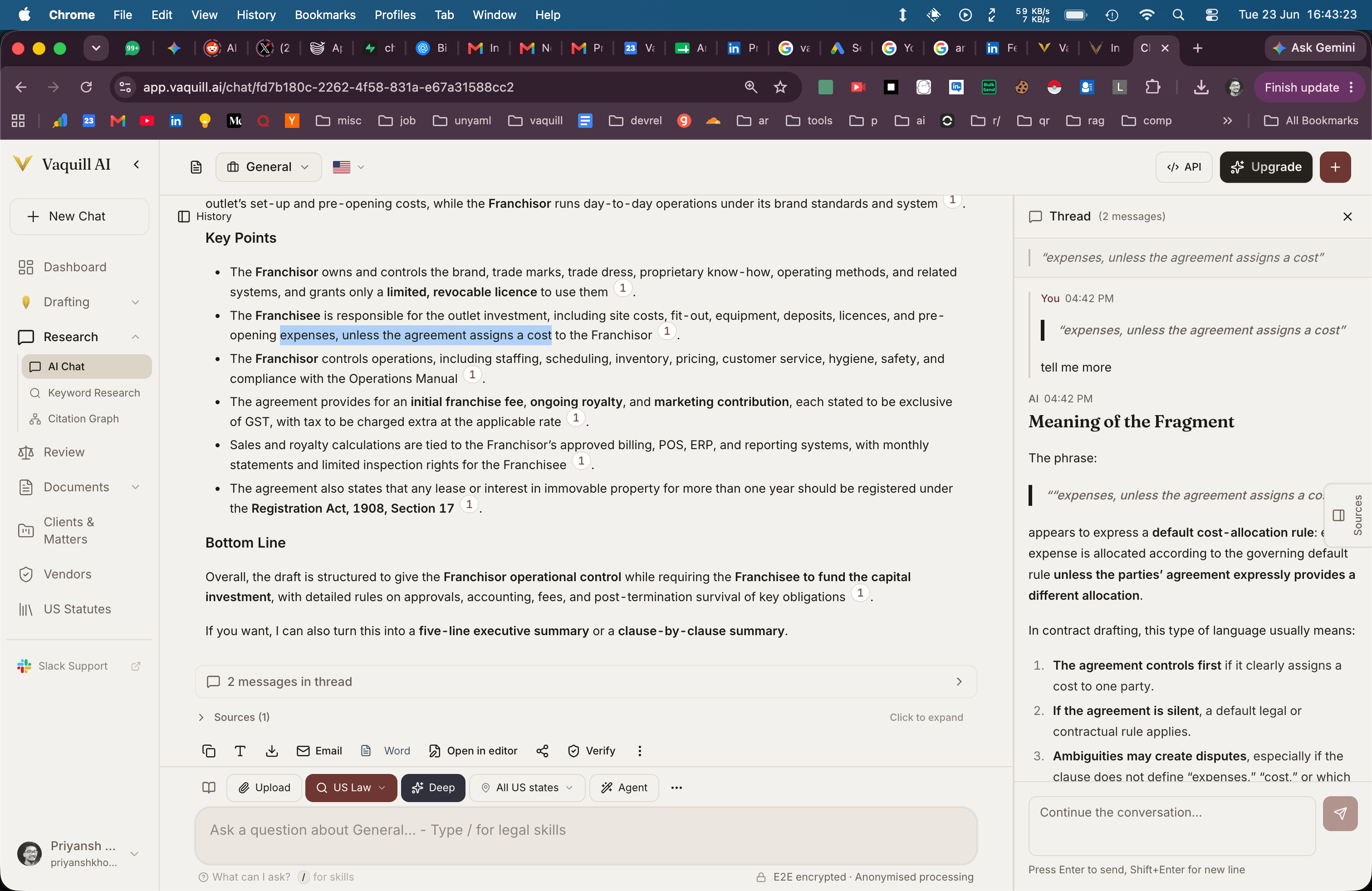
Inline Threading lets you select any passage in an AI response and start a focused sub-conversation about that specific point - without losing the original thread. Useful for going deep on one citation, exploring an alternative argument, or testing a hypothesis without polluting the main chat.
 ## When To Use It
* Going deep on one citation in a long response without losing the main thread
* Testing an alternative theory of the case without rewriting the original question
* Comparing two approaches in parallel sub-threads
* Letting different team members explore different angles from the same starting point
* Keeping a clean main thread for a client-facing memo while doing exploratory work in branches
## How It Works
Highlight any text in an AI response - one sentence, one citation, or a whole paragraph.
A "Thread" button appears next to the selection.
The selection becomes the starting context for the new branch.
The AI knows the parent conversation; you can have multiple threads off one response, and threads can have their own sub-threads.
## Branch Naming
Each thread can be named so the team knows what it is exploring:
* "Statute of limitations angle"
* "Counter-argument: implied waiver"
* "Cross-circuit comparison"
The name appears in the thread tree, making it easy to navigate when a conversation has grown.
## Thread Tree View
When a conversation has multiple threads, the tree view shows:
* The main conversation as the trunk
* Each thread as a branch
* Nested sub-threads beneath their parent
* Which threads are active vs. resolved
Collapse threads you have finished with to keep the workspace clean.
## Context Inheritance
When you start a thread, it inherits from the parent:
* The full conversation history up to the selection point
* All documents pinned to the matter
* The retrieval settings and matter scope
You can override these per-thread - for example, pin a different document as the focus, or change to Deep Research mode for one branch only.
## When To Use Threads vs. New Conversations
| Situation | Use |
| ----------------------------------------- | -------------------------------------- |
| Different question, same matter | New conversation in the same matter |
| Same line of inquiry, different angle | Inline thread |
| Exploring a counter-argument | Inline thread on the original argument |
| Multi-day research that needs persistence | New conversation, name it well |
| Quick clarification on one citation | Inline thread |
## Working With a Team
Threads are useful for team-based research:
* A partner can leave a thread off a specific paragraph asking the associate to dig deeper
* Two associates can run parallel threads exploring different angles
* A summer associate can branch into background research without touching the main thread
When threads are resolved, the partner-level summary in the main thread can pull in the findings.
## Tips
**Name threads explicitly.** "Counter-argument: implied waiver" beats an untitled thread every time - especially when the conversation grows past 5 branches.
**Resolve and close.** Mark threads as resolved when the question is answered so the workspace stays clean and the tree view shows only what is still live.
**Promote thread findings up.** When a sub-thread produces a key finding, summarize it back into the main thread so the partner-level memo carries the conclusion forward.
## Branch a focused sub-thread
Open a thread on the selected passage and explore it as a focused sub-question.
Do these steps:
1. Restate the selected passage and identify the exact claim or citation under examination.
2. Pull the full text of any case or statute cited in the passage and quote the operative language.
3. Stress-test the claim: identify the strongest counter-argument and the leading authority that supports it.
4. Identify the **narrowest reading** and the **broadest reading** of the claim - which one does the cited authority actually support?
5. Map any unsettled or open questions that follow from the claim.
6. Recommend whether this passage should stay in the main answer **as-is, with caveat, or be removed**.
Return: a short structured response - **Claim, Strongest Support, Strongest Counter, Recommended Disposition.** When done, propose a one-sentence summary to promote back into the main thread.
## Related
Cross-conversation memory tied to the matter.
Share a conversation (and its threads) with someone outside the matter.
Each matter has its own conversations and threads.
Switch a single branch into Deep Research mode for high-stakes exploration.
## When To Use It
* Going deep on one citation in a long response without losing the main thread
* Testing an alternative theory of the case without rewriting the original question
* Comparing two approaches in parallel sub-threads
* Letting different team members explore different angles from the same starting point
* Keeping a clean main thread for a client-facing memo while doing exploratory work in branches
## How It Works
Highlight any text in an AI response - one sentence, one citation, or a whole paragraph.
A "Thread" button appears next to the selection.
The selection becomes the starting context for the new branch.
The AI knows the parent conversation; you can have multiple threads off one response, and threads can have their own sub-threads.
## Branch Naming
Each thread can be named so the team knows what it is exploring:
* "Statute of limitations angle"
* "Counter-argument: implied waiver"
* "Cross-circuit comparison"
The name appears in the thread tree, making it easy to navigate when a conversation has grown.
## Thread Tree View
When a conversation has multiple threads, the tree view shows:
* The main conversation as the trunk
* Each thread as a branch
* Nested sub-threads beneath their parent
* Which threads are active vs. resolved
Collapse threads you have finished with to keep the workspace clean.
## Context Inheritance
When you start a thread, it inherits from the parent:
* The full conversation history up to the selection point
* All documents pinned to the matter
* The retrieval settings and matter scope
You can override these per-thread - for example, pin a different document as the focus, or change to Deep Research mode for one branch only.
## When To Use Threads vs. New Conversations
| Situation | Use |
| ----------------------------------------- | -------------------------------------- |
| Different question, same matter | New conversation in the same matter |
| Same line of inquiry, different angle | Inline thread |
| Exploring a counter-argument | Inline thread on the original argument |
| Multi-day research that needs persistence | New conversation, name it well |
| Quick clarification on one citation | Inline thread |
## Working With a Team
Threads are useful for team-based research:
* A partner can leave a thread off a specific paragraph asking the associate to dig deeper
* Two associates can run parallel threads exploring different angles
* A summer associate can branch into background research without touching the main thread
When threads are resolved, the partner-level summary in the main thread can pull in the findings.
## Tips
**Name threads explicitly.** "Counter-argument: implied waiver" beats an untitled thread every time - especially when the conversation grows past 5 branches.
**Resolve and close.** Mark threads as resolved when the question is answered so the workspace stays clean and the tree view shows only what is still live.
**Promote thread findings up.** When a sub-thread produces a key finding, summarize it back into the main thread so the partner-level memo carries the conclusion forward.
## Branch a focused sub-thread
Open a thread on the selected passage and explore it as a focused sub-question.
Do these steps:
1. Restate the selected passage and identify the exact claim or citation under examination.
2. Pull the full text of any case or statute cited in the passage and quote the operative language.
3. Stress-test the claim: identify the strongest counter-argument and the leading authority that supports it.
4. Identify the **narrowest reading** and the **broadest reading** of the claim - which one does the cited authority actually support?
5. Map any unsettled or open questions that follow from the claim.
6. Recommend whether this passage should stay in the main answer **as-is, with caveat, or be removed**.
Return: a short structured response - **Claim, Strongest Support, Strongest Counter, Recommended Disposition.** When done, propose a one-sentence summary to promote back into the main thread.
## Related
Cross-conversation memory tied to the matter.
Share a conversation (and its threads) with someone outside the matter.
Each matter has its own conversations and threads.
Switch a single branch into Deep Research mode for high-stakes exploration.