> ## Documentation Index
> Fetch the complete documentation index at: https://vaquill.ai/docs/llms.txt
> Use this file to discover all available pages before exploring further.
# Matter Summary
> A citation-backed narrative summary of an entire matter, with sections chosen to fit the kind of matter it is
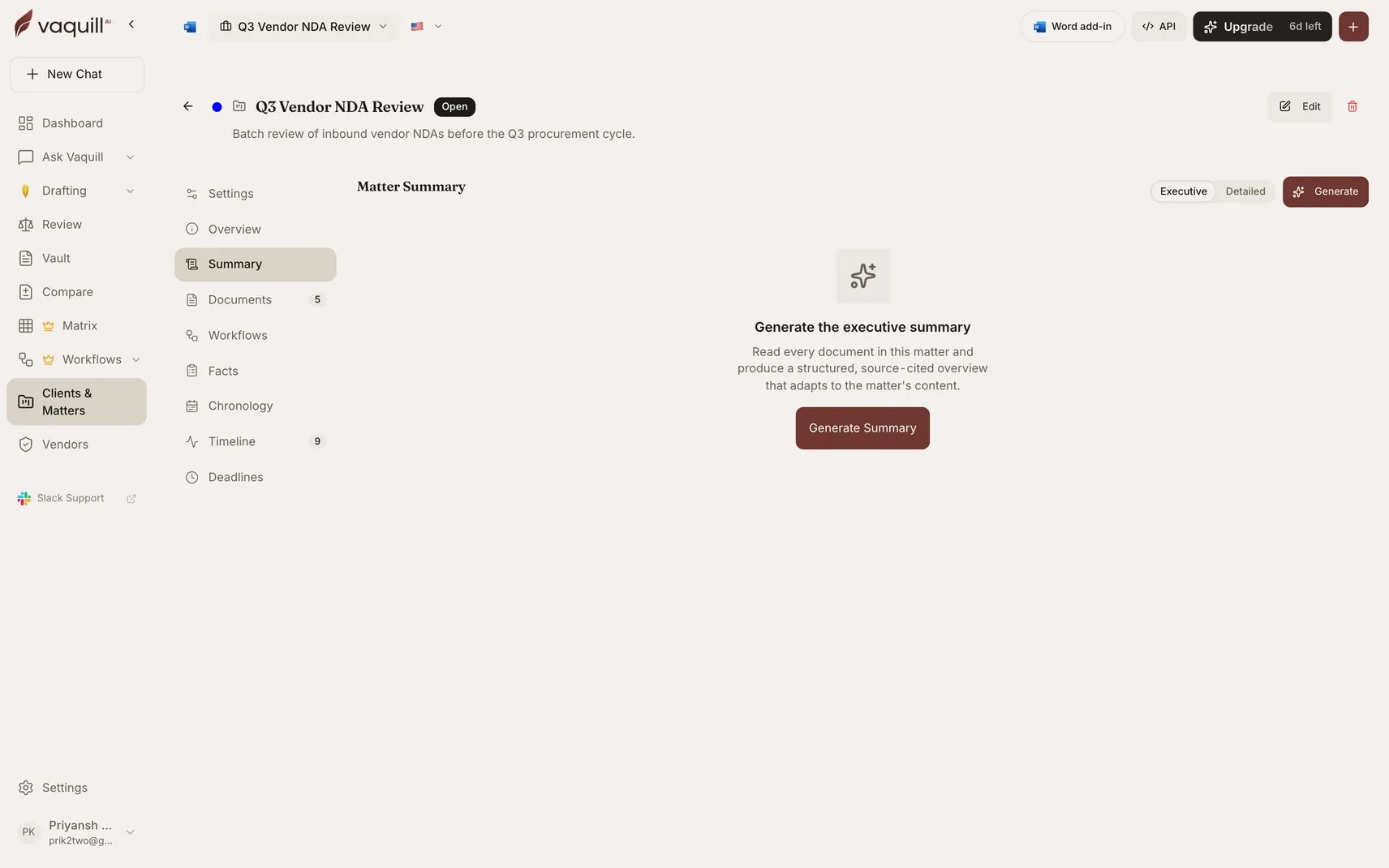
The Summary tab writes a narrative summary of a whole matter, section by section, with every claim tied to a citation you can click through to the source passage.
Unlike a document summary, it reads across the entire matter and structures itself around what kind of matter it is: a commercial dispute gets different sections from an M\&A diligence file.
 ## When to use it
* Handing a matter to a colleague, or picking one up
* Preparing for a client call on a file you have not touched in weeks
* Producing a first draft of a status memo
* Getting oriented on a matter with more documents than you have time to read
## How it works
Works out exactly which documents belong to the matter. Membership is resolved in the database rather than inferred from the search index, so nothing from another matter can leak in.
Reads every document in parallel for evidence. Results are cached and shared with [Matter Facts](/docs/guides/matter-facts).
Determines what kind of matter this is, which selects the section structure. You are not getting a generic five-heading template.
Plans the sections against the evidence actually available, then clusters evidence into each. Sections with nothing to say are dropped rather than padded.
Writes each section in parallel, attaching citations per claim.
Progress streams live while it runs, and you can cancel at any point.
The pipeline is partial-failure tolerant. One document that fails to process is excluded with a warning rather than failing the whole summary; only a large fraction failing stops the run.
## Altitude
Summaries generate at two levels of detail:
| Altitude | Use it for |
| ------------- | --------------------------------------------------------------------------- |
| **Executive** | The short version. A client update or a partner briefing. |
| **Detailed** | The working version, with more of the underlying specifics carried through. |
## Citations
Every claim carries a citation. Clicking one opens the source passage in a modal, the same citation viewer used by chat, compare, and the chronology, so verifying a line never means leaving the page and hunting through a PDF.
This is the part worth using. A summary you cannot check is a summary you cannot file anything against.
## Freshness
The summary reports whether it is current against the matter's present document set. Add documents and it is marked stale; regenerate to fold them in. Generation is idempotent, so triggering it twice does not produce two runs.
## Plan availability
| Action | Availability |
| ------------------------ | ------------------------------ |
| View an existing summary | Any matter member, on any plan |
| Generate or regenerate | Active paid or trial plan |
## Limitations
* Draws only on documents in the matter. No web, no case law, no general knowledge.
* Section structure is chosen for you by the classifier. It is a good default, not an outline you control.
* Dropped sections mean the evidence was not there. That is information, but it is not the same as the matter having no such issue.
* Verify cited passages before relying on the summary externally. It is a research aid, not a work product you should send unread.
## Related
The same evidence as a structured ledger instead of prose.
The time dimension of the same matter.
How claims get checked against sources.
The matter these tabs live on.
## When to use it
* Handing a matter to a colleague, or picking one up
* Preparing for a client call on a file you have not touched in weeks
* Producing a first draft of a status memo
* Getting oriented on a matter with more documents than you have time to read
## How it works
Works out exactly which documents belong to the matter. Membership is resolved in the database rather than inferred from the search index, so nothing from another matter can leak in.
Reads every document in parallel for evidence. Results are cached and shared with [Matter Facts](/docs/guides/matter-facts).
Determines what kind of matter this is, which selects the section structure. You are not getting a generic five-heading template.
Plans the sections against the evidence actually available, then clusters evidence into each. Sections with nothing to say are dropped rather than padded.
Writes each section in parallel, attaching citations per claim.
Progress streams live while it runs, and you can cancel at any point.
The pipeline is partial-failure tolerant. One document that fails to process is excluded with a warning rather than failing the whole summary; only a large fraction failing stops the run.
## Altitude
Summaries generate at two levels of detail:
| Altitude | Use it for |
| ------------- | --------------------------------------------------------------------------- |
| **Executive** | The short version. A client update or a partner briefing. |
| **Detailed** | The working version, with more of the underlying specifics carried through. |
## Citations
Every claim carries a citation. Clicking one opens the source passage in a modal, the same citation viewer used by chat, compare, and the chronology, so verifying a line never means leaving the page and hunting through a PDF.
This is the part worth using. A summary you cannot check is a summary you cannot file anything against.
## Freshness
The summary reports whether it is current against the matter's present document set. Add documents and it is marked stale; regenerate to fold them in. Generation is idempotent, so triggering it twice does not produce two runs.
## Plan availability
| Action | Availability |
| ------------------------ | ------------------------------ |
| View an existing summary | Any matter member, on any plan |
| Generate or regenerate | Active paid or trial plan |
## Limitations
* Draws only on documents in the matter. No web, no case law, no general knowledge.
* Section structure is chosen for you by the classifier. It is a good default, not an outline you control.
* Dropped sections mean the evidence was not there. That is information, but it is not the same as the matter having no such issue.
* Verify cited passages before relying on the summary externally. It is a research aid, not a work product you should send unread.
## Related
The same evidence as a structured ledger instead of prose.
The time dimension of the same matter.
How claims get checked against sources.
The matter these tabs live on.