> ## Documentation Index
> Fetch the complete documentation index at: https://vaquill.ai/docs/llms.txt
> Use this file to discover all available pages before exploring further.
# Playbooks
> Write your negotiation positions down once, then draft, review, and escalate against them
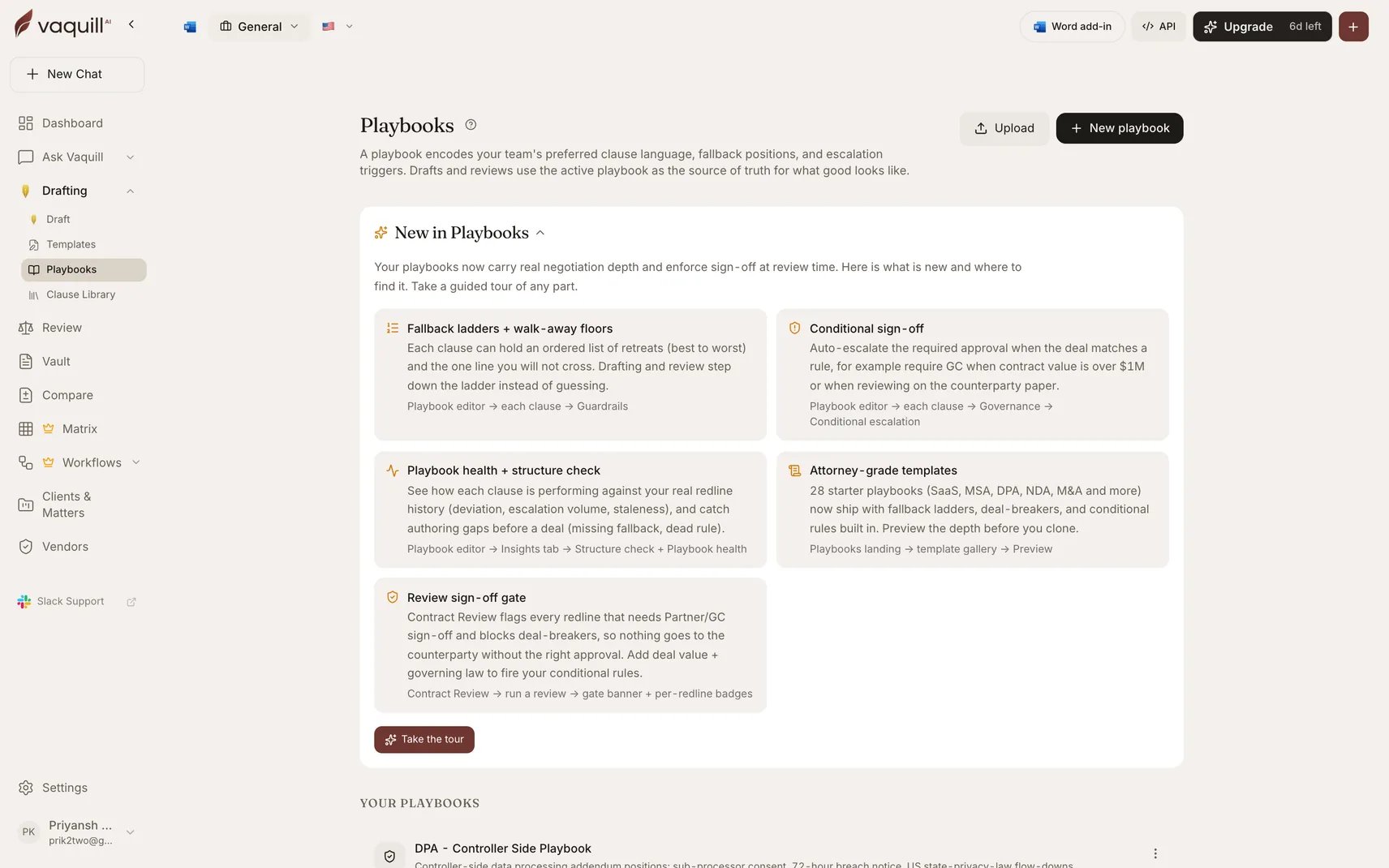
A playbook is your house position written down once, at the clause level, in a form the AI can act on.
It records the wording you want, how far you will flex, the line you will not cross, and who has to sign off when a deal goes past it.
Once a playbook exists, drafting generates toward it and review scores counterparty paper against it, so every document is measured against your standard instead of a generic one.
 ## What a playbook holds
Each playbook covers one contract type and holds one rule per clause.
Every rule is organized into three layers, which the editor surfaces as three tabs.
| Layer | What it controls | Fields |
| -------------- | ----------------------------------------------- | ---------------------------------------------------------------------------------------- |
| **Language** | What the AI writes | Preferred position, acceptable range, optional link to a vetted clause from your library |
| **Guardrails** | The limits that trip review | Fallback ladder, walk-away floor, escalation triggers, numeric limits |
| **Governance** | Who signs off, and how loudly a miss is flagged | Priority, rationale, approval level, conditional escalation, risk weight |
Only the preferred position is required.
A playbook with nothing but preferred wording still works.
The rest of the fields are what turn it from a style guide into something that can gate a deal.
Start in **Simple** detail level, which shows only the preferred position and acceptable range for each clause.
Switch to **Advanced** when you want fallback ladders, numeric limits, approvals, and risk weighting.
The editor picks Advanced automatically if the playbook already has that depth.
## Four ways to start
28 curated starting points covering both sides of 14 agreement types, already carrying fallback ladders, walk-away floors, and sign-off rules.
Name it, pick a contract type, add clause rules one at a time. Best when your positions are unusual enough that no template is close.
Upload or paste a contract you already negotiated. Vaquill splits it into clauses and infers a starting position for each one.
Bring a playbook over from another account or workspace using the portable export file.
## Where a playbook gets used
Attach a playbook and the drafter writes toward your preferred wording, using linked clause text verbatim where you set one. The editor then shows a per-section verdict of **Preferred**, **Fallback**, or **Needs attention**, plus a weighted risk band for the draft as a whole.
Flagged sections are fixable in place: the banner offers to drop the on-playbook wording in as a tracked change. See [Drafting](/docs/guides/drafting).
Run inbound paper against the playbook to get per-clause deviations, redline suggestions aimed at your fallback positions, and a sign-off gate on anything that needs senior approval before it goes back out.
Later negotiation rounds accept the version you sent, so the redlines target what actually changed rather than the whole contract.
See [Contract Review](/docs/guides/contract-review).
For scoring many contracts against a playbook at once, with a per-issue scorecard and a draft negotiation email, use the [Contract Playbook Review workflow](/docs/workflows/built-in/contract-playbook-review).
That workflow reads a playbook you upload as a document, which is a different path from the structured playbooks described here.
## In this section
The 28 built-in playbooks, what each one is tuned for, and how to preview before you clone.
Create, add clause rules, test-drive the result, and compare it against the market-standard baseline.
Every field on a clause rule and what it changes downstream.
Turn signed contracts into a playbook, including consensus across a whole folder of them.
The authoring linter that catches gaps before a playbook ever sees a deal.
Approval levels, conditional escalation, walk-away floors, and how they block a send.
How each clause is performing against your real redline history, plus coverage gaps and staleness.
Where your team's actual behavior has diverged from what the playbook says.
Version history, defaults per contract type, team sharing, and the portable export file.
## Limitations
* A playbook is scoped to one contract type. If your vendor terms and your customer terms differ, that is two playbooks, not one.
* Positions are mostly free text, and the AI interprets them. Vague wording produces vague enforcement. Numeric limits and fallback ladders are far more reliable than a paragraph of prose.
* A playbook only drives a draft or a review when it is attached or resolved as the default for that contract type. Nothing is applied globally.
* Editing is owner-only. Teammates can read and use a shared playbook but must duplicate it to change positions.
* Sign-off gates flag, and in deep review block. They do not route to a named approver, integrate with an approval system, or know your org chart.
* Health and drift analytics need recorded review decisions before they say anything. A new playbook shows no signal for a while.
* Nothing here is legal advice. The built-in defaults and templates are market-standard starting points that need a lawyer's review before you rely on them.
## Related
Generate drafts that use your playbook language and show per-section compliance.
Score and redline inbound contracts against your playbook.
Keep vetted clause text in one place and link it into playbook positions.
Score up to 500 contracts against an uploaded playbook document in one run.
## What a playbook holds
Each playbook covers one contract type and holds one rule per clause.
Every rule is organized into three layers, which the editor surfaces as three tabs.
| Layer | What it controls | Fields |
| -------------- | ----------------------------------------------- | ---------------------------------------------------------------------------------------- |
| **Language** | What the AI writes | Preferred position, acceptable range, optional link to a vetted clause from your library |
| **Guardrails** | The limits that trip review | Fallback ladder, walk-away floor, escalation triggers, numeric limits |
| **Governance** | Who signs off, and how loudly a miss is flagged | Priority, rationale, approval level, conditional escalation, risk weight |
Only the preferred position is required.
A playbook with nothing but preferred wording still works.
The rest of the fields are what turn it from a style guide into something that can gate a deal.
Start in **Simple** detail level, which shows only the preferred position and acceptable range for each clause.
Switch to **Advanced** when you want fallback ladders, numeric limits, approvals, and risk weighting.
The editor picks Advanced automatically if the playbook already has that depth.
## Four ways to start
28 curated starting points covering both sides of 14 agreement types, already carrying fallback ladders, walk-away floors, and sign-off rules.
Name it, pick a contract type, add clause rules one at a time. Best when your positions are unusual enough that no template is close.
Upload or paste a contract you already negotiated. Vaquill splits it into clauses and infers a starting position for each one.
Bring a playbook over from another account or workspace using the portable export file.
## Where a playbook gets used
Attach a playbook and the drafter writes toward your preferred wording, using linked clause text verbatim where you set one. The editor then shows a per-section verdict of **Preferred**, **Fallback**, or **Needs attention**, plus a weighted risk band for the draft as a whole.
Flagged sections are fixable in place: the banner offers to drop the on-playbook wording in as a tracked change. See [Drafting](/docs/guides/drafting).
Run inbound paper against the playbook to get per-clause deviations, redline suggestions aimed at your fallback positions, and a sign-off gate on anything that needs senior approval before it goes back out.
Later negotiation rounds accept the version you sent, so the redlines target what actually changed rather than the whole contract.
See [Contract Review](/docs/guides/contract-review).
For scoring many contracts against a playbook at once, with a per-issue scorecard and a draft negotiation email, use the [Contract Playbook Review workflow](/docs/workflows/built-in/contract-playbook-review).
That workflow reads a playbook you upload as a document, which is a different path from the structured playbooks described here.
## In this section
The 28 built-in playbooks, what each one is tuned for, and how to preview before you clone.
Create, add clause rules, test-drive the result, and compare it against the market-standard baseline.
Every field on a clause rule and what it changes downstream.
Turn signed contracts into a playbook, including consensus across a whole folder of them.
The authoring linter that catches gaps before a playbook ever sees a deal.
Approval levels, conditional escalation, walk-away floors, and how they block a send.
How each clause is performing against your real redline history, plus coverage gaps and staleness.
Where your team's actual behavior has diverged from what the playbook says.
Version history, defaults per contract type, team sharing, and the portable export file.
## Limitations
* A playbook is scoped to one contract type. If your vendor terms and your customer terms differ, that is two playbooks, not one.
* Positions are mostly free text, and the AI interprets them. Vague wording produces vague enforcement. Numeric limits and fallback ladders are far more reliable than a paragraph of prose.
* A playbook only drives a draft or a review when it is attached or resolved as the default for that contract type. Nothing is applied globally.
* Editing is owner-only. Teammates can read and use a shared playbook but must duplicate it to change positions.
* Sign-off gates flag, and in deep review block. They do not route to a named approver, integrate with an approval system, or know your org chart.
* Health and drift analytics need recorded review decisions before they say anything. A new playbook shows no signal for a while.
* Nothing here is legal advice. The built-in defaults and templates are market-standard starting points that need a lawyer's review before you rely on them.
## Related
Generate drafts that use your playbook language and show per-section compliance.
Score and redline inbound contracts against your playbook.
Keep vetted clause text in one place and link it into playbook positions.
Score up to 500 contracts against an uploaded playbook document in one run.