> ## Documentation Index
> Fetch the complete documentation index at: https://vaquill.ai/docs/llms.txt
> Use this file to discover all available pages before exploring further.
# Skills
> Curated legal playbooks that guide the AI through structured frameworks for contract review, risk assessment, and more
Skills are expert legal playbooks that give the AI structured methodologies for specific tasks - contract review, NDA screening, risk assessment, compliance checks, and more. Instead of freeform answers, the AI follows a proven framework with checklists, severity ratings, and domain-specific guidance.
 ## How to Use Skills
There are two ways to activate a skill:
### Slash Command (Recommended)
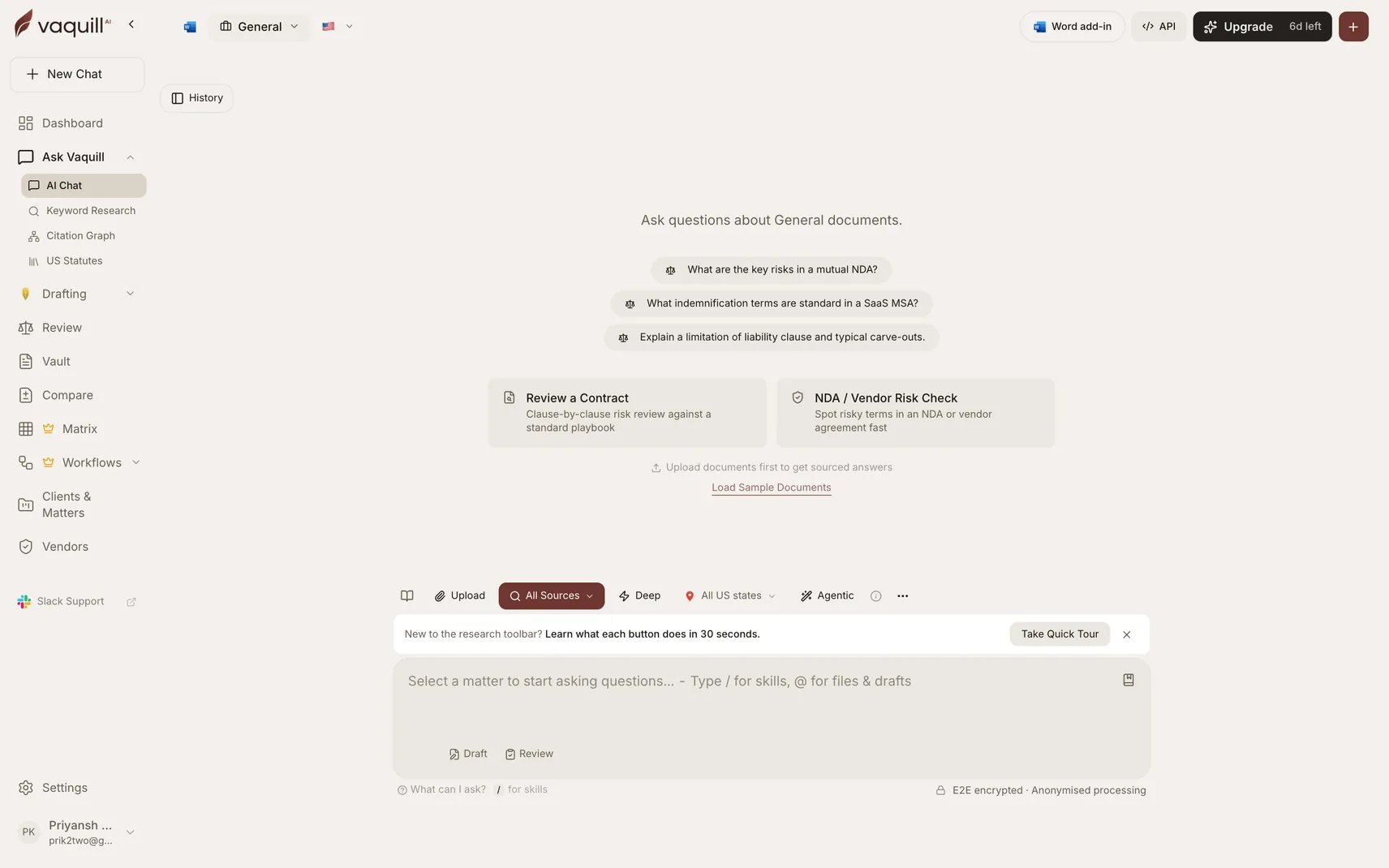
Type `/` in the chat input to open the skill menu. Select a skill, then type your question. The skill's framework guides the AI's response.
For example: Type `/`, select **Contract Review**, then paste your contract text or ask about a specific clause.
### Automatic Activation
In [Agent Mode](/docs/guides/agent-mode), the AI can autonomously activate a skill when your question clearly matches one. For example, if you ask "Review this NDA for risks," the agent may activate the NDA Triage skill on its own.
## Built-in Skills
Clause-by-clause analysis against standard positions. GREEN/YELLOW/RED severity flags with redline suggestions. Covers contract law, regulatory compliance, and arbitration considerations.
10-point NDA screening checklist. Classifies as GREEN (approve), YELLOW (negotiate), or RED (escalate) with routing recommendations. Non-compete and restrictive covenant analysis.
5x5 severity-by-likelihood matrix (scores 1-25). Color-coded risk levels with escalation criteria and mitigation recommendations. Regulatory considerations across jurisdictions.
Multi-framework privacy checklist covering CCPA, GDPR, HIPAA, and more. Data subject rights, cross-border transfer assessment, and penalty exposure analysis.
Systematic interpretation using established rules: literal, mischief (Heydon's Rule), purposive, harmonious construction, ejusdem generis, and operator word analysis.
IRAC format (Issue, Rule, Application, Conclusion). Supports Bluebook and standard US reporter citations. Headnote extraction, ratio decidendi analysis, and panel composition notes.
Templates for demand letters, cease and desist notices, breach of contract notices, and consumer complaint notices. Strict timeline guidance.
Pure redline mode with exact replacement language. Must-Have/Should-Have/Nice-to-Have priority classification with fallback positions and summary table output.
## Example Usage
### Contract Review via Slash Command
1. Type `/` and select **Contract Review**
2. Upload or paste your contract
3. Ask: "Review this services agreement and flag high-risk clauses"
4. The AI produces a clause-by-clause analysis with severity ratings and suggested redlines
### Risk Assessment in Agent Mode
With [Agent Mode](/docs/guides/agent-mode) enabled, simply ask:
> *"Assess the legal risks of this proposed joint venture with a Chinese company"*
The AI recognizes this as a risk assessment task, activates the skill, and produces a structured 5x5 risk matrix with regulatory considerations.
### Case Brief from a Judgment
1. Type `/` and select **Case Brief**
2. Ask: "Brief the judgment in Marbury v. Madison"
3. The AI produces an IRAC-format brief with proper citations and ratio decidendi
## Ready-to-run prompts
Copy any of these into your Vaquill chat. They activate the matching Skill automatically.
Run **Contract Review** on the attached agreement.
For every clause:
1. Classify as GREEN (acceptable), YELLOW (negotiate), or RED (escalate or do not sign).
2. Note the standard market position and how this clause deviates.
3. Suggest exact replacement language for any YELLOW or RED clause.
4. Flag any **missing** clauses that a US counterparty would reasonably expect (indemnity, limitation of liability, governing law, dispute resolution, IP ownership, confidentiality, termination for convenience).
End with a one-page executive summary: top three risks, recommended changes before signature, and a deal-go / deal-no-go recommendation.
Run **NDA Triage** on the attached NDA.
Score the agreement against the 10-point screen:
1. Definition of confidential information (scope, exclusions, marking requirement)
2. Permitted disclosures (advisors, affiliates, legally compelled)
3. Term and survival
4. Non-solicitation / non-compete reach
5. Return-or-destroy obligation
6. Residual knowledge clause
7. Injunctive relief and equitable remedies
8. Governing law and venue
9. Mutual vs one-way
10. Carve-outs (independently developed, publicly known, rightfully received)
Output a single rating - GREEN (approve as-is), YELLOW (negotiate listed clauses), or RED (escalate to senior counsel) - plus a routing recommendation and a paragraph of plain-English justification a non-lawyer business owner could understand.
Run **Case Brief** on this judgment. Pull the full opinion using Vaquill, then produce:
1. **Caption** - case name, citation (Bluebook), court, date, bench composition.
2. **Procedural posture** - how the case got to this court.
3. **Issue(s)** - the legal questions actually decided.
4. **Rule(s)** - the legal principles the court applied or announced.
5. **Application** - the court's reasoning, with verbatim quotes for any holding language.
6. **Conclusion** - the disposition and any remedy ordered.
7. **Ratio decidendi** vs **obiter dicta** - flag explicitly.
8. **Citation treatment** - is the case still good law? List any opinions that have followed, distinguished, questioned, or overruled it.
9. **Practitioner takeaway** - one paragraph on how a US litigator would use this case today.
Cite Vaquill source IDs for every factual claim.
## Skill Types
| Type | Purpose | Examples |
| ---------------------- | -------------------------------- | -------------------------------------- |
| **Playbook** | Step-by-step methodology | Contract Review, Case Brief, Redlining |
| **Checklist** | Point-by-point verification | Privacy Compliance |
| **Analysis Framework** | Structured evaluation matrix | Risk Assessment, Statute Analysis |
| **Drafting Template** | Guided document creation | Legal Notice |
| **Triage** | Quick classification and routing | NDA Triage |
## Related
* [Agent Mode](/docs/guides/agent-mode) - Skills are automatically available to the agent
* [Contract Review](/docs/guides/contract-review) - Detailed guide on contract analysis
* [Legal Tools](/docs/guides/legal-tools) - Full suite of 15 legal analysis tools
* [Vaquill MCP](/docs/integrations/mcp/vaquill) - Use Vaquill's tools in your AI editor
## How to Use Skills
There are two ways to activate a skill:
### Slash Command (Recommended)
Type `/` in the chat input to open the skill menu. Select a skill, then type your question. The skill's framework guides the AI's response.
For example: Type `/`, select **Contract Review**, then paste your contract text or ask about a specific clause.
### Automatic Activation
In [Agent Mode](/docs/guides/agent-mode), the AI can autonomously activate a skill when your question clearly matches one. For example, if you ask "Review this NDA for risks," the agent may activate the NDA Triage skill on its own.
## Built-in Skills
Clause-by-clause analysis against standard positions. GREEN/YELLOW/RED severity flags with redline suggestions. Covers contract law, regulatory compliance, and arbitration considerations.
10-point NDA screening checklist. Classifies as GREEN (approve), YELLOW (negotiate), or RED (escalate) with routing recommendations. Non-compete and restrictive covenant analysis.
5x5 severity-by-likelihood matrix (scores 1-25). Color-coded risk levels with escalation criteria and mitigation recommendations. Regulatory considerations across jurisdictions.
Multi-framework privacy checklist covering CCPA, GDPR, HIPAA, and more. Data subject rights, cross-border transfer assessment, and penalty exposure analysis.
Systematic interpretation using established rules: literal, mischief (Heydon's Rule), purposive, harmonious construction, ejusdem generis, and operator word analysis.
IRAC format (Issue, Rule, Application, Conclusion). Supports Bluebook and standard US reporter citations. Headnote extraction, ratio decidendi analysis, and panel composition notes.
Templates for demand letters, cease and desist notices, breach of contract notices, and consumer complaint notices. Strict timeline guidance.
Pure redline mode with exact replacement language. Must-Have/Should-Have/Nice-to-Have priority classification with fallback positions and summary table output.
## Example Usage
### Contract Review via Slash Command
1. Type `/` and select **Contract Review**
2. Upload or paste your contract
3. Ask: "Review this services agreement and flag high-risk clauses"
4. The AI produces a clause-by-clause analysis with severity ratings and suggested redlines
### Risk Assessment in Agent Mode
With [Agent Mode](/docs/guides/agent-mode) enabled, simply ask:
> *"Assess the legal risks of this proposed joint venture with a Chinese company"*
The AI recognizes this as a risk assessment task, activates the skill, and produces a structured 5x5 risk matrix with regulatory considerations.
### Case Brief from a Judgment
1. Type `/` and select **Case Brief**
2. Ask: "Brief the judgment in Marbury v. Madison"
3. The AI produces an IRAC-format brief with proper citations and ratio decidendi
## Ready-to-run prompts
Copy any of these into your Vaquill chat. They activate the matching Skill automatically.
Run **Contract Review** on the attached agreement.
For every clause:
1. Classify as GREEN (acceptable), YELLOW (negotiate), or RED (escalate or do not sign).
2. Note the standard market position and how this clause deviates.
3. Suggest exact replacement language for any YELLOW or RED clause.
4. Flag any **missing** clauses that a US counterparty would reasonably expect (indemnity, limitation of liability, governing law, dispute resolution, IP ownership, confidentiality, termination for convenience).
End with a one-page executive summary: top three risks, recommended changes before signature, and a deal-go / deal-no-go recommendation.
Run **NDA Triage** on the attached NDA.
Score the agreement against the 10-point screen:
1. Definition of confidential information (scope, exclusions, marking requirement)
2. Permitted disclosures (advisors, affiliates, legally compelled)
3. Term and survival
4. Non-solicitation / non-compete reach
5. Return-or-destroy obligation
6. Residual knowledge clause
7. Injunctive relief and equitable remedies
8. Governing law and venue
9. Mutual vs one-way
10. Carve-outs (independently developed, publicly known, rightfully received)
Output a single rating - GREEN (approve as-is), YELLOW (negotiate listed clauses), or RED (escalate to senior counsel) - plus a routing recommendation and a paragraph of plain-English justification a non-lawyer business owner could understand.
Run **Case Brief** on this judgment. Pull the full opinion using Vaquill, then produce:
1. **Caption** - case name, citation (Bluebook), court, date, bench composition.
2. **Procedural posture** - how the case got to this court.
3. **Issue(s)** - the legal questions actually decided.
4. **Rule(s)** - the legal principles the court applied or announced.
5. **Application** - the court's reasoning, with verbatim quotes for any holding language.
6. **Conclusion** - the disposition and any remedy ordered.
7. **Ratio decidendi** vs **obiter dicta** - flag explicitly.
8. **Citation treatment** - is the case still good law? List any opinions that have followed, distinguished, questioned, or overruled it.
9. **Practitioner takeaway** - one paragraph on how a US litigator would use this case today.
Cite Vaquill source IDs for every factual claim.
## Skill Types
| Type | Purpose | Examples |
| ---------------------- | -------------------------------- | -------------------------------------- |
| **Playbook** | Step-by-step methodology | Contract Review, Case Brief, Redlining |
| **Checklist** | Point-by-point verification | Privacy Compliance |
| **Analysis Framework** | Structured evaluation matrix | Risk Assessment, Statute Analysis |
| **Drafting Template** | Guided document creation | Legal Notice |
| **Triage** | Quick classification and routing | NDA Triage |
## Related
* [Agent Mode](/docs/guides/agent-mode) - Skills are automatically available to the agent
* [Contract Review](/docs/guides/contract-review) - Detailed guide on contract analysis
* [Legal Tools](/docs/guides/legal-tools) - Full suite of 15 legal analysis tools
* [Vaquill MCP](/docs/integrations/mcp/vaquill) - Use Vaquill's tools in your AI editor