> ## Documentation Index
> Fetch the complete documentation index at: https://vaquill.ai/docs/llms.txt
> Use this file to discover all available pages before exploring further.
# Document Templates
> Upload your own Word documents as reusable templates with detected variables, then generate drafts from them
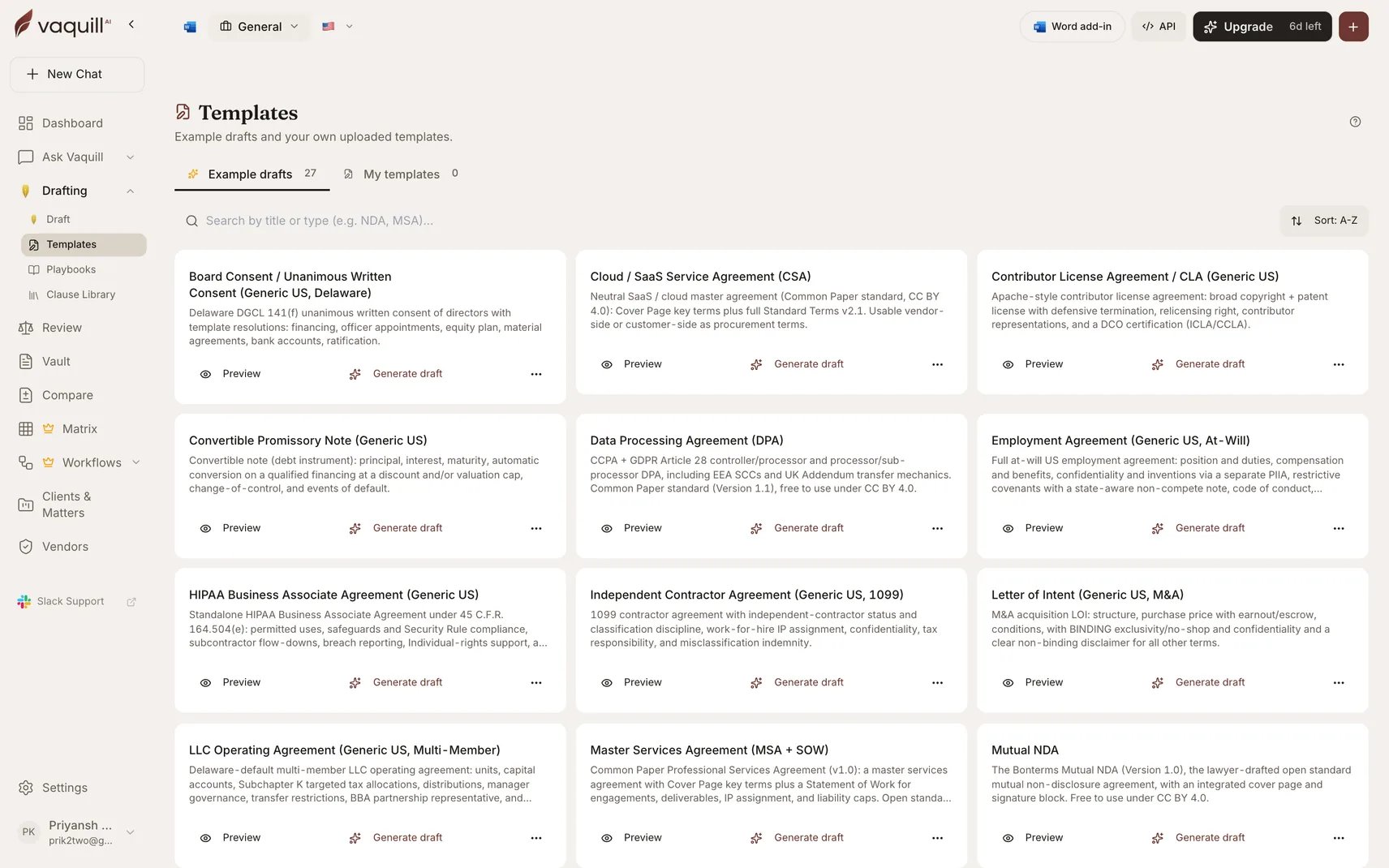
Templates turn a Word document you already use into a reusable skeleton. Upload a DOCX, Vaquill AI parses it and auto-detects the variables, and from then on you generate a filled draft instead of copying the last one and hunting for the names you forgot to change.
Find it under **Drafting, Templates** in the sidebar.
 ## When to use it
* Your firm has a house-style NDA, engagement letter, or notice you send constantly
* You want generation grounded in **your** precedent rather than a generic model draft
* A colleague keeps reusing a document by "save as", with all the risk that carries
## Creating a template
Upload the Word document you want to templatize. Vaquill AI parses the body and **auto-detects variables**, the placeholders that change per use: party names, dates, amounts, jurisdictions.
Review what it found. Add anything it missed, remove anything it over-detected. Body and variable set update atomically, so a template is never half-saved.
Run the template, fill the variables, and get a draft. Every past generation is listed against the template, so you can see what has been produced from it.
The original uploaded file stays retrievable, so you can always get back to the source document.
## Organizing your library
| Action | Effect |
| ------------- | ------------------------------------------------------------------------------------- |
| **Pin** | Sticks a template to the top of your library. Per-user, so your pins are yours. |
| **Reorder** | Persists your own manual ordering. |
| **Hide** | Removes a shared starter template from your view without deleting it for anyone else. |
| **Duplicate** | Clones the template and its variables, for a variant you want to diverge. |
| **Trash** | Soft-deletes by default; a hard purge is separate and explicit. |
## Sharing
Templates can be **org-shared**, following the same active-membership rule drafts use: colleagues in your organization see and use them.
You can also create a **public share link**. Anyone with the link can view the template, and a signed-in Vaquill AI user can clone it into their own library. Useful for a template you want to circulate beyond your organization.
A public share link is public. Anyone holding it can read the template body, so do not share a template containing client names, commercial terms, or anything else confidential.
## Templates versus the other reuse surfaces
Vaquill AI has several ways to reuse work, and they are easy to confuse:
| Surface | Reuses | Use it when |
| ---------------------------------------- | ---------------------------------------- | --------------------------------------------------- |
| **Templates** | A whole document skeleton with variables | You have a document you send repeatedly |
| [Clause Library](/docs/guides/clause-library) | Individual clauses | You want the right indemnity, not a whole agreement |
| [Playbooks](/docs/guides/playbooks) | Positions and fallbacks | You are negotiating and need your stance encoded |
| [Skills](/docs/guides/skills) | A prompt playbook | You want the same analysis run repeatedly in chat |
| [Workflows](/docs/workflows) | A multi-step pipeline | The job has stages and ends in a file |
## Limitations
* Variable detection is automatic but not infallible. Check the detected set before you rely on a template.
* Templates are DOCX-based. Complex Word features may not survive parsing exactly.
* Generation fills variables and drafts against the skeleton; it does not verify that the resulting document is legally appropriate for your matter.
## Related
The drafting surface templates generate into.
Clause-level reuse rather than whole documents.
Your negotiating positions, encoded.
What Vaquill AI can ingest.
## When to use it
* Your firm has a house-style NDA, engagement letter, or notice you send constantly
* You want generation grounded in **your** precedent rather than a generic model draft
* A colleague keeps reusing a document by "save as", with all the risk that carries
## Creating a template
Upload the Word document you want to templatize. Vaquill AI parses the body and **auto-detects variables**, the placeholders that change per use: party names, dates, amounts, jurisdictions.
Review what it found. Add anything it missed, remove anything it over-detected. Body and variable set update atomically, so a template is never half-saved.
Run the template, fill the variables, and get a draft. Every past generation is listed against the template, so you can see what has been produced from it.
The original uploaded file stays retrievable, so you can always get back to the source document.
## Organizing your library
| Action | Effect |
| ------------- | ------------------------------------------------------------------------------------- |
| **Pin** | Sticks a template to the top of your library. Per-user, so your pins are yours. |
| **Reorder** | Persists your own manual ordering. |
| **Hide** | Removes a shared starter template from your view without deleting it for anyone else. |
| **Duplicate** | Clones the template and its variables, for a variant you want to diverge. |
| **Trash** | Soft-deletes by default; a hard purge is separate and explicit. |
## Sharing
Templates can be **org-shared**, following the same active-membership rule drafts use: colleagues in your organization see and use them.
You can also create a **public share link**. Anyone with the link can view the template, and a signed-in Vaquill AI user can clone it into their own library. Useful for a template you want to circulate beyond your organization.
A public share link is public. Anyone holding it can read the template body, so do not share a template containing client names, commercial terms, or anything else confidential.
## Templates versus the other reuse surfaces
Vaquill AI has several ways to reuse work, and they are easy to confuse:
| Surface | Reuses | Use it when |
| ---------------------------------------- | ---------------------------------------- | --------------------------------------------------- |
| **Templates** | A whole document skeleton with variables | You have a document you send repeatedly |
| [Clause Library](/docs/guides/clause-library) | Individual clauses | You want the right indemnity, not a whole agreement |
| [Playbooks](/docs/guides/playbooks) | Positions and fallbacks | You are negotiating and need your stance encoded |
| [Skills](/docs/guides/skills) | A prompt playbook | You want the same analysis run repeatedly in chat |
| [Workflows](/docs/workflows) | A multi-step pipeline | The job has stages and ends in a file |
## Limitations
* Variable detection is automatic but not infallible. Check the detected set before you rely on a template.
* Templates are DOCX-based. Complex Word features may not survive parsing exactly.
* Generation fills variables and drafts against the skeleton; it does not verify that the resulting document is legally appropriate for your matter.
## Related
The drafting surface templates generate into.
Clause-level reuse rather than whole documents.
Your negotiating positions, encoded.
What Vaquill AI can ingest.