> ## Documentation Index
> Fetch the complete documentation index at: https://vaquill.ai/docs/llms.txt
> Use this file to discover all available pages before exploring further.
# Document Analyst
> Ask any question about an uploaded document and get a sourced answer with page-level citations
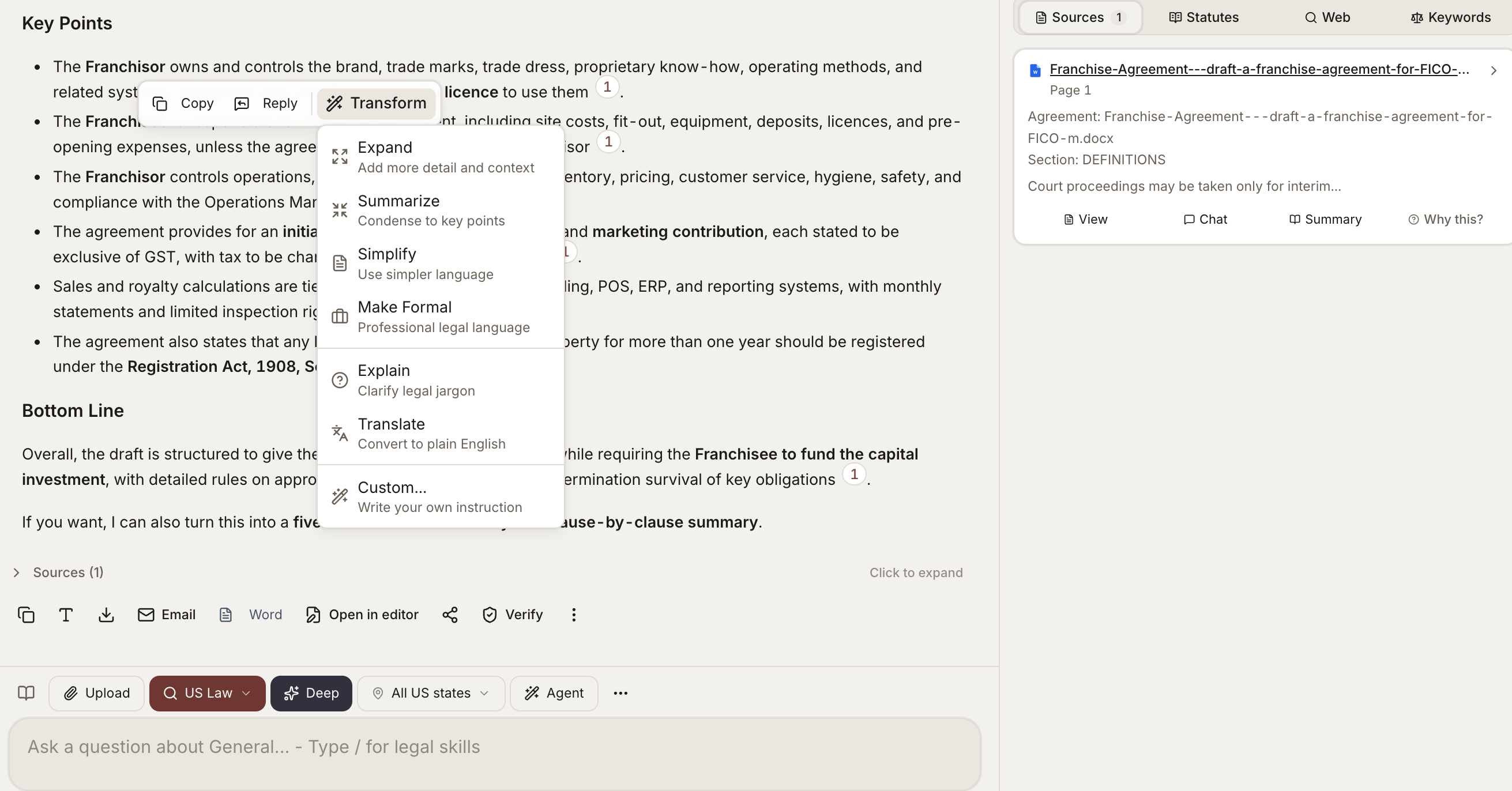
Document Analyst is the workhorse for one-off questions about a single document. Upload a contract, a complaint, a regulation, a deposition transcript - anything - and ask questions in plain English. Every answer is grounded in the document with the exact passages cited.
 ## When To Use It
* Reading through an unfamiliar contract and asking targeted questions
* Reviewing a complaint and pulling out causes of action and key allegations
* Working through a long regulation and asking what applies to your client
* Cross-examining a deposition transcript for inconsistencies
* Anything where you would otherwise be skimming a long document for specific information
## How To Use It
Drop in a contract, complaint, regulation, or transcript - or select one already in your matter.
Launch it from the tools menu, with the document scoped as the source.
Type a targeted question. Specific questions get tighter, better-cited answers than broad ones.
Jump straight to the highlighted passage in the source document to verify the answer.
You can keep asking follow-up questions; the tool maintains conversational context for the document.
## Ready-to-run prompt
Read the attached document end-to-end and answer the following as a senior US attorney briefing a partner:
1. **Identify the document type** (contract, complaint, regulation, transcript, opinion, etc.) and its operative date.
2. **List the parties** and their roles, with the exact legal names as they appear in the document.
3. **Summarize the top five obligations or holdings** in one sentence each, with page and section citations.
4. **Flag every defined term** that materially affects interpretation and quote the definition verbatim.
5. **Surface any unusual provisions** - carve-outs, non-standard remedies, aggressive limitations, missing-but-expected clauses - with the page reference.
6. **Identify governing law, venue, and dispute-resolution mechanics** verbatim.
7. **List open questions** a US litigator or transactional lawyer would want answered before relying on this document.
For every factual statement, cite the page and section. Where the document is ambiguous, say so explicitly rather than guessing.
## What It Does Well
* **Specific factual extraction** - "What is the term of this lease?" "Who are the parties?" "What is the governing law?"
* **Clause location** - "Show me the indemnification clause" "Where does it talk about termination?"
* **Comparison within a document** - "Are the IP provisions consistent between Sections 5 and 12?"
* **Plain-English summaries** - "Summarize the key obligations of the licensee"
* **Issue spotting** - "What are the most aggressive provisions in this NDA?"
* **Risk and exception calling** - "Are there any unusual carve-outs or exceptions I should be aware of?"
## What Each Answer Includes
* A plain-English response to your question
* The page numbers and section references that support it
* Direct quotes from the document where applicable
* A confidence indicator if the answer is hedged or based on inference
Click any citation to jump to the highlighted passage in the source document.
## File Types
Document Analyst works on any uploaded document type, including:
* Word, PDF, scanned PDF, image-only PDF
* Spreadsheets and presentations
* Emails and attachments
* Plain text and code files
For scanned and image-based documents, text is read automatically before analysis.
## Long Documents
For documents over a few hundred pages, the tool focuses retrieval on the most relevant sections rather than reading end-to-end every time. You can:
* Ask the tool to summarize an entire section by name
* Pin a specific section as the focus before asking questions
* Run a follow-up question that scopes to "the previous section we discussed"
## Tips
**Be specific about what you want.** "What is the cap on damages?" beats "tell me about damages." Targeted questions return tighter, better-cited answers.
**Ask one question at a time, then follow up.** The tool remembers the conversation, so "what about the exceptions to that?" works as a natural drill-down.
**Promote to a Matrix when you scale.** If you find yourself asking the same questions across many documents, switch to [Document Matrix](/docs/guides/document-matrix) for spreadsheet-style extraction.
## Related
Search across every document in a matter at once.
Same questions, many documents, returned in spreadsheet form.
Structured clause-level review with redlines and severity flags.
## When To Use It
* Reading through an unfamiliar contract and asking targeted questions
* Reviewing a complaint and pulling out causes of action and key allegations
* Working through a long regulation and asking what applies to your client
* Cross-examining a deposition transcript for inconsistencies
* Anything where you would otherwise be skimming a long document for specific information
## How To Use It
Drop in a contract, complaint, regulation, or transcript - or select one already in your matter.
Launch it from the tools menu, with the document scoped as the source.
Type a targeted question. Specific questions get tighter, better-cited answers than broad ones.
Jump straight to the highlighted passage in the source document to verify the answer.
You can keep asking follow-up questions; the tool maintains conversational context for the document.
## Ready-to-run prompt
Read the attached document end-to-end and answer the following as a senior US attorney briefing a partner:
1. **Identify the document type** (contract, complaint, regulation, transcript, opinion, etc.) and its operative date.
2. **List the parties** and their roles, with the exact legal names as they appear in the document.
3. **Summarize the top five obligations or holdings** in one sentence each, with page and section citations.
4. **Flag every defined term** that materially affects interpretation and quote the definition verbatim.
5. **Surface any unusual provisions** - carve-outs, non-standard remedies, aggressive limitations, missing-but-expected clauses - with the page reference.
6. **Identify governing law, venue, and dispute-resolution mechanics** verbatim.
7. **List open questions** a US litigator or transactional lawyer would want answered before relying on this document.
For every factual statement, cite the page and section. Where the document is ambiguous, say so explicitly rather than guessing.
## What It Does Well
* **Specific factual extraction** - "What is the term of this lease?" "Who are the parties?" "What is the governing law?"
* **Clause location** - "Show me the indemnification clause" "Where does it talk about termination?"
* **Comparison within a document** - "Are the IP provisions consistent between Sections 5 and 12?"
* **Plain-English summaries** - "Summarize the key obligations of the licensee"
* **Issue spotting** - "What are the most aggressive provisions in this NDA?"
* **Risk and exception calling** - "Are there any unusual carve-outs or exceptions I should be aware of?"
## What Each Answer Includes
* A plain-English response to your question
* The page numbers and section references that support it
* Direct quotes from the document where applicable
* A confidence indicator if the answer is hedged or based on inference
Click any citation to jump to the highlighted passage in the source document.
## File Types
Document Analyst works on any uploaded document type, including:
* Word, PDF, scanned PDF, image-only PDF
* Spreadsheets and presentations
* Emails and attachments
* Plain text and code files
For scanned and image-based documents, text is read automatically before analysis.
## Long Documents
For documents over a few hundred pages, the tool focuses retrieval on the most relevant sections rather than reading end-to-end every time. You can:
* Ask the tool to summarize an entire section by name
* Pin a specific section as the focus before asking questions
* Run a follow-up question that scopes to "the previous section we discussed"
## Tips
**Be specific about what you want.** "What is the cap on damages?" beats "tell me about damages." Targeted questions return tighter, better-cited answers.
**Ask one question at a time, then follow up.** The tool remembers the conversation, so "what about the exceptions to that?" works as a natural drill-down.
**Promote to a Matrix when you scale.** If you find yourself asking the same questions across many documents, switch to [Document Matrix](/docs/guides/document-matrix) for spreadsheet-style extraction.
## Related
Search across every document in a matter at once.
Same questions, many documents, returned in spreadsheet form.
Structured clause-level review with redlines and severity flags.