> ## Documentation Index
> Fetch the complete documentation index at: https://vaquill.ai/docs/llms.txt
> Use this file to discover all available pages before exploring further.
# NDA Triage
> Fast pass/warn/fail screening of NDAs against a standard checklist
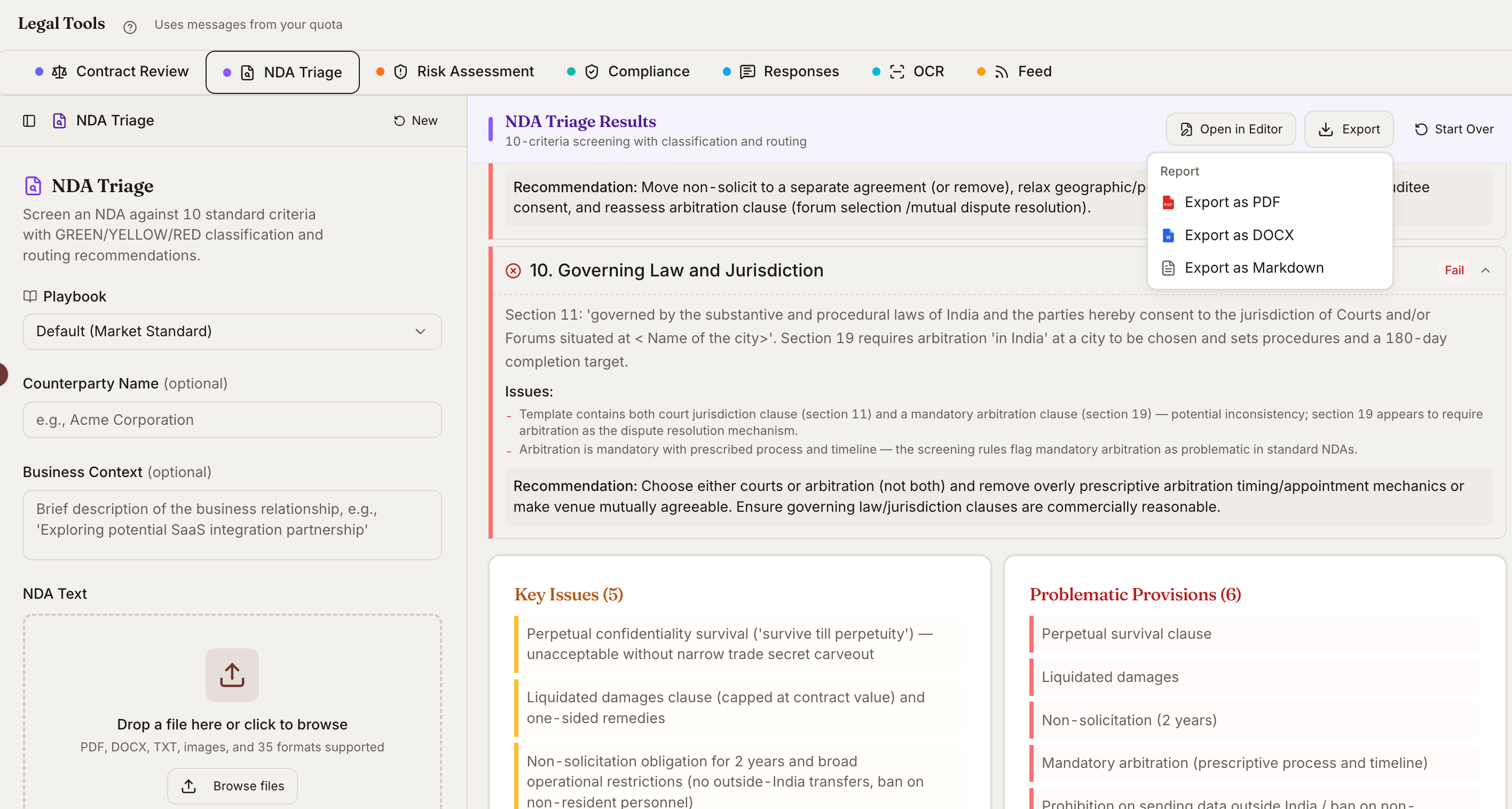
NDA Triage is built for the high-volume reality of in-house and transactional practice: stacks of incoming NDAs that all need a first-pass review before they get to a lawyer. Drop one in and get a pass/warn/fail rating against a ten-point checklist, plus a recommendation for routing.
 ## When To Use It
Teams receiving NDAs from vendors, customers, and partners on a daily basis.
Deal lawyers running a first pass on NDAs at the start of a transaction.
Procurement teams that route legal review based on contract risk.
Pre-screen before a partner or senior associate decides whether to negotiate.
## What It Checks
The triage scores each NDA against a ten-point checklist covering the provisions that typically determine whether an NDA is signable as-is. Items reviewed include:
* Definition of Confidential Information (scope, specificity)
* Term and duration of obligations
* Permitted disclosures and standard carve-outs
* Compelled disclosure (subpoena and court order procedures)
* Return and destruction obligations
* Residuals clauses
* Bundled non-compete or non-solicit provisions
* Governing law and venue
* Remedies (including injunctive relief)
* Assignment
Each item is rated Pass / Warn / Fail with a short rationale.
## NDA Type Classification
The tool first classifies the NDA by type, since the right review depends on which side you are on:
Both parties exchange confidential information. Review weights all clauses symmetrically.
You are sharing your confidential information. Review weights protective clauses (definition scope, term, remedies) heavily.
You are receiving the counterparty's confidential information. Review weights residual-knowledge, return-or-destroy, and non-compete reach.
The triage emphasizes different criteria based on the classification.
## Output
The triage produces a one-page summary you can paste into an email or matter file:
* **Overall rating** - Pass / Warn / Fail
* **Routing recommendation** - Sign as-is / negotiate / escalate / reject
* **Key issues** - The two or three items that drove the rating
* **Suggested markups** - Concrete changes that would move a Warn or Fail to Pass
* **Estimated negotiation time** - Rough effort to get to executable
## Suggested Markups
For each Warn or Fail item, the tool suggests specific language changes:
* The current clause text
* The proposed replacement language
* A one-line explanation of why the change matters
Copy the markups into your draft or use them as the basis for a redline.
## Ready-to-run prompt
Run **NDA Triage** on the attached NDA.
First, classify the NDA as Mutual, Unilateral-Disclosing, or Unilateral-Receiving and state which side our client is on.
Then score the agreement against the 10-point screen, marking each Pass / Warn / Fail with a one-sentence rationale:
1. Definition of Confidential Information (scope, exclusions, marking requirement)
2. Term of confidentiality obligations and survival
3. Permitted disclosures (advisors, affiliates, legally compelled)
4. Compelled-disclosure procedure (notice, cooperation, protective order)
5. Return-or-destroy obligation and certification
6. Residual-knowledge clause
7. Non-solicit / non-compete reach
8. Injunctive relief and equitable remedies
9. Governing law and venue (flag if not a US state)
10. Assignment and change-of-control
Output a single overall rating - **PASS** (sign as-is), **WARN** (negotiate listed clauses), or **FAIL** (escalate to senior counsel) - plus a routing recommendation, estimated negotiation effort, and a plain-English paragraph a non-lawyer business owner could understand. For every Warn or Fail clause, include proposed replacement language in a markup-ready format.
## Tips
**Build a playbook.** For high-volume teams, configure the Pass / Warn / Fail thresholds to match your standard playbook and save it as a [Skill](/docs/guides/skills) so every triage is graded against the same bar.
**Pair with Compare Documents.** After negotiation, compare the counter against your sent version to confirm only agreed changes were made.
The triage is for triage. High-stakes NDAs - M\&A, strategic deals, anything tied to a public filing - still warrant a full read by a qualified attorney before signature.
## Related
Deep clause-by-clause review with redlines for the NDAs that need more than a triage.
Diff two versions of an NDA to confirm only agreed-upon changes were made.
Run NDA Triage as part of a saved playbook tuned to your firm's house style.
Once the counterparty marks up your NDA, read their changes with full commentary.
## When To Use It
Teams receiving NDAs from vendors, customers, and partners on a daily basis.
Deal lawyers running a first pass on NDAs at the start of a transaction.
Procurement teams that route legal review based on contract risk.
Pre-screen before a partner or senior associate decides whether to negotiate.
## What It Checks
The triage scores each NDA against a ten-point checklist covering the provisions that typically determine whether an NDA is signable as-is. Items reviewed include:
* Definition of Confidential Information (scope, specificity)
* Term and duration of obligations
* Permitted disclosures and standard carve-outs
* Compelled disclosure (subpoena and court order procedures)
* Return and destruction obligations
* Residuals clauses
* Bundled non-compete or non-solicit provisions
* Governing law and venue
* Remedies (including injunctive relief)
* Assignment
Each item is rated Pass / Warn / Fail with a short rationale.
## NDA Type Classification
The tool first classifies the NDA by type, since the right review depends on which side you are on:
Both parties exchange confidential information. Review weights all clauses symmetrically.
You are sharing your confidential information. Review weights protective clauses (definition scope, term, remedies) heavily.
You are receiving the counterparty's confidential information. Review weights residual-knowledge, return-or-destroy, and non-compete reach.
The triage emphasizes different criteria based on the classification.
## Output
The triage produces a one-page summary you can paste into an email or matter file:
* **Overall rating** - Pass / Warn / Fail
* **Routing recommendation** - Sign as-is / negotiate / escalate / reject
* **Key issues** - The two or three items that drove the rating
* **Suggested markups** - Concrete changes that would move a Warn or Fail to Pass
* **Estimated negotiation time** - Rough effort to get to executable
## Suggested Markups
For each Warn or Fail item, the tool suggests specific language changes:
* The current clause text
* The proposed replacement language
* A one-line explanation of why the change matters
Copy the markups into your draft or use them as the basis for a redline.
## Ready-to-run prompt
Run **NDA Triage** on the attached NDA.
First, classify the NDA as Mutual, Unilateral-Disclosing, or Unilateral-Receiving and state which side our client is on.
Then score the agreement against the 10-point screen, marking each Pass / Warn / Fail with a one-sentence rationale:
1. Definition of Confidential Information (scope, exclusions, marking requirement)
2. Term of confidentiality obligations and survival
3. Permitted disclosures (advisors, affiliates, legally compelled)
4. Compelled-disclosure procedure (notice, cooperation, protective order)
5. Return-or-destroy obligation and certification
6. Residual-knowledge clause
7. Non-solicit / non-compete reach
8. Injunctive relief and equitable remedies
9. Governing law and venue (flag if not a US state)
10. Assignment and change-of-control
Output a single overall rating - **PASS** (sign as-is), **WARN** (negotiate listed clauses), or **FAIL** (escalate to senior counsel) - plus a routing recommendation, estimated negotiation effort, and a plain-English paragraph a non-lawyer business owner could understand. For every Warn or Fail clause, include proposed replacement language in a markup-ready format.
## Tips
**Build a playbook.** For high-volume teams, configure the Pass / Warn / Fail thresholds to match your standard playbook and save it as a [Skill](/docs/guides/skills) so every triage is graded against the same bar.
**Pair with Compare Documents.** After negotiation, compare the counter against your sent version to confirm only agreed changes were made.
The triage is for triage. High-stakes NDAs - M\&A, strategic deals, anything tied to a public filing - still warrant a full read by a qualified attorney before signature.
## Related
Deep clause-by-clause review with redlines for the NDAs that need more than a triage.
Diff two versions of an NDA to confirm only agreed-upon changes were made.
Run NDA Triage as part of a saved playbook tuned to your firm's house style.
Once the counterparty marks up your NDA, read their changes with full commentary.