> ## Documentation Index
> Fetch the complete documentation index at: https://vaquill.ai/docs/llms.txt
> Use this file to discover all available pages before exploring further.
# Redline Analysis
> Get commentary on a counterparty's tracked changes - what changed, why it matters, and how to respond
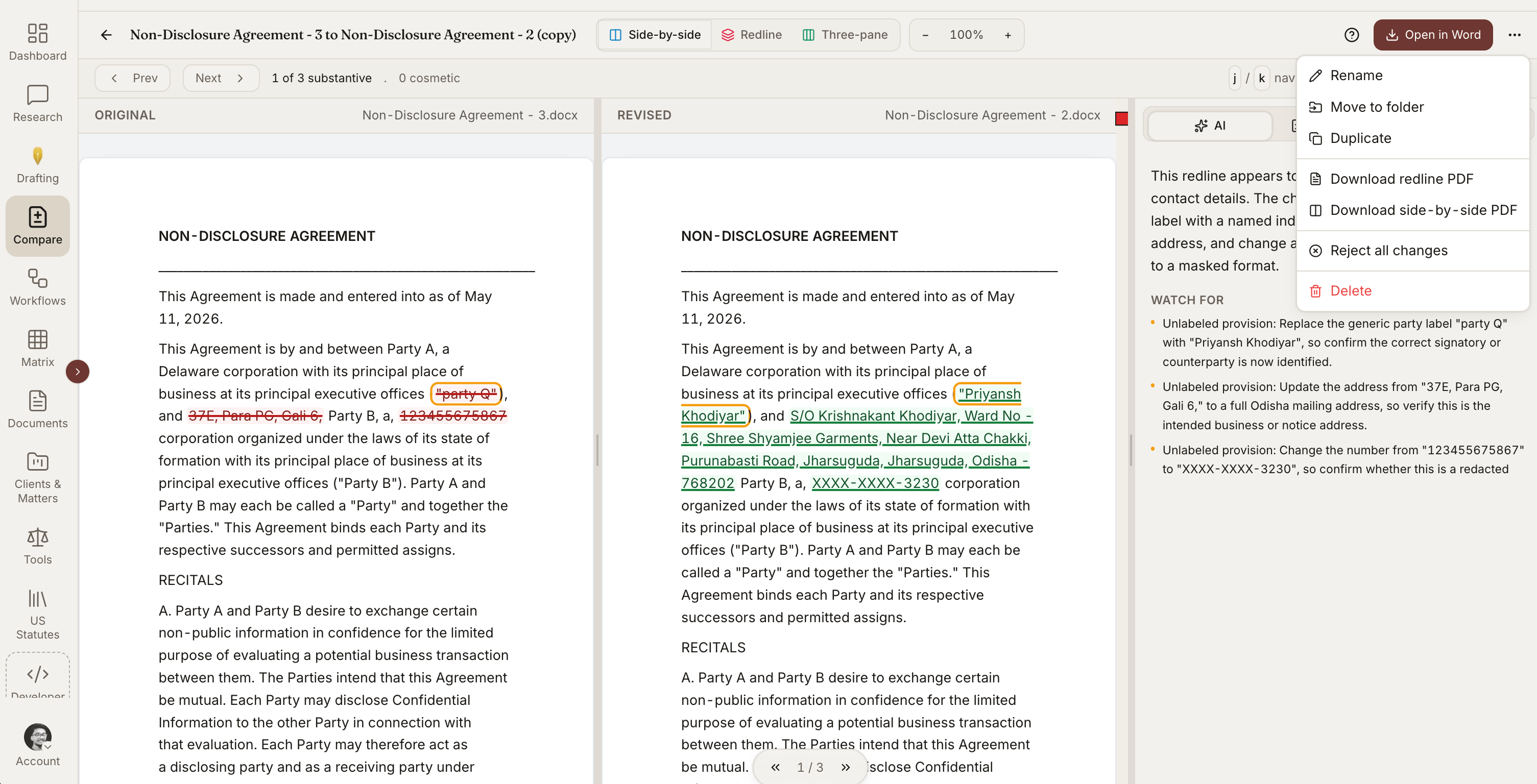
When you get a marked-up contract back from the other side, the question is not just *what* changed but *why* it matters. Redline Analysis reads through the tracked changes and produces a memo: each substantive change explained in plain English, its impact on your position, and a recommended response.
 ## When To Use It
* Reviewing a counterparty's redline before responding
* Briefing a partner or client on what changed in a markup
* Triaging which edits to accept, push back on, or escalate
* Comparing your sent draft to the version that came back
* Reviewing inherited markups when you join a deal mid-negotiation
## How It Works
Use the native Word version with Track Changes on, or pick a clean version and compare it to your sent version using [Compare Documents](/docs/guides/document-comparison) first.
Launch the tool from the tools menu.
Every tracked edit is bucketed (substantive, risk-shifting, clarifying, stylistic, typo) with significance scored.
Review the change-by-change memo, the negotiation themes, and the drafted counter-language for pushback positions.
## Ready-to-run prompt
Run **Redline Analysis** on the attached marked-up document. Treat this as a partner-ready briefing.
Do these steps in order:
1. For each tracked change, capture: section / clause, original text, revised text, change type (substantive, risk-shifting, risk-mitigating, clarifying, stylistic, typo / fix), and significance (Critical, High, Medium, Low).
2. Explain in one sentence how the change affects our client's position. Quote the operative language.
3. Recommend a response: **Accept**, **Push back**, **Counter**, or **Escalate**. For Push back and Counter, draft the exact alternative language in markup-ready form, plus a one-line justification and a fallback position if the counterparty rejects the counter.
4. Identify **negotiation themes** that run across the markup - what is the counterparty actually trying to accomplish across multiple clauses?
5. Sort the final output by significance (Critical first), then by section order.
End with a partner-level summary: top three themes, top five changes to push back on, and a recommendation on whether to send a counter-redline or escalate to a call.
The document can have tracked changes in native Word format, or it can be a clean version compared against your sent version using [Compare Documents](/docs/guides/document-comparison) first.
## What You Get For Each Change
| Element | Description |
| ------------------------ | -------------------------------------------------------- |
| **Location** | Section and clause where the change appears |
| **Original** | The text before the change |
| **Revised** | The text after the change |
| **Change type** | Substantive, clarifying, stylistic, or fix |
| **Impact** | How the change affects your client's position |
| **Significance** | Critical / High / Medium / Low |
| **Recommended response** | Accept / push back / counter / escalate |
| **Drafted counter** | If pushback is recommended, drafted alternative language |
## Change Categorization
The tool labels each change so you can scan and prioritize:
* **Substantive** - Changes that shift legal rights or obligations
* **Risk-shifting** - Changes that move risk to your client
* **Risk-mitigating** - Changes that reduce your client's risk
* **Clarifying** - Changes that resolve ambiguity without shifting position
* **Stylistic** - Changes to wording without legal effect
* **Typo / fix** - Corrections that should just be accepted
You can filter the memo to focus only on the substantive and risk-shifting changes when time is short.
## Negotiation Themes
Beyond change-by-change analysis, the tool identifies negotiation themes that run across the markup:
* "The counterparty is narrowing your indemnification rights in Sections 8, 11, and 14"
* "Three changes together extend payment terms by 30 days"
* "The non-compete and non-solicit edits track standard template language for their industry"
These themes are useful for the partner-level summary - what is the counterparty actually trying to accomplish?
## Recommended Counter
For changes you should push back on, the tool drafts counter-language:
* A proposed compromise position
* A reasoned justification you can use in negotiation
* A fallback if the counterparty pushes back on the counter
The drafted counter respects the markup format - paste it directly into a return redline.
## Output
* **Word memo** - Structured analysis with one entry per change, organized by section
* **Negotiation playbook** - The themes and recommended counters, organized for a partner briefing
* **Spreadsheet** - Tracker showing every change with its disposition column for team-based review
## Tips
**Use after Compare Documents.** If you only have two clean versions, generate the redline first with [Compare Documents](/docs/guides/document-comparison) and then feed the marked-up file into Redline Analysis.
**Filter to Critical and High before the partner call.** Most partners want the substantive analysis, not the typo list. Hide the Low-significance changes when you brief up.
**Save your standard positions as Skills.** Patterns of acceptable and unacceptable changes - cap-at-fees, mutual indemnity, anti-assignment - can be saved as a [Skill](/docs/guides/skills) and reused on every deal.
## Related
Generate the redline if you only have two clean versions.
Full clause-by-clause review against your playbook.
Encode your firm's standard negotiation positions as reusable playbooks.
Roll the surviving counterparty changes into a quantified risk register.
## When To Use It
* Reviewing a counterparty's redline before responding
* Briefing a partner or client on what changed in a markup
* Triaging which edits to accept, push back on, or escalate
* Comparing your sent draft to the version that came back
* Reviewing inherited markups when you join a deal mid-negotiation
## How It Works
Use the native Word version with Track Changes on, or pick a clean version and compare it to your sent version using [Compare Documents](/docs/guides/document-comparison) first.
Launch the tool from the tools menu.
Every tracked edit is bucketed (substantive, risk-shifting, clarifying, stylistic, typo) with significance scored.
Review the change-by-change memo, the negotiation themes, and the drafted counter-language for pushback positions.
## Ready-to-run prompt
Run **Redline Analysis** on the attached marked-up document. Treat this as a partner-ready briefing.
Do these steps in order:
1. For each tracked change, capture: section / clause, original text, revised text, change type (substantive, risk-shifting, risk-mitigating, clarifying, stylistic, typo / fix), and significance (Critical, High, Medium, Low).
2. Explain in one sentence how the change affects our client's position. Quote the operative language.
3. Recommend a response: **Accept**, **Push back**, **Counter**, or **Escalate**. For Push back and Counter, draft the exact alternative language in markup-ready form, plus a one-line justification and a fallback position if the counterparty rejects the counter.
4. Identify **negotiation themes** that run across the markup - what is the counterparty actually trying to accomplish across multiple clauses?
5. Sort the final output by significance (Critical first), then by section order.
End with a partner-level summary: top three themes, top five changes to push back on, and a recommendation on whether to send a counter-redline or escalate to a call.
The document can have tracked changes in native Word format, or it can be a clean version compared against your sent version using [Compare Documents](/docs/guides/document-comparison) first.
## What You Get For Each Change
| Element | Description |
| ------------------------ | -------------------------------------------------------- |
| **Location** | Section and clause where the change appears |
| **Original** | The text before the change |
| **Revised** | The text after the change |
| **Change type** | Substantive, clarifying, stylistic, or fix |
| **Impact** | How the change affects your client's position |
| **Significance** | Critical / High / Medium / Low |
| **Recommended response** | Accept / push back / counter / escalate |
| **Drafted counter** | If pushback is recommended, drafted alternative language |
## Change Categorization
The tool labels each change so you can scan and prioritize:
* **Substantive** - Changes that shift legal rights or obligations
* **Risk-shifting** - Changes that move risk to your client
* **Risk-mitigating** - Changes that reduce your client's risk
* **Clarifying** - Changes that resolve ambiguity without shifting position
* **Stylistic** - Changes to wording without legal effect
* **Typo / fix** - Corrections that should just be accepted
You can filter the memo to focus only on the substantive and risk-shifting changes when time is short.
## Negotiation Themes
Beyond change-by-change analysis, the tool identifies negotiation themes that run across the markup:
* "The counterparty is narrowing your indemnification rights in Sections 8, 11, and 14"
* "Three changes together extend payment terms by 30 days"
* "The non-compete and non-solicit edits track standard template language for their industry"
These themes are useful for the partner-level summary - what is the counterparty actually trying to accomplish?
## Recommended Counter
For changes you should push back on, the tool drafts counter-language:
* A proposed compromise position
* A reasoned justification you can use in negotiation
* A fallback if the counterparty pushes back on the counter
The drafted counter respects the markup format - paste it directly into a return redline.
## Output
* **Word memo** - Structured analysis with one entry per change, organized by section
* **Negotiation playbook** - The themes and recommended counters, organized for a partner briefing
* **Spreadsheet** - Tracker showing every change with its disposition column for team-based review
## Tips
**Use after Compare Documents.** If you only have two clean versions, generate the redline first with [Compare Documents](/docs/guides/document-comparison) and then feed the marked-up file into Redline Analysis.
**Filter to Critical and High before the partner call.** Most partners want the substantive analysis, not the typo list. Hide the Low-significance changes when you brief up.
**Save your standard positions as Skills.** Patterns of acceptable and unacceptable changes - cap-at-fees, mutual indemnity, anti-assignment - can be saved as a [Skill](/docs/guides/skills) and reused on every deal.
## Related
Generate the redline if you only have two clean versions.
Full clause-by-clause review against your playbook.
Encode your firm's standard negotiation positions as reusable playbooks.
Roll the surviving counterparty changes into a quantified risk register.