> ## Documentation Index
> Fetch the complete documentation index at: https://vaquill.ai/docs/llms.txt
> Use this file to discover all available pages before exploring further.
# Vendor and Sub-processor Registry
> Track third-party vendors, their DPA status, data categories, and renewal dates, with automatic DPA review
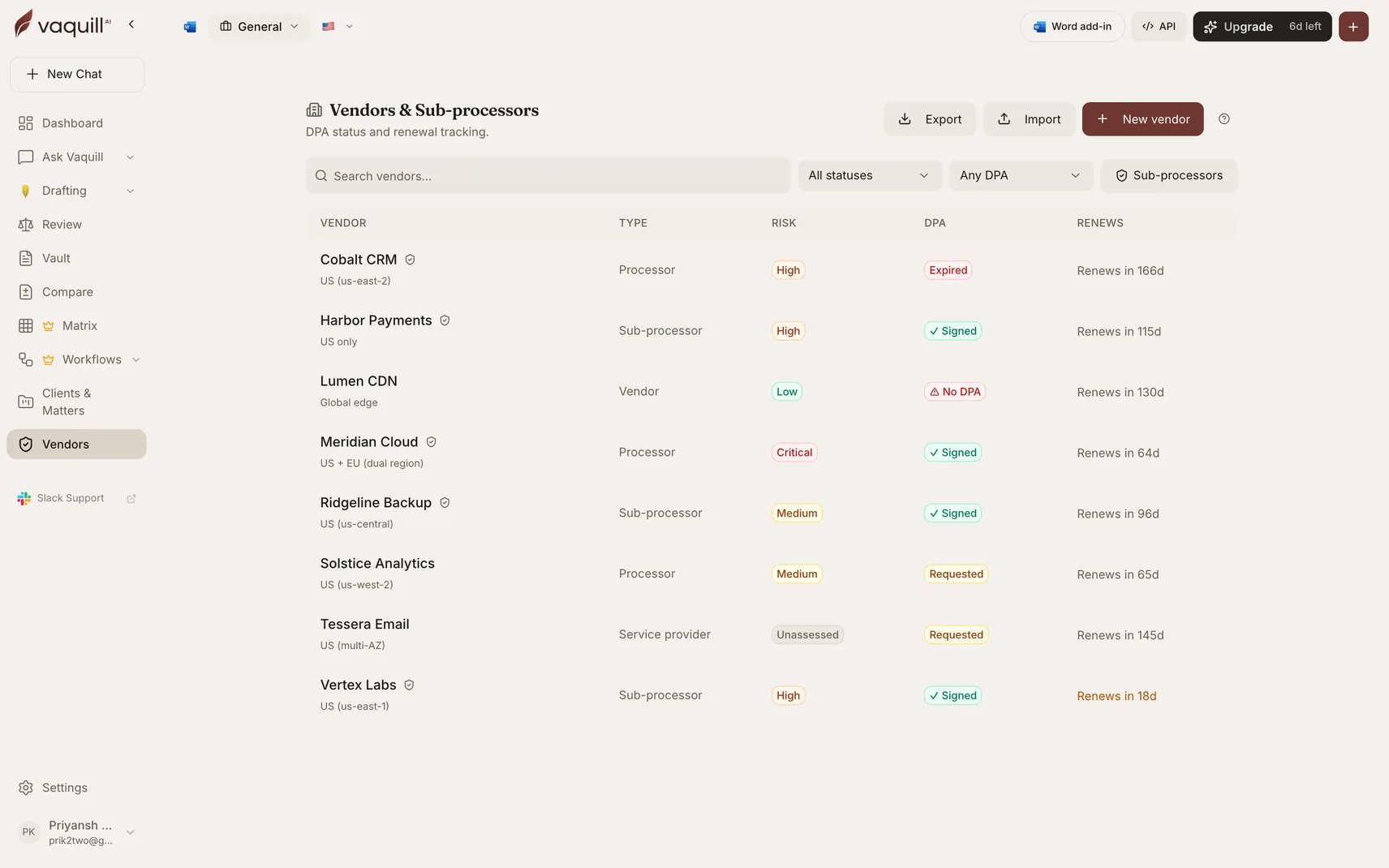
The Vendor Registry is the inventory privacy and procurement teams are expected to keep: who your vendors are, which of them are sub-processors, what data each touches, whether a DPA is signed, and when the contract renews.
It is the record you produce when a customer's security questionnaire or a regulator asks for your sub-processor list.
 ## When to use it
* Maintaining the sub-processor inventory GDPR Article 30 and customer DPAs require
* Tracking which vendors have a signed DPA and which are still outstanding
* Getting ahead of renewals rather than discovering them after auto-renewal
* Answering "what data does this vendor touch, and where does it live?" without a spreadsheet hunt
## What a vendor record holds
| Field | Purpose |
| ------------------------------- | ------------------------------------------------------------------------------- |
| Name, website, contact email | Identification |
| Vendor type | What kind of supplier this is |
| **Sub-processor flag** | Whether they process personal data on your behalf. Drives your Article 30 list. |
| Risk tier | Your own classification, for prioritizing review |
| Data categories | What kinds of data they touch |
| Processing purpose | Why they touch it |
| Data region | Where it is processed, which drives transfer analysis |
| DPA status and signed date | Whether the agreement exists and when it was signed |
| Contract start and renewal date | The dates that matter |
| Reminder lead days | How far ahead of renewal you want warning |
| Linked client or matter | Ties the vendor to the engagement it belongs to |
## Getting vendors in
Bulk import from a spreadsheet, which is how most teams start, since the list usually already exists somewhere. Download the import template first so the columns line up.
Point Vaquill at an uploaded DPA and it extracts the vendor details from the agreement itself: parties, data categories, processing purpose, region, dates.
Extraction is **fill-if-empty**: it never overwrites a value you set by hand. Your corrections survive re-extraction.
Create the record directly and attach documents to it later.
## Automatic DPA review
Run **Analyze DPA** on a vendor and the attached agreement is reviewed, with the findings written onto the vendor record. You get the compliance posture attached to the vendor rather than sitting in a separate document you have to remember to open.
For a deeper pass across many DPAs at once, including SCC module fit and Schrems II transfer analysis, use the [DPA Reviewer workflow](/docs/workflows/built-in/dpa-reviewer).
## Working with vendor documents
Documents attached to a vendor are more than storage:
* **Summarize** any attached document
* **Chat** with it, scoped to that document
* **Attach a draft** you already created elsewhere
## Export
Export the registry at any time. This is the artifact you hand to a customer's security review or attach to your Article 30 record.
## Limitations
* The registry records what you and your documents tell it. It does not discover shadow vendors or scan your spend.
* Renewal reminders are based on the dates on the record. A date you never entered cannot warn you.
* Automatic DPA review reads the agreement as uploaded; it does not verify the vendor's actual practice, sub-processor chain, or security posture.
* Risk tier is your classification, not a Vaquill assessment.
## Related
Reviewing a single data processing agreement.
Batch review across every vendor DPA at once.
Renewal and notice deadlines across a whole contract portfolio.
Your privacy posture across policies and DPAs together.
## When to use it
* Maintaining the sub-processor inventory GDPR Article 30 and customer DPAs require
* Tracking which vendors have a signed DPA and which are still outstanding
* Getting ahead of renewals rather than discovering them after auto-renewal
* Answering "what data does this vendor touch, and where does it live?" without a spreadsheet hunt
## What a vendor record holds
| Field | Purpose |
| ------------------------------- | ------------------------------------------------------------------------------- |
| Name, website, contact email | Identification |
| Vendor type | What kind of supplier this is |
| **Sub-processor flag** | Whether they process personal data on your behalf. Drives your Article 30 list. |
| Risk tier | Your own classification, for prioritizing review |
| Data categories | What kinds of data they touch |
| Processing purpose | Why they touch it |
| Data region | Where it is processed, which drives transfer analysis |
| DPA status and signed date | Whether the agreement exists and when it was signed |
| Contract start and renewal date | The dates that matter |
| Reminder lead days | How far ahead of renewal you want warning |
| Linked client or matter | Ties the vendor to the engagement it belongs to |
## Getting vendors in
Bulk import from a spreadsheet, which is how most teams start, since the list usually already exists somewhere. Download the import template first so the columns line up.
Point Vaquill at an uploaded DPA and it extracts the vendor details from the agreement itself: parties, data categories, processing purpose, region, dates.
Extraction is **fill-if-empty**: it never overwrites a value you set by hand. Your corrections survive re-extraction.
Create the record directly and attach documents to it later.
## Automatic DPA review
Run **Analyze DPA** on a vendor and the attached agreement is reviewed, with the findings written onto the vendor record. You get the compliance posture attached to the vendor rather than sitting in a separate document you have to remember to open.
For a deeper pass across many DPAs at once, including SCC module fit and Schrems II transfer analysis, use the [DPA Reviewer workflow](/docs/workflows/built-in/dpa-reviewer).
## Working with vendor documents
Documents attached to a vendor are more than storage:
* **Summarize** any attached document
* **Chat** with it, scoped to that document
* **Attach a draft** you already created elsewhere
## Export
Export the registry at any time. This is the artifact you hand to a customer's security review or attach to your Article 30 record.
## Limitations
* The registry records what you and your documents tell it. It does not discover shadow vendors or scan your spend.
* Renewal reminders are based on the dates on the record. A date you never entered cannot warn you.
* Automatic DPA review reads the agreement as uploaded; it does not verify the vendor's actual practice, sub-processor chain, or security posture.
* Risk tier is your classification, not a Vaquill assessment.
## Related
Reviewing a single data processing agreement.
Batch review across every vendor DPA at once.
Renewal and notice deadlines across a whole contract portfolio.
Your privacy posture across policies and DPAs together.