> ## Documentation Index
> Fetch the complete documentation index at: https://vaquill.ai/docs/llms.txt
> Use this file to discover all available pages before exploring further.
# Introduction
> Legal AI suite for in-house counsel, with a US statutes API - review contracts, run compliance research, draft, and manage matters in the app, search the US Code, CFR, and all 50 state codes, and build legal tech products
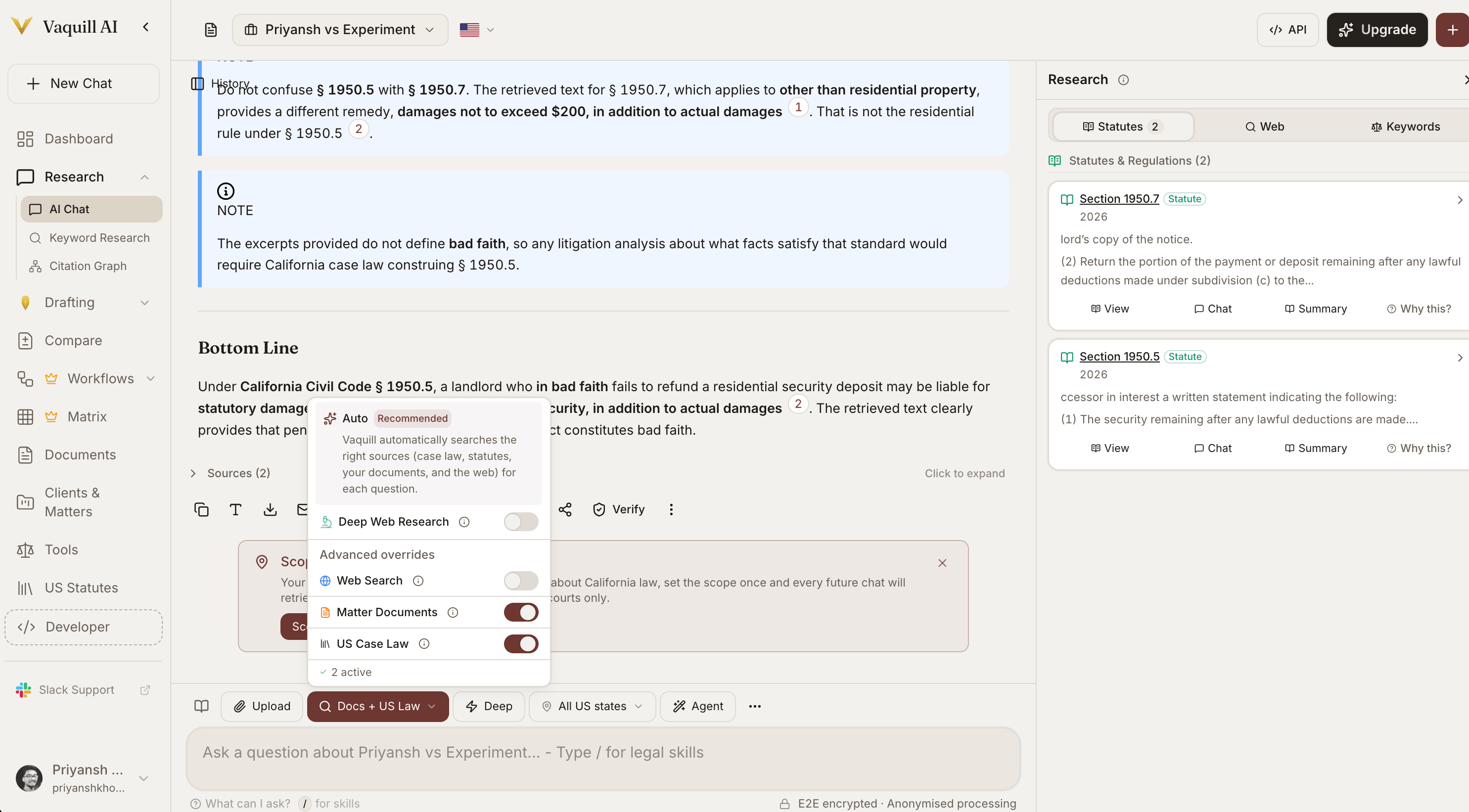 ## What is Vaquill?
Vaquill is a legal AI suite for in-house counsel: contract review, compliance research, drafting, document comparison, and matter management, with citation-verified answers. It also offers a US statutes API to search the US Code, the CFR, and all 50 state statute codes, or integrate that statute data into your own product.
Clause-by-clause analysis with severity ratings, redline suggestions, and Word Track Changes export.
Draft NDAs, MSAs, employment agreements, and notices from your templates or plain-language instructions, with jurisdiction-aware clauses and DOCX export.
Encode your team's standard clauses, fallback positions, and house style so every draft and review follows your playbook.
Spreadsheet-style review across hundreds of contracts: define columns once, get a sortable, citation-grounded grid.
Check contracts and policies against CCPA, GDPR, HIPAA, SOX, and more, with clause-level gap analysis.
Redline two documents and export a real Word file with native Microsoft Track Changes.
NDA triage, risk assessment, document compare, and more, with expert playbooks that guide structured analysis.
When a regulator or counterparty cites authority, look up case law and statutes in seconds, with verified citations.
## Coverage
United States Code, Code of Federal Regulations, the US Constitution, and federal case law from the Supreme Court through District Courts.
Statutory codes for all 50 states plus DC and Puerto Rico, constitutions for all 50 states plus Puerto Rico, and state appellate and supreme court opinions.
Supreme Court, all 13 federal Circuits, every federal District Court, and appellate and supreme courts across all 50 states.
PDF, DOCX, scanned and image-only documents (OCR), spreadsheets, presentations, emails, archives.
Coverage is continuously expanding. For specific jurisdictional questions, see the relevant feature documentation or contact support.
## Build with the API
The Developer API is designed for teams that need legal data as infrastructure. Search and retrieve the US Code, the CFR, all 50 state statutory codes plus DC and Puerto Rico, state and US constitutions, court rules, executive orders, Federal Register agency rules, and agency guidance, all programmatically (1.95M+ statute sections, 1.1M+ state regulation sections across 45 states, \~3.5M sections across all corpus types).
Embed statute search into contract drafting, CLM, or practice management tools.
Build internal legal research tools for in-house counsel and compliance workflows.
Power automated compliance checks with US Code, CFR, Federal Register, and state regulation data.
Build searchable statute databases for law schools, bar prep, and training platforms.
See [Authentication](/docs/api-guide/authentication) for API keys and the [API Reference](/docs/api-reference/statutes/search-us-statutes) for endpoints.
## Getting Started
Sign up at [app.vaquill.ai](https://app.vaquill.ai). Every new account starts with a 7-day free trial of the full feature set; after that, continue on a paid subscription.
Drag and drop a file - or forward an email - into a matter. Supports 50+ file formats including scanned PDFs.
Type a question in plain language. Every answer comes with page-level source citations you can click through to verify.
Activate Contract Review, NDA Triage, Compliance Check, or any of the [Legal Tools](/docs/guides/legal-tools) from the conversation bar.
Generate a key from your [dashboard settings](https://app.vaquill.ai/settings). See [Authentication](/docs/api-guide/authentication) for details.
Search statutes:
```bash theme={"theme":"github-dark"}
curl -X POST https://api.vaquill.ai/api/v1/statutes/search \
-H "Authorization: Bearer vq_key_..." \
-H "Content-Type: application/json" \
-d '{"query": "fair use copyright", "limit": 5}'
```
Browse the full [API Reference](/docs/api-reference/statutes/search-us-statutes) for statute and regulation search, section lookup, full text, and coverage across the US Code, CFR, state codes, and regulations.
## Frequently Asked
Yes. Your matters, documents, and conversations are isolated to your organization at the database and search-index level. Documents are encrypted at rest and in transit. See [Team Workspaces](/docs/guides/team-workspaces) for organization-level access controls.
Every AI response runs through claim-level verification against the actual cited sources before it reaches you. See [Answer Verification](/docs/guides/answer-verification) for the details.
Vaquill is a research and drafting tool, not a substitute for legal judgment. Always verify cited authorities and run a precedent freshness check (see [Citation Graph](/docs/guides/citation-graph)) before filing.
The platform is the full Vaquill app at [app.vaquill.ai](https://app.vaquill.ai): chat, case law research, matters, legal tools, and document management. The Developer API covers US statutes and regulations: it exposes search, section lookup, and full text across the US Code, the CFR, state statutory codes, constitutions, court rules, executive orders, Federal Register agency rules, and agency guidance, for product builders and enterprise teams to embed in their own tools. See the [API Overview](/docs/api-guide/overview).
Email [contact@vaquill.ai](mailto:contact@vaquill.ai) or join the [community Slack](https://join.slack.com/t/vaquillaicommunity/shared_invite/zt-3qxv4mtxg-64mtkVe2PxodDMwKGPfvMQ).
## What is Vaquill?
Vaquill is a legal AI suite for in-house counsel: contract review, compliance research, drafting, document comparison, and matter management, with citation-verified answers. It also offers a US statutes API to search the US Code, the CFR, and all 50 state statute codes, or integrate that statute data into your own product.
Clause-by-clause analysis with severity ratings, redline suggestions, and Word Track Changes export.
Draft NDAs, MSAs, employment agreements, and notices from your templates or plain-language instructions, with jurisdiction-aware clauses and DOCX export.
Encode your team's standard clauses, fallback positions, and house style so every draft and review follows your playbook.
Spreadsheet-style review across hundreds of contracts: define columns once, get a sortable, citation-grounded grid.
Check contracts and policies against CCPA, GDPR, HIPAA, SOX, and more, with clause-level gap analysis.
Redline two documents and export a real Word file with native Microsoft Track Changes.
NDA triage, risk assessment, document compare, and more, with expert playbooks that guide structured analysis.
When a regulator or counterparty cites authority, look up case law and statutes in seconds, with verified citations.
## Coverage
United States Code, Code of Federal Regulations, the US Constitution, and federal case law from the Supreme Court through District Courts.
Statutory codes for all 50 states plus DC and Puerto Rico, constitutions for all 50 states plus Puerto Rico, and state appellate and supreme court opinions.
Supreme Court, all 13 federal Circuits, every federal District Court, and appellate and supreme courts across all 50 states.
PDF, DOCX, scanned and image-only documents (OCR), spreadsheets, presentations, emails, archives.
Coverage is continuously expanding. For specific jurisdictional questions, see the relevant feature documentation or contact support.
## Build with the API
The Developer API is designed for teams that need legal data as infrastructure. Search and retrieve the US Code, the CFR, all 50 state statutory codes plus DC and Puerto Rico, state and US constitutions, court rules, executive orders, Federal Register agency rules, and agency guidance, all programmatically (1.95M+ statute sections, 1.1M+ state regulation sections across 45 states, \~3.5M sections across all corpus types).
Embed statute search into contract drafting, CLM, or practice management tools.
Build internal legal research tools for in-house counsel and compliance workflows.
Power automated compliance checks with US Code, CFR, Federal Register, and state regulation data.
Build searchable statute databases for law schools, bar prep, and training platforms.
See [Authentication](/docs/api-guide/authentication) for API keys and the [API Reference](/docs/api-reference/statutes/search-us-statutes) for endpoints.
## Getting Started
Sign up at [app.vaquill.ai](https://app.vaquill.ai). Every new account starts with a 7-day free trial of the full feature set; after that, continue on a paid subscription.
Drag and drop a file - or forward an email - into a matter. Supports 50+ file formats including scanned PDFs.
Type a question in plain language. Every answer comes with page-level source citations you can click through to verify.
Activate Contract Review, NDA Triage, Compliance Check, or any of the [Legal Tools](/docs/guides/legal-tools) from the conversation bar.
Generate a key from your [dashboard settings](https://app.vaquill.ai/settings). See [Authentication](/docs/api-guide/authentication) for details.
Search statutes:
```bash theme={"theme":"github-dark"}
curl -X POST https://api.vaquill.ai/api/v1/statutes/search \
-H "Authorization: Bearer vq_key_..." \
-H "Content-Type: application/json" \
-d '{"query": "fair use copyright", "limit": 5}'
```
Browse the full [API Reference](/docs/api-reference/statutes/search-us-statutes) for statute and regulation search, section lookup, full text, and coverage across the US Code, CFR, state codes, and regulations.
## Frequently Asked
Yes. Your matters, documents, and conversations are isolated to your organization at the database and search-index level. Documents are encrypted at rest and in transit. See [Team Workspaces](/docs/guides/team-workspaces) for organization-level access controls.
Every AI response runs through claim-level verification against the actual cited sources before it reaches you. See [Answer Verification](/docs/guides/answer-verification) for the details.
Vaquill is a research and drafting tool, not a substitute for legal judgment. Always verify cited authorities and run a precedent freshness check (see [Citation Graph](/docs/guides/citation-graph)) before filing.
The platform is the full Vaquill app at [app.vaquill.ai](https://app.vaquill.ai): chat, case law research, matters, legal tools, and document management. The Developer API covers US statutes and regulations: it exposes search, section lookup, and full text across the US Code, the CFR, state statutory codes, constitutions, court rules, executive orders, Federal Register agency rules, and agency guidance, for product builders and enterprise teams to embed in their own tools. See the [API Overview](/docs/api-guide/overview).
Email [contact@vaquill.ai](mailto:contact@vaquill.ai) or join the [community Slack](https://join.slack.com/t/vaquillaicommunity/shared_invite/zt-3qxv4mtxg-64mtkVe2PxodDMwKGPfvMQ).