> ## Documentation Index
> Fetch the complete documentation index at: https://vaquill.ai/docs/llms.txt
> Use this file to discover all available pages before exploring further.
# Workflows
> Multi-step legal pipelines that take documents in and return finished work product, either from the built-in catalogue or built by you
A workflow takes a pile of documents and a handful of answers about your situation, runs a multi-step pipeline over them, and hands back finished work product: a DOCX memo, an XLSX log, a scored redline package, a draft motion.
Everything in between (retrieval, extraction, scoring, synthesis, citation verification, rendering) runs unattended. You launch it and come back to the artifacts.
A folder of NDAs to a finished review memo, start to finish.
There are two ways to get one.
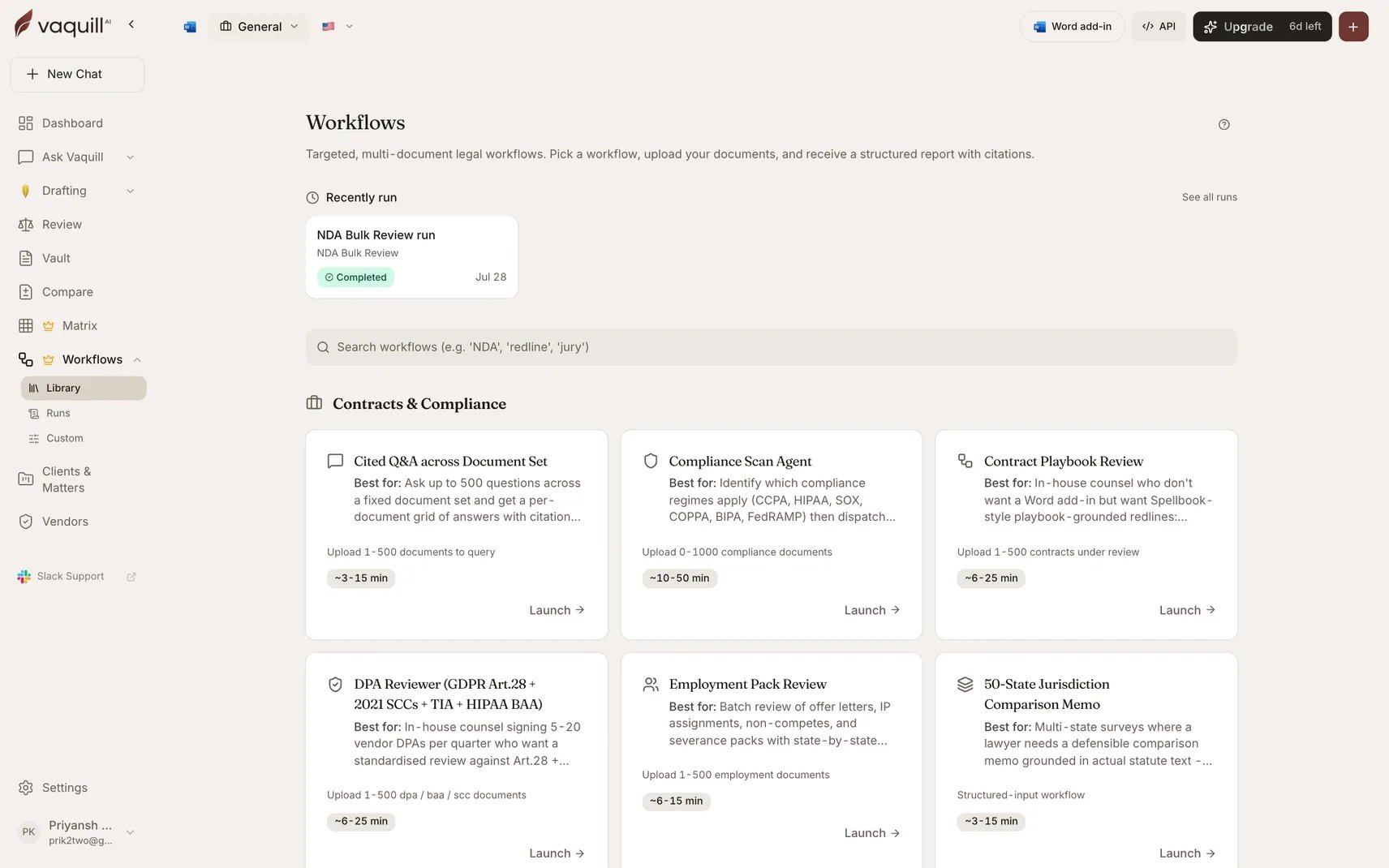
25 pre-built pipelines maintained by Vaquill. Pick one, upload documents, answer a short form, launch. No configuration.
Chain 25 typed step types into your own pipeline, or describe it in plain English and let Vaquill draft the chain for you.
 ## Which one do I want
The job is a recognizable legal task: reviewing a batch of NDAs, building a privilege log, drafting a motion, auditing vendors for privacy compliance. Someone has already thought hard about the prompts, the scoring rubric, and the output format.
Your job is specific to your organization: a custom intake sequence, a firm-specific scoring pass, a chain that ends in your own DOCX template. Or you want to run a built-in-style pipeline with your own steps swapped in.
The two are not exclusive. A common pattern is to run a built-in workflow to see the shape of the output, then build a custom one that does the same thing against your own playbook and your own export format.
Neither kind is billed per run. Both are covered by your subscription; see [Plans, trial, and limits](/docs/guides/plans-and-limits).
## How they differ
| | Built-in | Custom |
| --------------------- | ------------------------------------------------------- | ---------------------------------------------------- |
| Who defines the steps | Vaquill, in code | You, in the builder |
| Configuration | A form: document slots plus typed inputs | Per-step config panes, wired to upstream outputs |
| Versioning | Ships with the product | You publish versions; each publish is content-hashed |
| Branching and loops | Baked into the orchestrator | Conditional branch and loop-over-documents steps |
| Output | Fixed artifact set per workflow | Whatever your Output steps produce |
| Scope | Runs against uploaded documents plus an optional matter | Runs against a matter you pick at launch |
| Where it lives | The Workflows gallery | The Custom Workflows gallery |
## What a run looks like
Both kinds share the same run machinery.
Pick the workflow, attach documents to its slots, fill in the inputs, and optionally scope the run to a matter.
The run streams progress: which step is executing, a percentage, and an audit event for every step start, completion, document processed, and artifact rendered. Cancel at any point.
Completed runs expose their artifacts as signed downloads, plus an on-screen results panel. Runs persist in your run history, so the work product stays retrievable.
Read [Running a workflow](/docs/workflows/running-a-workflow) for the mechanics that apply to every workflow, and [Results and artifacts](/docs/workflows/results-and-artifacts) for what comes out the other end.
## Related
One-shot autonomous research that picks its own tools. A workflow is the repeatable, auditable version.
Several built-in workflows run a matrix under the hood. This is that engine on its own.
Negotiation playbooks feed the Contract Playbook Review workflow.
Runs scoped to a matter save their output back into it.
## Which one do I want
The job is a recognizable legal task: reviewing a batch of NDAs, building a privilege log, drafting a motion, auditing vendors for privacy compliance. Someone has already thought hard about the prompts, the scoring rubric, and the output format.
Your job is specific to your organization: a custom intake sequence, a firm-specific scoring pass, a chain that ends in your own DOCX template. Or you want to run a built-in-style pipeline with your own steps swapped in.
The two are not exclusive. A common pattern is to run a built-in workflow to see the shape of the output, then build a custom one that does the same thing against your own playbook and your own export format.
Neither kind is billed per run. Both are covered by your subscription; see [Plans, trial, and limits](/docs/guides/plans-and-limits).
## How they differ
| | Built-in | Custom |
| --------------------- | ------------------------------------------------------- | ---------------------------------------------------- |
| Who defines the steps | Vaquill, in code | You, in the builder |
| Configuration | A form: document slots plus typed inputs | Per-step config panes, wired to upstream outputs |
| Versioning | Ships with the product | You publish versions; each publish is content-hashed |
| Branching and loops | Baked into the orchestrator | Conditional branch and loop-over-documents steps |
| Output | Fixed artifact set per workflow | Whatever your Output steps produce |
| Scope | Runs against uploaded documents plus an optional matter | Runs against a matter you pick at launch |
| Where it lives | The Workflows gallery | The Custom Workflows gallery |
## What a run looks like
Both kinds share the same run machinery.
Pick the workflow, attach documents to its slots, fill in the inputs, and optionally scope the run to a matter.
The run streams progress: which step is executing, a percentage, and an audit event for every step start, completion, document processed, and artifact rendered. Cancel at any point.
Completed runs expose their artifacts as signed downloads, plus an on-screen results panel. Runs persist in your run history, so the work product stays retrievable.
Read [Running a workflow](/docs/workflows/running-a-workflow) for the mechanics that apply to every workflow, and [Results and artifacts](/docs/workflows/results-and-artifacts) for what comes out the other end.
## Related
One-shot autonomous research that picks its own tools. A workflow is the repeatable, auditable version.
Several built-in workflows run a matrix under the hood. This is that engine on its own.
Negotiation playbooks feed the Contract Playbook Review workflow.
Runs scoped to a matter save their output back into it.