> ## Documentation Index
> Fetch the complete documentation index at: https://vaquill.ai/docs/llms.txt
> Use this file to discover all available pages before exploring further.
# Steps and wiring
> The step palette, the eight categories, step kinds, and how to bind a field to an upstream step's output
Twenty-five step types across eight categories. Every step is a typed building block: its config form is rendered from its own schema, so the builder always knows what a step needs and what it returns.
 ## The eight categories
3 steps. Pick which documents the workflow reads, wait for an upload to finish ingesting, or save an output back to a matter.
5 steps. Pull passages from your documents, search US case law, look up a statute or its cross-references, or search the web.
3 steps. Summarize a document, pull a chronology, or extract structured contract facts.
5 steps. Run a matrix, compare two documents, check compliance gaps, score against benchmarks, or synthesize across a set.
2 steps. Detect fabricated case citations, and drop synthesis findings that reference documents outside the input set.
1 step. Generate a template-constrained legal document and save it to Drafts.
3 steps. Branch on a condition, fan a step out across documents, or hand off to a constrained agent.
2 steps. Export a DOCX report or an XLSX matrix workbook.
**Build and Run Matrix** lives in the Analysis category, and **Save to Matter** lives in Document I/O even though it is an output-kind step. The category is where the palette files it; the kind is how it behaves.
## Step kinds
Every step carries a kind badge in the palette so you can see at a glance what it will do.
| Kind | Behavior |
| ------------- | ---------------------------------------------------------------------------------------- |
| Deterministic | A pure function over its inputs. No model call. Idempotent. |
| AI | Invokes a model. Probabilistic. Worth pairing with a verification step. |
| Routing | Changes which step runs next. Has no output of its own. |
| Output | Produces a side effect: a file written, a matter updated. Test runs short-circuit these. |
Nine of the 25 step types are AI steps. Those are the ones that cost real money and take real time; the [cost estimator](/docs/workflows/builder/test-publish-run) prices them from your organization's actual usage history rather than a flat table.
## Latency tiers
Each step declares a tier so the builder can warn you before you chain five slow steps together.
| Tier | Steps |
| ------ | --------------------------------------------------------------------------------------------------------------------------------------------------------------------------- |
| Fast | Pick Documents, US Statute Cross-References, Score Against Benchmarks, Conditional Branch, Verify Synthesis, Save to Matter, Export DOCX, Export XLSX |
| Medium | Smart Auto-Fill, all four search and lookup steps, Extract Contract Facts, Compare Two Documents, Verify Citations |
| Slow | Wait For Ingestion, Summarize, Extract Chronology, Build and Run Matrix, Compliance Gap Check, Cross-Doc Synthesis, Generate Legal Draft, Loop Over Documents, Agentic Step |
## Adding a step
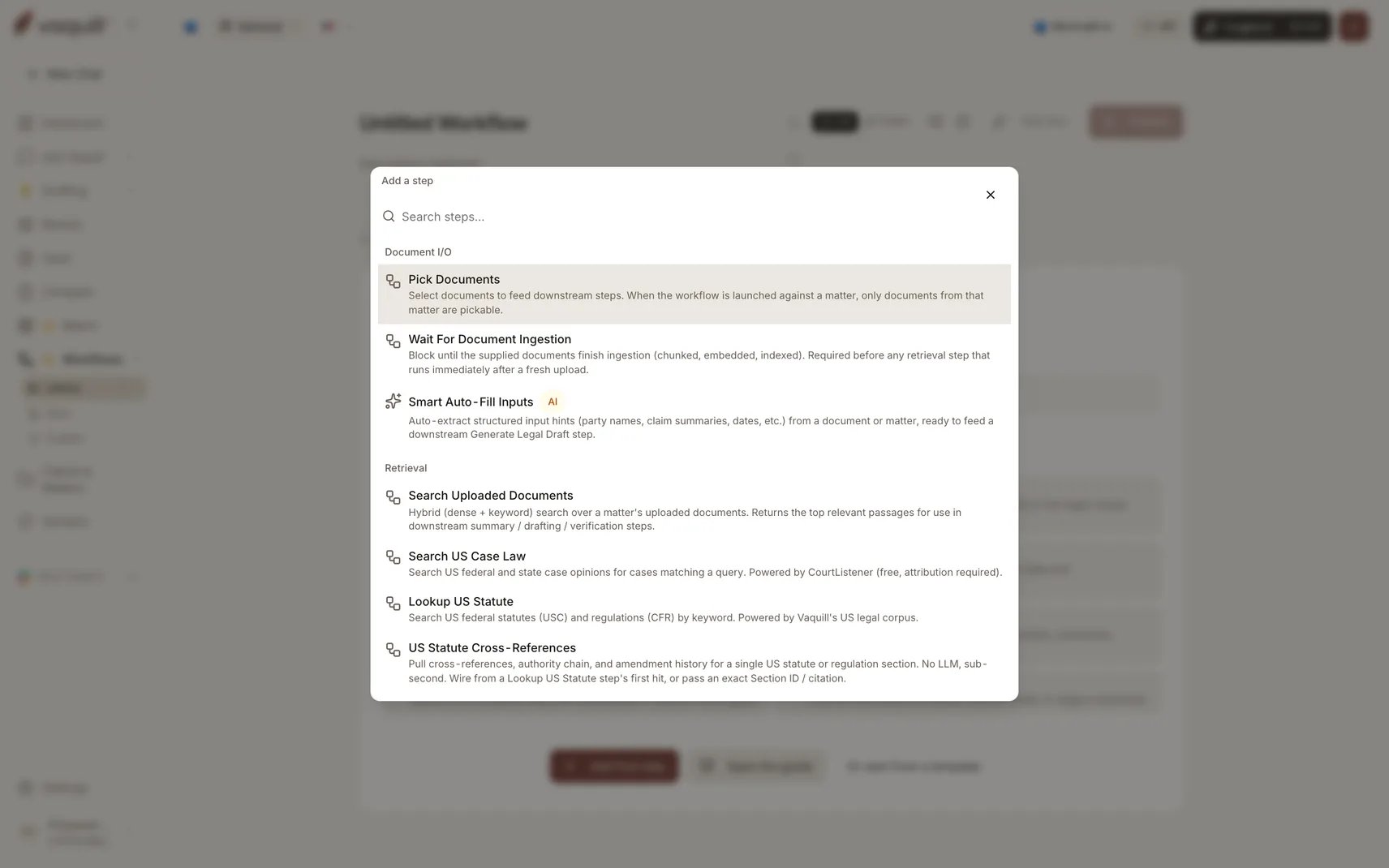
Click **Add Step**, or press ⌘K / Ctrl+K from anywhere in the builder, to open the step catalog. It is grouped by category, searchable, and shows the AI and routing badges. Picking a step inserts it into the chain and opens its config pane.
**To insert mid-flow**, hover between any two steps in list view to reveal a thin "+" affordance. In graph mode, drag from a step's bottom edge onto empty canvas.
## Configuring a step
Selecting a step opens a sticky right-side pane. The chain on the left stays interactive, so you can hop between steps without losing context.
Every field that wants a document, matter, matrix template, or upstream output gets a real picker. No UUID pasting.
## Wiring outputs into the next step
This is the part that makes a chain a chain rather than a list.
Long-text fields (verification text, export body, draft instructions) carry an **Upstream output** toggle. Click it and pick the source step instead of copy-pasting. The picker stores the link, and the executor pulls the live value at run time.
Under the hood the binding is a template reference such as `{{ step_0.summary_markdown }}`, but you will not see template-looking text unless you deliberately switch a field to the raw-text editor.
### What a step exposes
A step can only be read for the fields its output model actually declares. That is why the picker shows you a concrete list rather than a free-text box, and why publishing catches a reference to a field a step does not emit.
Some pairs are designed to chain directly:
| Upstream | Downstream | What flows |
| ---------------------------------------- | ------------------------------------------------------------ | ------------------------------------------------------------- |
| Pick Documents | Wait For Ingestion, Extract Chronology, Build and Run Matrix | The document list |
| Extract Contract Facts | Score Against Benchmarks | The Facts dict |
| Build and Run Matrix | Cross-Doc Synthesis | Answers By Question By Doc as the per-document starting point |
| Build and Run Matrix | Verify Synthesis | Findings By Filename as the per-document findings |
| Build and Run Matrix | Export Matrix as XLSX | The matrix id |
| Summarize Document, Generate Legal Draft | Verify Citations, Export DOCX | The markdown body |
| Lookup US Statute | US Statute Cross-References | The first hit's section id |
| Generate Legal Draft | Save to Matter | The draft id |
## Related
Making the chain conditional or fanning it out.
When a reference will not resolve.
## The eight categories
3 steps. Pick which documents the workflow reads, wait for an upload to finish ingesting, or save an output back to a matter.
5 steps. Pull passages from your documents, search US case law, look up a statute or its cross-references, or search the web.
3 steps. Summarize a document, pull a chronology, or extract structured contract facts.
5 steps. Run a matrix, compare two documents, check compliance gaps, score against benchmarks, or synthesize across a set.
2 steps. Detect fabricated case citations, and drop synthesis findings that reference documents outside the input set.
1 step. Generate a template-constrained legal document and save it to Drafts.
3 steps. Branch on a condition, fan a step out across documents, or hand off to a constrained agent.
2 steps. Export a DOCX report or an XLSX matrix workbook.
**Build and Run Matrix** lives in the Analysis category, and **Save to Matter** lives in Document I/O even though it is an output-kind step. The category is where the palette files it; the kind is how it behaves.
## Step kinds
Every step carries a kind badge in the palette so you can see at a glance what it will do.
| Kind | Behavior |
| ------------- | ---------------------------------------------------------------------------------------- |
| Deterministic | A pure function over its inputs. No model call. Idempotent. |
| AI | Invokes a model. Probabilistic. Worth pairing with a verification step. |
| Routing | Changes which step runs next. Has no output of its own. |
| Output | Produces a side effect: a file written, a matter updated. Test runs short-circuit these. |
Nine of the 25 step types are AI steps. Those are the ones that cost real money and take real time; the [cost estimator](/docs/workflows/builder/test-publish-run) prices them from your organization's actual usage history rather than a flat table.
## Latency tiers
Each step declares a tier so the builder can warn you before you chain five slow steps together.
| Tier | Steps |
| ------ | --------------------------------------------------------------------------------------------------------------------------------------------------------------------------- |
| Fast | Pick Documents, US Statute Cross-References, Score Against Benchmarks, Conditional Branch, Verify Synthesis, Save to Matter, Export DOCX, Export XLSX |
| Medium | Smart Auto-Fill, all four search and lookup steps, Extract Contract Facts, Compare Two Documents, Verify Citations |
| Slow | Wait For Ingestion, Summarize, Extract Chronology, Build and Run Matrix, Compliance Gap Check, Cross-Doc Synthesis, Generate Legal Draft, Loop Over Documents, Agentic Step |
## Adding a step
Click **Add Step**, or press ⌘K / Ctrl+K from anywhere in the builder, to open the step catalog. It is grouped by category, searchable, and shows the AI and routing badges. Picking a step inserts it into the chain and opens its config pane.
**To insert mid-flow**, hover between any two steps in list view to reveal a thin "+" affordance. In graph mode, drag from a step's bottom edge onto empty canvas.
## Configuring a step
Selecting a step opens a sticky right-side pane. The chain on the left stays interactive, so you can hop between steps without losing context.
Every field that wants a document, matter, matrix template, or upstream output gets a real picker. No UUID pasting.
## Wiring outputs into the next step
This is the part that makes a chain a chain rather than a list.
Long-text fields (verification text, export body, draft instructions) carry an **Upstream output** toggle. Click it and pick the source step instead of copy-pasting. The picker stores the link, and the executor pulls the live value at run time.
Under the hood the binding is a template reference such as `{{ step_0.summary_markdown }}`, but you will not see template-looking text unless you deliberately switch a field to the raw-text editor.
### What a step exposes
A step can only be read for the fields its output model actually declares. That is why the picker shows you a concrete list rather than a free-text box, and why publishing catches a reference to a field a step does not emit.
Some pairs are designed to chain directly:
| Upstream | Downstream | What flows |
| ---------------------------------------- | ------------------------------------------------------------ | ------------------------------------------------------------- |
| Pick Documents | Wait For Ingestion, Extract Chronology, Build and Run Matrix | The document list |
| Extract Contract Facts | Score Against Benchmarks | The Facts dict |
| Build and Run Matrix | Cross-Doc Synthesis | Answers By Question By Doc as the per-document starting point |
| Build and Run Matrix | Verify Synthesis | Findings By Filename as the per-document findings |
| Build and Run Matrix | Export Matrix as XLSX | The matrix id |
| Summarize Document, Generate Legal Draft | Verify Citations, Export DOCX | The markdown body |
| Lookup US Statute | US Statute Cross-References | The first hit's section id |
| Generate Legal Draft | Save to Matter | The draft id |
## Related
Making the chain conditional or fanning it out.
When a reference will not resolve.