> ## Documentation Index
> Fetch the complete documentation index at: https://vaquill.ai/docs/llms.txt
> Use this file to discover all available pages before exploring further.
# Starter templates
> Eight published starter workflows you can run as-is or fork into an editable copy
Each template is a published, ready-to-run workflow. Launch it against any matter, or fork a copy to customize without touching the original. Forking gives you a fresh editable draft with every step pre-wired, so the only thing left is swapping in your own documents and settings.
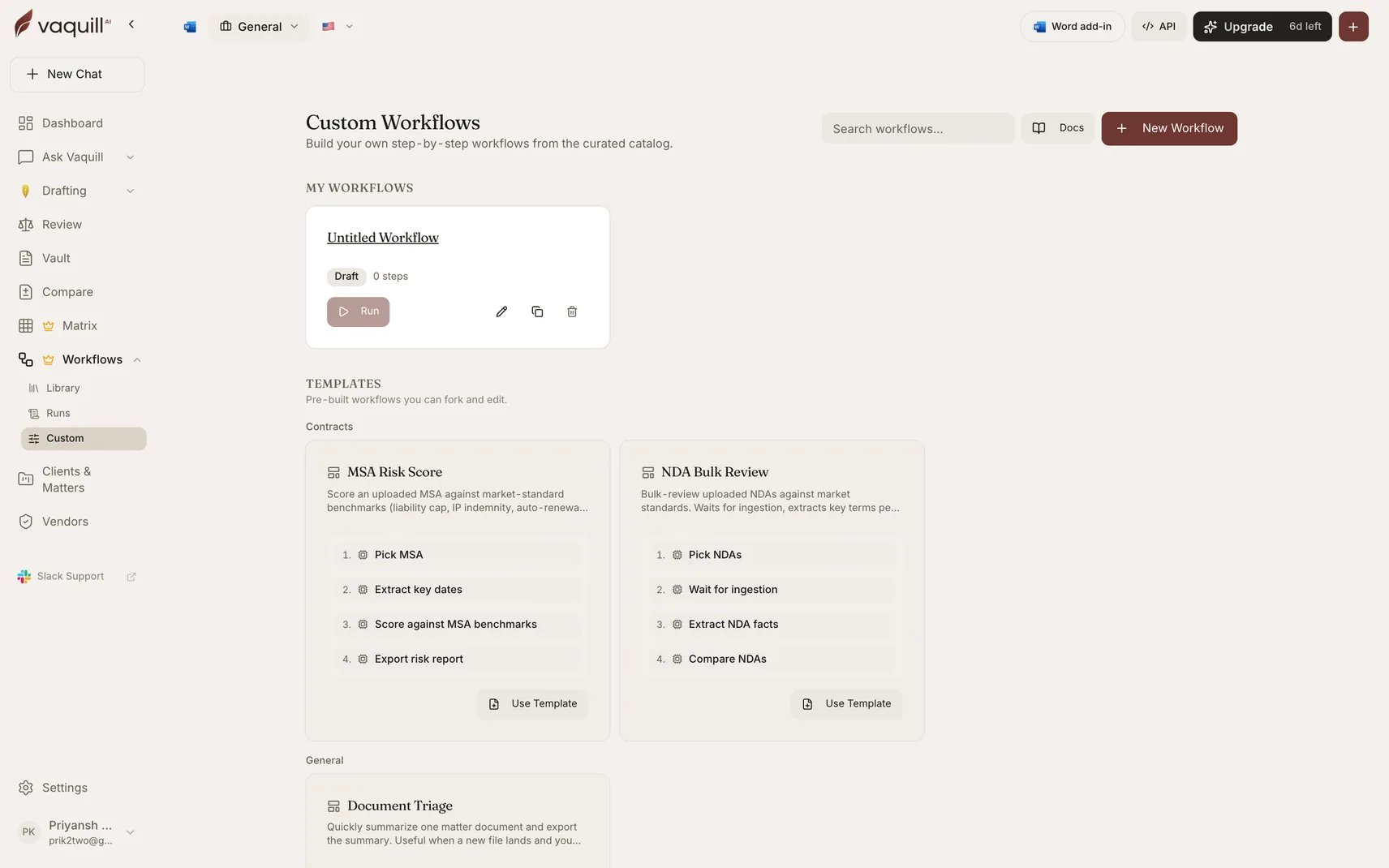 ## The eight templates
**Search US Case Law → Lookup US Statute → Generate Legal Draft → Verify Citations → Export DOCX Report**
Generates a short case-law memo grounded in cited authorities: searches case law, looks up the governing statute, drafts the memo, verifies the citations, exports DOCX. A good first workflow for litigators.
*Practice areas: litigation, research.*
**Search US Case Law → Generate Legal Draft → Verify Citations → Export DOCX Report**
Searches supporting case law, drafts a demand letter, verifies the cited cases, exports DOCX. A first pass before attorney review.
*Practice areas: litigation, pre-litigation.*
**Pick Documents → Summarize Document → Export DOCX Report**
Summarizes one matter document and exports the summary. Useful when a new file lands and you need a fast read. The smallest useful workflow, and a good one to fork when learning the builder.
*Practice areas: general, document review.*
**Lookup US Statute → Pick Documents → Summarize Document → Verify Citations**
Looks up a federal statute and verifies citations across an uploaded document. Useful when a brief references statutes and you want to confirm the citations are real.
*Practice areas: research, litigation.*
**Search Uploaded Documents → Pick Documents → Summarize Document → Verify Citations**
Searches a question across matter documents, summarizes the findings, and verifies any citations. A defensible scan for fabricated authorities before you rely on findings.
*Practice areas: research, verification.*
**Pick Documents → Wait For Document Ingestion → Build and Run Matrix → Cross-Doc Synthesis**
Bulk-reviews uploaded NDAs against market standards: waits for ingestion, extracts key terms per NDA via a matrix template, then synthesizes outliers across the portfolio.
Pick a matrix template under the **Build and Run Matrix** step before launching. The template ships without one selected.
*Practice areas: contracts, diligence.*
**Pick Documents → Extract Chronology → Score Against Benchmarks → Export DOCX Report**
Scores an uploaded MSA against market-standard benchmarks: liability cap, IP indemnity, auto-renewal, and the rest. Emits an overall risk tier and a redline-ready list of flagged clauses.
*Practice areas: contracts, redlining.*
**Pick Documents → Loop Over Documents**
Fans the Summarize step out across every picked document, in parallel. A clean starting point for any "do X per document" workflow: swap the inner step type to score, audit, or extract.
*Practice areas: research.*
## Fork versus run
**Run** launches the template as it is published. Fine when the template does exactly what you need and only the documents change.
**Fork** copies the template's latest published version into a new draft that you own, named with a `(copy)` suffix. Edit it, publish it, and it becomes a workflow in your own gallery. The original template is untouched.
Forking always copies the latest **published** version, never a template that is mid-edit or retired.
## Built-in workflows are different
These eight starters are custom workflows made of the same step types you have access to. They are not the same thing as the [25 built-in workflows](/docs/workflows/built-in), which are code-defined pipelines with their own orchestration and cannot be forked or edited.
If a built-in workflow is close to what you need but not quite right, you cannot fork it. Build the closest equivalent from steps instead, or use the built-in and post-process its output.
## Related
Understanding the chains above before you edit one.
The maintained catalogue, for jobs a template does not cover.
## The eight templates
**Search US Case Law → Lookup US Statute → Generate Legal Draft → Verify Citations → Export DOCX Report**
Generates a short case-law memo grounded in cited authorities: searches case law, looks up the governing statute, drafts the memo, verifies the citations, exports DOCX. A good first workflow for litigators.
*Practice areas: litigation, research.*
**Search US Case Law → Generate Legal Draft → Verify Citations → Export DOCX Report**
Searches supporting case law, drafts a demand letter, verifies the cited cases, exports DOCX. A first pass before attorney review.
*Practice areas: litigation, pre-litigation.*
**Pick Documents → Summarize Document → Export DOCX Report**
Summarizes one matter document and exports the summary. Useful when a new file lands and you need a fast read. The smallest useful workflow, and a good one to fork when learning the builder.
*Practice areas: general, document review.*
**Lookup US Statute → Pick Documents → Summarize Document → Verify Citations**
Looks up a federal statute and verifies citations across an uploaded document. Useful when a brief references statutes and you want to confirm the citations are real.
*Practice areas: research, litigation.*
**Search Uploaded Documents → Pick Documents → Summarize Document → Verify Citations**
Searches a question across matter documents, summarizes the findings, and verifies any citations. A defensible scan for fabricated authorities before you rely on findings.
*Practice areas: research, verification.*
**Pick Documents → Wait For Document Ingestion → Build and Run Matrix → Cross-Doc Synthesis**
Bulk-reviews uploaded NDAs against market standards: waits for ingestion, extracts key terms per NDA via a matrix template, then synthesizes outliers across the portfolio.
Pick a matrix template under the **Build and Run Matrix** step before launching. The template ships without one selected.
*Practice areas: contracts, diligence.*
**Pick Documents → Extract Chronology → Score Against Benchmarks → Export DOCX Report**
Scores an uploaded MSA against market-standard benchmarks: liability cap, IP indemnity, auto-renewal, and the rest. Emits an overall risk tier and a redline-ready list of flagged clauses.
*Practice areas: contracts, redlining.*
**Pick Documents → Loop Over Documents**
Fans the Summarize step out across every picked document, in parallel. A clean starting point for any "do X per document" workflow: swap the inner step type to score, audit, or extract.
*Practice areas: research.*
## Fork versus run
**Run** launches the template as it is published. Fine when the template does exactly what you need and only the documents change.
**Fork** copies the template's latest published version into a new draft that you own, named with a `(copy)` suffix. Edit it, publish it, and it becomes a workflow in your own gallery. The original template is untouched.
Forking always copies the latest **published** version, never a template that is mid-edit or retired.
## Built-in workflows are different
These eight starters are custom workflows made of the same step types you have access to. They are not the same thing as the [25 built-in workflows](/docs/workflows/built-in), which are code-defined pipelines with their own orchestration and cannot be forked or edited.
If a built-in workflow is close to what you need but not quite right, you cannot fork it. Build the closest equivalent from steps instead, or use the built-in and post-process its output.
## Related
Understanding the chains above before you edit one.
The maintained catalogue, for jobs a template does not cover.