> ## Documentation Index
> Fetch the complete documentation index at: https://vaquill.ai/docs/llms.txt
> Use this file to discover all available pages before exploring further.
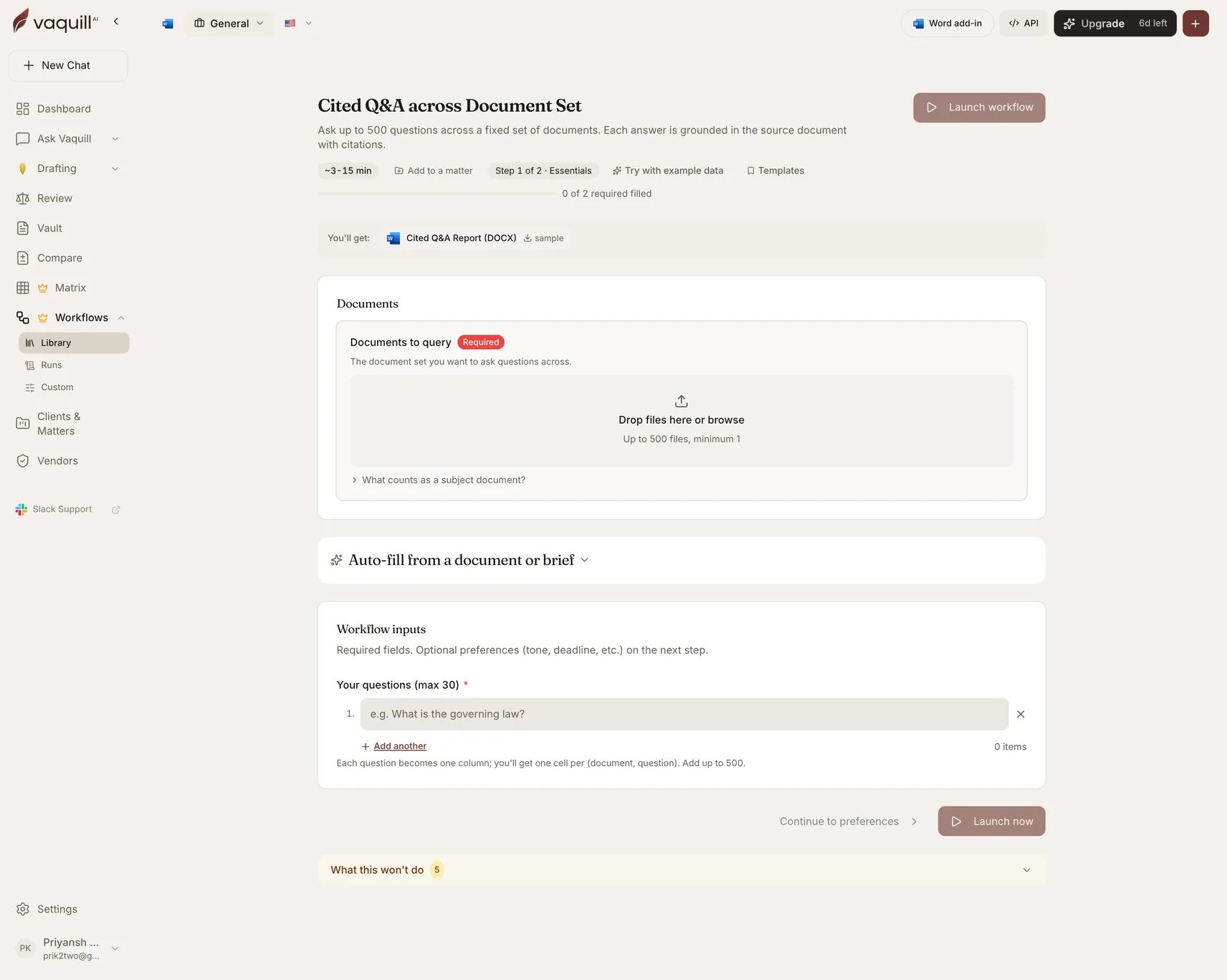
# Cited Q&A across a Document Set
> Ask up to 500 questions across a fixed document set and get a per-document grid of answers, each grounded in a citation
**Best for:** asking up to 500 questions across a fixed document set and getting a per-document grid of answers with citations down to the page or clause.
Every answer is grounded in the source document with a citation you can jump to. Nothing comes from the open web or from general knowledge.
| | |
| -------------- | ------------------------------- |
| Category | In-House |
| Jurisdiction | Any |
| Practice areas | General, commercial, litigation |
| Runtime | 3-15 minutes |
 ## What you need
| Slot | Required | Count | What goes in it |
| ---------------------- | -------- | ----- | -------------------------------------------------- |
| **Documents to query** | Yes | 1-500 | The document set you want to ask questions across. |
## Inputs
| Field | Type | Required | What it changes |
| -------------------------------------------- | ----------- | -------- | ------------------------------------------------------------------------------------------------------------------------------------------------------------------------------------------- |
| Report title | Text | No | Prints at the top of the report. If the report is privileged work product, choose a title you would be comfortable seeing on a privilege log. |
| **Your questions** | String list | **Yes** | Each question becomes one column, and you get one cell per document-question pair. Add up to 500. |
| Answer mode | Select | No | **Independent** gives a per-document grid: faster and cheaper. **Cross-document** additionally produces comparison and aggregation answers across the whole set: slower and more expensive. |
| Citation precision | Select | No | Sentence (most precise) · paragraph · page (default) · section/clause. Litigators prepping depositions want page-line; M\&A associates want section or clause. |
| Treat as attorney work product / privileged? | Yes/No | No | When Yes, the output DOCX is stamped with an Attorney Work Product / Privileged and Confidential banner. |
| Point-in-time anchor | Date | No | For temporal questions such as "was clause X in effect as of the merger signing date?". |
## How it runs
Builds a Q\&A matrix: rows are your documents, columns are your questions.
Schedules extraction for every cell. Each answer is produced against one document only, with the supporting passage captured at your chosen citation granularity.
Blocks until every answer resolves.
Writes the Q\&A report, with the privilege banner applied if you asked for one.
## What you get
| Artifact | Format | Contents |
| --------------------- | ------ | --------------------------------------------------------- |
| **Cited Q\&A Report** | DOCX | The full answer grid with a citation behind every answer. |
## Appending follow-up questions
This is the only workflow you can extend after it completes. Send new questions to a finished run and each becomes an additional column answered against the same document set, with the report re-rendered. You do not re-upload anything and you do not re-run the earlier questions.
That makes it a good first pass on an unfamiliar document set: ask five questions, read the answers, then append the twenty questions you now realize you needed.
## What this will not do
* Answer questions about anything that is not in the uploaded documents. There is no synthesis from the open web.
* Pull in external case law or statutes. Answers come from your documents only.
* Replace independent counsel review of the cited passages before you rely on an answer in a filing.
* Compare two versions of the same document or surface tracked changes.
* Draft new clauses, redlines, or a memo from the answers. This is a Q\&A surface only.
## Related
The same engine as an interactive spreadsheet you can edit column by column.
For version-to-version differences, which this workflow does not do.
## What you need
| Slot | Required | Count | What goes in it |
| ---------------------- | -------- | ----- | -------------------------------------------------- |
| **Documents to query** | Yes | 1-500 | The document set you want to ask questions across. |
## Inputs
| Field | Type | Required | What it changes |
| -------------------------------------------- | ----------- | -------- | ------------------------------------------------------------------------------------------------------------------------------------------------------------------------------------------- |
| Report title | Text | No | Prints at the top of the report. If the report is privileged work product, choose a title you would be comfortable seeing on a privilege log. |
| **Your questions** | String list | **Yes** | Each question becomes one column, and you get one cell per document-question pair. Add up to 500. |
| Answer mode | Select | No | **Independent** gives a per-document grid: faster and cheaper. **Cross-document** additionally produces comparison and aggregation answers across the whole set: slower and more expensive. |
| Citation precision | Select | No | Sentence (most precise) · paragraph · page (default) · section/clause. Litigators prepping depositions want page-line; M\&A associates want section or clause. |
| Treat as attorney work product / privileged? | Yes/No | No | When Yes, the output DOCX is stamped with an Attorney Work Product / Privileged and Confidential banner. |
| Point-in-time anchor | Date | No | For temporal questions such as "was clause X in effect as of the merger signing date?". |
## How it runs
Builds a Q\&A matrix: rows are your documents, columns are your questions.
Schedules extraction for every cell. Each answer is produced against one document only, with the supporting passage captured at your chosen citation granularity.
Blocks until every answer resolves.
Writes the Q\&A report, with the privilege banner applied if you asked for one.
## What you get
| Artifact | Format | Contents |
| --------------------- | ------ | --------------------------------------------------------- |
| **Cited Q\&A Report** | DOCX | The full answer grid with a citation behind every answer. |
## Appending follow-up questions
This is the only workflow you can extend after it completes. Send new questions to a finished run and each becomes an additional column answered against the same document set, with the report re-rendered. You do not re-upload anything and you do not re-run the earlier questions.
That makes it a good first pass on an unfamiliar document set: ask five questions, read the answers, then append the twenty questions you now realize you needed.
## What this will not do
* Answer questions about anything that is not in the uploaded documents. There is no synthesis from the open web.
* Pull in external case law or statutes. Answers come from your documents only.
* Replace independent counsel review of the cited passages before you rely on an answer in a filing.
* Compare two versions of the same document or surface tracked changes.
* Draft new clauses, redlines, or a memo from the answers. This is a Q\&A surface only.
## Related
The same engine as an interactive spreadsheet you can edit column by column.
For version-to-version differences, which this workflow does not do.