> ## Documentation Index
> Fetch the complete documentation index at: https://vaquill.ai/docs/llms.txt
> Use this file to discover all available pages before exploring further.
# Compliance Scan Agent
> An agent works out which compliance regimes apply to your company, dispatches the right checks, and rolls the results into one gap report
**Best for:** identifying which compliance regimes apply (CCPA, HIPAA, SOX, COPPA, BIPA, FedRAMP), dispatching the right checks, and rolling them up into a gap report.
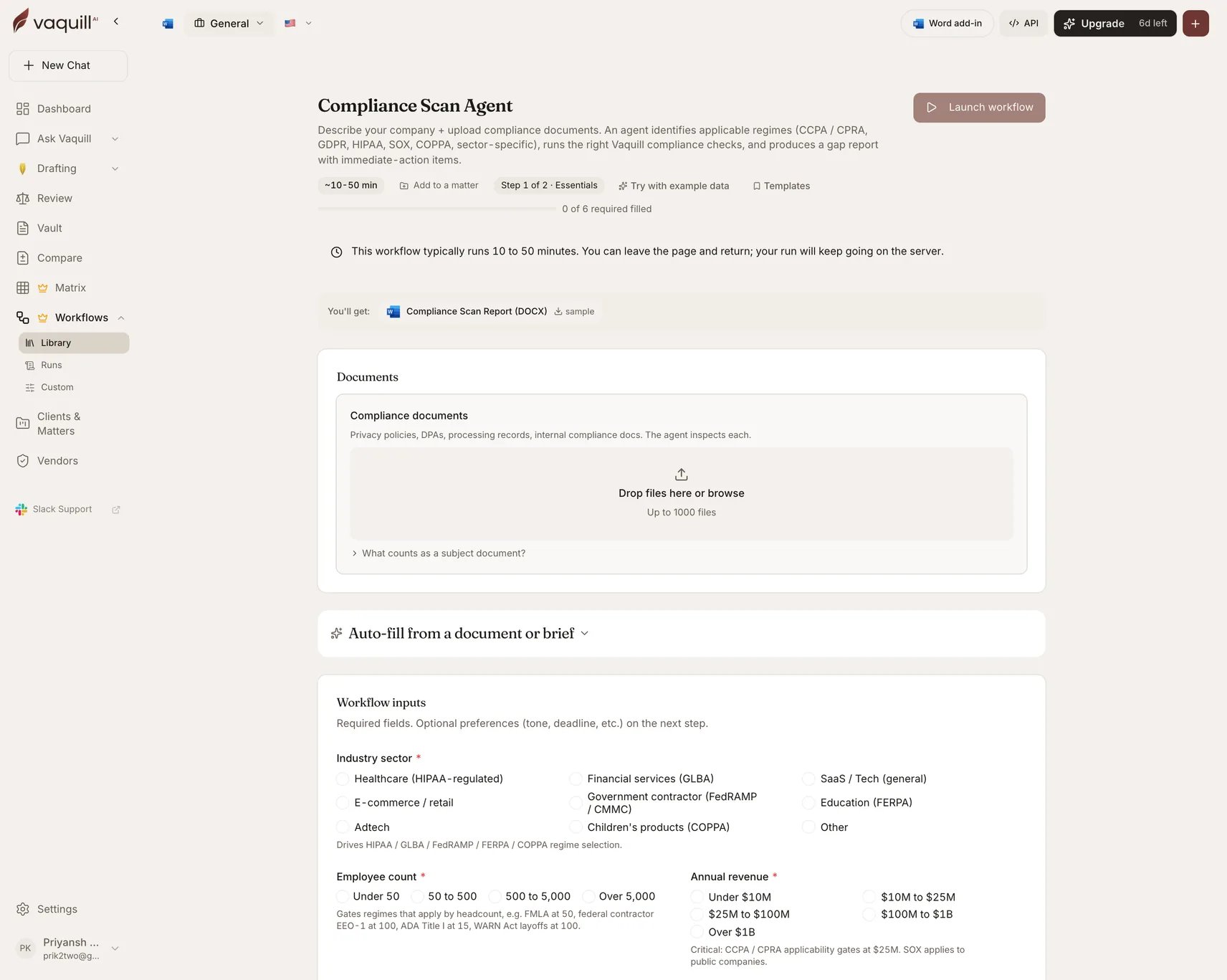
Describe your company and upload your compliance documents. An agent identifies the applicable regimes, launches the right child compliance workflows, waits for them, and produces a single gap report with immediate-action items.
| | |
| -------------- | ------------------------------- |
| Category | In-House |
| Jurisdiction | US |
| Practice areas | Privacy, compliance, regulatory |
| Runtime | 10-50 minutes |
| Queue | Long-running (two-hour ceiling) |
This is one of three **agentic** workflows. Rather than running a fixed pipeline, it plans which checks to run based on your answers, then dispatches them as child runs. The child runs are visible from the parent run's page.
 ## What you need
| Slot | Required | Count | What goes in it |
| ------------------------ | -------- | ------ | ------------------------------------------------------------------------------------------------------- |
| **Compliance documents** | No | 0-1000 | Privacy policies, DPAs, processing records, internal compliance documents. The agent inspects each one. |
Documents are optional: the agent can produce a regime-applicability analysis from your answers alone, though the gap findings get much sharper with documents attached.
## Inputs
| Field | Type | Required | What it changes |
| ------------------------------------- | ------------ | -------- | ------------------------------------------------------------------------------------------------------------------------------------------------------------------------------------------------------------------- |
| Scan name | Text | No | The parent scan handle, shared across all child workflows. Pick something a future auditor can match against your records. |
| **Industry sector** | Select | **Yes** | Healthcare (HIPAA), financial services (GLBA), SaaS/tech, e-commerce, government contractor (FedRAMP/CMMC), education (FERPA), adtech, children's products (COPPA), other. Drives regime selection. |
| **Employee count** | Select | **Yes** | Under 50, 50-500, 500-5,000, over 5,000. Gates headcount-triggered regimes: FMLA at 50, federal contractor EEO-1 at 100, ADA Title I at 15, WARN Act at 100. |
| **Annual revenue** | Select | **Yes** | Under $10M through over $1B. CCPA and CPRA applicability gates at \$25M. |
| **Public or private?** | Select | **Yes** | Public · private · pre-IPO. Triggers SOX, SOC controls, and SEC disclosure cadence checks. |
| **US states with users or employees** | Multi-select | **Yes** | 21 named states plus "All states". Illinois BIPA covers biometrics regardless of consumer count. |
| International data subjects? | Multi-select | No | EU/UK (GDPR), Canada (PIPEDA / Quebec Law 25), Brazil (LGPD), China (PIPL), none. Adds GDPR plus FCPA, OFAC, and EAR exposure. |
| Sensitive data categories handled | Multi-select | No | PHI, PII, children under 13, financial/payment card, biometric, precise geolocation, employee HR data. Drives the HIPAA, COPPA, PCI-DSS, and BIPA child workflows. |
| Customer base | Multi-select | No | US consumer, US B2B, US federal government, US state/local government, international consumer, international business. Government customers trigger FedRAMP, CMMC, and ITAR. |
| **Scan purpose** | Select | **Yes** | First-time baseline, annual refresh, pre-funding diligence, post-incident remediation, vendor onboarding. Sets depth and the dispatch order of child workflows. |
| Limit scan to these regimes | Multi-select | No | CCPA/CPRA, non-CA state privacy laws, HIPAA, GLBA, COPPA, GDPR/cross-border, SOX, FedRAMP/CMMC, PCI-DSS, BIPA. Leave blank for a full sweep; pick a subset to save cost when you already know which regimes matter. |
| Additional context | Long text | No | Anything the structured fields cannot capture: recent breaches, ongoing enforcement, an unusual business model. |
## How it runs
The agent scopes the compliance surface from your answers and the uploaded documents, and decides which regime checks apply.
Dispatches the planned compliance checks as child workflow runs.
Blocks until every child check completes. This is why the workflow runs on the long queue.
Aggregates the child findings into one prioritized gap picture.
Writes the scan report.
## What you get
| Artifact | Format | Contents |
| -------------------------- | ------ | --------------------------------------------------------------------------------------------------------------- |
| **Compliance Scan Report** | DOCX | Applicable regimes with the reasoning, the gap findings from each dispatched check, and immediate-action items. |
Child runs remain individually inspectable from the parent run page, so you can drill from a summarized gap into the check that produced it.
## What this will not do
* Replace compliance counsel review for final remediation calls or breach-notification decisions.
* Confirm regime applicability, such as HIPAA covered-entity status, SOX issuer status, or FedRAMP impact level, when the facts are ambiguous. Consult counsel.
* Send regulatory notifications, file state breach notices, or respond to an FTC inquiry on your behalf.
* Audit your actual data flows, vendor sub-processor chain, or technical controls beyond what is in the uploaded documents.
* Run a technical security review: penetration testing, code audit, SOC 2 readiness assessment.
## Related
Deeper on privacy specifically, when you already know that is the regime.
The interactive single-check version.
## What you need
| Slot | Required | Count | What goes in it |
| ------------------------ | -------- | ------ | ------------------------------------------------------------------------------------------------------- |
| **Compliance documents** | No | 0-1000 | Privacy policies, DPAs, processing records, internal compliance documents. The agent inspects each one. |
Documents are optional: the agent can produce a regime-applicability analysis from your answers alone, though the gap findings get much sharper with documents attached.
## Inputs
| Field | Type | Required | What it changes |
| ------------------------------------- | ------------ | -------- | ------------------------------------------------------------------------------------------------------------------------------------------------------------------------------------------------------------------- |
| Scan name | Text | No | The parent scan handle, shared across all child workflows. Pick something a future auditor can match against your records. |
| **Industry sector** | Select | **Yes** | Healthcare (HIPAA), financial services (GLBA), SaaS/tech, e-commerce, government contractor (FedRAMP/CMMC), education (FERPA), adtech, children's products (COPPA), other. Drives regime selection. |
| **Employee count** | Select | **Yes** | Under 50, 50-500, 500-5,000, over 5,000. Gates headcount-triggered regimes: FMLA at 50, federal contractor EEO-1 at 100, ADA Title I at 15, WARN Act at 100. |
| **Annual revenue** | Select | **Yes** | Under $10M through over $1B. CCPA and CPRA applicability gates at \$25M. |
| **Public or private?** | Select | **Yes** | Public · private · pre-IPO. Triggers SOX, SOC controls, and SEC disclosure cadence checks. |
| **US states with users or employees** | Multi-select | **Yes** | 21 named states plus "All states". Illinois BIPA covers biometrics regardless of consumer count. |
| International data subjects? | Multi-select | No | EU/UK (GDPR), Canada (PIPEDA / Quebec Law 25), Brazil (LGPD), China (PIPL), none. Adds GDPR plus FCPA, OFAC, and EAR exposure. |
| Sensitive data categories handled | Multi-select | No | PHI, PII, children under 13, financial/payment card, biometric, precise geolocation, employee HR data. Drives the HIPAA, COPPA, PCI-DSS, and BIPA child workflows. |
| Customer base | Multi-select | No | US consumer, US B2B, US federal government, US state/local government, international consumer, international business. Government customers trigger FedRAMP, CMMC, and ITAR. |
| **Scan purpose** | Select | **Yes** | First-time baseline, annual refresh, pre-funding diligence, post-incident remediation, vendor onboarding. Sets depth and the dispatch order of child workflows. |
| Limit scan to these regimes | Multi-select | No | CCPA/CPRA, non-CA state privacy laws, HIPAA, GLBA, COPPA, GDPR/cross-border, SOX, FedRAMP/CMMC, PCI-DSS, BIPA. Leave blank for a full sweep; pick a subset to save cost when you already know which regimes matter. |
| Additional context | Long text | No | Anything the structured fields cannot capture: recent breaches, ongoing enforcement, an unusual business model. |
## How it runs
The agent scopes the compliance surface from your answers and the uploaded documents, and decides which regime checks apply.
Dispatches the planned compliance checks as child workflow runs.
Blocks until every child check completes. This is why the workflow runs on the long queue.
Aggregates the child findings into one prioritized gap picture.
Writes the scan report.
## What you get
| Artifact | Format | Contents |
| -------------------------- | ------ | --------------------------------------------------------------------------------------------------------------- |
| **Compliance Scan Report** | DOCX | Applicable regimes with the reasoning, the gap findings from each dispatched check, and immediate-action items. |
Child runs remain individually inspectable from the parent run page, so you can drill from a summarized gap into the check that produced it.
## What this will not do
* Replace compliance counsel review for final remediation calls or breach-notification decisions.
* Confirm regime applicability, such as HIPAA covered-entity status, SOX issuer status, or FedRAMP impact level, when the facts are ambiguous. Consult counsel.
* Send regulatory notifications, file state breach notices, or respond to an FTC inquiry on your behalf.
* Audit your actual data flows, vendor sub-processor chain, or technical controls beyond what is in the uploaded documents.
* Run a technical security review: penetration testing, code audit, SOC 2 readiness assessment.
## Related
Deeper on privacy specifically, when you already know that is the regime.
The interactive single-check version.