> ## Documentation Index
> Fetch the complete documentation index at: https://vaquill.ai/docs/llms.txt
> Use this file to discover all available pages before exploring further.
# Contract Playbook Review
> Score contracts against your firm's own playbook and get counter-proposal language plus a draft negotiation email
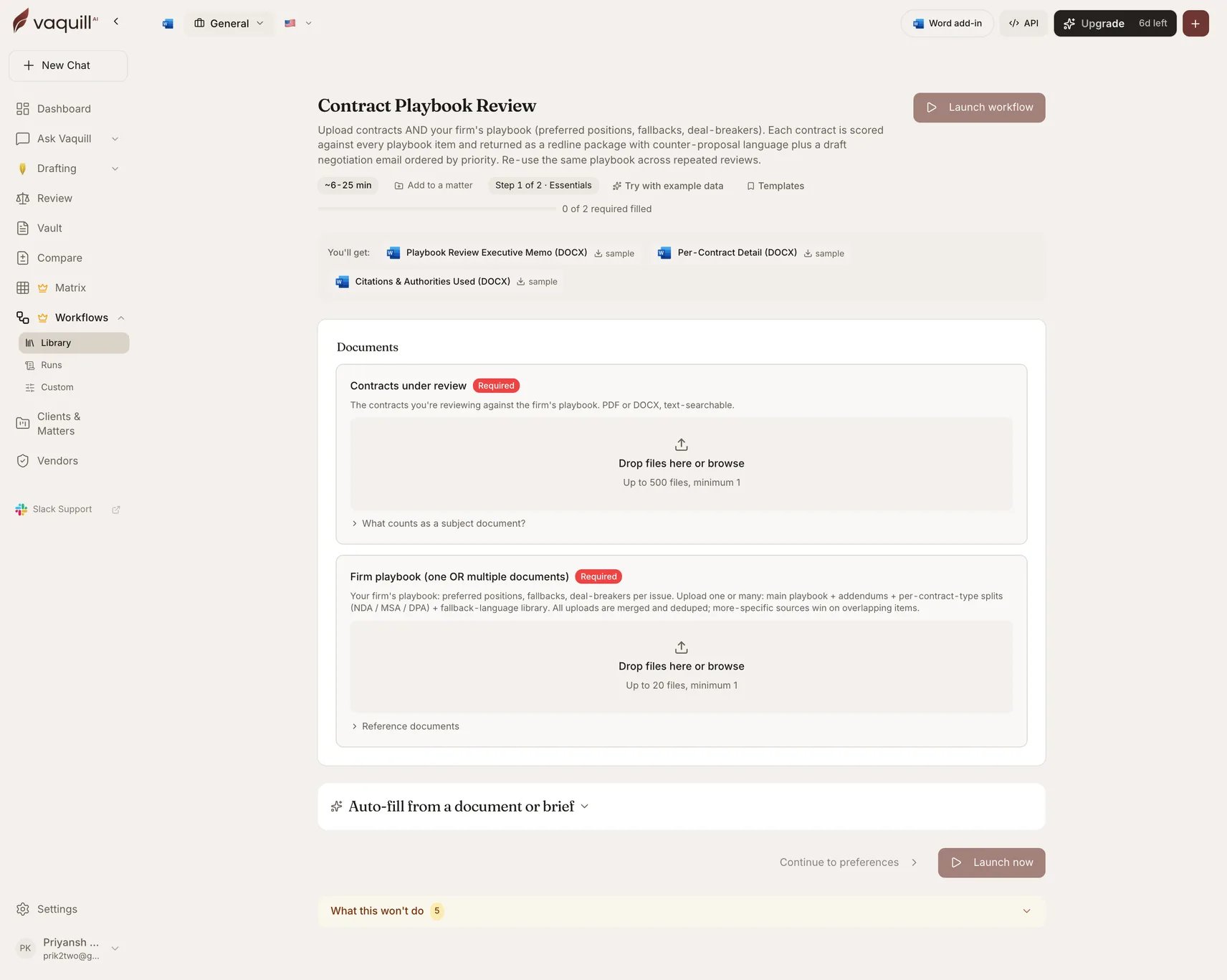
**Best for:** in-house counsel who want playbook-grounded redlines without a Word add-in. Upload contract plus playbook, get a per-issue scorecard, counter-proposal language tied to firm-preferred positions, and a draft negotiation email.
Every contract is scored against every item in your playbook and returned as a redline package with counter-proposal language, ordered by priority. The playbook is reusable: upload it once and run repeated reviews against it.
| | |
| -------------- | ------------------------------------------------------------ |
| Category | In-House |
| Jurisdiction | US |
| Practice areas | In-house, commercial, SaaS, vendor management, transactional |
| Runtime | 6-25 minutes |
 ## What you need
| Slot | Required | Count | What goes in it |
| -------------------------- | -------- | ----- | ----------------------------------------------------------------------------------- |
| **Contracts under review** | Yes | 1-500 | The contracts you are reviewing against the playbook. PDF or DOCX, text-searchable. |
| **Firm playbook** | **Yes** | 1-20 | Preferred positions, fallbacks, deal-breakers per issue. |
The playbook slot takes **multiple documents**. Upload a main playbook plus addendums, per-contract-type splits (NDA, MSA, DPA), and a fallback-language library. All uploads are merged and deduped, and more-specific sources win on overlapping items.
## Inputs
| Field | Type | Required | What it changes |
| --------------------- | ---- | -------- | -------------------------------------------------------------- |
| Matter / counterparty | Text | No | Labels the artifacts. Example: "Q2 MSA negotiations vs BigCo". |
That is the whole form. The playbook carries the configuration that other review workflows put in select fields, which is the point: your positions live in a document you control rather than in a picker.
## How it runs
A matrix-review pipeline with a playbook-parsing stage in front.
Reads every uploaded playbook document, extracts the issue list with preferred positions, fallbacks, and deal-breakers, then merges and dedupes across sources.
Turns the parsed playbook items into extraction-matrix columns, so the matrix asks exactly the questions your playbook cares about.
Each contract is answered against every playbook item, with the supporting quote captured.
Assigns each item one of five postures: matches, fallback, deviates, deal-breaker, or missing.
Portfolio synthesis across contracts: outliers, rejection patterns, and ranked playbook revisions. Verified before persistence.
Writes the three DOCX artifacts.
## What you get
| Artifact | Format | Contents |
| ---------------------------------- | ------ | ------------------------------------------------------------------------------------------------------------------------------------------------------------ |
| **Playbook Review Executive Memo** | DOCX | Per-contract posture table (matches, fallback, deviates, deal-breaker, missing) plus portfolio synthesis, outliers, and ranked playbook revisions. |
| **Per-Contract Detail** | DOCX | One section per contract: per-item scorecard, counter-proposal language tied to your preferred positions, and a draft negotiation email ordered by priority. |
| **Citations and Authorities Used** | DOCX | Deduplicated authority appendix. |
## What this will not do
* Negotiate with the counterparty. The workflow drafts the asks; you send them.
* Update the playbook based on negotiation outcomes. The synthesis flags rejection patterns, but you decide whether to soften the firm's stance.
* Replace partner review on items marked deal-breaker. Some deal-breakers are deal-savers in context.
* Apply non-contractual context: relationship history with the vendor, regulatory pressure, business-team preferences.
* Verify that the playbook itself is current. The workflow trusts what you upload.
## Related
Building and maintaining the playbook this workflow consumes.
The interactive, single-contract version.
## What you need
| Slot | Required | Count | What goes in it |
| -------------------------- | -------- | ----- | ----------------------------------------------------------------------------------- |
| **Contracts under review** | Yes | 1-500 | The contracts you are reviewing against the playbook. PDF or DOCX, text-searchable. |
| **Firm playbook** | **Yes** | 1-20 | Preferred positions, fallbacks, deal-breakers per issue. |
The playbook slot takes **multiple documents**. Upload a main playbook plus addendums, per-contract-type splits (NDA, MSA, DPA), and a fallback-language library. All uploads are merged and deduped, and more-specific sources win on overlapping items.
## Inputs
| Field | Type | Required | What it changes |
| --------------------- | ---- | -------- | -------------------------------------------------------------- |
| Matter / counterparty | Text | No | Labels the artifacts. Example: "Q2 MSA negotiations vs BigCo". |
That is the whole form. The playbook carries the configuration that other review workflows put in select fields, which is the point: your positions live in a document you control rather than in a picker.
## How it runs
A matrix-review pipeline with a playbook-parsing stage in front.
Reads every uploaded playbook document, extracts the issue list with preferred positions, fallbacks, and deal-breakers, then merges and dedupes across sources.
Turns the parsed playbook items into extraction-matrix columns, so the matrix asks exactly the questions your playbook cares about.
Each contract is answered against every playbook item, with the supporting quote captured.
Assigns each item one of five postures: matches, fallback, deviates, deal-breaker, or missing.
Portfolio synthesis across contracts: outliers, rejection patterns, and ranked playbook revisions. Verified before persistence.
Writes the three DOCX artifacts.
## What you get
| Artifact | Format | Contents |
| ---------------------------------- | ------ | ------------------------------------------------------------------------------------------------------------------------------------------------------------ |
| **Playbook Review Executive Memo** | DOCX | Per-contract posture table (matches, fallback, deviates, deal-breaker, missing) plus portfolio synthesis, outliers, and ranked playbook revisions. |
| **Per-Contract Detail** | DOCX | One section per contract: per-item scorecard, counter-proposal language tied to your preferred positions, and a draft negotiation email ordered by priority. |
| **Citations and Authorities Used** | DOCX | Deduplicated authority appendix. |
## What this will not do
* Negotiate with the counterparty. The workflow drafts the asks; you send them.
* Update the playbook based on negotiation outcomes. The synthesis flags rejection patterns, but you decide whether to soften the firm's stance.
* Replace partner review on items marked deal-breaker. Some deal-breakers are deal-savers in context.
* Apply non-contractual context: relationship history with the vendor, regulatory pressure, business-team preferences.
* Verify that the playbook itself is current. The workflow trusts what you upload.
## Related
Building and maintaining the playbook this workflow consumes.
The interactive, single-contract version.