> ## Documentation Index
> Fetch the complete documentation index at: https://vaquill.ai/docs/llms.txt
> Use this file to discover all available pages before exploring further.
# Matter Triage Agent
> Point an agent at a new matter's data room and let it decide which reviews to run, launch them, and roll up one master report
**Best for:** a new matter where you are not yet sure what to run. The agent inspects your data room, dispatches the right child workflows, and rolls the results into one report.
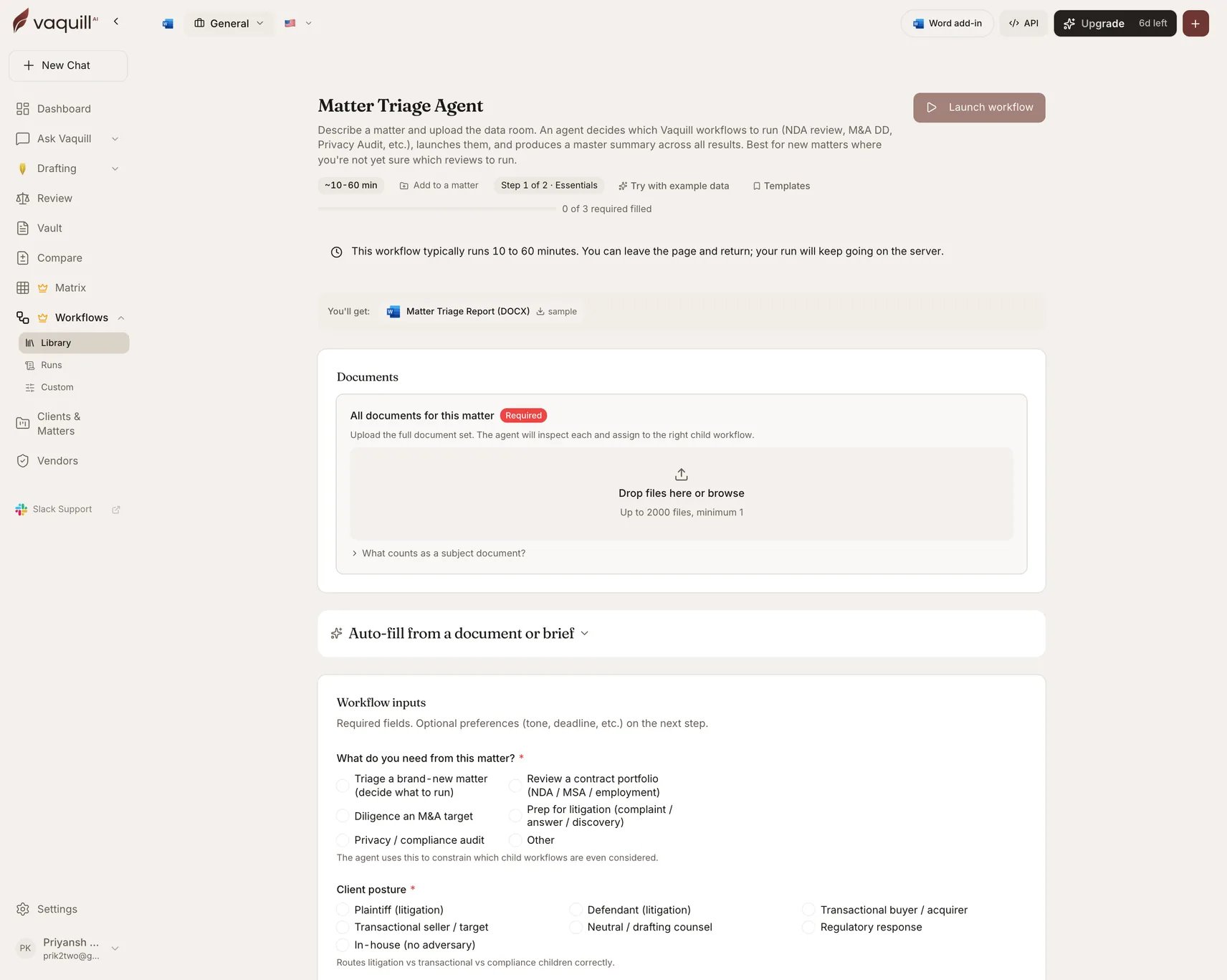
Describe the matter and upload the documents. An agent decides which Vaquill workflows apply (NDA review, M\&A diligence, privacy audit, and so on), launches them, waits, and produces a master summary across all results.
| | |
| -------------- | ----------------------------------------------------------------------------------- |
| Category | In-House |
| Jurisdiction | US |
| Practice areas | General, commercial, litigation, transactional, employment, IP, privacy, regulatory |
| Runtime | 10-60 minutes |
| Queue | Long-running (two-hour ceiling) |
This is an **agentic** workflow: it plans its own child runs rather than following a fixed pipeline. Every child run stays individually inspectable from the parent run page.
 ## What you need
| Slot | Required | Count | What goes in it |
| --------------------------------- | -------- | ------ | --------------------------------------------------------------------------------------------------- |
| **All documents for this matter** | Yes | 1-2000 | The full document set. The agent inspects each document and assigns it to the right child workflow. |
## Inputs
| Field | Type | Required | What it changes |
| -------------------------------------- | ------------ | -------- | --------------------------------------------------------------------------------------------------------------------------------------------------------------------------------------------------------------------------- |
| Matter / engagement name | Text | No | The parent matter handle. Every child workflow inherits it, so all artifacts roll up in one place. |
| **What do you need from this matter?** | Select | **Yes** | Triage a brand-new matter · review a contract portfolio · diligence an M\&A target · prep for litigation · privacy/compliance audit · other. Constrains which child workflows are even considered. |
| **Client posture** | Select | **Yes** | Plaintiff · defendant · transactional buyer · transactional seller · neutral drafting counsel · regulatory response · in-house (no adversary). Routes litigation versus transactional versus compliance children correctly. |
| Opposing / counterparties | Text | No | For conflict checking and adversarial workflow routing. |
| Practice area hint | Multi-select | No | Litigation, M\&A, employment, IP, privacy, real estate, regulatory, commercial. Stops the agent dispatching a privacy audit on a deposition-prep matter. |
| Time horizon | Select | No | Hearing or closing within 7 days · within 30 days · within 90 days · no hard deadline. Drives whether to skip long-running children when a hearing is imminent. |
| Conflict check status | Select | No | Completed (clear) · not yet done · not applicable (in-house). Rule 1.7 hygiene. |
| Additional context | Long text | No | Free-text catch-all. The agent reads this alongside the documents when planning. |
## How it runs
The agent reads your answers and inspects the uploaded documents, then decides which child workflows to run and in what order.
Dispatches the planned workflows as child runs, each inheriting the matter name.
Blocks until every child completes. With a near-term deadline set, long-running children may be skipped.
Builds a master summary across all child results.
Writes the triage report.
## What you get
| Artifact | Format | Contents |
| ------------------------ | ------ | ------------------------------------------------------------------------------- |
| **Matter Triage Report** | DOCX | Master summary across every child workflow result, with the planning rationale. |
Each child run keeps its own artifacts, so you get both the roll-up and the underlying detail.
## What this will not do
* Replace the conflict check, engagement letter, or matter-opening intake your firm requires.
* Replace counsel review of which child workflows to run and how to read their findings.
* Open billing matters, send the engagement letter, or notify the client on your behalf.
* Investigate facts outside the uploaded data room or what you typed into the description.
* Decide attorney staffing, fee structure, or whether to take the matter at all.
## Related
Where the triage output lands when you scope the run to a matter.
The interactive, single-question version of agentic behavior.
## What you need
| Slot | Required | Count | What goes in it |
| --------------------------------- | -------- | ------ | --------------------------------------------------------------------------------------------------- |
| **All documents for this matter** | Yes | 1-2000 | The full document set. The agent inspects each document and assigns it to the right child workflow. |
## Inputs
| Field | Type | Required | What it changes |
| -------------------------------------- | ------------ | -------- | --------------------------------------------------------------------------------------------------------------------------------------------------------------------------------------------------------------------------- |
| Matter / engagement name | Text | No | The parent matter handle. Every child workflow inherits it, so all artifacts roll up in one place. |
| **What do you need from this matter?** | Select | **Yes** | Triage a brand-new matter · review a contract portfolio · diligence an M\&A target · prep for litigation · privacy/compliance audit · other. Constrains which child workflows are even considered. |
| **Client posture** | Select | **Yes** | Plaintiff · defendant · transactional buyer · transactional seller · neutral drafting counsel · regulatory response · in-house (no adversary). Routes litigation versus transactional versus compliance children correctly. |
| Opposing / counterparties | Text | No | For conflict checking and adversarial workflow routing. |
| Practice area hint | Multi-select | No | Litigation, M\&A, employment, IP, privacy, real estate, regulatory, commercial. Stops the agent dispatching a privacy audit on a deposition-prep matter. |
| Time horizon | Select | No | Hearing or closing within 7 days · within 30 days · within 90 days · no hard deadline. Drives whether to skip long-running children when a hearing is imminent. |
| Conflict check status | Select | No | Completed (clear) · not yet done · not applicable (in-house). Rule 1.7 hygiene. |
| Additional context | Long text | No | Free-text catch-all. The agent reads this alongside the documents when planning. |
## How it runs
The agent reads your answers and inspects the uploaded documents, then decides which child workflows to run and in what order.
Dispatches the planned workflows as child runs, each inheriting the matter name.
Blocks until every child completes. With a near-term deadline set, long-running children may be skipped.
Builds a master summary across all child results.
Writes the triage report.
## What you get
| Artifact | Format | Contents |
| ------------------------ | ------ | ------------------------------------------------------------------------------- |
| **Matter Triage Report** | DOCX | Master summary across every child workflow result, with the planning rationale. |
Each child run keeps its own artifacts, so you get both the roll-up and the underlying detail.
## What this will not do
* Replace the conflict check, engagement letter, or matter-opening intake your firm requires.
* Replace counsel review of which child workflows to run and how to read their findings.
* Open billing matters, send the engagement letter, or notify the client on your behalf.
* Investigate facts outside the uploaded data room or what you typed into the description.
* Decide attorney staffing, fee structure, or whether to take the matter at all.
## Related
Where the triage output lands when you scope the run to a matter.
The interactive, single-question version of agentic behavior.