> ## Documentation Index
> Fetch the complete documentation index at: https://vaquill.ai/docs/llms.txt
> Use this file to discover all available pages before exploring further.
# Quickstart: your first workflow
> Go from a folder of contracts to a finished review memo in about ten minutes
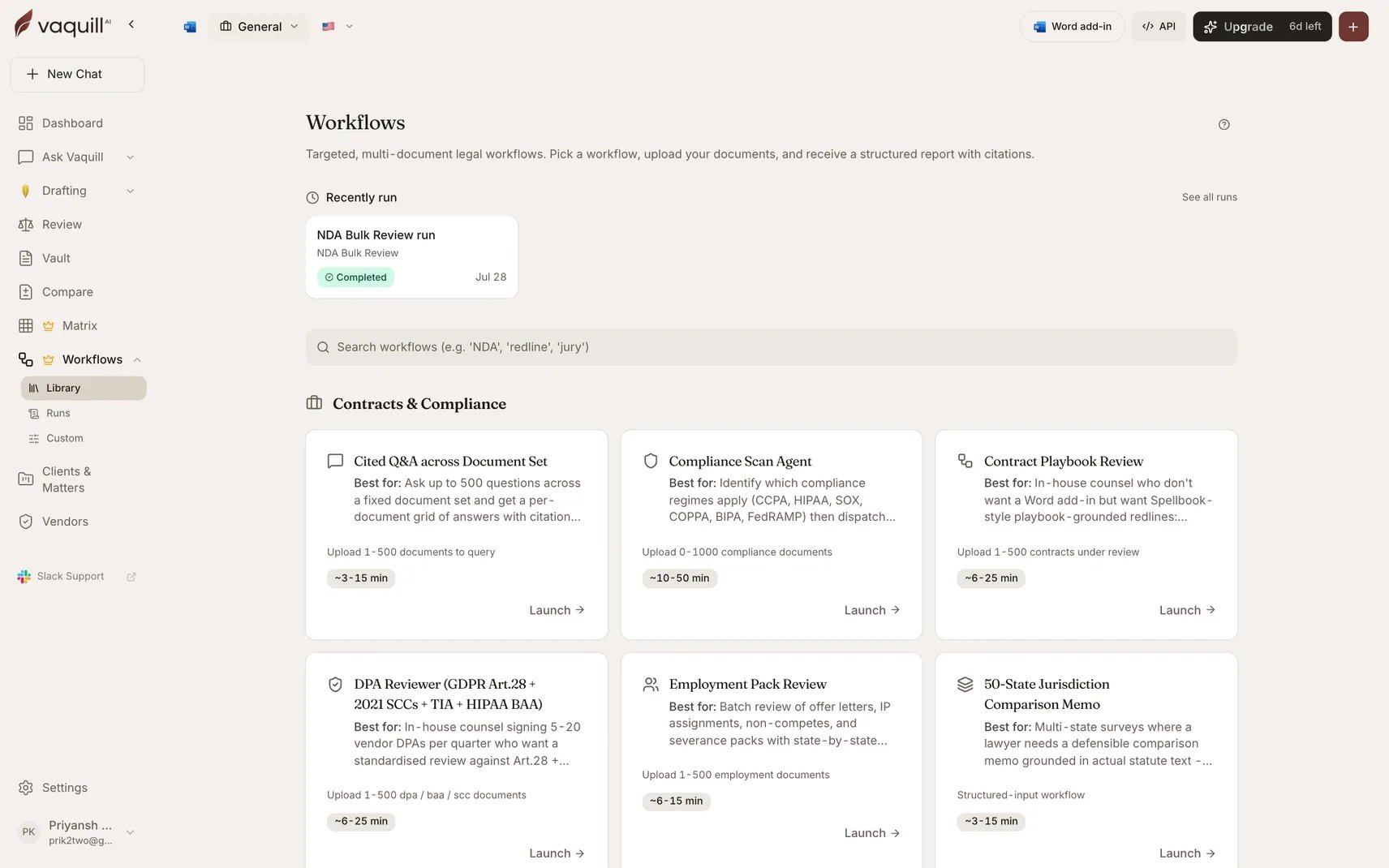
The fastest way to understand workflows is to run one. This walks through [NDA Bulk Review](/docs/workflows/built-in/nda-bulk-review), which needs nothing but a few NDAs and about ten minutes.
 ## Before you start
A [trial or paid plan](/docs/guides/plans-and-limits). Workflows are included in every plan and are not billed per run.
Two to five NDAs in PDF or DOCX. **They must be text-searchable.** A scanned image runs through OCR on upload, which works, but give it time to finish before launching.
You can run a workflow without one. Scoping to a matter files the output back into that matter automatically, which is worth doing on real work. See [Matters and workspaces](/docs/guides/matters-workspaces).
## Run it
Go to **Workflows** in the app and pick **NDA Bulk Review** from the In-House group.
The launcher shows a slot labelled **NDAs to review**. Drag your files in. Leave the optional playbook slot empty for now: with no playbook, the review scores against market benchmarks instead.
**Which side are you on?** is the only required field. It inverts most of the scoring rubric, so pick honestly: Receiving Party if you are the one being bound.
Everything else is optional and falls through to sensible defaults. Ignore it on the first run.
Click run. The pipeline builds an extraction matrix, answers a cell per document per clause question, scores each NDA, then synthesizes across the set. Expect 3 to 12 minutes.
You do not need to keep the tab open. Progress streams into the run view, and you can cancel at any point.
On completion you get an **Executive Summary** with a traffic-light grid across every NDA, and a **Per-Document Detail** with benchmark results and suggested redline language. Both are real DOCX files.
Uploaded and launched straight away, and retrieval came back thin? Documents have to finish ingesting before a workflow can read them. Give a fresh upload a minute.
## What just happened
You ran a fixed pipeline someone else designed. Every [built-in workflow](/docs/workflows/built-in) works the same way: slots for documents, a short form that changes what counts as risky, and a declared set of output files.
That is the whole model. The 24 other built-ins differ in what they extract and what they produce, not in how you drive them.
## Where to go next
The full catalogue, grouped by the work: contracts, compliance, research, discovery, drafting.
Auto-fill from a document or brief, matter scope, progress, and cancelling.
When no built-in matches, chain 25 step types into your own pipeline, or describe it in plain English.
Eight ready-made custom workflows. Document Triage is three steps and a good one to fork first.
## If something goes wrong
| Symptom | Cause |
| ----------------------------------- | ---------------------------------------------------------------------------------------------------------- |
| The workflow will not launch | A required slot is empty or below its minimum document count. The launcher names the slot. |
| Retrieval finds nothing | The documents were still ingesting. Wait, then re-run. |
| Everything returns a payment error | The trial lapsed. See [Plans, trial, and limits](/docs/guides/plans-and-limits). |
| The output is thinner than expected | A scanned document that OCR'd poorly, or the wrong side selected on the "which side are you on?" question. |
For builder-specific errors, see [Troubleshooting](/docs/workflows/builder/troubleshooting).
## Before you start
A [trial or paid plan](/docs/guides/plans-and-limits). Workflows are included in every plan and are not billed per run.
Two to five NDAs in PDF or DOCX. **They must be text-searchable.** A scanned image runs through OCR on upload, which works, but give it time to finish before launching.
You can run a workflow without one. Scoping to a matter files the output back into that matter automatically, which is worth doing on real work. See [Matters and workspaces](/docs/guides/matters-workspaces).
## Run it
Go to **Workflows** in the app and pick **NDA Bulk Review** from the In-House group.
The launcher shows a slot labelled **NDAs to review**. Drag your files in. Leave the optional playbook slot empty for now: with no playbook, the review scores against market benchmarks instead.
**Which side are you on?** is the only required field. It inverts most of the scoring rubric, so pick honestly: Receiving Party if you are the one being bound.
Everything else is optional and falls through to sensible defaults. Ignore it on the first run.
Click run. The pipeline builds an extraction matrix, answers a cell per document per clause question, scores each NDA, then synthesizes across the set. Expect 3 to 12 minutes.
You do not need to keep the tab open. Progress streams into the run view, and you can cancel at any point.
On completion you get an **Executive Summary** with a traffic-light grid across every NDA, and a **Per-Document Detail** with benchmark results and suggested redline language. Both are real DOCX files.
Uploaded and launched straight away, and retrieval came back thin? Documents have to finish ingesting before a workflow can read them. Give a fresh upload a minute.
## What just happened
You ran a fixed pipeline someone else designed. Every [built-in workflow](/docs/workflows/built-in) works the same way: slots for documents, a short form that changes what counts as risky, and a declared set of output files.
That is the whole model. The 24 other built-ins differ in what they extract and what they produce, not in how you drive them.
## Where to go next
The full catalogue, grouped by the work: contracts, compliance, research, discovery, drafting.
Auto-fill from a document or brief, matter scope, progress, and cancelling.
When no built-in matches, chain 25 step types into your own pipeline, or describe it in plain English.
Eight ready-made custom workflows. Document Triage is three steps and a good one to fork first.
## If something goes wrong
| Symptom | Cause |
| ----------------------------------- | ---------------------------------------------------------------------------------------------------------- |
| The workflow will not launch | A required slot is empty or below its minimum document count. The launcher names the slot. |
| Retrieval finds nothing | The documents were still ingesting. Wait, then re-run. |
| Everything returns a payment error | The trial lapsed. See [Plans, trial, and limits](/docs/guides/plans-and-limits). |
| The output is thinner than expected | A scanned document that OCR'd poorly, or the wrong side selected on the "which side are you on?" question. |
For builder-specific errors, see [Troubleshooting](/docs/workflows/builder/troubleshooting).