
You want Claude to quote a US statute, check a citation or pull a court opinion, and to show where each one came from. Is there a legal connector for that, and how do you add it?
Short answer: Yes. Vaquill AI Primary Law is listed in Claude's Connectors Directory as a community connector. Open the listing, click the button to add it, sign in once, then ask Claude for a statute, a citation check or an opinion. It reads only, and statute results carry a source link. Anthropic's own notice on the page says it does not verify community connectors, so check anything you rely on.
Written and checked on 23 November 2026. This is general information, not legal advice; check the cited opinion before relying on it.
TL;DR
- It is a community connector. The listing shows a Community badge, and Anthropic says it does not verify those.
- Adding it takes one sign-in. No API key to paste. It also works in Claude Code and in Cowork.
- It covers statutes, regulations, constitutions, court rules, agency guidance and US case law. Case search matches keywords only.
- A resolved citation is not a verified citation. Read the source before you file anything.
What the listing shows
Claude's directory page for the connector, as it looked on 23 November 2026:
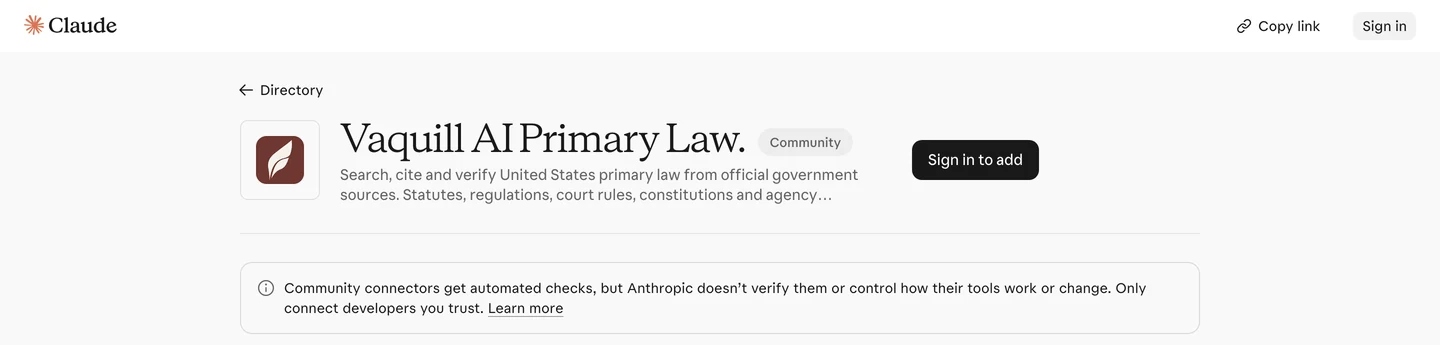
Screenshot of the live listing, 23 November 2026.
The notice under the title is Anthropic's. It says community connectors "get automated checks, but Anthropic doesn't verify them or control how their tools work or change." It adds: "Only connect developers you trust." So the vetting is left to you, and it starts with who made it and what their privacy policy says. Both are linked from the listing.
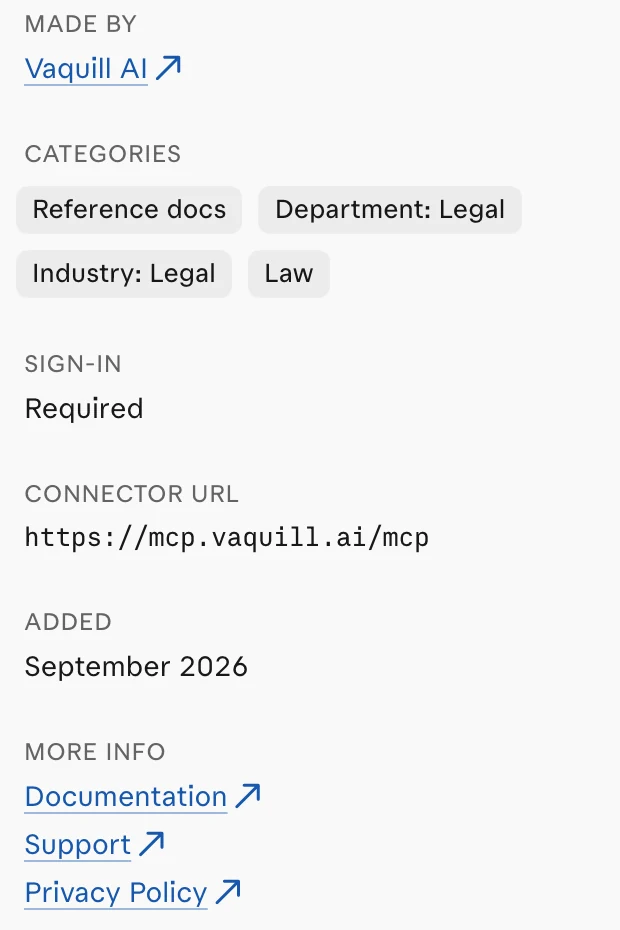
Screenshot of the live listing, 23 November 2026.
What else the page says:
- One-line description: "Search, cite and verify United States primary law from official government sources." Read "verify" narrowly. The check section below shows what a lookup does and does not prove.
- Sign-in: required. Added: September 2026.
- Read only. The listing says: "This connector only reads. It changes nothing in your Vaquill AI account or anywhere else."
- Four prompts (ready-made workflows).
cite_checkresolves the citations in a passage in one batch, then checks each claim against its section.fifty_state_surveycompares how states treat one issue and checks coverage first, so a gap is not read as "no such law".whats_changedlists what changed in a body of law since a date.good_law_checkis for statutes: its signal reports what the publisher records about repeal or supersession, and the listing says it is not a judicial-validity check. Do not use it as a case-law check.
The prompt summaries come from the server's own README and the listing, read on 23 November 2026.
Add it
Try it. Not run for this post: the add flow, the sign-in and consent screens, and the Claude Code command. The steps below come from the connector docs and the listing. Menu names can change.
From the listing. Open the listing. Signed out, the button reads "Sign in to add". Sign in to Claude, add it, then approve the consent screen once.
From the settings. The docs give this path: Settings, Connectors, Add custom connector. The MCP README calls the same menu Customize, so look for Connectors under either name. Paste the URL below and leave the key and header fields empty. This URL uses OAuth sign-in with your account, and a key pasted there is ignored.
https://mcp.vaquill.ai/mcp
Claude Code. The docs give one command, then /mcp to sign in:
claude mcp add --transport http --scope user vaquill https://mcp.vaquill.ai/mcp
Cowork. The docs say the connector is the only path that works there. A Cowork session runs in an Anthropic cloud container that cannot see your machine's environment, so a key in your shell profile cannot reach it. Tools load at session start, so start a new session after you connect.
Team and Enterprise. Not verified on 23 November 2026 for the sign-in connector. The MCP README says, in its section on adding a key as a request header, that on these plans an owner adds the connector under Organization settings first. The connector docs do not mention it. If you are on a Team or Enterprise plan, ask your owner before you start.
On first connect, the docs say the provider creates a key for the connector and holds it on the server. Claude never sees it. It does not show in your key list. Disconnecting in Claude stops Claude using it. Support can revoke it outright. Calls draw on your account's credit balance.
Make one live call. The docs say a tool list showing up is not proof that your sign-in works. Ask Claude: "Use Vaquill to list statutes coverage for California." That read is free. A normal answer means you are set. An error means the connection has no identity, so reconnect and finish the consent screen.
What it covers
Statutes, regulations, constitutions, court rules, agency guidance and US case law.
- Statutes and regulations: 6M+ sections of primary law. That spans federal law and all 56 state-level jurisdictions (the 50 states, DC and five territories).
- Case law: 10.1M+ case records. This is a separate count. It is never added to the section total.
Some features are statute-only: reading a section as of an earlier date, a recorded status such as in force or repealed, and comparing states. For cases, the connector can search opinion text by keyword, resolve a reporter citation, read an opinion and list the cases that cite it. Connect Claude to US case law over MCP walks through a real case-law run.
One real check
Two lookups ran on 23 November 2026 through the Vaquill MCP tools, run with an API key. That means the OAuth sign-in path was not tested. The output is trimmed.
Lookup 1: a statute. Resolving "42 U.S.C. 1983":
{
  "resolved": true,
  "inputCitation": "42 U.S.C. 1983",
  "section": {
    "actId": "USC_T42_C21_S1983",
    "citation": "42 U.S.C. § 1983 (2026)",
    "title": "Civil action for deprivation of rights",
    "corpusType": "USC",
    "actStatus": "in_force",
    "lastAmendedYear": 1996,
    "currentThrough": "2026-11-10"
  }
}
The full response also holds the amendment history and a source link. The actStatus value is the publisher's recorded status for a statute. It says nothing about what courts have done with the statute.
Section text, as of 23 November 2026. The section text was read next. The first sentence of section 1983 starts with "Every person who, under color of any statute, ordinance, regulation, custom, or usage" of a State, Territory or the District of Columbia causes the deprivation of rights "secured by the Constitution and laws." That person "shall be liable to the party injured in an action at law, suit in equity, or other proper proceeding for redress." The quoted clauses appear word for word on govinfo.gov, 2024 edition and on Cornell LII.
Lookup 2: a case. Resolving the Supreme Court citation "365 U.S. 167":
{
  "results": [
    {
      "index": 0,
      "status": "resolved",
      "case": {
        "caseId": "USCASE_BBAD093902CFAFCB4A4E",
        "caseName": "Monroe v. Pape",
        "court": { "name": "Supreme Court of the United States", "level": "supreme" },
        "decisionDate": "1961-02-20",
        "citations": ["5 L. Ed. 2d 492", "81 S. Ct. 473", "365 U.S. 167"]
      }
    }
  ],
  "resolved": 1
}
Resolved means a case record matched that citation. This check did not read the opinion, so it says nothing about what the case holds. A resolved result does not confirm a party name, a quote or a pincite (the page number of a quoted passage). A not_found result does not mean a case is fake either. The cite may be mistyped, or the case may have no reporter citation in the data.
What it does not do
- It is not legal advice. Claude writes the answer from the tool results, and Claude can still misread them.
- Case search is keyword-only. Every word must match, with up to three quoted phrases. There is no OR, no NOT, no wildcards and no search by meaning.
- It does not tell you whether a case is still good law. A list of cases that cite a decision shows who cited it. It does not show whether they followed it or limited it. Read the later cases that matter.
- Trial-court opinions often lack a reporter citation in the data. A district-court slip opinion may not resolve by citation. Search it by court, date or docket number instead.
- A connection is not proof it works. Make one live call, as above.
- Tool behavior can change. Anthropic's notice says it does not control how community connectors' tools work or change. Re-check after big changes.
Other legal connectors on the directory page
The listing page showed these related entries on 23 November 2026: CourtListener (by Free Law Project), CoCounsel Legal (by Thomson Reuters) and Legal Data Hunter (by GoodLegal). It also showed Anthropic's claude-for-legal plugin. This is a list of what the page showed, not a ranking or a comparison. Read each one's own page before you connect. For how the options differ in practice, see Claude legal research MCP and how to use Claude for legal research.
What goes wrong
- Connected, but every call fails. The connection has no identity. Reconnect and finish the consent screen.
- Asked to approve twice. Approve the second one. It is remembered after that.
- A key pasted into the connector dialog does nothing. The URL uses sign-in, so the key is ignored.
- Tools missing in Cowork. Start a new session.
- Every call returns an out-of-credits error. Top up in the console.
- An empty result. The docs say an outage returns an error, so an empty answer is a real answer. Check coverage before you assume no law exists. The MCP setup page covers other ways to connect.
A colleague says a connector with the Community badge in Claude's directory has been checked by Anthropic, so it is fine for client work. What does the listing page say?
FAQ
Is there a legal connector for Claude?
Yes, more than one. Claude's Connectors Directory lists Vaquill AI Primary Law under the categories Reference docs, Department: Legal, Industry: Legal and Law. It serves US statutes, regulations, constitutions, court rules, agency guidance and case law. Related legal connectors appear on the same page.
How do I add the Vaquill AI Primary Law connector to Claude?
Open the listing and use the add button, or add a custom connector in Claude's settings with the URL https://mcp.vaquill.ai/mcp. Sign in once and approve the consent screen. In Claude Code, the docs give a one-line command. Then make one free live call to confirm it works.
What does the Community badge mean?
Anthropic's notice on the page says community connectors get automated checks, but Anthropic does not verify them or control how their tools work or change. It tells you to connect only developers you trust. The badge is not an endorsement.
Do I need an API key?
No. You sign in with your Vaquill account, and the connector uses a key held on the server. Calls draw on the same credit balance as any other key. Coverage reads are free.
Does it cover case law?
Yes. It has 10.1M+ case records. You can search opinion text by keyword, resolve a reporter citation, read an opinion and list the cases that cite it. It does not tell you whether a case is still good law.
Can it change anything in my account?
The listing says it is read only and changes nothing in your account or anywhere else. That is the listing's statement. The result text is still the provider's data, so check it.
For US case law, statutes and regulations through one API key, see the US case law API.
New legal AI guides, weekly.
Further Reading
- Case Law MCP Server: Connect Claude to US Case Law
- ChatGPT Legal Research Plugin: Vaquill AI Primary Law
- How to Find a Case by Its Citation (and Confirm It Is the Right One)
- Court Opinions as JSON: The Fields and a Working Fetch
- How to Read a Case Citation, Piece by Piece (Real Example)
- Binding vs Persuasive Authority: Which Court Controls Yours

Co-Founder & CTO
Priyansh leads engineering and AI at Vaquill AI: the pipelines that pull statutes, regulations and court rules from every US jurisdiction's official publisher, and the REST API, MCP server and open dataset that serve them.