

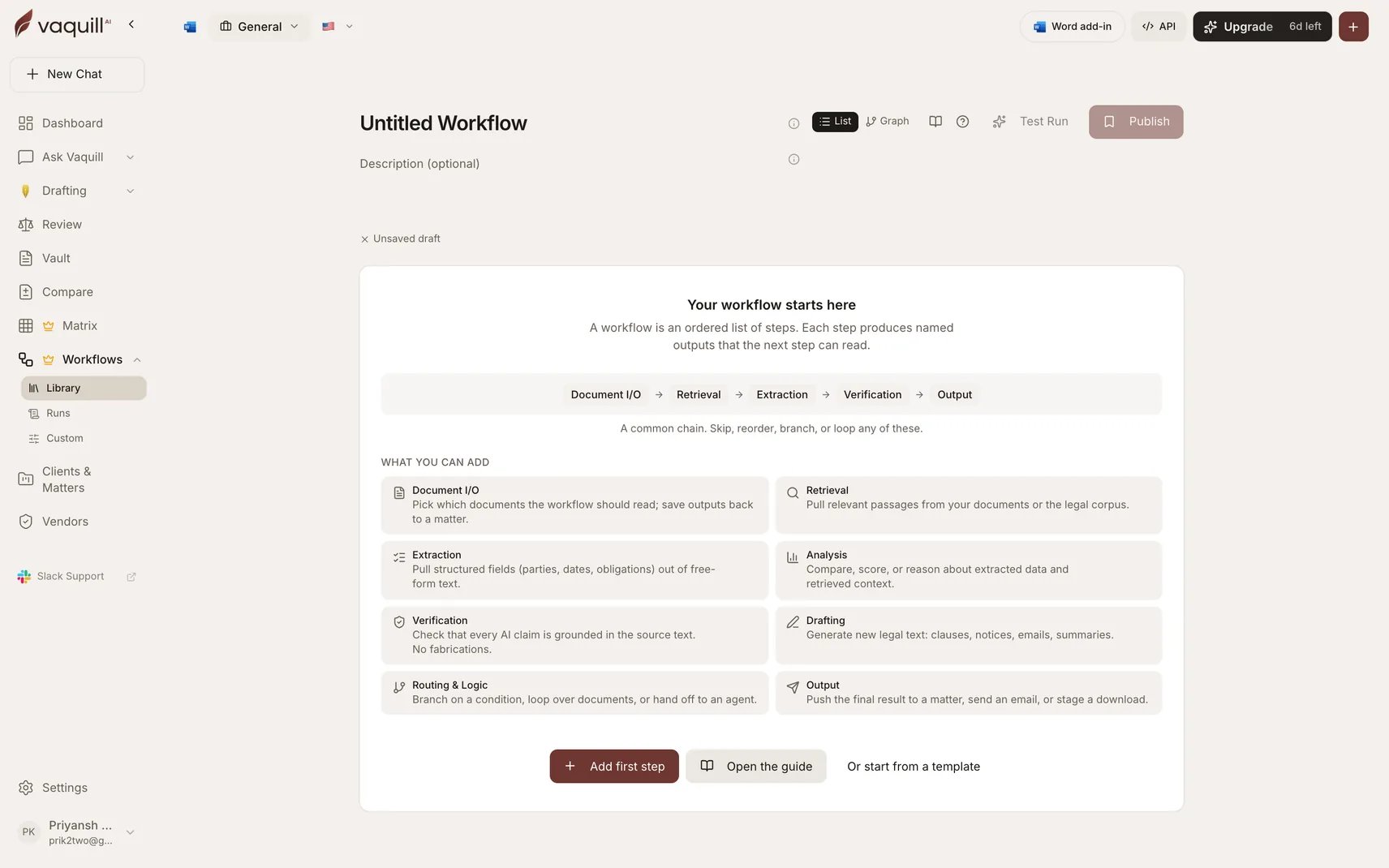
The builder: an ordered step chain plus the step-type palette
Three ways to start
From a template
Eight published starter workflows. Run one as-is or fork a copy to customize. Fastest path when a starter is close to your job.
From a prompt
Describe what you want in a sentence. Vaquill AI plans the steps, fills the configs, wires the references, and drops you into the builder with an editable draft.
From scratch
Open a blank workflow and chain the step types yourself.
What a chain looks like
A common one runs Document I/O → Retrieval → Extraction → Verification → Output: pick the documents, pull the relevant passages, extract structured fields, check that every claim is grounded, then push the result to a matter or a download. Steps are not limited to a straight line. You can branch on a condition, fan a step out across every document, or hand off to a constrained agent.Ownership and sharing
Workflows are stored per organization. Other members of your org can run any published workflow. Only the owner can edit or delete one.Where to go next
3. Steps and wiring
The palette, the eight categories, step kinds, and how to bind a field to an upstream step’s output.
5. Branching and loops
Conditional routing, fan-out over documents, and the rules the platform enforces.
6. Test, publish, run
The three verbs, the validator gates, versioning, and cost estimates.
8. Troubleshooting
Every validation error, what it means, and how to fix it.