
A client collaboration portal is a secure online space where a law firm and its client share documents, messages, invoices, and case updates in one place instead of over email. A shared matter workspace is the AI-era version of that portal: the client works inside the same workspace where the matter actually lives, and an AI assistant grounds its answers in that matter's file. The hard part is not the portal chrome. It is keeping each client's matter walled off from every other client, which is what the rest of this post is about.
The most interesting thing in legal AI right now is not a model. It is a doorway.
For two years, the entire category lived inside the firm. A lawyer typed into a chat box, got an answer, drafted a brief. The client never saw the tool.
Then, late in 2025 and into 2026, the vendors started opening a door to the client. Legora announced Portal, a client-facing AI workspace built with a dozen named design partners including Linklaters, Cleary Gottlieb, and Goodwin, with general availability slated for early 2026.
Bloomberg Law ran a piece titled "AI Feeds Demand for Shared Client, Outside Counsel Work Space," reporting that PwC piloted Harvey "Shared Spaces" on deal transactions and that MinterEllison chose to partner with Legora rather than build its own. The pitch is seductive: invite the client into the same AI workspace where the matter actually lives.
Law firm-client collaboration AI is the new battleground, and almost everyone is fighting on the wrong front. They are competing on collaboration UX (co-editing, comments, a slick portal) and assuming "secure" means "encrypted and SOC 2 certified."
The actual hard problem is segregation. The moment you invite a client through that doorway, the matter stops being just a grounding boundary and becomes a confidentiality boundary, and most of the industry is treating that as an IT checkbox instead of the central design constraint it is.
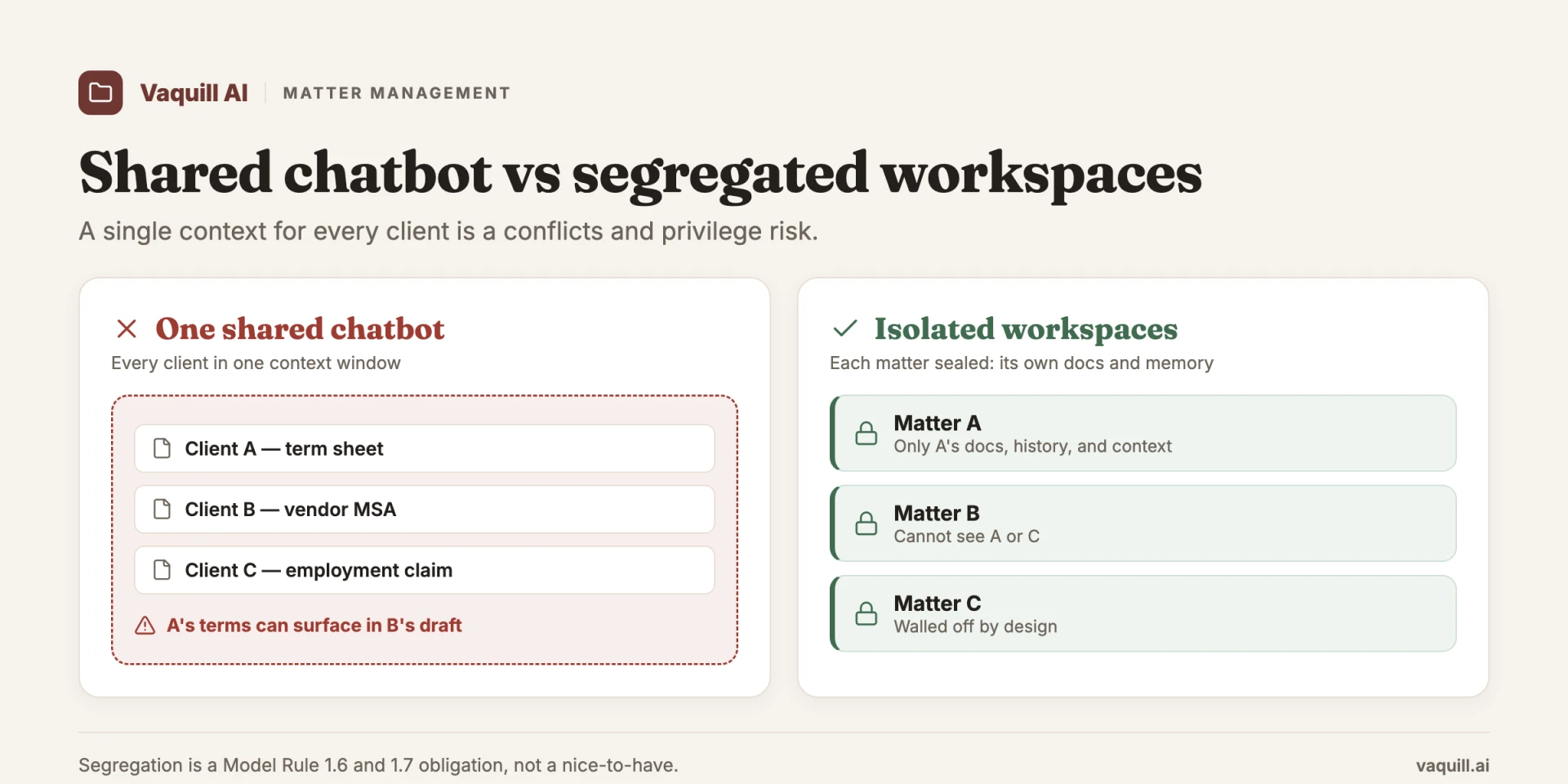
One shared context bleeds across clients; isolated matter workspaces do not.
TL;DR
Part of our in-house counsel guide series.
- The frontier in legal AI moved from the firm's internal chat box to the firm-to-client boundary. Legora launched Portal (GA early 2026, a dozen named design-partner firms); Harvey piloted "Shared Spaces" with PwC. Source: Bloomberg Law and Legora.
- Vendors are racing on collaboration polish. The under-discussed problem is matter-level segregation: keeping each client's matter (and each adverse party's data) hard-walled while still letting AI ground itself in that one matter.
- "Secure equals encrypted plus SOC 2" is the wrong mental model. ABA Formal Opinion 512 (July 2024) makes shared client AI an informed-consent and conflicts question, not just an infrastructure one.
- Op. 512 is blunt: lawyers need informed consent before putting client confidences into a generative tool, and "boilerplate consent included in engagement letters will not be adequate." It also warns that shared use of the same tool can cause inadvertent disclosure.
- The workspace that wins is the one where the matter is a hard isolation boundary, not a shared folder with permissions bolted on. The same primitive that makes AI accurate (matter-scoped context) is what keeps clients walled off.
- Pooling matters into one context window to make the assistant "smarter across the firm" is exactly the architecture that leaks. Narrower is both more accurate and more defensible.
According to the post, what does ABA Formal Opinion 512 say about consent for putting client confidences into a generative AI tool?
The doorway is real, and the timing is not an accident
Start with why this is happening now. The forcing function is the client, not the vendor.
Andreas Junestrand, Legora's CEO, told Bloomberg Law something that explains the whole shift: "To stay on the panel of big corporates, you need to display how you're leveraging technology." Read that as a procurement reality. In-house teams are no longer impressed that their outside counsel "uses AI." They want to see it, touch it, and increasingly work inside it.
A client-facing workspace is how a firm turns a back-office efficiency into a visible deliverable. When the GC can log into the same space where the deal documents and the diligence grid live, the technology stops being a cost the firm absorbs and becomes a service the firm sells.
That is the genuine product insight behind Portal and Shared Spaces, and it is worth taking seriously. The collaboration is real value. A shared workspace beats the eternal email thread with forty attachments named Final_v3_REVISED_USE_THIS. Co-editing a draft with the client in the loop beats reconciling three redlines by hand. None of that is fake.
But notice what the marketing emphasizes and what it skips. The demos show the chat, the co-editing, the portal chrome. They tout SOC 2 Type II, ISO 27001, role-based access control, zero training, zero retention. All necessary. All table stakes.
And all of it answers the question "is the infrastructure secure?" while quietly stepping past the question that actually matters once a client is in the room: is this matter isolated from every other matter in the building?
Segregation is the problem encryption does not solve
Here is the distinction that the "encrypted and SOC 2" framing flattens.
Encryption protects data in transit and at rest from an outside attacker. Sub-processor diligence tells you which third parties touch the bytes. Zero retention tells you the foundation model is not keeping a copy. Those are perimeter and pipeline questions. They are about keeping strangers out.
Segregation is a different axis entirely. It is about keeping insiders apart. Can client A's matter ever surface in client B's workspace? Can the firm's own assistant, trying to be helpful, pull a fact it learned on the Acme acquisition into a session for a different client who happens to be Acme's adversary?
Can a paralegal with access to twelve matters accidentally ground a query against the wrong one? None of that is solved by TLS or by a clean SOC 2 report. It is solved, or not, by how the product draws boundaries around a matter and whether those boundaries are load-bearing walls or suggestions.
I made the case in a companion post on matter-folder workspaces that the matter is the unit of grounding: the folder is not a filing cabinet, it is the boundary that tells the model what to ground itself in. That argument was firm-side and about accuracy.
This is the same primitive turned outward. The instant a client walks through the doorway, that grounding boundary has to double as a confidentiality boundary. Same wall, new job, much higher stakes.
Get the grounding boundary right and you get the segregation boundary almost for free. Treat the matter as a loose shared folder and you have built a leak with a nice UI.
Why pooling context is the quiet trap
The dangerous instinct, and it is a commercially attractive one, is to make the assistant smarter by giving it more. Feed it the whole firm's document store. Let it reason across every matter. Sell it as institutional knowledge that compounds.
That is precisely the architecture that leaks, and it leaks worst exactly when a client is watching.
Think about the mechanics. A model that has ingested ten thousand documents across four hundred matters has to guess which ones are relevant to today's question. Guessing is where cross-matter bleed happens: a stray retrieval, a summary that imports a fact from the wrong file, an answer grounded in a confidence that belongs to someone else.
In a purely internal tool, that is an accuracy bug and a confidentiality risk. In a client-facing workspace, it is potentially disclosing client A's privileged information to client B, live, in a session the client can see. The blast radius changed.
The counterintuitive fix is the same one that improves answer quality. Scope the assistant to one matter. A matter-scoped assistant knows the relevant universe is the forty documents in this file, not the firm's entire vault.
Narrower context is more accurate context, and it is also the only context that cannot leak across the wall, because the wall is the context. This is why I keep arguing that segregation and accuracy are not in tension. They are the same design decision. The product that pools everything to look impressive in a demo is making both worse at once.
FTI Consulting's Jon Chan, quoted in the same Bloomberg Law coverage, flagged exactly the privacy and validation concerns that this architecture raises. He is right to. The validation question (is the answer grounded and correct?) and the privacy question (is it grounded in the right matter?) are two faces of one coin once the client is in the workspace.
The ethics rule already wrote the spec
If you think this is a forward-looking concern, the American Bar Association already turned it into a present-tense obligation. ABA Formal Opinion 512, issued July 29, 2024, is the document every firm building or buying a client-facing AI workspace should read before the procurement deck.
Two of its holdings translate directly into product requirements.
First, on consent. Op. 512 says lawyers must obtain clients' informed consent before inputting client confidences into a generative AI tool, and it is explicit that "boilerplate consent included in engagement letters will not be adequate."
Sit with that. The opinion is telling you that the standard "we may use technology to provide services" clause buried on page nine of the engagement letter does not cover this. Informed consent means the client understands what the tool does, where the data goes, and what the risks are, matter by matter. A client-facing workspace that does not surface and capture that consent per matter is shipping a compliance gap as a feature.
Second, on shared tools. Op. 512 warns that the shared use of the same generative AI tool can result in the inadvertent disclosure of one client's confidences to another. That is not a footnote. That is the ABA describing the exact failure mode of a pooled-context, multi-client AI workspace, written before most of these products shipped.
The opinion essentially specified the segregation requirement in advance. The vendors racing on collaboration UX are, in effect, building products whose central risk the ABA already named.
So the trust problem is not soft. It is not "clients might feel nervous." It is a competence-and-confidentiality obligation under the rules of professional conduct, and the boundary that satisfies it is, once again, hard matter isolation. The ethics rule and the architecture point at the same wall.
How a shared matter workspace actually works
Strip the marketing and the setup is the same across Clio, MyCase, Smokeball, Thomson Reuters HighQ, and the AI-native entrants like Legora and Harvey. The differences are in what the AI does and how hard the walls are, not in the basic flow.
- The firm creates the matter. Everything attaches to one matter record: documents, messages, the diligence grid, the billing.
- The firm invites the client. The client gets a signup link by email and logs in with a password plus a second factor (Clio supports Face ID and Touch ID on mobile; per Clio's client portal page, June 2026).
- The firm sets who sees what. Role-based access control decides whether someone is a client, co-counsel, expert, or internal-only. The client sees their matter and nothing else.
- Both sides work in the space. The client uploads documents, the firm pushes status updates, drafts get co-reviewed, invoices get paid. No more Final_v3_REVISED_USE_THIS email threads.
- The AI grounds in the matter. Ask a question and the assistant answers from this matter's documents and the controlling law, then shows a deliverable (a grid, a redline, a memo).
That last step is the whole ballgame. A practice-management portal from 2015 just moved files. A shared matter workspace puts an assistant on top of those files, and that is what changes the risk.
What to share and what to keep internal
A portal is only as safe as its sharing defaults. The privilege risk is real: when confidential attorney-client material reaches the wrong person through a misconfigured portal, courts have found privilege waived (Moxo, "Mastering access controls in legal client portals," 2025). Role-based access is how you avoid that. Here is the rough split.
| Role | Gets access to | Never sees |
|---|---|---|
| Client | Their matter's documents, messages, invoices, status | Strategy memos, other clients' matters, internal work product |
| Co-counsel | Shared discovery, joint communications on the matter | Anything outside the joint engagement scope |
| Expert witness | Only the materials they were retained to review | The full file, billing, unrelated documents |
| Firm (internal) | Everything on the matter, plus internal-only notes | Other matters they are walled off from by conflict screens |
The table is the easy part to draw and the hard part to enforce. A folder with permissions on top can be reconfigured into a leak by one wrong toggle. A workspace where the matter is a hard boundary cannot, because the wall is structural, not a setting.
What good segregation actually looks like, walked through a matter
Abstractions are cheap, so take a concrete file. Say the matter turns on a Stored Communications Act question: 18 U.S.C. § 2703, the disclosure provision at the center of Carpenter v. United States, 585 U.S. 296 (2018).
The client is a company facing a government data request, and you have invited their in-house counsel into the workspace. Here is what real segregation means at each step.
The grounding is scoped, not pooled. When you ask whether the good-faith exception applies, the assistant grounds in this matter's documents and the controlling authority, not in a firm-wide vault that might contain an adverse party's files. The wall is the context window. The client sees answers about their matter and structurally cannot see anything from another.
State stays inside the matter. The per-matter recall that carries forward prior sessions has to be scoped to the matter, not the user. Some suites call that layer "matter memory"; the design point is that what the tool remembers about the Acme deal lives in the Acme matter, not in a global profile that follows the lawyer into the next client's room. Memory that crosses matters is a leak waiting to happen.
Structured output is per matter. Clients do not want a transcript of a chat. They want artifacts. A Document Matrix that extracts fields across dozens of documents into a grid (which exhibit cites § 2703, where the disputed date is established) is the kind of deliverable a GC actually values, and it is scoped to the one matter it concerns.
Statutes are public; the matter is not. Worth keeping the layers straight. Pulling the text of § 2703 is a public-data operation; a statutes API (the only public API surface on our side) is the right tool for that, exposing the U.S. Code, the CFR, and fifty state codes. Case-law grounding inside the product is an in-app feature that draws on millions of US court opinions, not a public API endpoint anyone can call.
But the client's matter, the documents, the memory, the grid, that is the confidential layer, and the entire job of the workspace is to keep it isolated. Public statute lookups can be shared freely. A client's privileged file cannot. The product has to know the difference.
Notice the through-line. At every step, the thing that makes the answer good (matter-scoped grounding) is the same thing that keeps the client walled off. That is the test for any client-facing legal AI: not "does it have a portal," but "is the matter a real wall or a label?"
What most people get wrong
The dominant mistake is reading client-facing AI as a collaboration feature and grading it on UX. Buyers run demos on how nice the co-editing feels and whether the portal looks modern, then check the box marked "SOC 2" and call security handled. They are evaluating the layer that is converging (everyone will have a decent portal) while ignoring the layer that decides whether the product is safe to put in front of a client.
The second mistake is believing more context is always better. It is the single most natural product instinct and it is wrong here. Pooling matters to make the assistant seem omniscient is the architecture that bleeds one client into another, and it is the exact scenario Op. 512 warns about.
The firms partnering with Legora and Harvey are not wrong to want client-facing AI. The risk is buying it without asking the one question that matters: when my client is in this workspace, what guarantees they cannot, by any path, touch another client's matter, and what guarantees the assistant will not import one?
If you are weighing the underlying mechanics, how AI legal research works with RAG explains why grounded retrieval beats a blank model, and where your legal AI data actually goes maps which third parties touch your client's confidences before you sign. For firms standing up this kind of shared work with clients, the law-firm use case is the right lens: the workspace is a service you deliver, and the segregation is what makes delivering it defensible.
FAQ
What is a client collaboration portal for a law firm?
It is a secure online space where a firm and its client share documents, messages, invoices, and case updates in one place instead of by email. A shared matter workspace is the AI-era version: the same space holds the matter file and an AI assistant that grounds its answers in that file.
What is the difference between a client portal and a shared matter workspace?
A traditional client portal moves files and messages between firm and client. A shared matter workspace adds an AI assistant on top of those files, so both sides can ask questions, build grids, and co-review drafts inside the matter. The added risk is that the AI can read across matters if the workspace is not segregated.
What should clients see in a legal client portal, and what should stay internal?
Clients should see their own matter: documents, messages, invoices, and status. They should not see strategy memos, internal work product, or any other client's matter. Co-counsel and experts get scoped access to only what their role needs, set through role-based access control.
Are law firm client portals secure?
The good ones use encryption in transit and at rest, multi-factor authentication, and role-based access, and they carry SOC 2 Type II and ISO 27001 reports. Those controls keep outsiders out. They do not, on their own, keep one client's matter from surfacing in another's workspace, which is a separate design question called segregation.
Do I need client consent to use AI in a shared workspace?
Yes. ABA Formal Opinion 512 (July 29, 2024) says lawyers need informed consent before putting client confidences into a generative AI tool, and that "boilerplate consent included in engagement letters will not be adequate." Plan for a per-matter, plain-language disclosure of what the AI does and where the data goes.
How does a shared matter workspace protect attorney-client privilege?
Through hard matter isolation and scoped access. The AI grounds only in the one matter, so it cannot pull a fact from another client's file. Access controls keep confidential material from reaching people who would break privilege if they saw it. A misconfigured portal that leaks privileged material to the wrong party can waive privilege.
Which vendors offer client portals and shared AI workspaces?
Practice-management portals include Clio, MyCase, Smokeball, CARET Legal, and Thomson Reuters HighQ. AI-native shared workspaces include Legora Portal (general availability early 2026) and Harvey Shared Spaces (piloted with PwC). Vaquill AI takes the matter-scoped, hard-isolation approach described in this post.
Where this leaves you
The doorway between firm and client is going to stay open. That is the right direction, and the vendors pushing it (Legora, Harvey, and the firms partnering with them) are reading the market correctly. Clients want in.
But the score that matters is not the portal. It is the wall. Before you put any client-facing AI in front of a client, ask the unglamorous questions. Is each matter hard-isolated, or is it a shared folder with permissions on top? Does the assistant ground in one matter, or does it reason across a firm-wide pool that can bleed?
Does the tool capture per-matter informed consent, or lean on a boilerplate engagement clause the ABA has already said is not enough? Can you tell a client, in writing, that nothing they put in this space can reach another client?
The collaboration is the easy part, and it will commoditize. The segregation is the hard part, and it is where the trust, and the ethics, actually live. The workspace that wins the firm-client boundary is the one that treats the matter as a load-bearing wall, not a label on a folder.
That is the bet behind Vaquill AI: the matter is the isolation boundary, so the AI grounds in one client's file and structurally cannot reach another's.
For related operational playbooks, see The Legal Research Platform With Folder & Matter Workspace Organization, What Is Matter Management in Legal AI, and the best matter management software for in-house teams.
New legal AI guides, weekly.
Further Reading
- Legal Research Platforms: Why Matter & Folder Organization Wins
- What Is Matter Management in Legal AI, and Why Segregation Beats One Chatbot
- Legal AI DPA, GDPR, and EU vs US Data Hosting: Vendor Guide
- Where Your Data Actually Goes When You Use Legal AI (2026)
- ABA Formal Opinion 512 (2024): Generative AI Duties for Lawyers
- AI for Criminal Defense: Research, Timelines, Evidence Review

Product & Content
The US primary law data API: statutes, regulations, constitutions, court rules, executive orders and agency guidance across 53 US jurisdictions, each section cited and linked to its official source, via REST, MCP or SQL.