
A litigator I know spent a Tuesday afternoon last month watching one of her associates do something quietly absurd. He had a suppression motion to draft, a Carpenter-style cell-site location issue, and he was working it inside a general AI chat box.
He pasted the warrant affidavit. He pasted the relevant statute. He asked his question, got an answer, closed the tab.
Wednesday morning he opened a fresh session to refine the brief, and the model had no idea who he was, what matter he was on, or that any of yesterday's work had ever happened. So he pasted it all again.
That is the quiet tax nobody puts on the invoice. And it is exactly why the legal research platform with real folder, workspace, and matter organization features is the structural bet that matters in 2026, not the one with the smartest chat box.
The next axis of competition in legal AI is not model quality. Everybody rents the same frontier models from the same three labs. The axis is matter-scoped state: the folders, memories, document grids, and chronologies that mirror how a lawyer actually works one file from intake to filing.
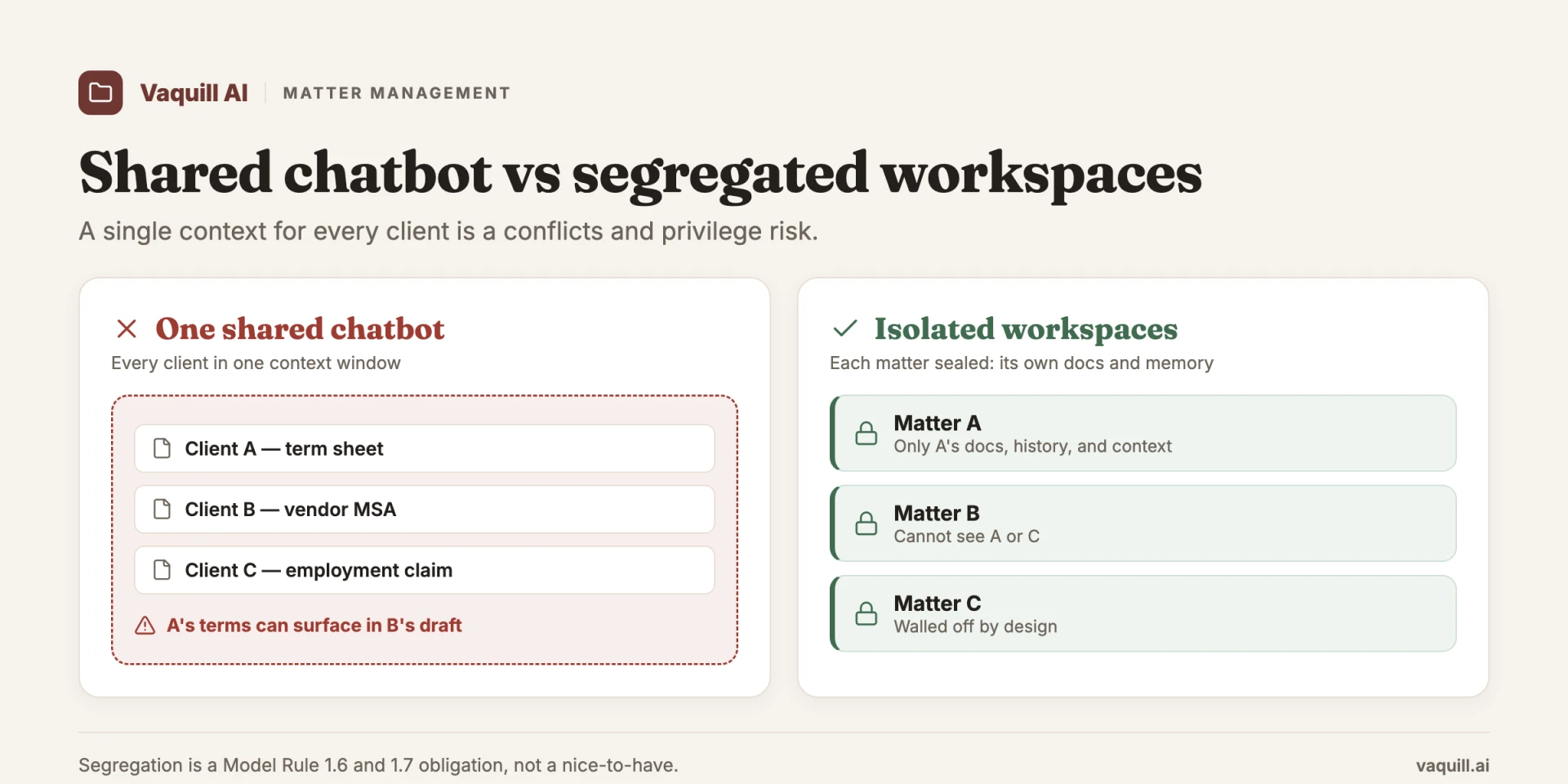
One shared context bleeds across clients; isolated matter workspaces do not.
Short answer: To organize legal matter files well, build one repeatable matter folder structure (Client, then Matter, then document-type subfolders), name files in a fixed order (date, client, matter, doc type, description), and keep every matter's documents, research, timeline, and memory inside its own boundary. A legal matter workspace does the same thing as a live container the AI reads from, so the structure scopes answers instead of just storing files.
TL;DR
Part of our in-house counsel guide series.
- Model quality is commoditizing fast. Every serious legal AI tool rents the same frontier models, so raw answer quality is converging. The durable differentiator is information architecture: how the product organizes work around a matter.
- A general chat box has no persistent memory of which matter a question belongs to. The lawyer re-supplies context every session. That is the real failure mode, not weak retrieval.
- A matter workspace holds the documents, the playbook, the timeline, and the prior research as persistent state. The folder is not filing-cabinet busywork. It is the unit of grounding.
- Incumbents agree. Thomson Reuters now frames CoCounsel around grounding every agent action in "the client and matter context." New entrants like LawVu are launching as workspaces, not chatbots.
- The economics push the same way. Per-seat pricing is breaking under token costs, and scoping context to a matter (instead of one giant context window) is both cheaper and more accurate.
- The sharpest version of this is structured output per matter: a document grid across dozens of exhibits, a chronology, per-matter memory, not single-document chat.
What file-naming order does this post recommend for legal matter files?
The chatbot era is ending, and that is a good thing
For two years the entire category was sold as a better search box. You typed a question, you got an answer with citations, you moved on.
The pitch was always about the answer: is it grounded, is it hallucinating, are the cites real. Those are real questions (the Mata v. Avianca sanctions in 2023, where lawyers filed ChatGPT-invented cases, made sure every firm asks them now). But they are increasingly the wrong questions to obsess over, because the answer layer is the part of the stack that is commoditizing fastest.
Here is the uncomfortable truth for anyone selling a wrapper. When Harvey, Legora, and CoCounsel all orchestrate the same frontier models against documents with a retrieval layer on top, the model is not where the moat is.
The r/legaltech consensus has caught up to this. The most-upvoted pricing thread this quarter had a commenter put it bluntly: Harvey and Legora "are just wrappers and RAG." Harvey runs $1,200 to $2,000+ per user per month and Legora $300 to $800, each a bundle with per-feature add-ons plus a pay-as-you-go credit option, and the commenter's point is that paying that for a wrapper is "comedy."
The wrapper critique oversimplifies what these platforms do, but it correctly intuits that answer quality alone cannot hold that premium when the underlying intelligence is rentable by anyone. I dug into those exact numbers in the Harvey, Legora, and CoCounsel pricing reality post, and the takeaway there reinforces the takeaway here: the answer is not the product.
So what is? Watch what the lawyer actually does. She does not ask one question and leave. She works a matter for weeks.
The suppression motion is not a query, it is a file: an affidavit, a docket, a chronology of cell-tower pings, three prior orders, a playbook for how this judge treats Fourth Amendment arguments, and a running set of research she has already validated. The work is not the search. The work is everything that accretes around the file over time. A chat box throws all of that away the moment you close the tab.
Why folders are the unit of grounding, not the unit of filing
When people hear "matter folders" they picture a digital filing cabinet, the kind of organizational hygiene a paralegal nags you about. That framing badly undersells what is happening.
In an AI-native platform, the folder is not where you store documents after the work is done. It is the boundary that tells the model what to ground itself in while the work is being done.
Think about what changes when context is scoped to a matter. Ask "does the good-faith exception save this search?" inside a general chat box and the model answers in the abstract, pulling from its training distribution.
Ask the same question inside a matter workspace that already holds your affidavit, your jurisdiction's controlling authority, and your earlier note that this judge reads Carpenter narrowly, and the answer is grounded in this file. Same model. Completely different output. The difference is not intelligence. It is state.
This is also why the per-matter framing is more accurate, not just more convenient. A general assistant that has ingested your entire firm's document store has to guess which of ten thousand documents are relevant to today's question.
A matter-scoped assistant knows the relevant universe is the forty documents in this folder. Narrower context is more accurate context. The boundary does work.
Some suites call the persistent layer "matter memory" or Memories, per-matter recall that carries forward what you established in prior sessions so you are not re-explaining the matter every Monday.
But the specific name matters less than the structural point, which is industry-wide: the matter is becoming the primary object, and the chat is becoming a thing that happens inside it.
How to organize legal matter files: the structure that actually holds
The hard part is not agreeing that matters should be organized. It is picking one structure and using it on every file, every time. The firms whose files stay findable run a three-level matter folder structure: Client, then Matter, then document type. That is the same shape Clio and LexWorkplace recommend for a document management system, and it is the shape an AI workspace grounds itself in (LexWorkplace, "How to Organize Your Legal Files," 2025; verified live June 2026).
Here is a general matter folder structure you can copy. It works for a single matter whether the file lives in a shared drive, a DMS, or an AI workspace.
Smith v. Acme Corp (2026-0142)/
  00_Matter-Admin/ engagement letter, conflicts check, retainer
  01_Correspondence/ client, opposing counsel, court (dated)
  02_Pleadings/ complaint, answer, motions, orders
  03_Discovery/
       Us-to-Them/ requests and our responses
       Them-to-Us/ their requests and productions
  04_Research/ memos, statutes, case law, validated answers
  05_Chronology/ the dated timeline of events
  06_Exhibits/ numbered, one file per exhibit
  07_Drafts/ work in progress, versioned
  08_Privileged/ attorney work product, access-restricted
  09_Billing/ invoices, costs, time records
Bill4Time publishes practice-area versions of this same tree (family law, personal injury, criminal defense, estate planning) if you want a starting template per area (Bill4Time, "5 File Tree Structure Templates For Law Firms," verified live June 2026). The folder names change; the logic does not.
Name files in a fixed order, every time
A folder tree only helps if the files inside it sort and search cleanly. Use one naming pattern firm-wide: date, client, matter, document type, short description, lowercase, underscores instead of spaces, ISO-style dates so they sort chronologically.
A worked example, the format the North Carolina Bar and Bill4Time both teach:
2026-08-23_smith_acme_MOT_dismiss.docx
2026-08-23_smith_acme_DISC_first-rogs.docx
2026-09-01_smith_acme_CORR_oc-meet-confer.pdf
The 2026-08-23 prefix means the folder sorts itself in date order. MOT, DISC, and CORR are fixed abbreviations anyone on the team can scan. Skip spaces and special characters (&, #, %), since they break links and search (North Carolina Bar Association, "DIY File Naming Conventions and Folder Structure," April 2022; verified live June 2026).
Build privilege and conflicts into the structure, not on top of it
Two folders in that tree are doing safety work, not filing work. The 08_Privileged folder exists so attorney work product and privileged communications sit behind their own access control, separate from documents you might have to produce. In-house teams are expected to keep privileged material segregated to preserve the privilege, so the folder is the mechanism, not decoration.
The 00_Matter-Admin folder holds the conflicts check and engagement letter because conflicts live at the matter boundary. When each matter is its own scoped container, an assistant working Matter A physically cannot reach into Matter B's documents or memory. That isolation is the difference between a tidy filing cabinet and a tool that cannot accidentally bridge two clients. The ethics case for that segregation is the whole subject of what matter management means in legal AI.
AI-native workspaces vs plain folders
A shared drive gives you the structure. It does not give you grounding. The folder sits there inertly; you still open files one at a time and hold the synthesis in your head.
In a legal matter workspace, the same boundary becomes the thing the model reads from. The tree above stops being storage and becomes the retrieval scope: ask a question and the answer is grounded in the forty documents in this matter, not your whole firm's drive. Same folders, different physics. That is also why you can search matter files conversationally instead of clicking through subfolders. The structure you built for tidiness is the structure that makes the AI accurate.
The incumbents have already conceded this
You do not have to take a vendor's word for where the category is heading. Watch where the biggest player is moving.
When Thomson Reuters repositioned CoCounsel in 2026, the framing was explicit: every agent action is grounded in "the client and matter context, the applicable playbooks, and the firm's knowledge and standards" (per Artificial Lawyer's coverage of the Claude-for-Legal launch in May 2026).
Read that sentence carefully. The pitch is no longer "our model is smarter." It is "our model is anchored to your matter." Thomson Reuters spent $650M acquiring Casetext in 2023 and folded it into Westlaw, and the product language has now shifted from answer quality to matter grounding. That is a tell.
New entrants are skipping the chatbot phase entirely. Law.com reported in June 2026 that LawVu launched an updated AI Workspace for in-house teams, positioned as a workspace surface rather than a chat assistant.
The naming is the strategy. When a company calls its product a "workspace" instead of an "assistant," it is betting that the organizing container, not the conversation, is the thing customers will pay for.
This is the part most buyers miss while they are running bake-offs on answer quality. They are A/B testing the layer that is converging while ignoring the layer that is diverging.
The economics point the same direction
There is a money reason this is happening now, and it is worth understanding because it is not obvious.
Per-seat pricing is breaking. Shawn Curran, CEO of Jylo, noted in June 2026 that foundation providers "can set the price without too much competition now," and one founder in the same Artificial Lawyer piece declared flatly that "per seat pricing is gone."
Here is the mechanism. When a tool bills you a flat $1,200 per seat per month, but the lawyer in that seat fires off a research run that burns a fortune in tokens against a giant context window, the vendor eats the gap. Multiply across power users and the unit economics invert.
The fix the smart vendors are converging on is to scope consumption to a matter rather than dumping everything into one enormous context window per query. A matter workspace is, conveniently, also the natural billing and metering boundary.
You are not paying to re-process your whole document store on every question. You are operating inside a bounded file. The architecture that makes answers more accurate (narrower, matter-scoped context) is the same architecture that makes the economics sane.
That alignment is why I think matter-scoping wins, not as a feature, but as the shape of the whole product.
What working a single matter actually looks like
Abstractions are cheap, so walk one real file with me. Take the suppression motion from the top of this post. For the stage-by-stage version of this same walk from intake to filing, see a day in the matter.
The hinge statute is 18 U.S.C. § 2703, the Stored Communications Act provision on required disclosure of customer communications and records, the same provision at the center of Carpenter v. United States, 585 U.S. 296 (2018). Here is how a matter workspace carries that file, stage by stage, versus how a chat box drops it.
Intake and research. You pull § 2703 and the controlling Fourth Amendment authority. In a workspace, that legal research lands inside the matter folder, grounded in real opinions with citations you can open. It stays there. Tomorrow it is still there, attributed to this file, not lost in a chat history you have to scroll.
Building the timeline. Suppression turns on sequence: when the request issued, what the affidavit said, when the data came back, when the arrest happened. A Chronology Builder turns the docket and the affidavit into a dated timeline that lives in the matter. A chat box can produce a timeline once, in an answer you will lose. A workspace makes it a persistent object you refine across sessions.
Comparing versions. The government's affidavit gets amended. You need to know exactly what changed between drafts.
The grid, where it stops being a chatbot. This is the differentiator most people have not internalized. A suppression fight can involve dozens of exhibits: prior orders, multiple affidavits, returns, declarations. Single-document chat handles them one at a time, and you hold the synthesis in your head.
A Document Matrix extracts structured fields across all of them at once into a tabular grid: which document cites § 2703, which establishes the disputed date, where the good-faith argument appears, all in rows and columns you can scan. That is structured output per matter, and it is the thing a chat interface structurally cannot give you. The grid is the artifact that proves the workspace is doing something a conversation cannot.
The research, the chronology, the redline, the grid all live in one folder, scoped to one matter, available next session without re-supplying anything.
Notice what every stage shares. That is the whole argument in one worked file.
A note on scope, because it matters for accuracy. A credible public statutes API in this category is statutes and legislation only: the full U.S. Code, the CFR, and all fifty state codes for programmatic search and fetch, with no case-law or court-data endpoint.
The matter workspace, the research grounded in opinions, the comparison, the chronology, and the grid are in-app product features, not public API endpoints. Pulling § 2703 programmatically is an API job; working the whole suppression matter around it is a workspace job.
What most people get wrong
The dominant mistake is equating "AI legal research" with "a smarter search box," and then evaluating tools entirely on the quality of single answers. That sends buyers chasing the converging layer.
Two tools renting the same frontier model will give you near-identical answers to a clean, well-scoped question. The bake-off feels rigorous and tells you almost nothing about which tool will be better in month three.
The real failure mode is context loss between sessions. A chatbot has no idea that today's question belongs to the suppression motion you worked yesterday. Every session starts from zero.
The cost is not a wrong answer. It is the re-paste, the re-explain, the lost chronology, the synthesis you rebuild in your head every time because the tool will not hold it for you. That tax is invisible on any feature comparison sheet and brutal in daily practice.
The second mistake is treating organization as administrative overhead rather than as grounding. Folders are not where the AI work goes to die after you finish. They are the boundary that makes the AI work good in the first place.
Get the information architecture right and the answer quality mostly takes care of itself, because the model is finally working from the right, bounded context.
If you are assembling a stack and weighing this against breadth or price, I would weigh it above both. The breadth-versus-cost case lives in the small-firm legal tech stack post, and the build-your-own argument for a Claude + MCP setup lives in the Claude + MCP stack walkthrough.
Those are real considerations. But the structural bet, the one that will look obvious in two years, is matter-scoping. And if you want the underpinning of why grounded retrieval beats a chat box on a blank model, how AI legal research actually works with RAG and the hallucination-and-sanctions post cover the mechanics and the stakes.
FAQ
How do you organize legal matter files? Use a three-level structure: a folder per client, a folder per matter under it, then document-type subfolders (correspondence, pleadings, discovery, research, exhibits, billing). Apply the same template to every matter so files always land in the same place. In an AI workspace, that same structure also scopes what the model reads.
What is the best matter folder structure for a law firm? The most reliable one is Client, then Matter, then document type, with a privileged subfolder behind its own access control and a matter-admin folder for the engagement letter and conflicts check. Bill4Time and LexWorkplace both publish versions of this tree; the practice-area labels change but the three levels do not.
What is a legal matter workspace? A legal matter workspace is a single container that holds everything tied to one matter: its documents, research, timeline, drafts, and the AI's memory of that file. It does what a matter folder does, plus the AI reads from the same boundary, so answers are grounded in that matter instead of pulled from a blank model or your whole document store.
What is a good file naming convention for legal documents?
Put the parts in a fixed order: date first (ISO-style, like 2026-08-23, so files sort chronologically), then client, matter, a document-type abbreviation, and a short description. Use underscores instead of spaces and skip special characters such as &, #, and %, which break links and search.
How do you keep privileged documents segregated? Give privileged material and attorney work product their own folder with restricted access, separate from documents you may have to produce. When each matter is its own scoped container, an assistant working one matter cannot reach another matter's files or memory, which is how segregation preserves both privilege and conflicts boundaries.
Is a matter workspace different from a document management system? A DMS stores and retrieves files; you still open and synthesize them yourself. A matter workspace adds grounding: the same folder boundary becomes what the AI retrieves from, and it can produce a grid across dozens of documents at once instead of chatting about one at a time.
How should I name and organize matters so I can find them later?
Give each matter a stable identifier (client name plus a matter number, like Smith v. Acme Corp (2026-0142)), reuse it on the folder and in file names, and keep one folder template across all matters. Consistent identifiers plus a fixed tree are what make search and AI retrieval reliable months later.
Where this leaves you
If you are choosing a legal research platform in 2026, stop scoring the chat box. Score the workspace.
Ask the questions that actually predict month-three satisfaction. Does it remember the matter between sessions, or do I re-explain every Monday? Can it produce a grid across dozens of documents, or only chat about one at a time? Does the research, the chronology, and the comparison all live in the matter, or scattered across disposable conversations?
The model under the hood will be roughly the same wherever you go, and it will keep getting better on its own. The thing only the product can give you is the architecture around the work.
The chatbot era is ending. The matter is becoming the unit. That is where the defensible value lives now, and it is where a careful buyer should be looking.
For related operational playbooks, see What Is Matter Management in Legal AI and Law Firm-Client Collaboration With AI. For more on what a matter-scoped workspace looks like in practice, see matter workspaces.
New legal AI guides, weekly.
Further Reading
- Law Firm-Client Collaboration With AI: Shared Matter Workspaces
- What Is Matter Management in Legal AI, and Why Segregation Beats One Chatbot
- Where Your Data Actually Goes When You Use Legal AI (2026)
- Legal AI DPA, GDPR, and EU vs US Data Hosting: Vendor Guide
- Building an Internal Legal Copilot for Your In-House Team
- Legal AI for Chief Legal Officers (CLOs) in 2026

Product & Content
The US primary law data API: statutes, regulations, constitutions, court rules, executive orders and agency guidance across 53 US jurisdictions, each section cited and linked to its official source, via REST, MCP or SQL.