
The first internal legal copilot I watched a five-person legal department ship was not a moonshot. It was a Slack bot, a Postgres database with a pgvector extension turned on, a Next.js route, and a $200/month OpenAI Enterprise contract that the GC signed after exactly one 45-minute call with their account team.
They went from "let's see what we can build" to "Sales just asked the bot a real question" in nineteen days. The bot's first useful answer was the statute of limitations for breach-of-contract claims in Texas, pulled by act ID from a statutes API, returned in Slack with a citation, in under three seconds.
That is the bar. Not a six-month consulting engagement, not a $300K vendor license. A small, opinionated, in-house build that turns the questions Sales and Finance ask at 4:47 p.m. on a Friday into structured, cited, auditable answers.
To build an internal legal copilot, you need four layers: an LLM under a zero-data-retention contract, an integration layer for primary law, RAG over your own playbooks and matter documents, and a surface like Slack. A two-engineer team ships a useful first version in two to three weeks, for roughly $50 to $200 per user per month on real usage. The rest is the gold set that proves it works.
This post is a how-to for in-house counsel and legal ops at scaleups with an engineer or two on the team. I will name the providers, name the architecture, give you a working code skeleton, and tell you what to measure so the project survives its first quarterly review.
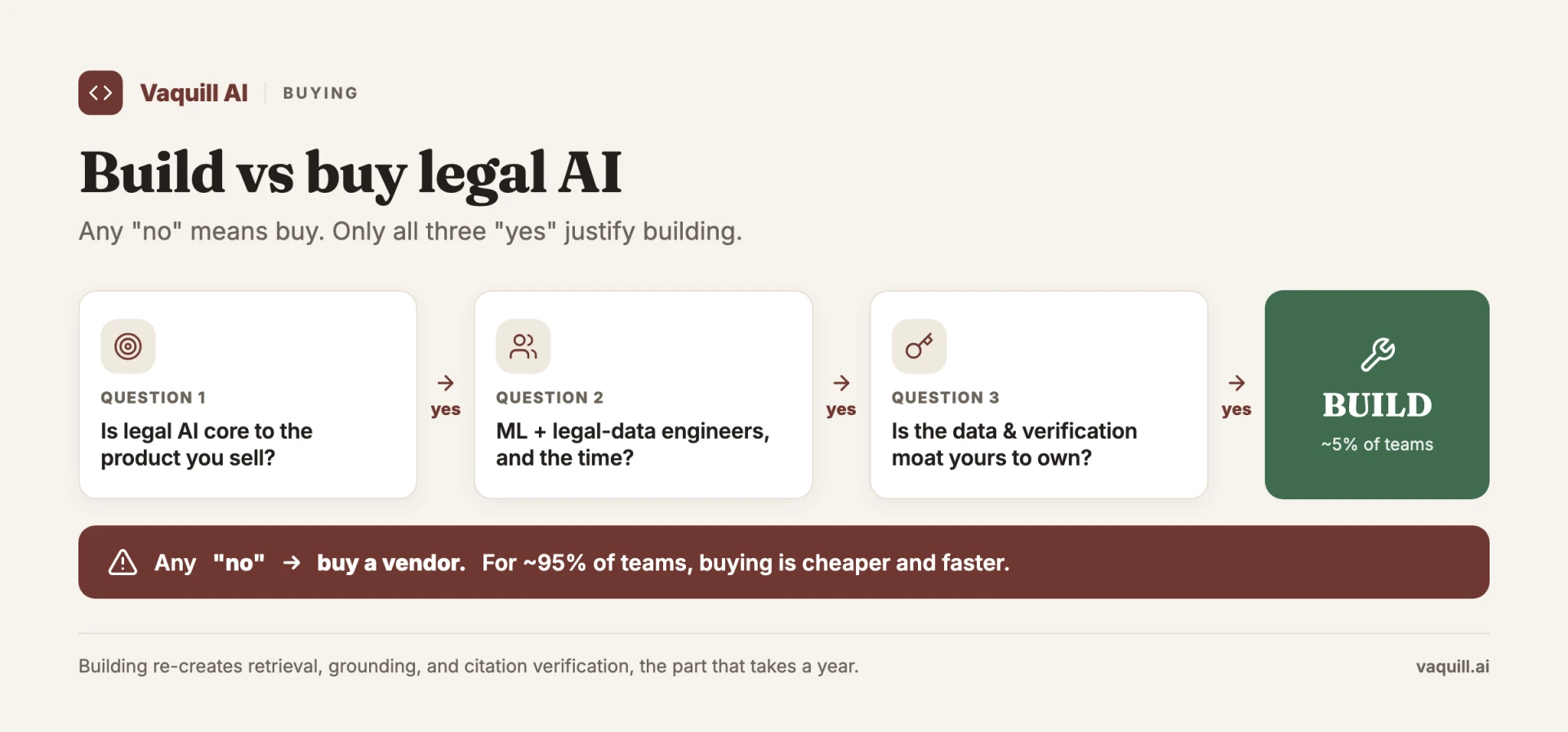
Three questions; any 'no' means buy. Only all three 'yes' justify building.
TL;DR
Part of our in-house counsel guide series.
- A working internal legal copilot for an in-house team of five to forty is a 2-3 week build, not a 6-month project. Four layers: an LLM with a zero-data-retention agreement, an MCP layer for primary law, RAG over your own playbooks and prior matters, and a surface (Slack, Teams, or a small web UI).
- All-in cost lands at roughly $50 to $200 per user per month on real usage. The LLM bill dominates; vector DB and hosting are line items, not the line item.
- Build wins over buy when you have firm-specific knowledge (playbook positions, prior negotiation outcomes, matter precedent) you do not want sitting in a third-party SaaS, and when data residency is a board-level concern. Buy wins when you mostly want generic capability and would rather not own a retrieval pipeline.
- The four starter use cases are all retrieval problems, not generation problems: clause precedent lookup, playbook position lookup, statute of limitations lookup, primary-law section lookup. Solve those four well and the team will trust the bot enough to ask harder things.
- Build a 50-question gold set on day one. Without an eval set you cannot detect a 5% accuracy regression, which is the only quality bar your team will care about six months in.
How big should your legal copilot's gold set be on day one, per this post?
Build vs buy
The case for buying is real. A serious workbench vendor (Harvey, Legora, CoCounsel, GC AI, Eudia) gives you a UI your team will actually adopt, a verification posture you did not have to design, and a vendor on the support pager at 2 a.m.
If you do not have engineering capacity and the in-house team is mostly doing standard contract review, buy.
Build wins in three specific cases. First, you have firm-specific knowledge you do not want to upload: playbook positions, prior negotiation outcomes, the unredacted Series C side letters. If your answer to "would you put that into a third-party vector DB" is no, you build.
Second, data residency is a procurement gate, not a preference: healthcare, fintech, defense, anything multinational with German or Singaporean rules.
Third, you want optionality on the model layer. A build-it-yourself stack lets you swap the LLM behind the same retrieval layer when Anthropic ships a better one, OpenAI cuts prices, or an open-weights model crosses your accuracy bar.
If none of those apply, buy. The rest of this post is for the teams where they do. For the full decision framework with a scoring rubric, see build vs buy: legal AI for in-house teams.
The architecture, in four layers
A workable copilot has four layers and exactly four. Add a fifth and you have a six-month project. Skip one and the bot is a toy.
Layer 1: an LLM with a zero-data-retention agreement. Three credible options in 2026. OpenAI Enterprise offers ZDR by default with a signed BAA available; the Anthropic API offers a zero-data-retention option for qualified customers (their docs are explicit about it). Azure OpenAI gives you Microsoft's cloud guarantees, useful if the rest of your stack is already in Azure and your security team has a strong "no consumer OpenAI" line.
Pick one. The model is not the differentiator. The contract is.
Layer 2: an MCP integration layer for primary law. Model Context Protocol is becoming the default way to expose tools to LLMs without writing one-off integrations. For an in-house copilot, the MCP that earns its keep on day one is a statutes MCP that wraps a statutes-and-legislation API for U.S. Code, CFR, state codes, and federal rules.
If you do not want to host an MCP, you can call that API directly from a tool-use function. MCP is the cleaner abstraction if you also use Claude Desktop or Cursor internally.
Layer 3: an internal knowledge base. This is RAG over your own documents: prior contracts (with counterparty data redacted or access-controlled), playbooks, prior memos, past matter folders. This retrieval layer is the whole game; for how teams price and structure it, see internal knowledge management for legal teams.
Three production-grade vector store options in 2026. Qdrant is the open-source choice that scales well and self-hosts cleanly. Pinecone is the managed option if you do not want to run infrastructure. pgvector is the right answer if you already have Postgres and want to avoid adding a new system; it is good enough for the first 100,000 chunks, which is more than most in-house teams will index in year one.
Layer 4: a surface. Slack bot, Microsoft Teams app, or a small internal web UI. Slack is the right starting point for almost every scaleup.
The integration is one OAuth flow and one Events API endpoint. The bot lives in #legal-help or as a DM, and the team is already there. Teams works the same way if you are a Microsoft shop. A web UI is appropriate if you need fine-grained access control or if Slack is not the company comms tool.
That is it. No reranker on day one. No fine-tuning. No agent framework. You add those when the eval set tells you the basics are working and the bottleneck has moved. Multi-step agent mode and chained legal AI workflows are a phase-two upgrade, not a starting point.
The four starter use cases
Pick these four for the first two weeks. Each is a retrieval problem, which is the only kind of problem this stack handles well from the start.
1. "Has this clause been pre-negotiated before?" RAG over prior contracts. A salesperson is staring at a prospect's redline of your MSA, and the indemnity section looks similar to something the team negotiated six months ago. The bot pulls the three closest matches from your contract corpus, shows the clause as signed, and notes the counterparty. Saves roughly thirty minutes of "let me search the contracts folder" per query.
2. "What's our position on X clause?" RAG over playbooks. Your playbook has positions on data processing addenda, most-favored-nation pricing, uncapped liability for fraud, auto-renewal terms. The bot retrieves the relevant playbook section verbatim with the document name as the citation. Verbatim retrieval is the goal; paraphrasing is the failure mode.
3. "What's the statute of limitations in [state] for [claim]?" Statutes API lookup. An employment claim came in from California and the GC needs the limitations period for wrongful termination before the next call. The bot routes the query to the statutes MCP, returns the state code section text and the citation. Three seconds, cited, current.
4. "Find me the relevant statute." Statutes API lookup, broader query. "What's the federal law on background check disclosures for new hires?" The bot searches the U.S. Code corpus for the Fair Credit Reporting Act sections and returns act IDs and citations. This one quietly does the most work because it replaces "let me email outside counsel a quick question" with "let me ask the bot first."
Four use cases. Two retrieval modes. Build for these four and refuse scope creep until they all clear 80% accuracy on a gold set.
A working code skeleton
Here is the shape. A Next.js API route that receives a Slack slash command, classifies the query, hits either the statutes API or the internal KB, and returns a cited answer.
This is intentionally minimal. Add error handling, retries, and tracing in production.
// app/api/legal-copilot/route.ts
import { NextRequest, NextResponse } from "next/server";
import Anthropic from "@anthropic-ai/sdk";
import { QdrantClient } from "@qdrant/js-client-rest";

const anthropic = new Anthropic({ apiKey: process.env.ANTHROPIC_API_KEY });
const qdrant = new QdrantClient({ url: process.env.QDRANT_URL });
const STATUTES_BASE = "https://api.vaquill.ai/api/v1";

async function statutesSearch(query: string, state?: string) {
  const res = await fetch(`${STATUTES_BASE}/statutes/search`, {
    method: "POST",
    headers: {
      Authorization: `Bearer ${process.env.STATUTES_API_KEY}`,
      "Content-Type": "application/json",
    },
    body: JSON.stringify({
      query,
      corpusType: state ? "STATE" : "USC",
      state,
      limit: 3,
    }),
  });
  return res.json();
}

async function kbSearch(query: string, embedding: number[]) {
  return qdrant.search("legal_kb", {
    vector: embedding,
    limit: 4,
    with_payload: true,
  });
}

export async function POST(req: NextRequest) {
  const { text, user_id } = await req.json();
  // Tiny router: anything that mentions "section", "statute", or
  // "U.S.C." goes to primary law. Everything else hits the KB first.
  const isStatute = /\b(statute|section|u\.s\.c\.|c\.f\.r\.)\b/i.test(text);

  const context = isStatute
    ? await statutesSearch(text)
    : await kbSearch(text, await embed(text));

  const reply = await anthropic.messages.create({
    model: "claude-opus-4-5",
    max_tokens: 1024,
    system:
      "You are an internal legal copilot. Answer ONLY from the provided context. " +
      "Quote verbatim where possible. Always cite. If the answer is not in context, say so.",
    messages: [
      {
        role: "user",
        content: `Question: ${text}\n\nContext:\n${JSON.stringify(context)}`,
      },
    ],
  });

  await logForAudit({ user_id, query: text, context, reply });
  return NextResponse.json({ response_type: "in_channel", text: reply.content[0].text });
}
Forty lines. The interesting bits are the router (a regex is fine on day one; replace with a small classifier once you have traffic), the strict system prompt that forbids answering from model memory, and logForAudit.
You do want every query, every retrieved context chunk, and every response written to a tamper-evident log. The privilege and audit section below explains why.
What is deliberately missing: streaming, rate limiting, Slack signature verification, prompt caching, retries. Add them. They are not the project.
Eval: 50 questions and three metrics
Without an eval set, you cannot tell the difference between "the model got better" and "the model got worse" between versions.
The single biggest reason internal copilots stall at the six-month mark is that the team trusted the bot, the model provider quietly updated the weights, accuracy dropped 8% on one question type, and nobody noticed for a month.
Build a 50-question gold set on day one. Why 50? Below that, you cannot statistically detect a 5% accuracy regression with any confidence. (With 50 binary trials, the 95% confidence interval on a 0.85 measured accuracy is roughly plus or minus 10%; push to 200 and it tightens to plus or minus 5%, which is production territory.) Start at 50, get to 200 by end of quarter one.
For each gold-set question, write: the exact question text (the way someone on the team would actually ask it), the expected source (a specific playbook section, statute citation, or prior contract), the expected answer (one or two sentences), and the category (KB lookup, primary law, multi-hop, edge case).
Track three metrics, weekly.
-
Accuracy on the gold set. Did the model produce the expected answer with the expected source? An LLM-as-judge with a different model (use GPT for grading if you use Claude for the bot, or vice versa) is fine for a first pass. Spot-check 10% by hand.
-
Hallucination rate. Did the model produce a citation that does not exist, or a claim that is not in the retrieved context? Anything above 2% on a real production query log is unacceptable for in-house work. The mitigation is almost always retrieval, not generation: more relevant chunks in the context, not a stricter prompt.
-
Time to first useful answer. From "user typed the question" to "user got a citation they trusted enough to act on." Median this, not the average. If P90 is over fifteen seconds, the team will go back to Slack-DMing each other.
The eval framework is the only piece of this build that does not look impressive in a demo and does most of the work in production.
Privilege and security
Five things to get right before the bot goes to the rest of legal, much less the company.
No-train commitments in writing. Every LLM call has to flow through a contract that prohibits training on your inputs and outputs. OpenAI Enterprise, the Anthropic API (with the ZDR option), and Azure OpenAI all support this. Get the language reviewed.
Encryption at rest and in transit. Standard for LLM API calls. The piece teams forget is the vector DB. Qdrant, Pinecone, and pgvector all support encryption at rest; turn it on.
Access controls in the retrieval layer, not just the surface. A salesperson asking about contract precedent should not retrieve the side letters from a failed Series C extension. The vector store has to support per-chunk access metadata, and the retrieval query has to filter on the asking user's role.
Qdrant payload filters and Pinecone metadata filters both handle this. Doing this at the Slack-bot layer ("only the legal channel can use it") is not the same thing and will leak.
Audit logs of every query, retrieval, and response. Append-only, immutable, retained for the same period as your other litigation hold targets. If a privilege question ever comes up about what the bot returned to whom on what date, this log is the only thing that answers it.
Privilege framing in the UX. Bot outputs to in-house counsel can plausibly fall within the attorney-client privilege and attorney work product doctrines when produced at counsel's direction in anticipation of legal advice. Bot outputs surfaced into a Sales channel are not privileged.
The UI should make the boundary visible: responses in #legal-internal look different from responses in #sales-ops. UX decision, legal consequences. Get it right before launch.
What this costs
On real usage from a 25-person legal-and-legal-ops team running 600 to 1,200 queries a month: LLM bill at $1,500 to $3,000, vector DB at $50 to $400 (self-hosted Qdrant at the low end, managed Pinecone at the high end), embedding API at $50 to $150, statutes API at $200 to $500, hosting at $100, and engineer time amortized at a percentage of one FTE. All-in, roughly $50 to $200 per seat per month, which is one-third to one-fifth of what you would pay for a comparable enterprise seat from a major workbench vendor.
The position
In-house teams under fifty people, with at least one engineer-adjacent person on the team, should build the first version of their legal copilot rather than buy. Not because vendors are bad. Because the build forces you to define your gold set, define your retrieval boundary, and define your privilege posture in code.
Those three artifacts outlast any vendor contract. They will be the inputs to a buy decision in year two if you choose to make one.
The work is real but it is bounded. Two engineering weeks, one week of eval set construction, one OAuth flow, one Slack channel, one quiet Monday morning when the bot returns its first useful answer and the GC stops sending you that question in DMs. That is the unlock.
If you would rather not host the primary-law layer yourself, Vaquill AI runs the statutes-and-legislation API this skeleton calls (U.S. Code, CFR, all 56 state and territory codes), so you can wire Layer 2 in an afternoon and spend your two weeks on the retrieval boundary that actually matters. See the Vaquill AI legal API for the endpoints, or email contact@vaquill.ai.
FAQ
What is an internal legal copilot? An internal legal copilot is an in-house-built AI assistant that answers your legal team's questions from your own knowledge (playbooks, prior contracts, matter folders) plus primary law (statutes, case law), with citations. It runs on an LLM under a no-train contract and lives where the team already works, usually a Slack or Teams channel.
How do you build a legal AI assistant for an in-house team? Build four layers: an LLM with a zero-data-retention agreement, an integration layer for primary law (a statutes-and-legislation API, often via MCP), RAG over your own documents in a vector store, and a surface such as a Slack bot. Start with four retrieval use cases, build a 50-question eval set on day one, and add rerankers or agents only after the basics clear 80% accuracy.
Should an in-house team build or buy a legal copilot? Build when you have firm-specific knowledge you will not upload to a third party, when data residency is a procurement gate, or when you want to swap models behind your own retrieval layer. Buy when you mostly need generic capability and do not want to own a retrieval pipeline. Most teams under fifty with one engineer-adjacent person should build the first version.
How long does it take to build an in-house legal copilot? A two-engineer team ships a useful first version in two to three weeks: about two engineering weeks plus one week building the gold set. The first useful answer (a cited statute lookup in Slack) often lands inside the first three weeks.
How much does an internal legal copilot cost to run? Roughly $50 to $200 per user per month on real usage for a 25-person legal team running 600 to 1,200 queries a month. The LLM bill dominates ($1,500 to $3,000), with vector DB, embeddings, statutes API, and hosting as smaller line items. That is one-third to one-fifth of a comparable enterprise workbench seat.
Which LLM should an in-house legal copilot use? Any model offered under a zero-data-retention contract: OpenAI Enterprise, the Anthropic API with its ZDR option, or Azure OpenAI. The model is not the differentiator; the no-train contract and your retrieval quality are. Build the retrieval layer so you can swap the model later.
How do you keep a legal copilot from hallucinating? Force it to answer only from retrieved context, demand a citation on every answer, and measure a hallucination rate weekly against a gold set. Keep it under 2% on production queries. The fix is almost always better retrieval (more relevant chunks), not a stricter prompt.
Is a legal copilot's output protected by attorney-client privilege? Outputs produced at counsel's direction in anticipation of legal advice can plausibly fall within privilege and work-product doctrines; the same output surfaced into a Sales channel is not privileged. Make the boundary visible in the UI, filter privileged documents at the retrieval layer by user role, and keep append-only audit logs of every query and response.
For related operational playbooks, see AI Governance Policy for In-House Legal and What Is Matter Management in Legal AI.
New legal AI guides, weekly.
Further Reading
- Legal AI for Chief Legal Officers (CLOs) in 2026
- AI Compliance Check: CCPA, GDPR, and SOX for In-House Teams (2026)
- Legal Research Platforms: Why Matter & Folder Organization Wins
- Law Firm-Client Collaboration With AI: Shared Matter Workspaces
- What Is Matter Management in Legal AI, and Why Segregation Beats One Chatbot
- Rolling Out Legal AI to Your Team (Adoption Playbook)

Co-Founder & CTO
Priyansh leads engineering and AI at Vaquill AI: the pipelines that pull statutes, regulations and court rules from every US jurisdiction's official publisher, and the REST API, MCP server and open dataset that serve them.