Microsoft Copilot earns its seat for in-house lawyers as a document and email productivity tool inside Microsoft 365. It drafts from your own files, summarizes long threads, and cleans up tone. It is a productivity layer, not a legal-authority engine. Ask it to find a case or state a rule and it can invent citations and misstate the law. The lawyers who get burned are the ones who read its fluent output as researched law. The fix is simple. Use Copilot for productivity, and pair it with a grounded legal AI for legal substance. This is general information, not legal advice. Last updated: July 2026.
TL;DR
- Copilot is great at productivity, not law. Drafting from documents you give it, summarizing emails and meetings, and formatting are its strengths.
- It is not a legal research tool. It does not retrieve primary law, so it can produce confident answers and citations with nothing real behind them.
- The grounding it has is your own data, not legal authority. Microsoft 365 Copilot reads your work files through Microsoft Graph (Microsoft, checked June 2026), not a verified law database.
- Confidentiality splits by version. Consumer Copilot is not built for client data; Microsoft 365 Copilot carries Enterprise Data Protection. The privacy sibling below covers this.
- Verification is still your job. Treat every legal proposition from Copilot as unverified until you check it against the source.
- Pair it, do not replace your research tool. Copilot for the document, a grounded legal tool for the law.
What does Microsoft 365 Copilot actually ground its legal answers in?
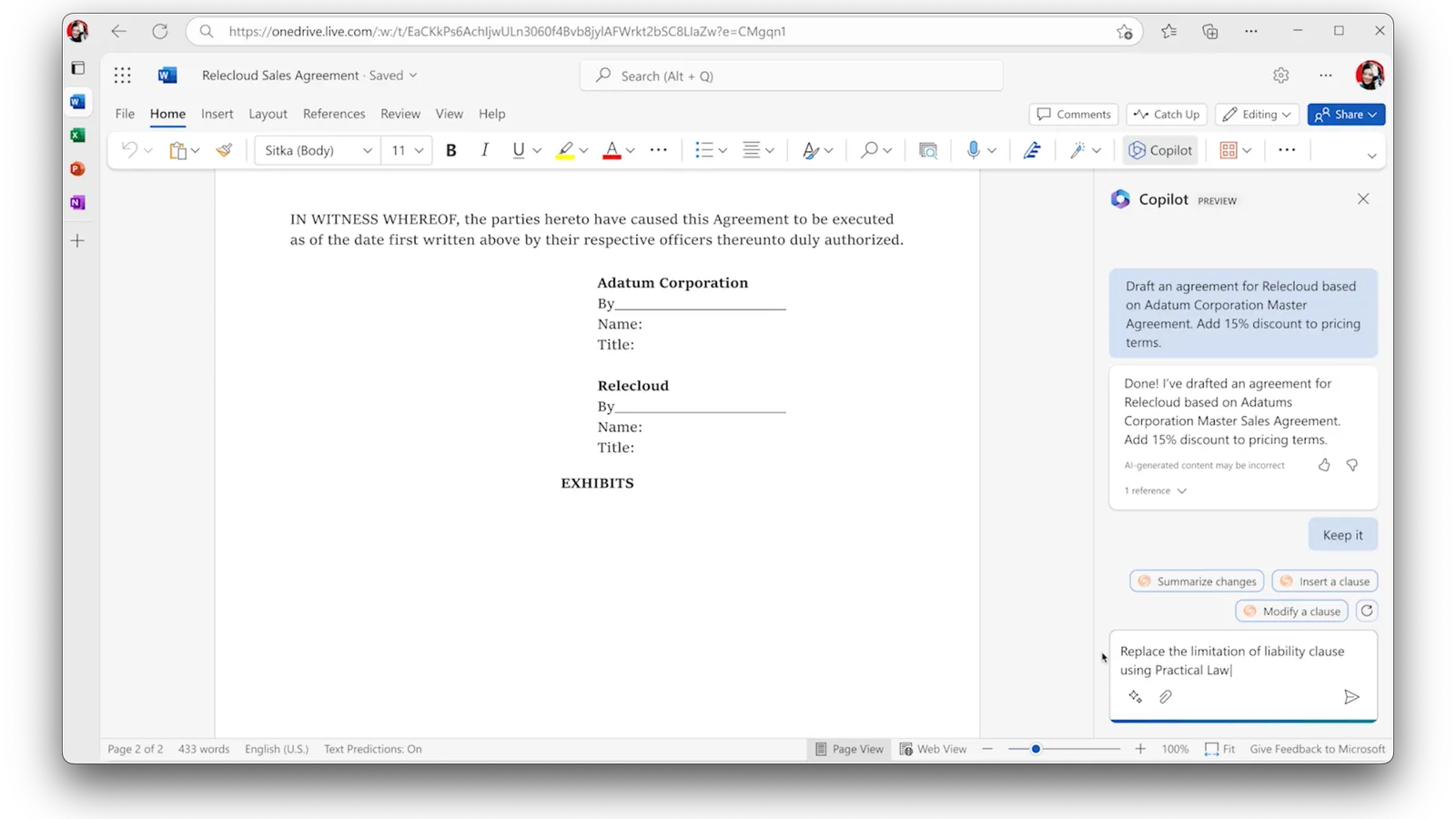
What Microsoft Copilot actually is
Microsoft Copilot is a general productivity assistant built into the apps you already use. It is not one product. It is a family that shares a name.
For lawyers, two versions matter. Microsoft 365 Copilot is the paid add-on that works inside Word, Excel, PowerPoint, Outlook, and Teams, and reads your organizational data through Microsoft Graph (Microsoft, checked June 2026). Copilot Chat is the web chat that runs on public web content. There is also a free consumer Copilot tied to a personal account, which is the wrong tool for client work.
The key word is productivity. Copilot is designed to help you write, summarize, and format faster. It is not designed to tell you what the law is.
What each version costs
Pricing trips people up because Copilot is sold as an add-on, not a standalone app. The paid tiers require a qualifying Microsoft 365 base license underneath them, so the seat you actually pay for is base plus Copilot.
| Version | What it is | Price (annual billing) |
|---|---|---|
| Consumer Copilot | Free chat tied to a personal account | Free (wrong tool for client data) |
| Microsoft 365 Copilot Chat | Web-grounded chat with a work account | Included at no extra cost with eligible Microsoft 365 plans |
| Microsoft 365 Copilot (Business add-on) | Copilot inside Word, Outlook, Excel, Teams, reading your files through Graph | ~$21/user/mo add-on; promo $18/user/mo through Sep 2026 |
| Business Standard / Premium with Copilot | Base Microsoft 365 bundled with Copilot | $23.50 / $32.00 per user/mo |
(Microsoft pricing page, checked July 2026.) The free Copilot Chat runs on the public web only. The paid tier is the one that reaches your documents, and it is the one that matters for legal work.
Where Copilot helps a legal workflow
These are the tasks where Copilot saves real time. In each one, you supply the substance and Copilot shapes it.
- Drafting from your own documents. Point Copilot in Word at a brief, a policy, or a contract you already have, and ask for a first draft or a rewrite. It grounds the draft in your file, not its memory.
- Summarizing email threads. Copilot in Outlook can summarize a long thread so you catch up in seconds. You are reading your own correspondence back, condensed.
- Recapping meetings. Copilot in Teams works off the meeting transcript to surface decisions, action items, and owners. It answers only from that transcript.
- Formatting and tone. Tighten a rambling memo, adjust tone for a client, or turn notes into prose. The legal content is already yours.
- Light spreadsheet work. Copilot in Excel suggests formulas and charts over data you provide.
Prompts that stay in this lane work well. A few that hold up:
- Word: "Draft a first-pass mutual NDA from the attached term sheet, then flag any clause the term sheet does not cover."
- Outlook: "Summarize this thread and list every open question the client still needs to answer."
- Teams: "From today's transcript, list the decisions, the action items, and who owns each."
- Excel: "Build a matter-budget table from this expense list and total it by phase."
Every one of those supplies the substance and asks Copilot for structure. None asks it what the law says.
The pattern is worth naming. Copilot is strong when the legal content comes from you, and it just handles the language and the structure.
What Microsoft added for legal work in 2026
Microsoft is not standing still. On April 8, 2026 it rolled out Word capabilities aimed at "legal, finance, and compliance professionals" (Artificial Lawyer, April 2026). Three of them close real drafting gaps:
- Track changes on demand. Copilot can now turn on track changes so its edits are visible and auditable by default, which matters when document integrity is the point.
- Contextual comments. It can add, read, reply to, and manage comment threads anchored to specific text, so a "needs legal sign-off" note lands where it belongs.
- Contract and due-diligence review in-document. Microsoft's own demo walked through building a due-diligence report: flagging unclear items in a risk-factors section, tagging them for legal review, and generating a summary of proposed changes and open questions.
Under the hood, these features run on a multi-model setup that mixes OpenAI and Anthropic's Claude models. Early access came through the Work IQ Frontier program on the Office Insiders beta channel, Windows first, with Mac to follow.
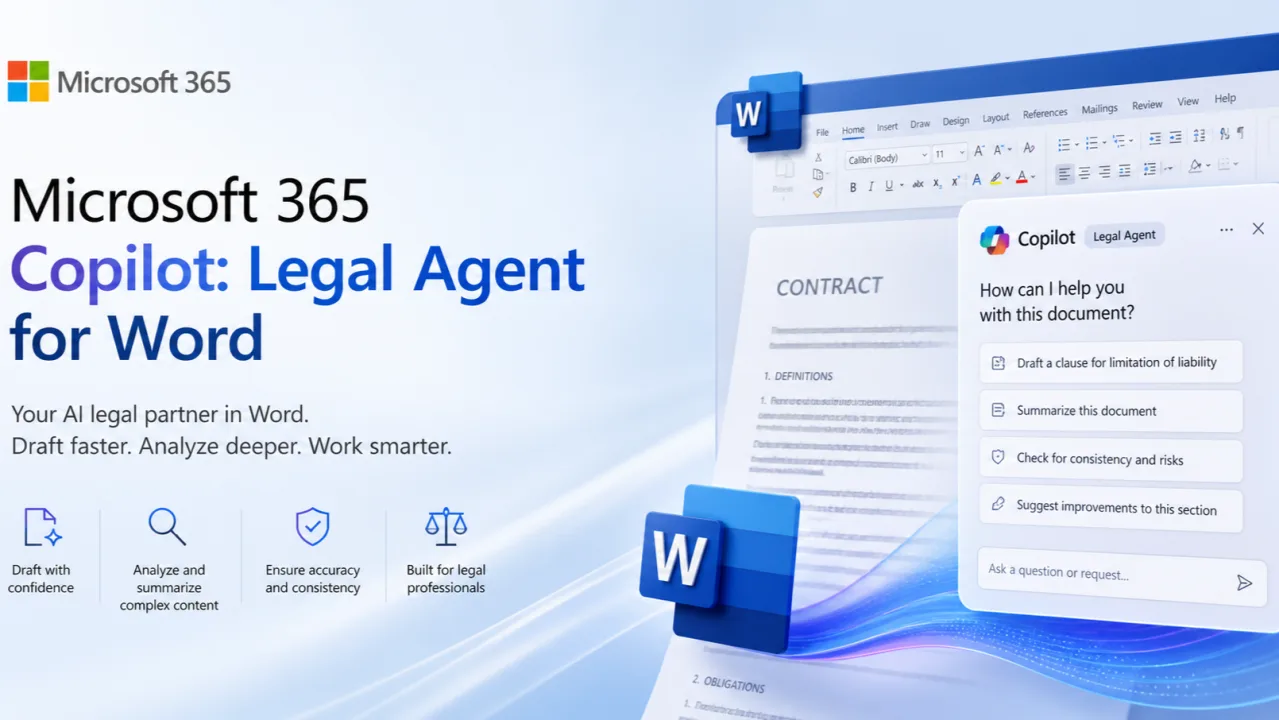
Read the capability list closely and the boundary has not moved. Track changes, comments, and review summaries are all productivity mechanics on a document you already have. None of them adds a verified law source. Copilot can now write a cleaner redline and a tidier due-diligence memo, and it still cannot tell you whether the clause it flagged is actually market or whether the rule it summarized is good law.
Where Copilot falls short for lawyers
The failures cluster around legal substance. That is exactly the work that ends up in front of a court or a client.
It does not research primary law
Microsoft 365 Copilot grounds answers in your own files and, for Copilot Chat, the public web (Microsoft, checked June 2026). Neither is a verified database of statutes and case law. Ask Copilot to find authority and it is not searching a law library. It is predicting plausible text or pulling from open web pages of uneven quality.
It can fabricate citations
A general assistant produces citation-shaped strings that look real. The case name reads right, the reporter cite is formatted correctly, and the case may not exist. This is the failure that keeps getting lawyers sanctioned, and Copilot is no more immune to it than any other general model.
The cautionary tale is Mata v. Avianca. In that case, lawyers filed a brief in the Southern District of New York with cases that ChatGPT had invented. Judge Castel sanctioned them under Rule 11 and fined them $5,000 (S.D.N.Y., June 2023). The cases looked real. None existed. The lesson is not about ChatGPT specifically. It applies to any ungrounded assistant, Copilot included, because the failure mode is shared. We keep a running list of these rulings in our AI hallucination sanctions tracker.
It blends jurisdictions
Copilot does not know whether you mean Delaware, California, or federal law unless you say so. Even then, a general model mixes rules across states and years. It will answer with confidence and not flag the ambiguity.
Its answers are not checkable at the source
When Copilot states a legal rule, there is often no underlying authority it retrieved. The claim is a prediction, not a lookup. So verifying means rebuilding the research from scratch, which is the step people skip under deadline.
It cannot run a contract playbook
The 2026 Word features help Copilot draft and comment, but negotiation work needs more than clean prose. Copilot cannot encode a firm's fallback positions, apply a consistent redline across a deal set, or run conditional logic like "if the liability cap exceeds one year of fees, swap in our standard cap." It has no sense of what counts as market for a given clause, and it cannot check a draft against your own precedent library. Legal-specific review tools build those rules into the software layer; a general assistant leaves that judgment entirely to you. For how far Copilot's own review actually goes, see can Copilot review a contract; for bulk redlining across a deal set, best legal redline software covers what a purpose-built tool does that Copilot does not.
Good fit vs poor fit
A quick map of legal tasks. The split is whether you supply the substance or ask Copilot to supply the law.
| Legal task | Fit | Why |
|---|---|---|
| Draft from a document you provide | Good | Grounded in your file, you own the content |
| Summarize an email thread or meeting | Good | Works off your own text or transcript |
| Reformat, tighten, or adjust tone | Good | Language work, no legal authority needed |
| Suggest Excel formulas over your data | Good | Productivity task on data you supply |
| Find case law or a controlling holding | Poor | No retrieval over verified opinions |
| State what the law is in a jurisdiction | Poor | Blends jurisdictions, no source to check |
| Produce citations for a brief | Poor | Can fabricate cites that look real |
| Confirm current statutory text | Poor | Not grounded in an authoritative code |
A note on confidentiality
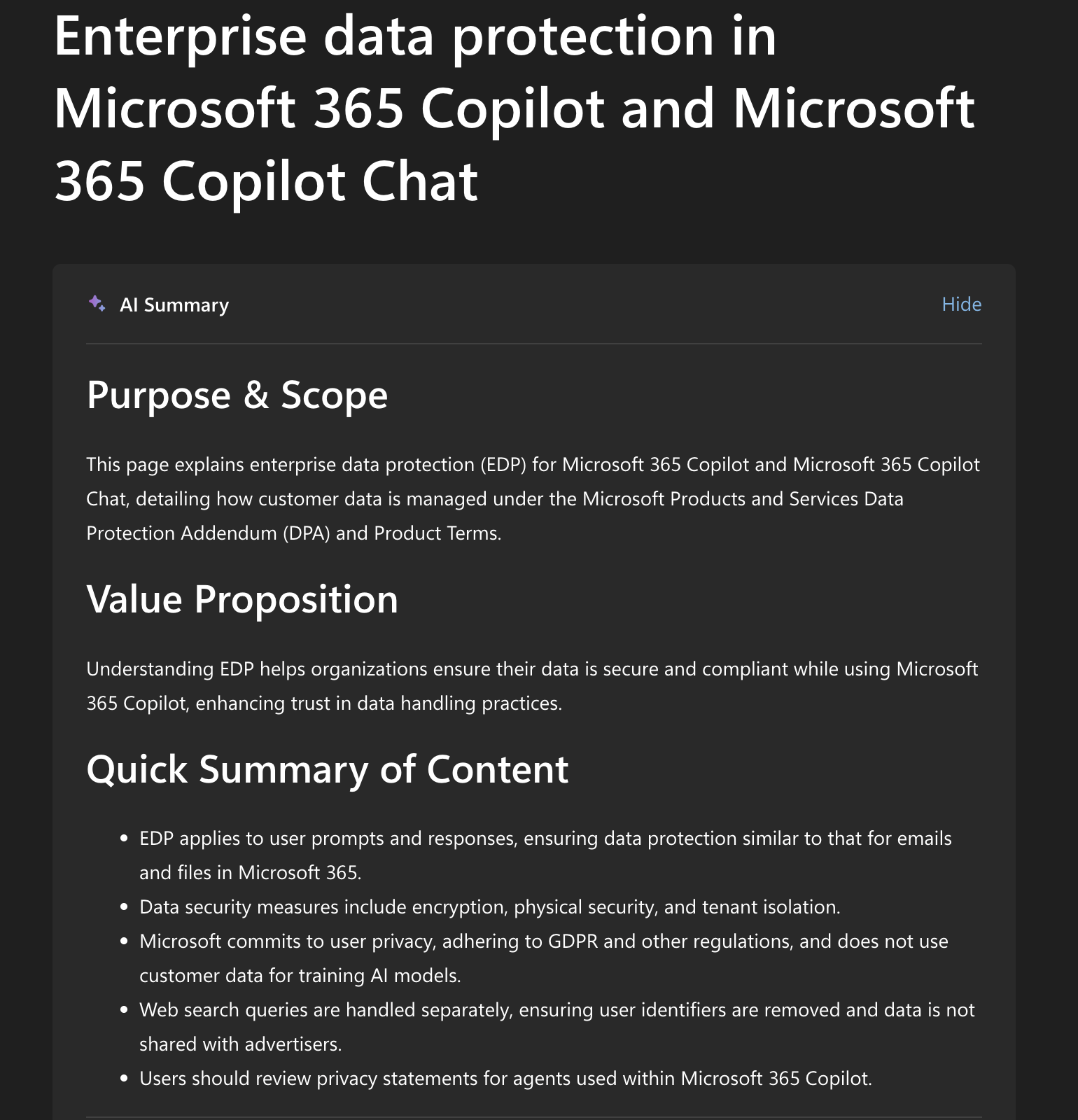
Whether you can paste a client matter into Copilot depends entirely on which version you are signed into. Consumer Copilot is not built for client-confidential work. Microsoft 365 Copilot and Copilot Chat carry Enterprise Data Protection, and Microsoft states that prompts, responses, and Microsoft Graph data are not used to train foundation models (Microsoft, checked June 2026).
That distinction decides your confidentiality duty, and it has enough moving parts to deserve its own page. Our privacy guide covers the consumer-versus-enterprise split, what Enterprise Data Protection does and does not promise, and how tenant configuration fits in. See is Microsoft Copilot private for legal work. Confirm your own tenant terms before pasting anything sensitive.
The permission-model trap
Here is the risk most lawyers miss. Microsoft 365 Copilot reaches your data through Microsoft Graph. It surfaces any document the user technically has permission to open (Microsoft, checked June 2026). That sounds safe. It is not, if your permissions are sloppy.
Most tenants have years of access sprawl. A shared SharePoint site that was never locked down. A Teams channel with broader membership than the matter warrants. Folders shared once and never revoked. Copilot does not know which of those a lawyer should use for a given matter. It only knows what the account can reach.
So a query like "summarize what we have on the Acme dispute" can reach the wrong files. It can pull a document from behind a screening wall. It can pull a draft that should not cross between matters. Copilot makes existing access faster to act on. It does not fix who has access.
The cluster of culprits is predictable:
- SharePoint sprawl. Old sites with open permissions become Copilot-readable overnight.
- Overbroad Teams membership. People left on channels surface those channels in Copilot answers.
- Missing Purview sensitivity labels. Without labels, Copilot cannot honor a confidentiality boundary it was never told about.
- Stale shared links. A one-time share stays live and feeds the index.
The takeaway is a sequence, not a setting. Run a permission cleanup before you roll Copilot out, not after. Tighten SharePoint and Teams access, apply Purview sensitivity labels to privileged and matter-specific content, and review what each role can actually reach. Microsoft's own rollout guidance points here, and for good reason. Copilot is only as careful as your permission model.
How to use Copilot safely as a lawyer
A short checklist keeps Copilot in its lane.
- Know your version. Confirm you are on Microsoft 365 Copilot with Enterprise Data Protection, not consumer Copilot, before any client data goes in.
- Feed it the substance. Give Copilot the documents and facts. Do not ask it to supply the law.
- Treat every cite as suspect. Assume any case or statute it names is unverified until you open the source yourself.
- Verify in a grounded tool. Check every legal proposition against primary law or a tool that retrieves real opinions and statutes.
- Mind your ethics duties. US lawyers carry duties of competence, confidentiality, and verification under ABA Formal Opinion 512. Those duties do not pause for AI.
- Own the output. You are responsible for every claim in the final document, no matter which tool helped write it.
How Copilot compares to other general assistants
Copilot, ChatGPT, and Claude share the same core trait. They are language models, strong at drafting and weak at legal authority. The version and data terms differ, but the lane is the same.
If your firm runs Microsoft 365, Copilot has a real edge for productivity. It sits inside Word and Outlook and reads your own files, so the drafting and summarizing flow is tight. For the broader picture of using general chatbots in legal work, see ChatGPT for lawyers and Claude for legal work. The verdict across all three is consistent. Use them for the document, not for the law.
Where a grounded legal tool fits
A general assistant and a grounded legal tool can look identical. Both are a text box. The difference is what happens before the answer appears.
A grounded tool retrieves real opinions and statutes, then answers on top of them with citations that link back. When it cites a section of the US Code, you click and read the actual text. The cite is a retrieval, not a guess. That makes verification a click instead of a research project.
So the honest division of labor for an in-house team:
- Microsoft Copilot: drafting from your documents, summarizing email and meetings, formatting, light data work.
- A grounded legal tool: anything that asserts what the law is and needs a citation a court can check, or confirming statutory text.
Vaquill AI sits on the grounded side. It is a legal AI suite for in-house counsel that retrieves over real US opinions and statutes, so each cite links back to a source you can open, and our open accuracy benchmark shows how much that grounding cuts wrong answers on recently changed law. One scope note. Our public API is statutes-only (US Code, CFR, and 50-state codes), while case-law research lives inside the product. For a fuller roundup of options, see best legal AI tools for in-house counsel. For the drafting side, our AI legal drafting guide walks through the workflow.
The handoff that works in practice
Theory aside, here is the path an in-house team can run today. Take a typical motion that started with a client call.
- Capture in Teams. Run the call or meeting in Teams so Copilot has a transcript to work from.
- Summarize with Copilot. Ask Copilot for the decisions, action items, and open questions from that transcript. It pulls from the meeting, not its memory.
- Draft in Word. Move to Word and have Copilot build a first draft from your summary and the documents you provide. The structure and prose come fast.
- Clean up as the attorney. Edit the draft yourself. Fix the framing, the facts, and the arguments. Copilot wrote the scaffolding, not the judgment.
- Check every legal proposition. Take each claim about what the law is into a grounded research tool. Pull the actual statute or opinion behind it.
- Open and verify each cite. Click through to the source for every citation. Read the holding. A cite you have not opened is a cite you cannot file.
- Then file. Only after each proposition traces to a source you opened.
Notice where Copilot stops and the grounded tool starts. Copilot owns steps two through four, the productivity work. The legal substance moves to a tool built to retrieve it. That handoff is the whole point.
Verdict
Microsoft Copilot is worth its seat for any legal team already inside Microsoft 365. It is a genuine productivity gain for drafting, summarizing, and formatting. The mistake is treating it as a legal research or citation tool. It is not one, and it will not warn you when it is guessing.
Use Copilot for the document and the email. Use a grounded legal tool for the law. Run both, with a clear handoff, and you get the speed without the sanctions risk.
FAQ
Can Microsoft Copilot do legal research? Not reliably. Copilot grounds answers in your own files and, for Copilot Chat, the public web. Neither is a verified database of statutes and case law. For research you can cite, use a grounded tool that retrieves real opinions and statutes, then verify the result.
Does Copilot hallucinate legal citations? Yes. Like any general model, Copilot can produce a case name and reporter cite that look correct for a case that does not exist. Treat every citation it gives you as unverified until you open the source.
Is Microsoft Copilot safe for client-confidential work? It depends on the version. Consumer Copilot is not built for client data. Microsoft 365 Copilot and Copilot Chat carry Enterprise Data Protection, and Microsoft states prompts and responses are not used to train foundation models. Confirm your tenant terms first, and see our privacy guide.
What is Copilot actually good at for lawyers? Drafting from documents you provide, summarizing email threads in Outlook, recapping meetings in Teams from the transcript, formatting, and light Excel work. In each case you supply the legal content and Copilot handles the language.
Is Microsoft 365 Copilot grounded in legal authority? No. It grounds responses in your organizational data through Microsoft Graph and, in chat, the public web. That is grounding in your own content, not in a verified law database. So its legal answers still need independent checking.
Should I use Copilot or a legal AI tool? Use both. Copilot for productivity inside Microsoft 365, a grounded legal tool for anything that has to state the law or cite it accurately. The split is whether the task needs a checkable source or just good prose.
How is Copilot different from ChatGPT or Claude for legal work? All three are general language models, strong at drafting and weak at legal authority. Copilot's edge is that it lives inside Microsoft 365 and reads your own files. The core limitation, no grounding in legal authority, is the same across all three.
Does Copilot know which jurisdiction my question is about? Not unless you tell it, and even then it blends rules across states and years. It will answer confidently without flagging the ambiguity, which is why jurisdiction-specific questions need a grounded legal tool.
How much does Microsoft Copilot cost for a law firm? Copilot Chat is included at no extra cost with eligible Microsoft 365 plans. The paid Microsoft 365 Copilot add-on that works inside Word and Outlook runs about $21 per user per month on annual billing, with a promo of $18 through September 2026, on top of a qualifying base license (Microsoft pricing page, checked July 2026). Consumer Copilot is free but is not built for client data.
What is the Copilot Legal Agent in Word? In April 2026 Microsoft added Word features for legal, finance, and compliance work: Copilot can turn on track changes, manage contextual comment threads, and build review summaries for tasks like due-diligence reports (Artificial Lawyer, April 2026). These help you draft and review faster, but they still do not add a verified law source, so citations and legal rules need independent checking.
New legal AI guides, weekly.
Further Reading
Can Microsoft Copilot Review a Contract?
Read postGoogle Gemini for Lawyers: What It Can and Cannot Do
Read postWhat Lawyers Want From Legal AI in 2026: A 534-Lawyer Study
Read postAI Medical Record Review for Lawyers: How It Works, What It Costs, and Where It Breaks
Read postIs Legal AI a Bubble? What the 2026 Market Data Says
Read postWhat Lawyers Really Think of Legal AI in 2026 (Reddit + Reviews)
Read post
Co-Founder & CEO · Attorney
Arshita leads product and strategy at Vaquill, building the legal AI suite that solo, small-firm, and in-house US lawyers use to run a matter end to end.