

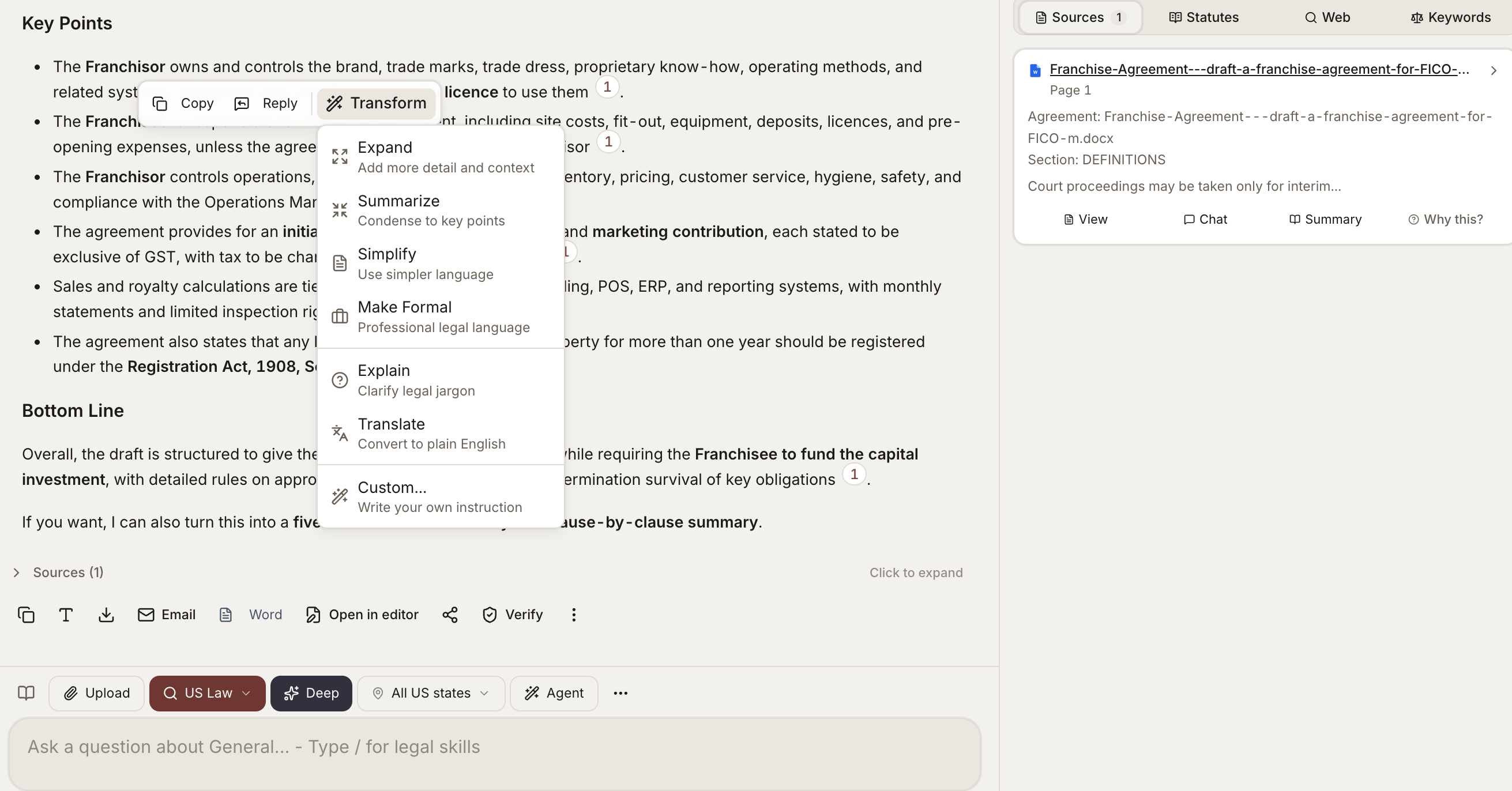
Asking a question on a document, with answer transforms and a sources panel
When To Use It
- Reading through an unfamiliar contract and asking targeted questions
- Reviewing a complaint and pulling out causes of action and key allegations
- Working through a long regulation and asking what applies to your client
- Cross-examining a deposition transcript for inconsistencies
- Anything where you would otherwise be skimming a long document for specific information
How To Use It
1
Upload or pick a document
Drop in a contract, complaint, regulation, or transcript - or select one already in your matter.
2
Open Document Analyst
Launch it from the tools menu, with the document scoped as the source.
3
Ask in plain English
Type a targeted question. Specific questions get tighter, better-cited answers than broad ones.
4
Click any citation
Jump straight to the highlighted passage in the source document to verify the answer.
Ready-to-run prompt
Document Analyst - extract the operative facts and obligations from any uploaded document.
What It Does Well
- Specific factual extraction - “What is the term of this lease?” “Who are the parties?” “What is the governing law?”
- Clause location - “Show me the indemnification clause” “Where does it talk about termination?”
- Comparison within a document - “Are the IP provisions consistent between Sections 5 and 12?”
- Plain-English summaries - “Summarize the key obligations of the licensee”
- Issue spotting - “What are the most aggressive provisions in this NDA?”
- Risk and exception calling - “Are there any unusual carve-outs or exceptions I should be aware of?”
What Each Answer Includes
- A plain-English response to your question
- The page numbers and section references that support it
- Direct quotes from the document where applicable
- A confidence indicator if the answer is hedged or based on inference
File Types
Document Analyst works on any uploaded document type, including:- Word, PDF, scanned PDF, image-only PDF
- Spreadsheets and presentations
- Emails and attachments
- Plain text and code files
Long Documents
For documents over a few hundred pages, the tool focuses retrieval on the most relevant sections rather than reading end-to-end every time. You can:- Ask the tool to summarize an entire section by name
- Pin a specific section as the focus before asking questions
- Run a follow-up question that scopes to “the previous section we discussed”
Tips
Related
Document Search
Search across every document in a matter at once.
Document Matrix
Same questions, many documents, returned in spreadsheet form.
Contract Review
Structured clause-level review with redlines and severity flags.