Describe what you need. Get a draft you can send.
Draft NDAs, MSAs, vendor agreements, and notices from a plain-English instruction or your own template. Jurisdiction-aware clauses, playbook enforcement, and a clean DOCX export.
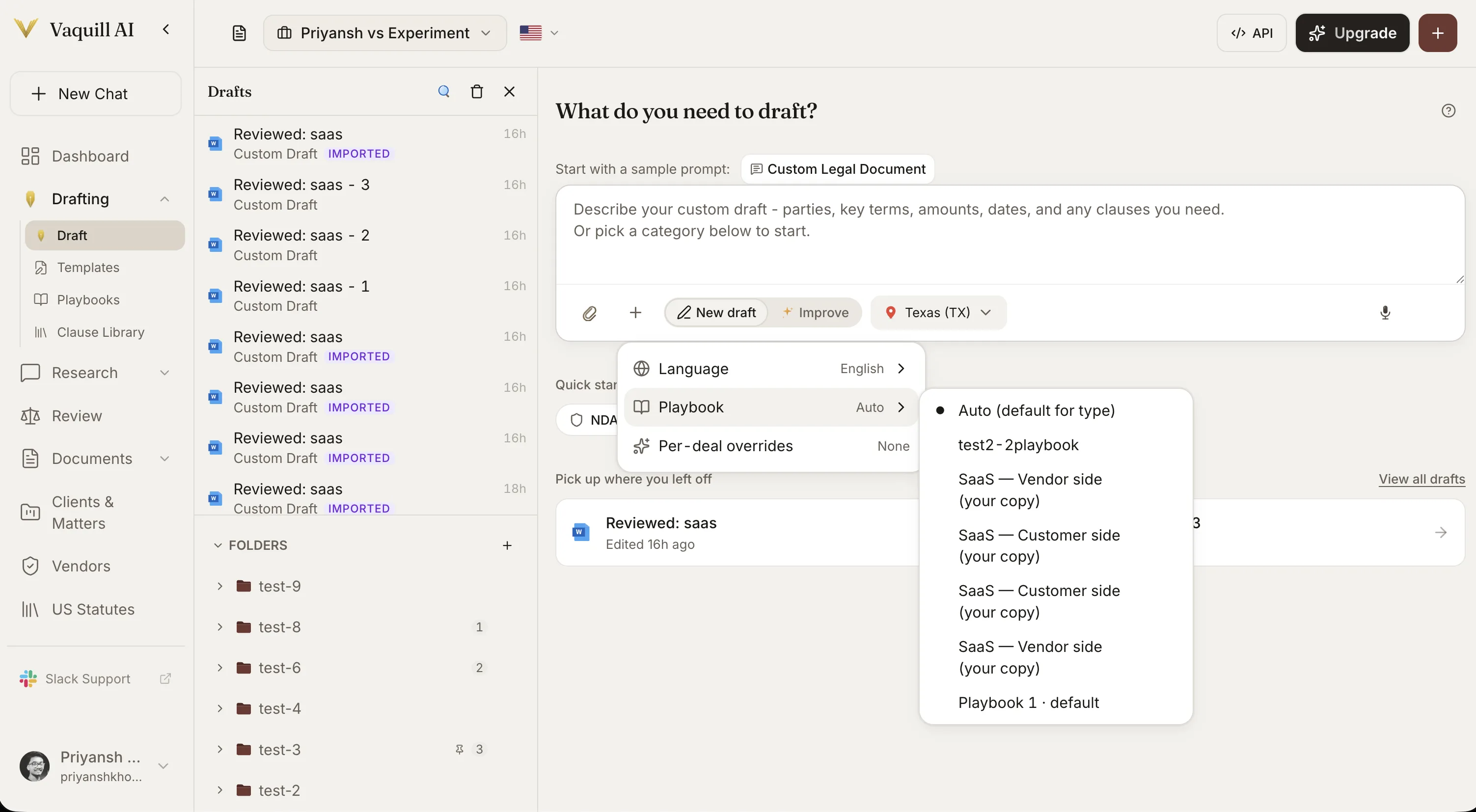
What You Get
Draft from your templates
Upload your team's NDAs, MSAs, and notices once. Every new draft starts from your paper, not generic boilerplate, with the variables you set carried through.
Plain-language drafting
Describe the document in a sentence or two, with parties, key terms, dates, and any clauses you want. Vaquill AI returns a structured first draft.
Jurisdiction-aware clauses
Set the governing state and Vaquill AI drafts with the right governing-law, notice, and formatting conventions for that jurisdiction.
Inline editing and refinement
Edit directly or ask for changes in plain English. Tighten a clause, add a carve-out, or change the tone until it reads the way you want.
Suggestions, comments, and redlines
Work the draft the way lawyers do: leave comments, suggest edits, and redline inline, all in one editor instead of round-tripping a Word file.
Real-time collaboration
Multiple people edit the same draft at once and every change syncs live, so your team stops emailing versions back and forth.
Mention teammates
Mention a colleague in a comment and they get an email, so the right person is pulled into the draft without anyone leaving it.
Share a draft by link
Turn a draft into a shareable link after you create it, open indefinitely or set to expire, for a reviewer who is not in the workspace.
Playbook enforcement
Generate against your playbook so every draft uses your preferred clause language and fallback positions, with per-section verdicts against your standard.
Clean export and resume
Export to a clean DOCX or PDF, or share a link. Drafts are saved per matter, so you pick up exactly where you left off.
How Document Drafting Works in Vaquill AI
Start from your templates, not a blank page
Upload your NDAs, MSAs, vendor agreements, and notices. Every draft starts from your paper.
- ✓Reuse your team's approved language instead of generic boilerplate.
- ✓Set variables once (parties, term, governing law) and carry them across drafts.
- ✓Or describe what you need in plain English when there is no template.
Drafting that respects your standards
Drafting connects to your playbooks so output follows your team standard by default.
- ✓Attach a playbook and the draft uses your preferred clause language.
- ✓Per-section verdicts show what is on-standard and what needs review.
- ✓Jurisdiction selection adjusts governing-law and notice conventions.
Draft together, in real time
A draft is a shared surface, not a file you email around. Your team works it together and the AI works alongside them.
- ✓Multiple people edit the same draft at once, with changes synced live.
- ✓Leave comments, suggest edits, and redline inline in one editor.
- ✓Mention a teammate in a comment and they get an email.
- ✓Share a public link to the draft, open indefinitely or set to expire.
Built into the matter
Every draft lives in the matter it belongs to, alongside research, documents, and comparisons.
- ✓Drafts are saved per matter and resume where you left off.
- ✓Compare a new draft against a prior version with one action.
- ✓Export to DOCX or PDF, or share by link.
How It Works
Get started in minutes, not weeks.
Describe or pick
Write a plain-English instruction, or choose a category like NDA, employment, or lease to start from a template.
Set the jurisdiction
Choose the governing state so clauses, governing-law, and notice conventions match where the document will be used.
Edit and collaborate
Adjust the draft inline or ask for changes in plain English. Bring your team in to co-edit, comment, and redline together, and mention a colleague to pull them in.
Export, share, and file
Export a clean DOCX or PDF, share a public link, or continue in Word. The draft stays attached to its matter.
Frequently Asked Questions
Can I draft from a plain-English instruction, or do I need a template?
Either. Describe the document in a sentence or two and Vaquill AI writes a structured first draft, or start from a template category like NDA, employment agreement, service agreement, or lease and shape it from there.
Does drafting account for the right state?
Yes. Set the governing state and Vaquill AI drafts with the governing-law, notice, and formatting conventions appropriate for that jurisdiction, across all 50 states. You remain responsible for final review.
Can I enforce my firm's clause standards?
Yes. Attach a playbook and every draft uses your preferred clause language and fallback positions, with a per-section read on where the draft sits against your standard.
Can my team work on a draft together?
Yes. Multiple people can edit the same draft at the same time, with every change synced live. You can leave comments, suggest edits, and redline inline in one editor, so there is no emailing versions back and forth.
Can I mention a colleague on a draft?
Yes. Mention a teammate in a comment and they get an email, so the right person is pulled into the draft without leaving it.
Can I share a draft with someone outside the workspace?
Yes. After you create a draft you can turn it into a shareable link, open indefinitely or set to expire, for a reviewer who is not in your workspace.
What can I export?
Export a clean DOCX or PDF, or share a link. The DOCX opens in Word so you can keep editing where opposing counsel will work.
Do my drafts stay organized?
Drafts are saved per matter and resume exactly where you left off, so a half-finished notice or agreement is always one click away.
Is my drafting data used to train AI models?
No. Vaquill AI does not train on your documents, prompts, or outputs unless you request it in writing. Data is encrypted in transit and at rest, hosted in the US, and tenant-isolated. See /security for the full posture.
Stop starting from a blank page
Describe the document, pick a jurisdiction, and get a draft you can file. Drafting lives inside Vaquill AI, next to your research, matters, and redlines.