Every matter, vendor, and document in one place
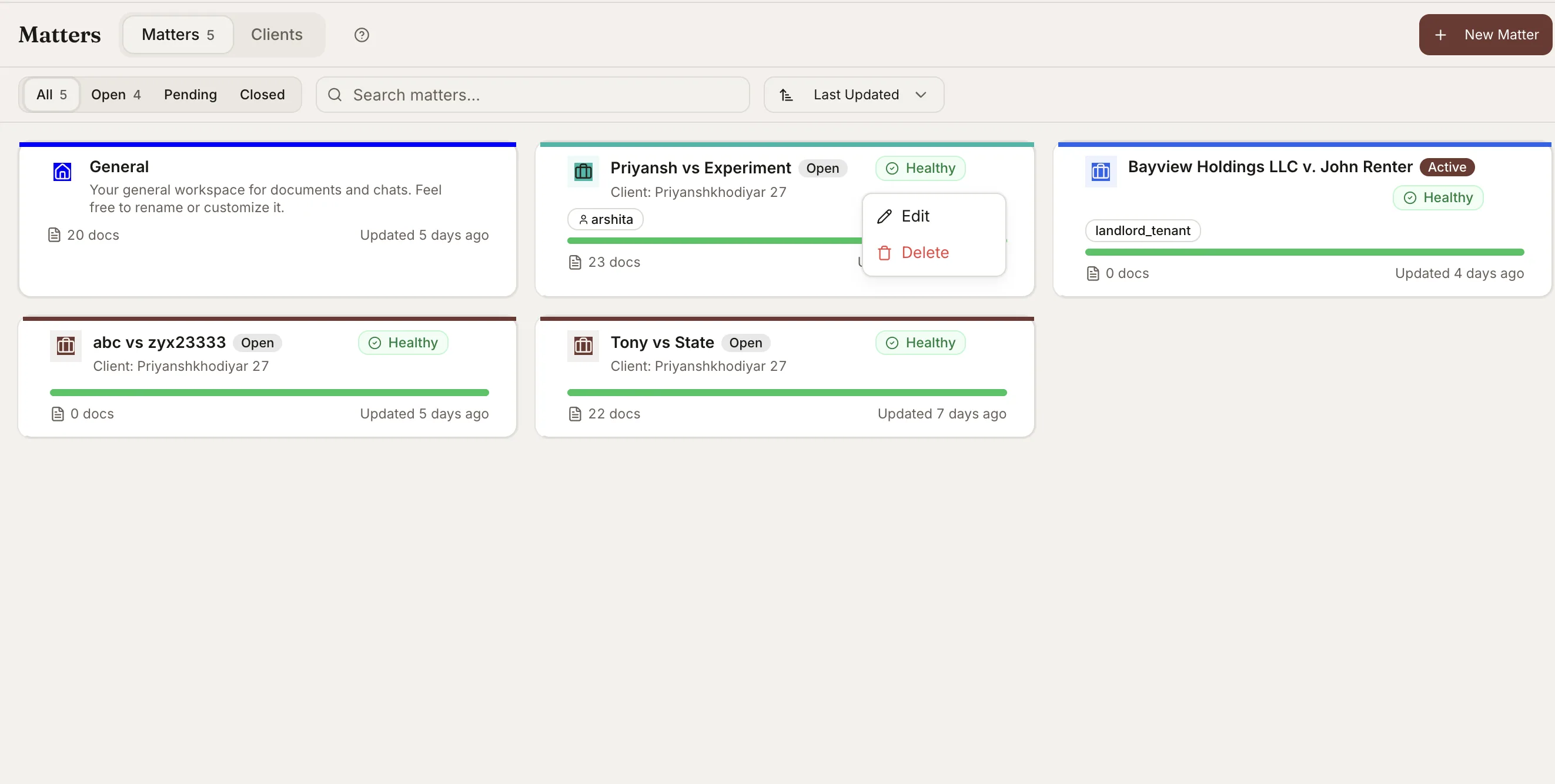
Run every vendor, matter, and document set from its own workspace. Research, drafts, comparisons, and case files attach to the matter they belong to, with thousands of documents supported per matter.
What You Get
Workspaces organized by matter
Every client and matter is its own workspace. Research, drafts, comparisons, and documents attach to the matter they belong to.
Verifiable facts, categorized
Vaquill AI extracts the facts from a matter and sorts them into key facts, parties, amounts, obligations, and conflicts. Click any fact to open the exact line in the source document it came from.
Document and matter summaries
Get a summary of any single document, or a detailed summary of the whole matter, so you can walk into a file cold and be current in minutes.
Deadlines and a matter timeline
Track deadlines per matter, and see a timeline that includes extracted events and the chats run against the matter.
Client and matter metadata
Associate each matter with its client and store matter and client metadata, so status, ownership, and context stay in one place.
Metadata-aware AI
Research and chat know the matter and client behind your question, so answers use that context instead of starting from zero.
Upload, email, or Drive intake
Drag and drop 50+ file formats, import from Google Drive, or forward a document to the matter's own email address and it files itself into the right matter.
Chat one document or many
Chat with a single document, or scope a chat across several at once, and draft, compare, or run a matrix without leaving the matter.
Thousands of documents per matter
Bring an entire case file or vendor portfolio into a matter, kept searchable and chat-ready.
How Matters & Workspaces Works in Vaquill AI
A workspace per matter
Each matter holds everything related to it, so context never gets lost between tools.
- ✓Research, drafts, comparisons, and uploads attach to the matter.
- ✓Status and document counts show where every matter stands.
- ✓Search and chat are scoped to the matter you are in.
Build the file as work comes in
A matter should fill itself. Intake stays current without manual filing.
- ✓Drag and drop 50+ file formats, or import from Google Drive.
- ✓Every matter has its own email address. Forward a document or note and it files itself into that matter.
- ✓Thousands of documents per matter, kept searchable and chat-ready.
Facts and summaries you can verify
The matter reads itself so you do not have to. Every fact traces back to its source.
- ✓Facts sorted into key facts, parties, amounts, obligations, and conflicts.
- ✓Click any fact to open the exact line in the document it came from.
- ✓Per-document summaries plus a detailed summary of the whole matter.
- ✓Deadlines and a timeline that includes the chats run against the matter.
Context-aware research
The AI works inside the matter, not blind to it. It knows the client and the file behind your question.
- ✓Matter and client metadata are stored and used as context.
- ✓Chat with one document or scope a chat across several at once.
- ✓Draft, compare, and run a matrix without leaving the matter.
Built for teams
Matters are shared workspaces, so your team can collaborate without emailing files around.
- ✓Per-seat access with role-based permissions.
- ✓Matter-level access so the right people see the right work.
- ✓Drafts and research are shareable with co-counsel.
How It Works
Get started in minutes, not weeks.
Create a matter
Spin up a workspace for a client matter, or use your general workspace for ad hoc work.
Bring in documents
Upload the case file, import from Google Drive, or forward documents to the matter's own email address. Vaquill AI keeps 50+ formats searchable.
Work the matter
Chat with the documents, draft, compare versions, build a chronology, and run a matrix, all in one place.
Track and collaborate
Watch status across your matters and share drafts and research with co-counsel under role-based access.
Frequently Asked Questions
How are matters organized in Vaquill AI?
Each matter is its own workspace. Research threads, drafts, comparisons, and documents attach to the matter they belong to, so everything for a client lives in one place.
How many documents can a matter hold?
Thousands of documents per matter. Vaquill AI keeps large case files searchable and ready to chat with, without re-uploading.
Can I get documents into a matter by email?
Yes. Every matter has its own unique email address. Forward a document or note to it and it files itself into that matter. You can also drag and drop 50+ file formats or import from Google Drive.
Can I verify where a fact came from?
Yes. Vaquill AI extracts a matter's facts and sorts them into key facts, parties, amounts, obligations, and conflicts. Click any fact to open the exact line in the source document it came from, so nothing is taken on trust.
Does Vaquill AI summarize a matter?
Yes. You can get a summary of any single document, or a detailed summary of the entire matter, so you can pick up an unfamiliar file and be current in minutes.
Does the AI know which client and matter I am working in?
Yes. Each matter can be associated with its client, and matter and client metadata are stored and used as context. Research and chat use that context, so answers are aware of the file behind your question.
Can I track deadlines and a timeline for a matter?
Yes. Matters track deadlines, and the timeline includes both events extracted from the documents and the chats run against the matter, with source attribution.
Can my team share a matter?
Yes. Matters are shared workspaces with per-seat, role-based access (Owner, Admin, Member, Viewer) and matter-level permissions, so the right people see the right work.
Is my matter data kept private?
Yes. Data is encrypted in transit and at rest, hosted in the US, and strictly tenant-isolated with row-level security. Vaquill AI never trains on your data unless you request it in writing. See /security.
Run every matter from one workspace
Keep clients, matters, and documents together, with research and drafts attached where they belong. No more hunting across folders, inboxes, and tools.