AI that gets better the more you use it
Memories lets Vaquill AI learn your jurisdiction, practice area, citation preferences, and research context across sessions. No manual setup - it learns from your conversations and silently personalizes every response.
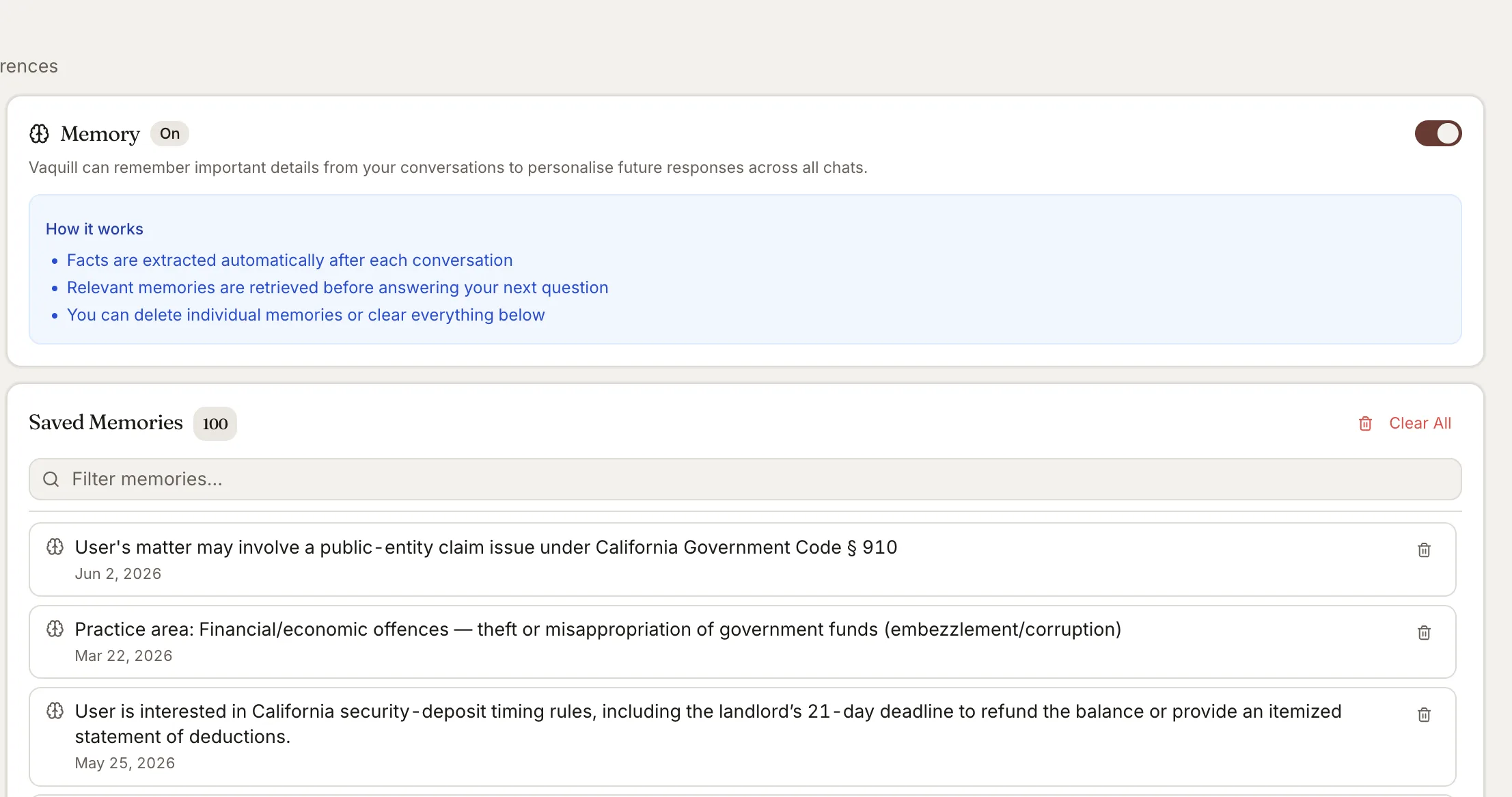
What You Get
Automatic preference extraction
Vaquill AI analyzes your conversations and automatically extracts noteworthy facts - your jurisdiction focus, practice areas, citation format preferences, and ongoing research topics.
Silent personalization
Before each question, relevant memories are retrieved via semantic search and silently injected into the AI context. Vaquill AI never says "I remember you" - it just gives better answers.
Jurisdiction and practice area
Remembers which country, state, and courts you work with most. Practice areas like criminal, civil, corporate, IP, or family law are tracked to tailor research and analysis.
Citation preferences
Learns whether you prefer Bluebook, Westlaw, official reporters, or other citation formats and uses them consistently across responses.
Professional context
Captures your role (lawyer, judge, student, in-house counsel), firm name, and language preference to adapt tone and depth.
Full privacy controls
Memories are fully opt-in (disabled by default), per-user isolated, and deletable. Delete individual memories or clear everything at once from your settings.
How Memories Works in Vaquill AI
How Memories work
The memory system operates in the background - no manual saving or configuration required.
- ✓You chat normally - no save button or explicit memory commands
- ✓The AI analyzes exchanges and extracts noteworthy facts automatically
- ✓Before your next question, relevant memories are retrieved via semantic search
- ✓Memories are silently injected into context for better, personalized answers
What gets remembered
Memories capture preferences and context that improve future research quality.
- ✓Jurisdiction focus: country, state, specific courts you work with
- ✓Practice areas: criminal, civil, corporate, IP, family, and more
- ✓Citation preferences: Bluebook, Westlaw, official reporter format choices
- ✓Professional context: role, firm name, language preference
Privacy and control
Complete transparency and control over what Vaquill AI remembers about you.
- ✓Disabled by default - you must explicitly opt in
- ✓Per-user isolation: your memories are never shared
- ✓Delete individual memories or clear all at once
- ✓Graceful degradation: if the memory system is down, everything still works
How It Works
Get started in minutes, not weeks.
Enable Memories
Go to Settings and toggle Memories on. It is disabled by default for privacy.
Chat normally
Ask legal questions, upload documents, run analyses. Vaquill AI observes your preferences in the background.
AI learns your context
Jurisdiction, practice area, citation preferences, and research topics are automatically extracted and stored.
Get personalized results
Future responses are silently tailored to your preferences - right jurisdiction, right citation format, right depth.
Frequently Asked Questions
Is Memories enabled by default?
No. Memories is fully opt-in and disabled by default. You must explicitly enable it in Settings.
What does Vaquill AI remember about me?
Jurisdiction focus, practice areas, citation format preferences, ongoing research topics, professional context (role, firm name), and language preference.
Can I delete my memories?
Yes. You can delete individual memories or clear all memories at once from your Settings page.
Are my memories shared with other users?
No. Memories are strictly per-user isolated. Your preferences and context are never visible to other users, even within the same organization.
How many memories can Vaquill AI store?
Up to 1,000 memories per user. Each query uses at most 5 relevant memories within a 500-token context budget.
Does Vaquill AI tell me when it uses a memory?
No. Memories are silently applied - Vaquill AI never says "I remember you." It just gives better, more contextual answers based on your preferences.
Try AI personalized to your practice
Enable Memories and let Vaquill AI learn your jurisdiction, practice area, and citation preferences.