Research the law with precision, not guesswork
Ground board memos, compliance opinions, and deal questions in real authority. Search millions of US opinions, the US Code, CFR, and all 52 state and territory codes, with every citation 4-layer verified.
What You Get
AI + Boolean Search
Ask legal questions in plain English or use boolean operators. Filter by court, date, bench size, and jurisdiction to narrow results fast.
Citation Mapping
Trace a judgment forward to later cases that relied on it, or backward to its foundational authorities, through a full citation network.
4-Layer Answer Verification
Every answer passes source retrieval, relevance scoring, citation verification, and hallucination detection, with supporting case references inline.
Full Court Coverage
Opinions from SCOTUS, all 50 state courts, circuit courts, federal agencies, and administrative tribunals, updated as new opinions publish.
50+ File Format Support
Upload contracts, petitions, affidavits, or memos and the AI surfaces case law tied to the specific clauses and arguments in your document.
Intent-aware search
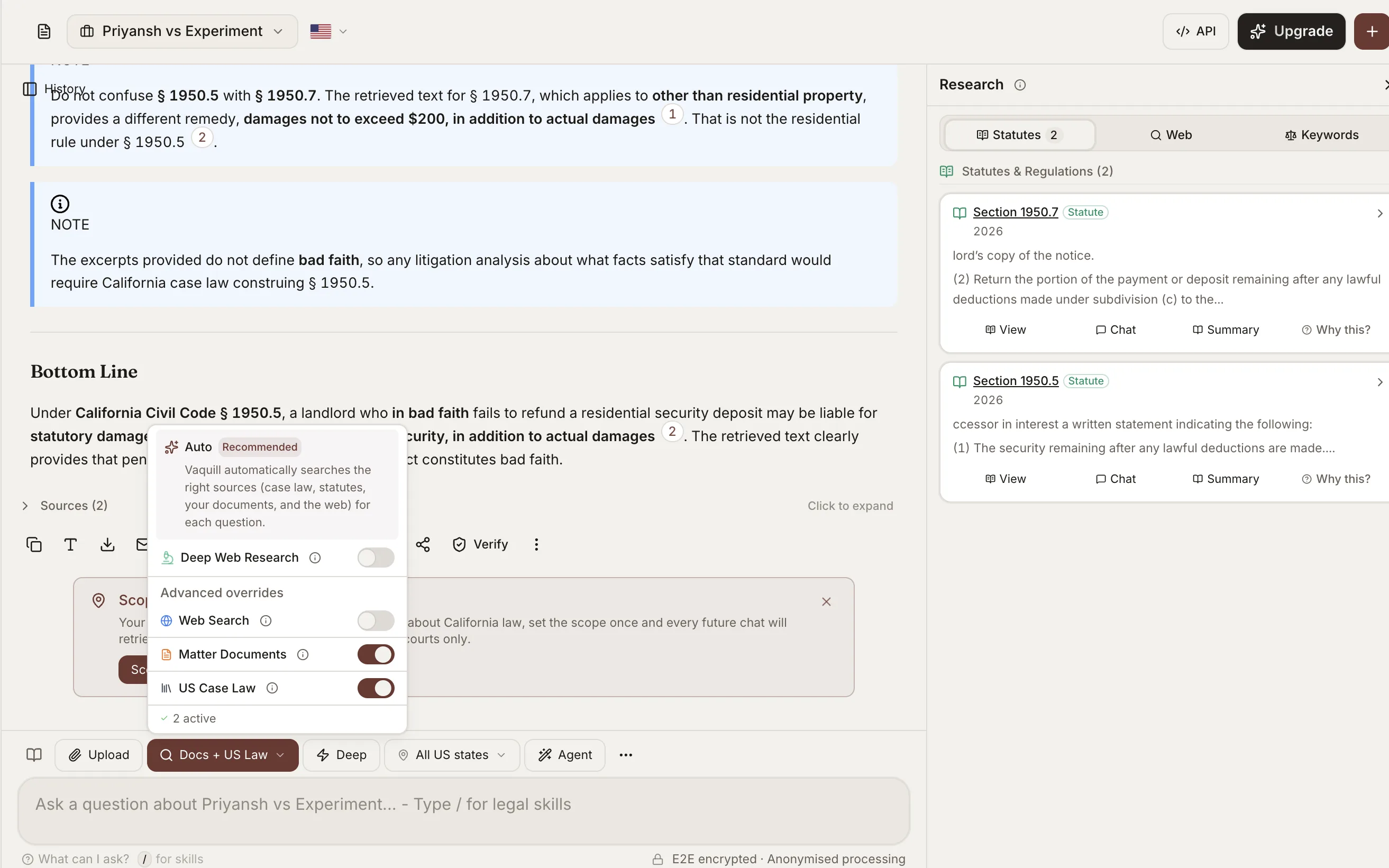
The chat detects what you are actually asking for and routes it: a research question searches case law and statutes, a "summarize this" or "proofread this" runs on your text without a needless search, and it can reach the web and your own documents in the app when they help.
Mention documents in the composer
Chain multiple documents into one question by mentioning them by name in the composer, so the answer works across exactly the set of files you pick.
Generate documents on request
Ask the chat to generate a file and it produces one you can open and edit, from a memo to a clause to a full draft.
Share and thread conversations
Turn any conversation into a shareable link, open indefinitely or set to expire after a few days, and branch a conversation into threads you can continue separately, Slack-style.
One-click handoff to the right tool
When your ask fits a tool, the chat offers a button to open it: compare two versions, build a matrix across documents, run a review, draft a document, or open a workflow, playbook, or the matter summary.
How AI Legal Research Works in Vaquill AI
Accurate research backed by real citations
Every answer is grounded in actual opinions from the indexed database, with inline citations you can click through.
- ✓Each answer lists the exact case name, court, date, and paragraph reference
- ✓Hallucination detection flags any claim that lacks a verifiable source
- ✓Relevance scoring ranks cited cases by how closely they match your query
Built for how lawyers actually work
Bluebook references, administrative tribunal orders, opinions other platforms miss.
- ✓Covers orders from federal agencies and administrative courts
- ✓Resolves Westlaw, Bluebook, and PACER citation formats automatically
- ✓Search works across opinions from all indexed courts
One chat that runs the whole suite
The main composer is the control surface. Ask a question, and the chat routes it, pulls the right sources, and hands the task off to the tool that finishes it.
- ✓Mention several documents by name to scope a question across exactly those files
- ✓Say "compare these" or "review this" and get a one-click button into the matrix, comparison, review, or drafting tool
- ✓Ask it to generate a document and it produces a file you can open and edit
- ✓Share a conversation by link, or split it into threads you continue separately
No setup, no friction
Sign up and start researching immediately. No demo call, no sales process.
- ✓Instant access on signup with a 7-day free trial, no credit card required
- ✓Runs entirely in the browser, no install
- ✓API access for teams that want to integrate search into their own tools
How It Works
Get started in minutes, not weeks.
Ask your legal question
Type a question in plain English, mention specific documents by name to scope it, or use boolean operators and filters. The chat detects your intent and routes the question to the right sources.
Review cited answers
Vaquill AI returns an AI-generated answer with inline citations to specific opinions. Each citation links to the full text of the case.
Explore the citation network
Click any cited case to see its own citation map: which cases it relies on and which later opinions have cited it.
Export and use in your work
Copy answers with citations, download case PDFs, or export your research session. Use the results directly when drafting briefs, client advisories, deal memos, board updates, or opinion letters.
Frequently Asked Questions
How many cases does Vaquill AI cover?
Vaquill AI indexes 8M+ opinions from SCOTUS, all 50 state courts, circuit courts, and major administrative tribunals. New opinions are added regularly.
Is the AI search accurate?
Every AI-generated answer passes through a 4-layer verification process: source retrieval, relevance scoring, citation verification, and hallucination detection. Answers include inline citations so you can verify each claim against the original opinion.
Can I use boolean search alongside AI search?
Yes. You can combine natural language questions with boolean operators (AND, OR, NOT) and apply filters for court, date range, bench size, and jurisdiction. This lets you run both broad exploratory queries and narrow targeted searches.
What file formats can I upload for document analysis?
Vaquill AI supports 50+ file formats including PDF, DOCX, TXT, RTF, and scanned images. You can upload contracts, petitions, or legal memos, and the AI will identify relevant case law tied to specific clauses and arguments in your document.
Can the chat search my own documents and the web, not just case law?
Yes. The chat detects the intent behind your question and routes it. A research question searches case law and statutes; a request to summarize or edit your text runs on that text directly; and it can reach the web and the documents you have in the app when they help answer.
Can I mention specific documents in a question?
Yes. In the composer you can mention multiple documents by name to chain them into one question, so the answer is scoped to exactly the files you pick rather than everything at once.
Can the chat generate a document for me?
Yes. Ask it to generate a file, such as a memo, a clause, or a draft, and it produces a document you can open and edit.
Can I share or thread a conversation?
Yes. You can turn any conversation into a shareable link, open indefinitely or set to expire after a few days. You can also branch a conversation into threads and continue each one separately, similar to Slack threads.
Can I run other tools from the chat?
Yes. When your question fits a tool, the chat hands it off with a one-click button: compare two versions, build a matrix across documents, run a review, draft a document, or open a workflow, playbook, or the matter summary. The main composer controls the whole suite.
Do I need a credit card to start?
No. You can sign up and start researching immediately with a 7-day free trial, no credit card required. There is no demo call and no sales process.
Is there API access for teams?
Yes. Vaquill AI offers a public statutes API covering the US Code, the CFR, and all 52 state and territory codes, with full-text search and section retrieval billed by API credits, documented at vaquill.ai/docs. AI legal answers and case-law research run inside the product and through the Vaquill MCP server for Claude, Cursor, and VS Code, rather than as separate REST endpoints.
Does AI legal research hallucinate fake cases?
It can, which is exactly why verification matters. General chatbots like ChatGPT invent citations that look real. Vaquill AI runs every answer through 4-layer verification (source retrieval, relevance scoring, citation checking, and hallucination detection) and grounds each claim in a real, linked opinion, so you are checking a cite rather than trusting a guess.
Can AI legal research replace Westlaw or LexisNexis?
For a growing share of everyday research it can, at a fraction of the price. Vaquill AI searches 8M+ US opinions plus the US Code, CFR, and all 52 state and territory codes with cited, verified answers, and starts at a transparent, self-serve per-seat price with published pricing. Teams with deep litigation-analytics needs may keep a premium seat, but many in-house lawyers run Vaquill as their primary research tool.
How much does Vaquill AI legal research cost?
Vaquill AI is priced per seat, billed transparently with no seat minimum and a 7-day free trial that needs no credit card and no sales call. Legal research, statutes, drafting, and contract review are all included in the one seat.
Does it cover statutes and state law, not just case law?
Yes. Beyond 8M+ court opinions, Vaquill AI covers the full US Code, the CFR, and all 52 state and territory codes, with amendment and regulatory tracking. You can research a statute, the regulation under it, and the cases interpreting them in one place.
Start researching case law now
Search millions of US federal and state court opinions with AI-powered answers, citation mapping, and 4-layer verification. Free to start.