
A legal AI suite intake to filing workflow is what you actually buy when you stop buying point tools. A new client matter walks in at 9 a.m. Monday. By 5 p.m. Friday, a brief is filed.
Ten years ago that week lived in a Westlaw tab, a Word document, two folders on a shared drive, four PDFs in Outlook, a yellow legal pad, and the lawyer's head. In 2026 the interesting thing is not that any single piece got an AI bolted onto it. It is that the whole week now lives inside one workbench, with the matter as the persistent object every step touches.
Here is what a full intake-to-filing run looks like when matter state actually persists across the week: one workspace, intake creates a matter, every document and every research run gets scoped to it, and Friday's filing draws from the same verified context Monday's intake captured. The unit of work is the file, not the query.
How a legal matter flows, short version: a request comes in (intake), it gets sized and assigned (triage), the lawyer does the work (research, chronology, redline, matrix), the work gets checked (review and cite-check), and the matter is filed and closed with an audit trail. A real legal AI suite keeps all five stages tied to one persistent matter so context never has to be re-supplied. The walkthrough below runs those five stages on one commercial dispute, Monday 9 a.m. to Friday 5 p.m.
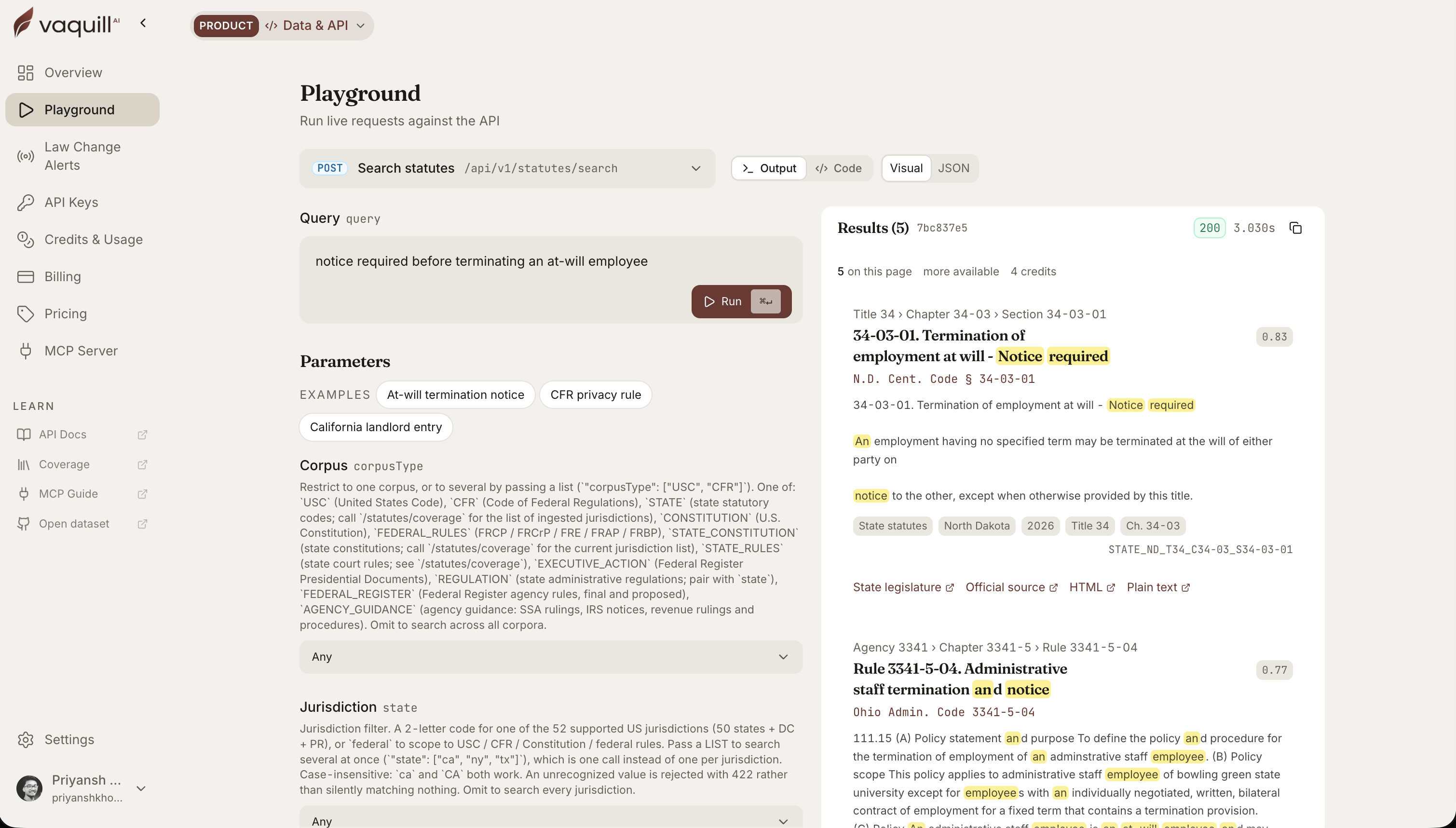 The same corpus behind this article, queried live. Every result carries its citation and a link to the official source.
TL;DR
- The unit of work in modern practice is the matter, not the question. A real legal AI suite holds documents, research, chronology, redlines, matrix, and draft inside one persistent matter context for the life of the file.
- Monday 9 a.m. through Friday 5 p.m., one commercial dispute, one tool: intake, grounded research, chronology, redline comparison with a tracked-changes DOCX, document matrix across a portfolio, drafting against verified citations, cite-check, file.
- Realistic time budget: about 6 hours of human work compressed out of a week of grind. The savings come from the matter holding state between sessions, not from any single feature being magic.
- Every step happens in the same workspace, tied to the same matter, with an audit log preserving the trail. That is the suite shape solo, small-firm, and in-house lawyers are buying.
Across the anonymized commercial-dispute walkthrough, how much total human time was logged from Monday intake to Friday filing?
Part of our legal AI vendor comparison and pricing series.
The five stages of a legal matter workflow
Every matter management vendor names roughly the same lifecycle. The labels vary, the shape does not: a request arrives, it gets sized, the work happens, the work gets checked, and the file closes. Here is the matter lifecycle from intake to filing, mapped to the AI step at each stage and the human gate that has to sign off before the matter advances.
| Stage | What happens | AI does | Human gate | Time on this matter |
|---|---|---|---|---|
| 1. Intake | Client forwards engagement letter, contract, summary; matter created | Scopes the folder as the grounding boundary | Lawyer names and frames the matter | ~3 min |
| 2. Triage | Size the dispute, set the legal question, decide the work plan | Drafts the issue from the contract in the folder | Lawyer confirms the question and approach | ~30 min |
| 3. Work | Grounded research, chronology, redline, document matrix | Retrieves opinions, builds the timeline, diffs the redline, extracts the matrix | Lawyer corrects dates, reorders events, trusts cited cells | ~3.5 hr |
| 4. Review | Cite-check every authority; verify change summaries | Flags wrong-jurisdiction and missing pin cites | Lawyer swaps weak cites, fixes pin cites | ~20 min |
| 5. File and close | Filing-ready brief, partner sign-off, audit log preserved | Drafts against verified context | Partner reviews, lawyer files | ~3 hr drafting + review |
The rest of this post runs each stage on one real matter so you can see where AI carries the load and where the lawyer has to stay in the loop.
Legal AI suite intake to filing workflow, in one anonymized matter
The case below is a commercial dispute I walked through with a small-firm partner in May. Names are stripped, the contract type generalized, the hours and timestamps actual.
The partner runs 30 to 40 contract matters a year solo and was an early skeptic of matter-scoped tooling; she has since become the loudest internal voice for it.
Across the run, total human time logged was 6.2 hours against a manual baseline of 22 to 26 associate hours her firm had budgeted the prior year for a similar matter, roughly a 70 to 75 percent compression. Index latency on the document corpus stayed under 8 seconds per query; one re-index event triggered when an opposing-counsel DOCX replaced a prior draft.
9:00 a.m. Monday: intake
The client is a regional medical device distributor. She forwards the engagement letter, the underlying supply agreement, and a two-paragraph email summary: the manufacturer is threatening to terminate for an alleged breach of an exclusivity clause; she thinks the clause was waived by a course of conduct over the last eighteen months.
Three minutes of work. The lawyer creates a new matter, associates it with the client, and gets the documents in. She could drag them in, import them from Google Drive, or just forward the email straight to the matter's own address, which files the attachments into that matter automatically. The distributor's engagement letter, supply agreement, and note are in.
By the time she looks up, the matter has already read itself. The facts are extracted and sorted into key facts, parties, amounts, obligations, and conflicts, and she can click any one to see the exact line it came from. There is a per-document summary of the supply agreement and a summary of the whole matter, so a colleague picking this up on Thursday starts current instead of cold.
The matter is now the durable object: every research run, chronology, draft, and redline for the rest of the week will be scoped to it, and the AI is aware of the client and matter metadata behind each question. The folder is not where documents rest. It is the boundary that tells the model what to ground itself in for every later step.
A general chat box has no idea, at 2 p.m. Thursday, that the question being asked belongs to the matter the lawyer was working on Monday. A matter-scoped system knows the supply agreement, the engagement letter, the email, and everything added later are the universe of context for this file.
The wider argument for why folders are the unit of grounding is in the matter-folder workspace post; take it as given that the folder is the prompt.
For related vendor / pricing / buyer-guide coverage, see The Small-Firm Legal Tech Stack That Actually Works in 2026 and Legal AI Tools for Solo Practitioners: 7 Picks That Fit a One-Person Firm.
9:30 a.m. Monday: triage
Before any research runs, the lawyer sizes the matter. Triage is the stage in-house and small-firm teams most often skip, and the one that decides whether the rest of the week stays on rails. Three calls get made here: how urgent (termination threat, so high), how complex (single waiver question under Delaware law, so moderate), and who owns it (her, solo, no handoff).
In a larger team this is where skills-based routing and conflict checks happen. Solo, it is a five-minute decision, but it still produces the work plan the rest of the week follows: research the waiver question first, build the chronology second, handle whatever opposing counsel sends, then draft. The mechanics of intake plus triage for a one-person legal function are in the matter intake and triage workflow post.
11:00 a.m. Monday: first research pass
After two read-throughs, the lawyer has the question. Under the governing law clause (Delaware), does eighteen months of the manufacturer accepting orders from a non-exclusive sub-distributor amount to a waiver of the exclusivity provision, given the no-oral-modification clause in section 14?
In a general chatbot, that question gets an abstract answer about Delaware contract law and waiver doctrine, useful for a 1L outline, not for a brief.
In a matter workspace, the same question runs against the contract already in the folder. The research tool surfaces real Delaware Supreme Court and Chancery opinions on waiver where a no-oral-modification clause exists, every citation opens to the actual opinion, and the answer ties back to specific sections of this supply agreement.
The capability is grounded retrieval against a real opinion corpus, with millions of US federal and state court opinions queryable (8M+ opinions), not a model hallucinating from training memory. Matter scoping makes the answer load-bearing instead of generic.
The lawyer saves the memo into the folder; it will still be there Wednesday with the citations open-able. About 45 minutes elapsed, most of it reading opinions, not waiting on the tool.
A subtle point worth naming: matter-scoped retrieval is not free. It implies a per-matter index (embeddings of folder documents in a vector store keyed to the matter), a verification step that maps cited paragraphs back to source pages, and re-indexing on document change.
Deliverable: one citation-verified memo, four Delaware opinions on point, all in the matter.
Tuesday morning: building the chronology
The waiver argument is sequence-dependent. It matters when the sub-distributor started taking orders, when the manufacturer first acknowledged the arrangement in writing, every invoice or shipping confirmation afterward, and whether the manufacturer ever objected.
Source material: forty-three emails, twelve invoices, and a few months of order acknowledgements the client forwarded overnight.
A chronology builder reads across the full matter (now sixty-plus documents) and assembles a dated timeline: every order, acknowledgement, shipment, and objection from the manufacturer, with a citation back to the source.
The lawyer reviews and corrects. Two events get reordered because the model used the email timestamp where she wants the order date in the body. One row gets flagged and split because two events were collapsed into one. Total time: roughly 90 minutes, against most of a billable day by hand.
The deliverable is a dated chronology that lives in the matter, not a one-shot chat answer. It is the spine the brief will run along Friday and is open-able Thursday to fact-check a date.
The mechanics of where AI helps and where human gates land are in the PI demand letter chronology post. The model assembles, the lawyer verifies.
Wednesday: opposing counsel sends a redline
By Wednesday afternoon, the manufacturer's counsel has sent a proposed amendment and a narrative letter, both as Word documents, both purporting to clarify "the parties' actual ongoing course of dealing." There are 412 tracked changes across the contract redline alone.
The associate's instinct is to print both versions, sit down with a highlighter, and burn three hours catching every move. Or worse, to skim, miss a quiet definitional change buried in section 9, and have it surface as a problem six weeks later.
A document comparison tool produces a tracked-changes DOCX and, separately, a substantive change summary that flags what matters: which edits are stylistic, which clarify ambiguous language, which materially shift risk.
In this matter, the summary surfaces three substantive moves opposing counsel buried in cosmetic edits: a quiet narrowing of the exclusivity definition in section 2, a new mutual waiver of past breaches in section 9 (which would moot the client's main argument), and a force majeure carve-out that did not exist before.
The lawyer opens the DOCX, sees the tracked changes, and trusts the summary because it cites the paragraphs.
Time: about 40 minutes including verification, against half a day by hand. The DOCX opens cleanly in Word and goes to the client without further formatting.
A challenge worth flagging: opposing counsel sometimes sends the redline as a flat document with tracked changes already accepted, so there is no Word-native redline. The comparison feature has to handle that case by reconstructing the diff against the version of record in the matter folder. If the tool cannot do that, every redline becomes a manual exercise.
Thursday: portfolio review across twelve contracts
The waiver argument needs context. The client has signed similar supply agreements with eleven other manufacturers; the lawyer wants to know whether the disputed exclusivity language is a one-off or matches the client's standard playbook. The client's office manager uploads the other eleven contracts into the matter overnight.
This is where single-document chat hits a wall. The lawyer does not need a conversation with each of twelve contracts. She needs structured fields extracted across all of them at once: governing law, exclusivity language, term, termination triggers, indemnity caps, choice of forum, no-oral-modification clauses.
A document matrix runs the extraction in one pass and produces twelve rows by seven columns, each cell linked back to the source paragraph.
Time: 25 minutes of extraction plus 35 minutes for the lawyer to scan and spot-check, against a full associate-day of contract reading. Surfaced surprise: two contracts have conflicting indemnity caps (one capped at 12 months of fees, one uncapped), and one of those two contains an exclusivity clause that was successfully enforced against the client three years ago in a different dispute.
That last data point is potentially adverse, and exactly what the lawyer would not have surfaced in time if she had been reading contracts in sequence on Friday morning.
The matrix lives in the matter as a saved object. The lawyer adds notes about the conflicting caps, flags the adverse exclusivity precedent for follow-up, and moves on. The deeper case for structured output per matter is in the document matrix post.
Friday morning: drafting against verified citations
By 9 a.m. Friday, everything the brief needs is in the matter: a verified chronology, a memo with four Delaware opinions, a tracked-changes redline and summary, a matrix across the client's other contracts, the supply agreement, and the engagement letter.
Drafting grounded in matter context operates against a bounded universe: this client, this dispute, this chronology, these citations, this contract language. It produces a first draft that quotes the supply agreement correctly, uses the chronology dates correctly, and cites the four Delaware cases correctly (because they were verified Monday).
The lawyer is editing on Friday morning, not writing from a blank cursor.
The cite-check pass earns its keep here. Every citation gets verified against the source opinion: that it exists, that it stands for what the brief says, that the jurisdiction is right, that the pin cite is real. The wrong-jurisdiction failure (a real opinion from the wrong state slides through) is sneakier than the fake-case mode but just as fatal.
The pass takes about 20 minutes and surfaces one citation needing a pin cite fix and one the lawyer wants to swap for a stronger post-2020 Chancery opinion. The sanctions stakes, with the Mata v. Avianca trail behind them, are in the hallucinations-and-sanctions post.
Total drafting and cite-check time: about 3 hours from first draft to filing-ready brief. Everything lives in the matter and is available to the partner when she reviews at 3 p.m.
5 p.m. Friday: filed.
What the week looked like in hours
Roughly six hours of the lawyer's attention across the week, against a manual baseline of two to three days of associate time and at least one anxious weekend.
The savings are not concentrated in any single AI feature. The chronology builder did not save the week; the matrix did not save the week; the cite-check did not save the week.
What saved the week is that no step required the lawyer to re-supply matter context, re-upload documents to a different tab, or re-explain the dispute to a chatbot that had no idea who the client was on Tuesday.
Every step happened in the same workspace, tied to the same matter. The audit log preserves every research run, document touched, chronology revision, and draft version.
If the client asks in October "what was the basis for the waiver argument," the answer is one click in, not a forensic reconstruction across five tools.
The data-governance layer nobody talks about until discovery
One piece of this week most product marketing skips, and it gets called out in malpractice review. When every research run, chronology, redline, and draft lives inside the matter, you need clean answers to who owns the data, what happens on offboarding, whether the firm can export the file in a usable format, how long model prompt logs are retained, and whether the audit log is immutable.
Concrete specs to ask for, not vague plumbing: per-matter export as a zipped folder containing source documents (originals plus latest revisions), DOCX outputs, a JSON metadata file with the full audit log, and signed citation snapshots (the cited paragraph plus opinion URL plus a timestamp) so you can prove later what the cited authority actually said on the day you cited it.
A reasonable SLA target is citation verification under 5 seconds per cite and vector-store refresh within 60 seconds of a document mutation. None of this is glamorous; all of it matters the day opposing counsel issues a discovery request on your own work product.
The pattern, and what it means for buying
The structural claim is small: the unit of legal work is the matter, and a tool wins by holding the matter as persistent state across every capability the lawyer needs that week. Grounded research, chronology, comparison, matrix, drafting, verification, audit. All scoped to one file, all surviving session to session.
At a blended $300-per-hour rate, compressing roughly 24 associate hours into 6 saves about $5,400 on a single matter. Treat that as illustrative, not promised, but the math is what makes the per-seat pricing arguments resolve. The tool does not need to be cheap if matter throughput is what changes.
That is what solo lawyers, small firms, and in-house teams are buying when they buy a suite. It is also where the incumbents are racing as the model layer commoditizes underneath them.
Thomson Reuters, which acquired Casetext in 2023, now positions CoCounsel around grounding agent work in "the client and matter context, the applicable playbooks, and the firm's knowledge and standards." LawVu launched its AI offering as a "workspace" rather than an "assistant." The naming has changed because the architecture has changed.
When you evaluate a tool in this category, the question is not "does it answer well." Most vendors layer the same LLM providers (OpenAI, Anthropic, Google) over proprietary indexing, so answer quality is converging.
The real evaluation question is how each vendor implements grounding, citation verification, and re-indexing on document change, and whether Friday afternoon's brief draws from Monday morning's intake without you carrying the context in your head.
The workflow-orchestration view of chaining these capabilities is in the multi-step automation post.
FAQ
What are the stages of a legal matter workflow? Five: intake (create the matter, capture documents), triage (size it, assign it, set the legal question), work (research, chronology, redline, document matrix), review (cite-check and verify), and file and close (filing-ready output plus an audit trail). Vendors label these differently, but the shape is the same across in-house and small-firm practice.
What is the matter lifecycle from intake to filing? It is the path a single file takes from the moment a request lands to the day a brief is filed or the matter is closed. The lifecycle tracks the matter as one persistent object, so the research, timeline, and drafts created early in the week are still scoped to the same file when you draft at the end of it.
How does a legal matter flow through a legal team? A request enters through intake, gets prioritized and assigned in triage, moves into execution where the substantive work happens, passes a review and verification gate, then closes with documents archived and a record kept. In a matter-scoped tool, each step grounds itself in the same folder instead of starting from a blank prompt.
Where does AI fit in the matter workflow, and where does the human stay in the loop? AI carries retrieval, timeline assembly, redline diffing, matrix extraction, and a first draft. The human gates are the load-bearing ones: confirming the legal question at triage, correcting chronology dates, trusting a change summary only because it cites paragraphs, and cite-checking every authority before filing. The tool assembles; the lawyer verifies.
How long does a full intake-to-filing matter take with AI? In the worked example here, about 6.2 hours of human attention across a week, against a manual baseline of 22 to 26 associate hours the firm had budgeted for a similar matter. Treat that as one documented case, not a guarantee; the savings come from the matter holding state between sessions, not from any single feature.
What is the difference between matter management and matter workflow? Matter management is the system of record (status, documents, spend, reporting across a portfolio). Matter workflow is the sequence of steps one matter moves through inside that system. The matter management explainer covers the system side; this post covers the per-matter sequence.
How do I choose a tool that handles the whole workflow? Run the buying test: does Friday's brief draw from Monday's intake without you re-supplying context? Ask how the vendor implements grounding, citation verification, and re-indexing on document change. The matter management software buyer's guide compares options against those criteria.
We build Vaquill AI, a matter-scoped legal AI suite that holds research, chronology, redlines, document matrix, and drafting inside one persistent matter. If you want to see whether Friday's brief really draws from Monday's intake, walk a matter through the workflow.
New legal AI guides, weekly.
Further Reading
- Legal AI Tools for Solo Practitioners: 7 Picks That Fit a One-Person Firm
- Personal Injury AI in 2026: What It Actually Does for Plaintiff Lawyers
- 7 Ways AI Helps Personal Injury Lawyers Win Cases Faster
- AI for Family Law Firms: A Workflow Playbook for Intake, Discovery, Filings
- AI for Family Law: How Solo and Small-Firm Family Lawyers Use It
- AI for Criminal Defense: Research, Timelines, Evidence Review

Product & Content
The US primary law data API: statutes, regulations, constitutions, court rules, executive orders and agency guidance across 53 US jurisdictions, each section cited and linked to its official source, via REST, MCP or SQL.