
An NDA triage AI reads an inbound non-disclosure agreement, compares each clause against your playbook, flags the deviations, and drafts the redline, in about a minute instead of the 30 to 60 a manual review takes. That is the whole job. To automate NDA review well you need three pieces working together: a playbook the model can read, a structured output it produces every time, and a track-changes file a lawyer can approve.
NDA review is the canonical "show me what your AI can actually do" demo in legal AI. Every vendor pitches it, every buyer evaluates it, and the marketing makes them all sound identical.
The reality is that there are two or three distinct things called "NDA triage" by different vendors, and the price difference between them is roughly 20x.
Earlier this year, an r/legaltech user posted the system prompt for a popular NDA Analysis Agent, reverse-engineered from a Harvey-class tool. The thread is small (14 comments) but the prompt itself is revealing: it shows exactly what the platform is doing under the hood.
Stripped of the vendor lock-in and the polished UI, NDA triage is an ~800-word system prompt, a structured output schema, and a foundation model call.
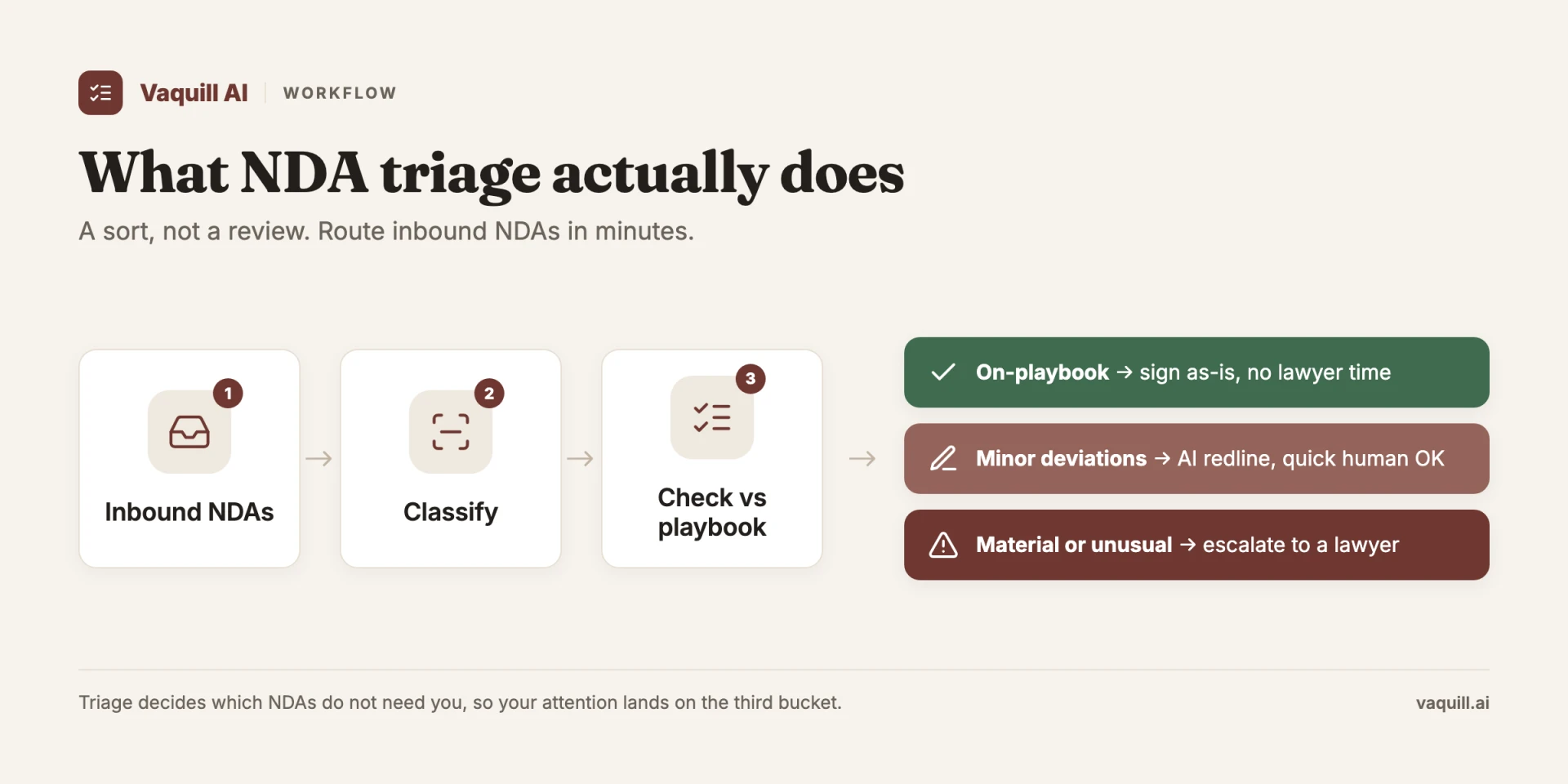
Triage is a sort, not a review: most NDAs never need a lawyer's attention.
TL;DR
- Most "NDA triage AI" you see in 2026 is Level 1 (completeness check) or Level 1.5 dressed up as Level 2. A useful evaluation focuses on playbook ingestion, redlining in Word, audit trail, and reproducibility, not the demo polish.
- A leaked NDA analysis prompt confirms the prompt itself is roughly 800 words. The moat is structured playbook ingestion, track-changes output in Word, DMS integration, and a stable model version, not the prompt.
- The price band runs $0 to $1,200+ per seat for roughly the same surface job. Per-NDA math matters more than per-seat math for most small-firm volumes.
- Bring three real NDAs and your playbook to the demo. If the vendor cannot ingest your playbook in the session, the product is a Level 1 tool wearing Level 2 marketing.
What separates a Level 2 tool from a Level 1 tool?
Part of our document tools, redline, and matrix guide series.
For related document-tools coverage, see What Is NDA Triage? How Lawyers Sort Inbound NDAs in Minutes With AI and How to Build an NDA Playbook Your AI Can Actually Enforce, and which built-in legal AI skill to run for each task.
This post walks through what that prompt actually does, what good NDA triage requires beyond a clever prompt, the difference between the $20-per-seat tools and the $1,200-per-seat tools, and the eight questions to put to any vendor before signing.
The three things called "NDA triage" in 2026
| Level | What it does | Output | Typical price | What you actually need |
|---|---|---|---|---|
| 1 | Completeness check against generic clauses | Checklist | $0 to $20 / seat | A prompt and a model |
| 2 | Playbook compliance with your firm's preferred positions | Tracked-change redlines | $99 to $400 / seat | Structured playbook ingestion + Word integration |
| 3 | Risk-adjusted negotiation strategy with counterparty modeling | Redlines + negotiation order | $400 to $1,200+ / seat | Level 2 + deal context + audit trail |
When a vendor says "our AI does NDA review," they mean one of three increasingly capable workflows.
Level 1: Completeness check. The AI reads the NDA and tells you which standard clauses are present, missing, or unusual. Standard clauses include: definition of confidential information, permitted use scope, exclusions from confidentiality (publicly known, independently developed, etc.), term and survival, return/destruction obligations, remedies (injunction, attorney fees), jurisdiction and governing law.
The output is a checklist. A competent paralegal with a template does the same thing in 10 minutes.
This is what most consumer-grade tools (ChatGPT with the right prompt, a Spellbook free tier, etc.) do. Useful, but the bar is low.
Level 2: Playbook compliance. The AI compares the NDA against your firm's negotiating playbook and flags every clause that deviates from your preferred position. The playbook is a structured document defining acceptable ranges for each negotiable term: term length (e.g., "1 to 3 years is acceptable, 5+ requires partner approval"), exclusions ("must include independent development carveout"), choice of law ("Delaware or New York preferred"), etc.
The AI's output is a redlined version of the NDA with proposed counter-edits.
This is where the work actually lives. A useful Level 2 tool requires you (or the vendor) to ingest your firm's playbook in a structured format. Most vendors call this "configuration" and it is the difference between a $20-per-month tool and a $200-per-month tool.
Level 3: Risk-adjusted negotiation strategy. The AI does Level 2 plus reasons about the counterparty's likely position, the deal context, and the negotiation leverage. "This NDA was drafted by a Fortune 500 buyer who typically does not negotiate term length. Push on the IP carveout instead; that is where they usually concede."
The output includes a recommended negotiation order and predicted concession path.
This is where Harvey, Legora, and the higher-end CoCounsel workflows are. Harvey runs $1,200 to $2,000+ per user per month and Legora $300 to $800, both for unlimited AI usage as a bundle with per-feature add-ons, both with a pay-as-you-go, credit-based metered model as well.
The marketing claims Level 3 capability at that price. The actual product is often closer to Level 2 with a polish layer.
If you are evaluating a vendor and they show you Level 1 in the demo, ask to see Level 2 with your actual playbook. If they cannot ingest your playbook, the tool is a Level 1 tool wearing Level 2 marketing.
The triage sort: three lanes every inbound NDA lands in
The three levels above describe how capable a tool is. This is a different axis: what the tool actually does with each NDA once it reads one. Triage is a routing decision. Every inbound agreement lands in one of three lanes, and the whole point is to keep as many as possible out of a lawyer's inbox.
| Lane | Criteria | Who touches it | Turnaround |
|---|---|---|---|
| Auto-approve | Mutual NDA, standard terms, zero deviations from playbook | Nobody. Signed same day | Minutes |
| Counsel review | Non-standard but not dangerous: unusual forum, modified CI definition, term slightly over range | One lawyer, light pass on the flagged clauses only | Same day |
| Full review | Material risk: broad IP assignment, uncapped liability, embedded non-compete, perpetual survival on all CI | Senior counsel, full read | 1 to 3 days |
A team that receives 10 to 50 NDAs a month (the common range for a growing company) can push the majority into the top two lanes. The lawyer stops reading clean mutual NDAs at all and spends attention only on the handful that carry real exposure.
The batch output is the tell of a real triage tool. Point it at the eight NDAs that came in this week and it should hand back a segmented list: counts per lane, then each agreement with its company name, lane, and the specific deviation that put it there. If the output is one long undifferentiated summary per document, the tool is reviewing, not triaging.
How AI NDA review actually works, step by step
Strip the branding off any NDA triage AI and the pipeline is the same five stages. Vendors differ on how well they do each one, not on the shape.
- Parse. The PDF or Word file is converted to clean, machine-readable text. Scanned NDAs go through OCR first. Bad parsing is where most "the AI missed a clause" failures start, because a clause it never read is a clause it cannot flag.
- Extract clauses. The model isolates each provision by category: definition of confidential information, permitted use, exclusions, term and survival, return or destruction, remedies, governing law, and any non-solicit or residuals language hiding in the back.
- Apply the playbook. Each extracted clause is checked against your preferred position. This is the playbook-as-prompt step, and it is the part that turns a generic summarizer into a tool that reviews NDAs the way your firm does.
- Detect deviations and score. Clauses that fall outside your acceptable range get flagged with a severity (and, in a good tool, a confidence score and a source quote so you can verify the flag).
- Draft the redline. The flagged clauses come back as tracked-change edits in the original Word file, plus a short summary. A Level 1 tool stops at a list; a Level 2 tool produces the redline.
A third-party NDA agent can run all five stages and return a redline in about 60 seconds, against the 45 to 60 minutes a manual first pass takes (V7 Go, accessed June 2026). Gavel reports in-house teams reviewing NDAs in under five minutes with playbook-driven redlines (Gavel, accessed June 2026). Treat those as vendor figures, useful for the order of magnitude, not as a benchmark you should accept untested.
Playbook-as-prompt: the part that does the work
The playbook is just your firm's positions written so a model can act on them. You can keep it in markdown, YAML, or plain prose. A usable entry names the term, the acceptable range, and what happens outside it:
Term length: 1 to 3 years acceptable. 5+ years requires partner sign-off.
Exclusions: Must include "independently developed" carveout.
Governing law: Delaware or New York preferred. Reject exclusive foreign forums.
Liability cap: No uncapped indemnity for ordinary confidentiality breach.
Non-solicit: Out of scope for an NDA. Flag and strike.
Feed that to the model alongside the NDA and the deviation detection step has something concrete to measure against. Without it, the tool can only tell you what a generic NDA usually contains, which is Level 1. The full method is in How to Build an NDA Playbook Your AI Can Actually Enforce.
A worked example: one real flagged clause
Here is what a single deviation looks like end to end. Say the inbound NDA contains:
"The receiving party's confidentiality obligations shall survive in perpetuity following termination of this Agreement."
Your playbook says survival caps at 3 years for ordinary commercial information, with perpetual survival reserved for trade secrets only. The triage AI returns:
- Clause: Term and survival
- Severity: High
- Flag: Perpetual survival applied to all confidential information, not limited to trade secrets. Open-ended obligation, hard to administer, outside the 3-year cap in the playbook.
- Proposed redline: "...shall survive for three (3) years following termination, except that obligations as to trade secrets shall continue for as long as the information remains a trade secret under applicable law."
That last clause, the trade-secret carveout, is the tell. A Level 1 tool flags "perpetual survival is unusual" and stops. A Level 2 tool rewrites it to your position and drops the edit into the Word file with track changes on. (Whether perpetual survival is even enforceable depends on the governing state; see NDA enforceability by state.) When you evaluate a tool, ask for exactly this: the flag, the severity, and the inserted redline, run on your own NDA.
What the leaked NDA Analysis Agent prompt reveals
The r/legaltech post shared a system prompt for "triaging the completeness and protection level of non-disclosure agreements." The prompt instructs the model to:
- Identify each material NDA clause by category (definition of CI, scope, exclusions, term, survival, remedies, etc.)
- Rate each clause on completeness (0 to 5) and protective strength (0 to 5)
- Flag missing standard clauses
- Flag unusual or one-sided clauses
- Output a structured JSON with the rated clauses, flags, and a 2-sentence summary
This is a Level 1 to Level 1.5 prompt. It is competent. With a frontier model behind it (GPT-4 or Claude Sonnet 4.5+) it produces useful output on a standard NDA.
It is also roughly 700 to 900 words of system prompt that any halfway competent legal tech engineer could write in 30 minutes. The pricing premium for an enterprise tool delivering this exact capability is significant, and the value is mostly in the surrounding workflow rather than the prompt itself.
The actual moat in NDA triage is not the prompt. It is:
- The structured playbook ingestion (does the tool accept your firm's playbook in a machine-readable format, or do you have to re-explain your preferences every time?)
- The redlining workflow (does the output produce track-changes in the original Word document, or just a list of suggestions?)
- The integration with your DMS (does it route to iManage / NetDocs, or do you copy-paste the result?)
- The audit trail (can you see which clauses were flagged, what the recommended edit was, and what the partner approved, for compliance review?)
- The model version stability (is the AI's output reproducible six months later for the same NDA, or does each model upgrade move your baseline?)
A vendor that solves the prompt but not the surrounding workflow is selling you a $20 tool at a $1,200 price.
A vendor that solves both is worth the premium, conditional on whether your firm actually does enough NDA volume to amortize the cost.
The eight questions to ask any NDA triage vendor
This is the actual evaluation checklist we recommend before signing with any vendor (Harvey, Legora, CoCounsel, Spellbook, ContractWorks, Ironclad, or an open-source stack):
1. Show me your tool reading my firm's actual playbook. Bring three NDAs, your firm's playbook in whatever format you maintain it, and ask the vendor to ingest the playbook and run the three NDAs. Watch the demo on your screen, not theirs.
If the playbook ingestion requires "professional services" or "a few weeks of setup," that is a meaningful signal about the product's maturity.
2. Show me the redlining output in Word. A Level 2 tool produces tracked-change edits in the original Word document. A Level 1 tool produces a list. Demand to see the actual track-changes output for your three NDAs.
3. What is the model version? When does it change? If the vendor cannot tell you which foundation model is running (GPT-4, Claude Sonnet 4.5, etc.), they do not have a stable product.
If they cannot tell you their policy on model upgrades (do they notify customers? Do they hold the old version for a transition period?), your NDA review baseline will silently shift on you.
4. Reproducibility test. Run the same NDA through the tool twice in the same session. Does it produce identical output? Then run it again next month. Does it produce equivalent output? A useful audit trail requires reproducibility within reason.
5. What is the per-clause confidence score? A Level 2+ tool should tell you not just what it flagged, but how confident it is in the flag. Vendors that surface only a binary "flag/no-flag" are leaving lawyers to guess which flags actually need partner review.
6. Where does the NDA actually go? Your client's NDAs are confidential information by definition. Walk through the data flow: from your computer, to the vendor's servers, to which foundation model, with what retention. Cross-reference this with the questions in our Where Your Legal AI Data Actually Goes post.
7. Bulk processing. Can you point the tool at a folder of 200 NDAs and get back a CSV with all the flags and rating scores? For in-house teams doing high-volume NDA intake, this is the workflow that matters; one-at-a-time NDA review is a $20-per-month problem. More on the batch pattern in bulk contract review with a document matrix.
8. Pricing per NDA vs per seat. Some vendors charge per seat (Harvey, Legora). Some charge per NDA processed (Spellbook variants). Some charge per credit (statutes/legislation API model, OpenAI direct). Run the math on your actual NDA volume.
A 5-lawyer firm doing 30 NDAs per month at $1,500 per seat is paying $250 per NDA reviewed. The same firm on a self-serve suite seat pays a small fraction of that per NDA. The same firm running NDA review directly through Claude Sonnet (Pro, $20/mo) plus a statutes/legislation API call to pull the controlling state-code section for verification is paying roughly $3 per NDA.
What a sensible NDA triage stack looks like in 2026
For a firm doing 10 to 100 NDAs per month, the practical stack is:
For solo and 2-15 lawyer firms:
- Claude Pro ($20/mo) or Claude Max ($100/mo for high-volume practices)
- A structured playbook stored as a markdown or YAML file your team maintains
- An open-source NDA review prompt (the Reddit-shared prompt is a credible starting point)
- Optional: a research-suite seat (self-serve, published) that adds in-app case-law research on novel clauses (for example, which California cases interpret "legitimate business interest" for executive non-competes) plus a statutes/legislation API for code verification
- Word's native track-changes for the redlining output
Total: $20 to $200 per seat per month, depending on whether you bundle in the research workbench.
For in-house teams at 15 to 100 employees:
- Claude Team or Enterprise for the AI layer
- A purpose-built NDA tool (Spellbook, Pincites, or a playbook-driven skill inside whatever research suite you already run) for the workflow layer with native track-changes and DMS integration
- Your existing DMS (iManage, NetDocs, SharePoint) as the document store
Total: $200 to $400 per seat per month.
For mid-to-large firms (100+ lawyers) doing very high volume contract intake:
- Harvey, Legora, or CoCounsel Legal for the integrated agentic workflow
- Or a custom build on Claude / GPT with your own engineering team
Total: $400 to $2,400 per seat per month, justifiable at scale.
The honest take
The NDA triage market is the legal AI segment where the marketing-to-product gap is widest. Every vendor demos NDA review because it is photogenic; few of them are doing meaningfully more than what a well-crafted 800-word prompt and a foundation model can deliver.
The vendors who are doing more (workflow integration, structured playbook ingestion, audit trails, DMS integration) deserve the premium for those layers, not for the prompt itself.
If you are buying NDA triage as your first legal AI use case, do the eight-question demo with three vendors at different price points. The honest answer for most firms is that a Claude Pro subscription plus a structured playbook plus the firm's own track-changes review process beats any $1,200-per-seat tool on a cost-per-NDA basis, and equals it on quality up to roughly Level 2.
The places where the premium tools earn their keep are at the workflow layer (bulk processing, audit trail, partner approval routing) and the integration layer (deep iManage hooks, e-signature handoff). If your firm needs those layers, pay the premium. If you do not, do not.
If you are comparing NDA tools against broader contract-review platforms, see Best AI Contract Review Tools Compared (2026) and the in-house contract review playbook. For the redline output layer specifically, see Best Legal Redline Software (2026).
FAQ
How does AI review an NDA? It parses the document into text, extracts each clause by category, compares every clause against your playbook, flags the ones that deviate with a severity rating, and drafts tracked-change edits in the Word file. The whole pass runs in roughly a minute. The quality depends on the playbook you give it, not on the model alone.
Can AI automate NDA review end to end? For standard, low-risk NDAs that match your playbook, yes: many teams auto-approve clean ones and route only the deviations to a lawyer. For unusual or high-stakes agreements, AI does the first pass and a human approves the redline. Fully removing the lawyer from a material NDA is not advisable yet.
How long does AI NDA review take? Vendors report 60 seconds to under five minutes per NDA for the AI pass, against 45 to 60 minutes for a manual first read (V7 Go; Gavel, both accessed June 2026). Add a few minutes for a lawyer to approve the redline. Treat the speed claims as vendor figures and test them on your own documents.
How accurate is AI NDA review? On standard NDAs with a frontier model and a clear playbook, accuracy is high enough to trust for triage. It is not perfect: models can flag a clause that is not present or miss one buried in dense text. Always run a verification pass that makes the tool quote the exact source clause for each flag.
Can AI redline an NDA in Word? A Level 2 tool produces tracked-change edits in the original Word document, not just a list of suggestions. This is the dividing line in evaluation. If a tool only returns a checklist, it is a Level 1 completeness checker regardless of how it is priced.
What is the difference between NDA triage and NDA review? Triage is the sort: deciding which NDAs are clean enough to auto-approve, which need light counsel review, and which need a full read. Review is the clause-by-clause work on the ones triage flags. A good tool does both. More on the sort in What Is NDA Triage?.
What are the tiers an NDA triage tool sorts into? Three lanes. Auto-approve for mutual NDAs with standard, in-range terms and zero deviations. Counsel review for non-standard but low-risk agreements (unusual forum, a slightly long term, a modified confidential-information definition). Full review for material risk: broad IP assignment, uncapped liability, an embedded non-compete, or perpetual survival on all confidential information. The value is how many NDAs a tool can safely keep in the first lane.
Does AI review mutual and one-way NDAs the same way? No. A mutual NDA binds both sides, so the key check is balance: whether an obligation quietly favors the counterparty. A one-way NDA binds only the receiving party, so the review concentrates on scope, term, and return obligations from that side. A tool that runs one generic clause list against both misses the asymmetry check that matters most on mutual agreements.
Is it safe to run client NDAs through an AI tool? Only if you control the data flow. Use enterprise or API tiers with no-training and short-retention terms, not a consumer chatbot's free tier. Walk the path from your machine to the vendor to the underlying model. See Where Your Legal AI Data Actually Goes.
What should an NDA triage AI cost? Anywhere from $0 to $1,200+ per seat for roughly the same surface job. Run per-NDA math on your real volume, not per-seat. A small team doing 30 NDAs a month can pay $250 per NDA on a premium seat or a few dollars per NDA on a model subscription plus a playbook.
Sources
- r/legaltech leaked NDA agent prompt (linked above)
- V7 Go AI NDA Processing Agent (accessed June 2026): 60-second review and 45 to 60-minute manual baseline
- Gavel: AI for NDAs (accessed June 2026): under-five-minute review with playbook-driven redlines
- Anthropic and OpenAI pricing pages
- Where Your Legal AI Data Actually Goes (2026): companion privacy analysis
New legal AI guides, weekly.
Further Reading
- What Is NDA Triage? How Lawyers Sort Inbound NDAs in Minutes With AI
- How to Draft a PI Demand Letter and Build the Chronology With AI
- Top 12 Legal Redline Software Tools (2026)
- How to Build an NDA Playbook Your AI Can Actually Enforce
- Legal AI Workflows: How Law Firms Chain Multi-Step AI Tasks in 2026
- Legal Research Agent: What Agentic AI Agent Mode Actually Does (and Where It Breaks)

Product & Content
The US primary law data API: statutes, regulations, constitutions, court rules, executive orders and agency guidance across 53 US jurisdictions, each section cited and linked to its official source, via REST, MCP or SQL.