
Legal redline software does one of two jobs. A compare tool shows what changed between two versions of a document. An AI redline tool reads a draft against your standards and proposes edits, ideally as Word tracked changes you can accept or reject. This guide has twelve numbered entries across both jobs, from AI add-ins to the free comparison built into Word, plus three more tools worth knowing.
Reviewed and corrected on 12 October 2026. This is general information and not legal advice. Every product and price statement below comes from the vendor's own page, named in the entry and read on 12 October 2026. Vendors change these often, so check the page before you buy. Where a page did not say something, we say so.
You have two versions of a 40-page agreement and a deadline. You need a clean redline that shows every changed word, handles the PDF opposing counsel sent back, and exports as real Word track changes you can hand off.
This is a list of tools that offer a usable redline. It is about the redline act itself: what each vendor's own pages say about the changes it catches, the file formats it accepts, and what it costs. It is not a test. We did not run these tools on a contract, and the order below is not a ranking.
Short answer: Match the tool to the job. For an exact two-version blackline, look at a dedicated compare engine such as Litera Compare or Draftable, or at Word's built-in Compare if both files are clean Word documents. For an AI that proposes edits against a playbook inside Word, look at tools such as Spellbook, Gavel, LegalOn, Ivo, Ironclad's Jurist and BlackBoiler. Microsoft's own Edit with Copilot and Legal Agent preview now do some of this work inside Word too.
TL;DR
- Playbook markup in Word: Spellbook, Gavel Exec, LegalOn, Ivo, DraftWise, Ironclad Jurist and BlackBoiler all describe redlining a draft against your standards inside or alongside Word on their own pages.
- Two-version compare: Litera Compare lists Word, PDF, Excel and PowerPoint. Draftable Legal lists the same formats plus scanned PDFs and publishes $261 per user per year.
- DMS-native compare: iManage's help center describes Compare inside iManage Work for Word and PowerPoint documents.
- Free baseline: Word's Compare builds a document showing changes as tracked changes from two Word files.
- Microsoft Copilot: Edit with Copilot leaves Track Changes switching and accepting to you, and the Legal Agent preview color-codes each playbook topic and lets you accept its suggested edits one by one or all at once. Neither has a separate price on Microsoft's pages, and both are tied to Copilot licensing.
Opposing counsel returns a contract as a PDF, and your last version is a Word file. You need to see exactly what changed. What should you look for?
Part of our document tools, redline, and matrix guide series. For the broader buyer's view, see our legal AI for in-house counsel pillar.
How we picked
We looked for tools whose job is marking up contracts, not only diffing clean files. For each, we read the vendor's own pages for three things: how the redline is delivered (native Word track changes or a viewer), which file formats it accepts, and whether a price is published. Where a page does not say, the entry says "not stated" instead of guessing.
Third-party estimates of vendor prices are not used. Where a vendor publishes a figure, we quote it with the page name. Where it does not, we say so.
How AI redline software works
An AI redline tool reads a draft, compares it against your standard positions or a prior version, and writes the edits back as tracked changes you accept or reject. The mechanics are similar across the AI tools on this list.
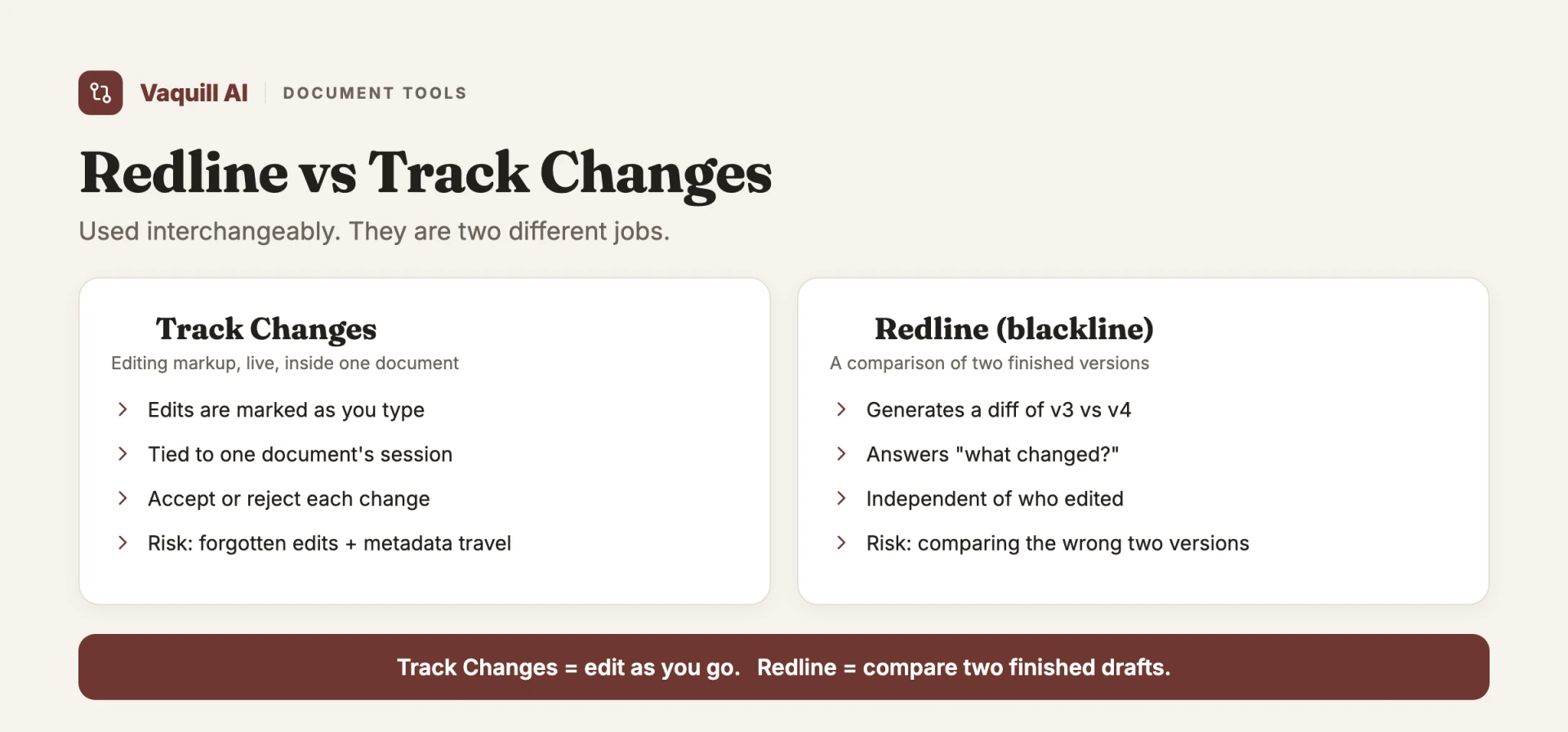
Redline and track changes are not the same thing. Track changes is the Word feature that records each edit as you type. A redline, or blackline, is the marked-up output that shows what moved between two versions. Redline software builds that output for you, and the AI tools go one step further by drafting the edits against a playbook instead of only diffing two files. For the version-by-version mechanics, see our guide to AI tools for comparing document versions.
1. Spellbook: playbook markup inside Word
At a glance: Pricing not published (custom, by team size) · 7-day free trial · Aimed at transactional lawyers who work in Word
For redlines, the "Examine Documents with Reviews" article in Spellbook's help center mentions a "Use tracked changes" toggle for revisions. Per its pricing page, the price depends on how many team members share a license, and its homepage offers a 7-day free trial. The homepage says the product works "directly in Word" and lists Review, Draft, Ask, Benchmarks and Associate.
An outside view: Lawyerist rates Spellbook 4.1 out of 5 and calls the rating subjective. Its listed pros include contract review and Word integration, and its listed cons include no published pricing and that it is not for case law research (Lawyerist review).
Bottom line: A fit if your work is drafting and marking up transactional contracts in Word. For an exact diff of v3 against v4, a compare engine answers a different question than a playbook tool does. See our Spellbook alternatives guide.
2. Gavel: review and automation
At a glance: Exec lists $160 per month per user for 1,000 completions · Workflows plans start at $83 per month · Free trial
Gavel's homepage says Gavel Exec helps legal teams "review, redline, and draft contracts in Microsoft Word and online," and that the playbooks behind it can be built-in or custom. The redline output it names is "suggested redlines and negotiation-ready comments directly in Word." The same page describes Gavel Workflows as document automation that turns intake answers into Word documents and PDFs. Gavel's pricing page lists Workflows plans starting at $83 per month. The pages we read do not say whether Exec's redlines are native tracked changes.
Bottom line: Relevant if you both review inbound contracts and generate your own. If all you need is a two-version diff, the automation side is more than you need.
3. DraftWise: markup drawn from your own past deals
At a glance: Pricing not stated · Sales-led
DraftWise's in-house page describes redlines based on your guidelines and negotiation history, and says you can "redline, rewrite, compare clauses, apply playbooks, and insert language" from Word. Its Playbook Studio page says it creates and maintains playbooks from your deal history, and lets you apply automated redlines based on playbook rules and export the marked-up document. An iManage partner page says DraftWise securely connects to a firm's document management system, including iManage. The pages we read do not say whether its edits arrive as native Word tracked changes.
Bottom line: Built around your own precedent, so it depends on having a deal archive to learn from. Not a version-to-version diff tool.
4. Definely: defined terms and cross-references
At a glance: Pricing not stated · Sales-led
Definely's homepage describes tools for lawyers working on complex contracts in Word. For redline output, it says you can "instantly export tracked changes, redlines, and comments into a clean, shareable issues list." Its Cascade page describes AI-powered impact analysis for changes to a contract, including third-party markups, covering the clauses, definitions and references they may touch. The homepage also says definitions, provisions and cross-references can be viewed without leaving the clause.
Bottom line: Review and navigation come first. It is not described as a two-version compare engine.
5. Lexis Create+ (Henchman)
At a glance: Pricing by quote, per the page · Demo
LexisNexis announced on 22 July 2024 that it had completed its acquisition of Henchman (LexisNexis press release), and the henchman.io site now presents Lexis Create+, described as a drafting experience within Microsoft 365 that connects your organization's documents with LexisNexis content and the Protégé generative AI assistant. The page says it lets you centralize previously written clauses and definitions and draft "directly in Microsoft Word."
Bottom line: A drafting and clause-reuse tool. The page does not describe it as a two-version compare engine.
6. Litera Compare: firm-wide compare
At a glance: Price not stated on the page
Litera's product page describes "highest-accuracy" comparison across Word, PDF, Excel, PowerPoint and more, in Word, Outlook, web, Google Workspace, iOS, desktop and server. It says Compare Server can run scanned PDFs through optical character recognition, and that Compare now handles Outlook email threads. Litera says 72 percent of the legal market trusts Litera Compare and that 98 percent of the Am Law 100 rely on it; those are Litera's figures. The page also introduces Lito, an AI agent for chat-based redlining and summarization that Litera says is included for Compare customers.
Bottom line: The firm-grade comparison option on this list. Ask Litera which plan and delivery method (desktop, server or cloud) your firm would need.
7. Draftable: cross-format compare
At a glance: Legal $261 per user per year · Business $129 per user per year · Free trial (5 days)
Draftable's pricing page lists a Business plan at $129 per user per year and a Legal plan at $261 per user per year, both billed annually. Both list input from Word, PDF, PowerPoint and Excel and support for scanned PDFs. The Legal plan adds redlines for Word, PDF, Excel, PowerPoint and Outlook emails, export of redlines in DOCX, PDF, Excel and PowerPoint and as tracked changes, and integrations with Microsoft Office, iManage, NetDocuments, SharePoint, Epona and Worldox. The page lists a Windows desktop application and says Mac support is "coming late 2026."
Bottom line: A single-purpose comparison tool for teams that receive returns in different formats.
8. iManage Compare
At a glance: Pricing not stated · Part of the iManage platform
iManage's help center describes Compare in iManage Work Desktop for Windows as comparing the open document with a document in an iManage Work library, available for Microsoft Word and PowerPoint only. Its comparison settings include insertions and deletions, moves, comments, formatting, tables, headers and footers, footnotes and endnotes, and fields, and you can show changes at character or word level in the original, the revised document or a new document. A separate iManage help page describes comparing two documents and viewing a redline analysis in Ask iManage.
Bottom line: Makes sense if iManage is already your system of record.
9. Microsoft Word: Compare and Track Changes
At a glance: Part of Word · No separate purchase
Microsoft Support's page "Compare document differences using the legal blackline option" says the option "compares two documents and displays what changed between them in a third new document," and that the source documents are not changed. If either version has tracked changes, Word asks whether to accept them for the comparison, and in the new document the revised version's changes appear as tracked changes. The instructions describe opening two documents; they do not describe PDF comparison. Microsoft's separate Compare and merge page describes combining two versions into one document with revision marks.
Microsoft Copilot, redline behaviour. Microsoft's page "Edit with Copilot in Word" says the feature "cannot turn on/off or accept/reject tracked changes," and then adds that it "will respect Track Changes, and if Track Changes is enabled then Edit with Copilot changes will be tracked in the document." In practice that means you switch Track Changes on yourself and accept or reject each edit yourself. The page also says it cannot add or modify comments, and that the feature is still rolling out. It needs a Microsoft 365 Copilot license or, for individuals, Microsoft 365 Premium, and Microsoft states no separate price on the page.
Microsoft Copilot, Legal Agent preview. Microsoft's page "Get started with the Legal Agent (Frontier)" says the redlines the agent generates are "tuned to resemble those of a legal professional," and arrive as tracked changes. You click Accept, or Accept with Comment to include its commentary. In the Review with Playbook flow, the agent works through your .docx playbook topic by topic: gray topics are not relevant, green topics comply, light red topics need at least one change, and dark red topics need whole clauses added or removed. There is an Accept All button for the suggested edits. The page says you can currently run full reviews against playbooks alone, not against templates or other documents. The preview is for Word desktop and needs a Copilot license, Frontier enrollment and Word 2604 or higher, with no separate price stated. Microsoft's Message Center post MC1388706 (updated 7 October 2026) says general availability will be tracked separately and gives no date. For the install path and what the Legal Agent reads in the open document, see legal AI Word add-ins compared; for more on review, see can Microsoft Copilot review a contract.
Bottom line: The free floor for two clean Word files. Add a dedicated engine when PDFs or heavy formatting show up.
10. Ironclad: redline inside a contract lifecycle platform
At a glance: Pricing not stated · Sales-led
Ironclad's homepage calls it an AI contract lifecycle management platform. Its Microsoft Word integration page says Jurist brings AI contract review into Word and that its playbook-powered redlines "generate tracked changes and rationale based on approved negotiation positions." The same page describes searching, opening and saving Ironclad documents from Word.
Bottom line: Relevant if you want redline folded into a platform that also routes, approves and stores contracts.
11. LegalOn: curated playbooks
At a glance: Pricing not stated on the pages we read · Sales-led
LegalOn's homepage describes AI that reviews contracts against your playbooks and redlines them in Word, with "135+" attorney-built playbooks. Its blog post on Direct Editing says the assistant applies edits and returns tracked changes in the LegalOn Word add-in or its Word for the web editor.
Bottom line: Review-focused. It is not described as a two-version compare engine.
12. Ivo: custom-playbook markup
At a glance: Pricing not stated
Ivo's homepage says you can "apply redlines right in Microsoft Word or Google Docs," review contracts against playbooks, historical contracts and deal context, and turn templates and repository contracts into a working playbook. The homepage does not say whether the redlines are native tracked changes. See our Ivo alternatives guide.
Bottom line: Targets draft-versus-playbook markup, not exact diffs.
Others worth knowing
- BlackBoiler: its homepage says it marks up third-party paper against your playbook and returns "a fully redlined Word document with track changes," accepts Word documents and PDFs, and has a Word add-in and an AI product called Veris. It lists a 7-day free trial with a credit card required. The page shows no price.
- Adobe Acrobat Pro: Adobe's help page says Compare Files in Acrobat Pro compares two versions of a PDF and presents "a report detailing differences." The page does not describe editable Word tracked changes as output.
- DocJuris: its homepage describes contract review and redlining as a first pass on third-party paper, with real redlines and a screening report. It says it is priced on the work it completes and not per seat, and shows no figure.
Comparison table
This table repeats what the vendor pages above say. "Not stated" means the pages we read did not say.
| Tool | Price on vendor pages | Main job |
|---|---|---|
| Spellbook | Custom, by team size | Playbook markup in Word |
| Gavel | Exec: $160 per month per user listed; Workflows from $83 per month | Review plus document automation |
| DraftWise | Not stated | Markup from your own past deals |
| Definely | Not stated | Defined terms and cross-references |
| Lexis Create+ (Henchman) | Not stated | Clause reuse and drafting |
| Litera Compare | Not stated | Firm-wide compare |
| Draftable | $129 (Business) and $261 (Legal) per user per year | Cross-format compare |
| iManage Compare | Not stated | Compare inside iManage Work |
| Microsoft Word | Part of Word | Clean Word-to-Word compare |
| Ironclad | Not stated | Redline inside a lifecycle platform |
| LegalOn | Not stated | Curated playbooks |
| Ivo | Not stated | Custom-playbook markup |
The ethics line on any AI-assisted redline
Some of these tools use generative AI to propose edits. ABA Formal Opinion 512 (29 July 2024) says lawyers using generative AI tools "must fully consider their applicable ethical obligations, including their duties to provide competent legal representation, to protect client information, to communicate with clients, to supervise their employees and agents, to advance only meritorious claims and contentions, to ensure candor toward the tribunal, and to charge reasonable fees" (opening summary of the opinion on americanbar.org).
Two practical takeaways. Verify the output before it leaves your office. And know how the vendor handles the document you upload. Our ABA Opinion 512 guide walks through what that means in practice.
Picking one
- Playbook markup of a single draft in Word: look at Spellbook, Gavel Exec, LegalOn, Ivo, Ironclad Jurist or BlackBoiler, and compare their written quotes.
- Markup drawn from your own past deals or clause archive: DraftWise or Lexis Create+, if you have a deep precedent library.
- Reading defined terms and cross-references in long drafts: Definely.
- Firm-wide compare standard with a DMS and IT support: Litera Compare or iManage Compare.
- Cross-format comparison, single-purpose tool: Draftable.
- Two clean Word files, no budget: Microsoft Word Compare.
- Redline folded into a contract lifecycle platform: Ironclad.
There is no single winner. The free option covers a narrow case, and the compare engines are built for firms that need their coverage.
To see how each AI tool installs and what it touches in the open Word document, read legal AI Word add-ins compared.
For the US statutes, regulations and court rules these laws sit in, see the US primary law API.
FAQ
What is legal redline software? It is software that shows the differences between two versions of a contract or marks up a draft against your standard positions. The good ones export native Word track changes you can accept or reject. The weaker ones give you a read-only diff stuck in a viewer.
What is contract redlining software, and how is it different from track changes? Track changes is the Word feature that records each edit. Redlining software is the layer on top: it either builds the blackline between two versions automatically, or, in the AI tools, drafts the edits for you against a playbook. For the deeper version-by-version mechanics, see our guide to AI tools for comparing document versions.
Do compare tools like Litera and Draftable publish prices? Draftable does: its pricing page lists $261 per user per year for Legal and $129 for Business, billed annually. The Litera page we read does not state a price. Among the AI tools, Gavel lists $160 per month per user for Exec and says Workflows plans start at $83 per month, while Spellbook says its pricing is custom.
Which tool handles a PDF from opposing counsel? Draftable lists PDF input, including scanned PDFs, on its pricing page. Litera lists PDF among supported formats and says Compare Server can run scanned PDFs through optical character recognition. Microsoft's Word legal blackline instructions describe comparing two Word documents and do not describe PDF comparison.
How accurate is AI redlining? Vendors publish their own accuracy and time-savings figures, and none of those are independent benchmarks. Treat any AI redline as a first pass that a lawyer reviews line by line. It tends to help most on standardized paper and least on bespoke deals, so test on your own contracts before relying on a vendor's number.
Is it safe to use AI redlining on legally binding documents? Treat AI edits as a first pass a lawyer signs off on, not a final answer. ABA Formal Opinion 512 (29 July 2024) lists the duties that apply, including competence, protecting client information and supervision, so verify every suggested change and confirm how the vendor handles your upload. Our ABA Opinion 512 guide covers what that means in practice.
What is the difference between AI redlining and a full CLM? AI redlining tools focus on the review-and-markup step: read a draft, propose edits, export track changes. A contract lifecycle management platform like Ironclad wraps that in intake, routing, approvals, signature, and storage. If you only need the diff and the markup, a redline tool may be all you need; if you need the whole pipeline, see our CLM and AI contract review breakdown.
Can AI redlining tools work on third-party paper? Several describe it that way. BlackBoiler's homepage says it marks up third-party paper against your playbook, and Gavel Exec, Spellbook, Ivo and Ironclad Jurist describe redlining against playbooks. For a wider look at the review category, see our roundup of the best AI contract review tools.
Can Microsoft Word redline a contract with AI? Partly, per Microsoft's own pages. Edit with Copilot tracks its changes only when you have Track Changes on and does not accept or reject for you. The Legal Agent preview proposes playbook-based edits that you accept or dismiss. Both are tied to Copilot licensing, and Microsoft describes them as rolling out or in preview. See can Microsoft Copilot review a contract.
What is the best free legal redline software? Microsoft Word's Review > Compare builds a comparison document from two Word files with no separate purchase beyond Word itself. Microsoft's instructions describe Word documents, so check how it handles a PDF or heavy formatting before relying on it.
Sources
Every page below was read on 12 October 2026.
- Spellbook: pricing page, help center article "Examine Documents with Reviews" (the help center blocks automated requests), and the Lawyerist review.
- Gavel: homepage and pricing.
- DraftWise: in-house page, Playbook Studio and the iManage partner page.
- Definely: homepage and Cascade.
- Lexis Create+ (Henchman): the henchman.io homepage and the LexisNexis press release of 22 July 2024.
- Litera: Litera Compare.
- Draftable: pricing.
- iManage: Comparing documents and Comparing two documents and redline analysis.
- Microsoft: legal blackline option, Edit with Copilot in Word, Get started with the Legal Agent (Frontier) and Message Center post MC1388706, read through a public archive.
- Ironclad: Microsoft Word integration.
- LegalOn: homepage and Direct Editing in Word.
- Ivo: ivo.ai.
- BlackBoiler: blackboiler.com. Adobe: the help page "Compare two versions of a PDF file (Acrobat Pro)" on helpx.adobe.com (it blocks automated requests). DocJuris: docjuris.com.
- ABA: Formal Opinion 512, 29 July 2024, on americanbar.org (it blocks automated requests).
Pricing and feature details change often. Check the vendor page before you rely on any figure here.
New legal AI guides, weekly.
Further Reading
- Top Contract Management Vendors for Fortune 500 Legal Teams
- How to Build an NDA Playbook Your AI Can Actually Enforce
- Legal AI Workflows: How Law Firms Chain Multi-Step AI Tasks in 2026
- How to Compare Documents and Export Clean Redlines (Step-by-Step)
- Bulk Contract Review: How to Review Many Contracts at Once With a Document Matrix
- Legal Document Version Control: Which Platforms Track Versions

Product & Content
The US primary law data API: statutes, regulations, constitutions, court rules, executive orders and agency guidance across 53 US jurisdictions, each section cited and linked to its official source, via REST, MCP or SQL.