

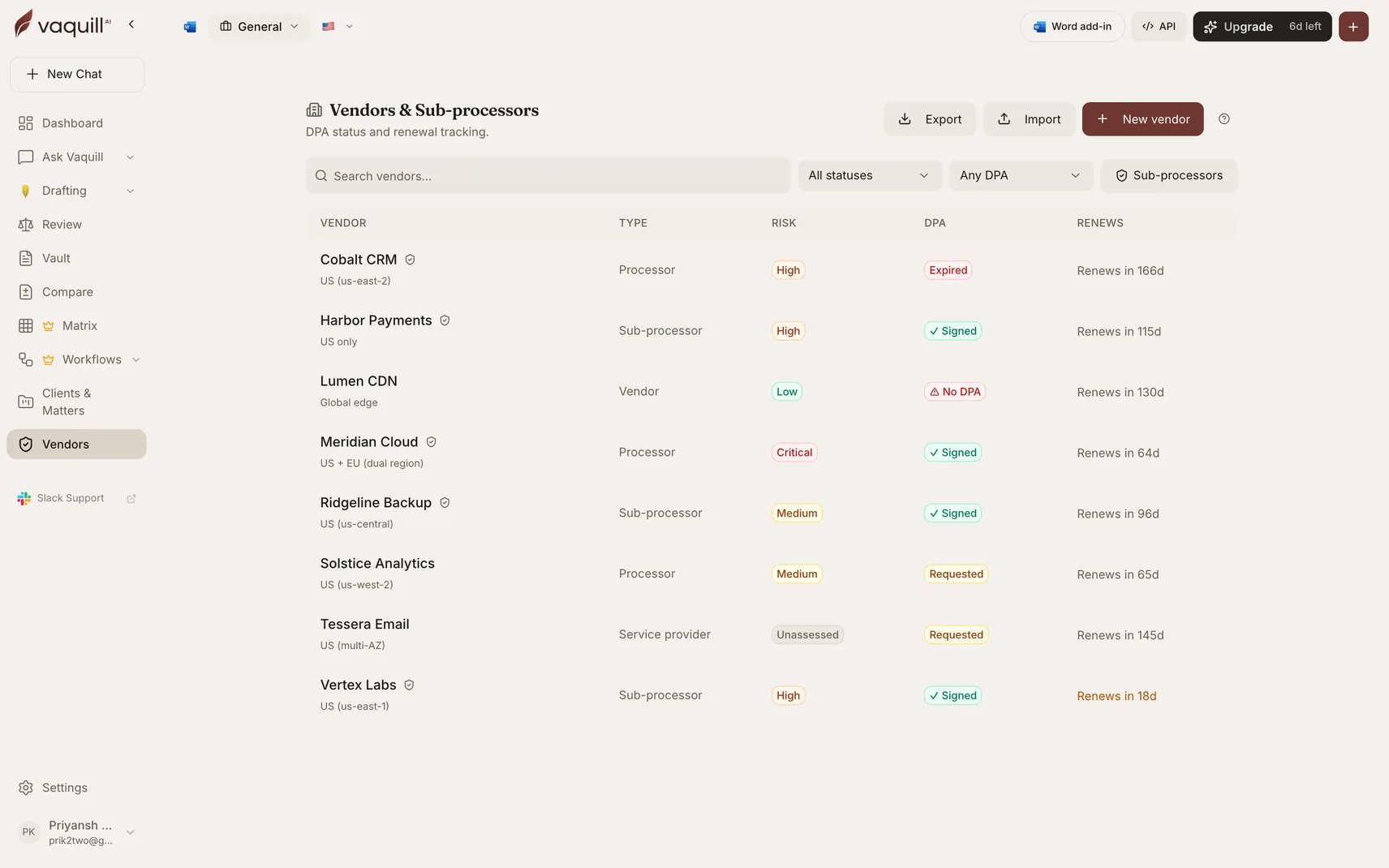
The vendor registry: DPA status, risk tier, and renewal window per vendor
When to use it
- Maintaining the sub-processor inventory GDPR Article 30 and customer DPAs require
- Tracking which vendors have a signed DPA and which are still outstanding
- Getting ahead of renewals rather than discovering them after auto-renewal
- Answering “what data does this vendor touch, and where does it live?” without a spreadsheet hunt
What a vendor record holds
Getting vendors in
Import from CSV or Excel
Import from CSV or Excel
Bulk import from a spreadsheet, which is how most teams start, since the list usually already exists somewhere. Download the import template first so the columns line up.
Extract from a DPA
Extract from a DPA
Point Vaquill AI at an uploaded DPA and it extracts the vendor details from the agreement itself: parties, data categories, processing purpose, region, dates.Extraction is fill-if-empty: it never overwrites a value you set by hand. Your corrections survive re-extraction.
Add manually
Add manually
Create the record directly and attach documents to it later.
Automatic DPA review
Run Analyze DPA on a vendor and the attached agreement is reviewed, with the findings written onto the vendor record. You get the compliance posture attached to the vendor rather than sitting in a separate document you have to remember to open. For a deeper pass across many DPAs at once, including SCC module fit and Schrems II transfer analysis, use the DPA Reviewer workflow.Working with vendor documents
Documents attached to a vendor are more than storage:- Summarize any attached document
- Chat with it, scoped to that document
- Attach a draft you already created elsewhere
Export
Export the registry at any time. This is the artifact you hand to a customer’s security review or attach to your Article 30 record.Limitations
- The registry records what you and your documents tell it. It does not discover shadow vendors or scan your spend.
- Renewal reminders are based on the dates on the record. A date you never entered cannot warn you.
- Automatic DPA review reads the agreement as uploaded; it does not verify the vendor’s actual practice, sub-processor chain, or security posture.
- Risk tier is your classification, not a Vaquill AI assessment.
Related
DPA Review
Reviewing a single data processing agreement.
DPA Reviewer workflow
Batch review across every vendor DPA at once.
Obligations Tracker
Renewal and notice deadlines across a whole contract portfolio.
Privacy Audit workflow
Your privacy posture across policies and DPAs together.