
Legal AI for in-house counsel is software that does the recurring corporate-legal jobs end to end: drafting, contract review, Word-native redlining, matter management, and compliance checks, with case-law and statute research as a supporting tool rather than the main act. For a lean in-house legal team the right pick is a workbench that covers the whole week in one place, priced for a small team, not a law-firm research engine with an AI assistant bolted on.
Most "legal AI for in-house counsel" guides are vendor lists with a buy button. This one starts with the Monday queue, because that is what the tool has to survive.
A typical week for a in-house team looks like this: a Fortune 500 MSA with thirty redlines, ten inbound NDAs, a stack of vendor DPAs, new sub-processors the platform team shipped last sprint, an AI governance memo the CTO needs Thursday, two board questions, and a renewal nobody calendared. One lawyer, sometimes two. No procurement department. No appetite for a sixty-day pilot.
That reality, not the model benchmark, decides which legal AI is worth buying.
This guide covers what legal AI for in-house legal teams is, the jobs it should do, how to evaluate it, the red flags that should kill a deal, what it should cost, where it sits in your existing stack, how to roll it out, and what to measure once you own it. For the ranked shortlist of named products, see the companion roundup: the legal AI tools for in-house counsel.
TL;DR
- In-house legal AI is a workbench, not a search engine. The value is in the deliverables it produces (drafts, redlines, reviewed contracts, a managed matter), not in how big its database is.
- Buy for the jobs you actually do every week: drafting, contract review, redlining, matter management, compliance, and only then research.
- The single most expensive mistake is buying the wrong category of tool. A firm-side research engine and a contract-review point tool both call themselves "legal AI," and they solve different weeks.
- The four buying criteria that matter: data posture (privilege), workflow fit, procurement friction, and price. Demos answer none of these.
- A suite beats a stack of point tools for a small team, because the work crosses tools (review feeds redline feeds matter) and you do not have headcount to integrate five vendors.
- Pricing reality: enterprise legal AI runs $500 per seat and up, gated behind sales. That math does not work for a solo or fractional GC. Look for transparent, self-serve pricing.
Which category best fits a generalist in-house week (draft, review, redline, matters, compliance in one place)?
Where in-house AI adoption actually stands in 2026
The shift is real, and it is recent. Generative AI use in corporate law departments jumped from 23 percent to 52 percent in a single year, per the ACC "Generative AI's Growing Strategic Value for Corporate Law Departments" survey of 657 in-house professionals across 30 countries (2025). The FTI Consulting and Relativity General Counsel Report (March 2026) puts the number higher still: 87 percent of general counsel report AI use within their teams, up from 44 percent the year before, with summarization (83 percent) and clause identification (63 percent) the most common jobs.
The 2026 ACC Chief Legal Officers Survey of 1,049 CLOs across 43 countries found 47 percent of CLOs say their CEO now expects them to build expertise in technology and AI, and 63 percent expect to keep team headcount flat, so the tool is meant to add capacity, not cut heads.
Adoption is wide but shallow. The Wolters Kluwer Future Ready Lawyer 2026 report (810 lawyers in the US, China, and eight European countries) found more than 90 percent already use at least one AI tool, yet the Bloomberg Law State of Practice 2026 survey of 760 practitioners (June 2026) found only 23 percent of in-house lawyers use AI tools daily.
The gap between "tried it" and "depend on it" is the gap this guide is about. Closing it is mostly a question of buying the right category and setting the data posture before the first upload.
What "legal AI for in-house counsel" actually means
There are two very different things sold under this label, and conflating them is the most expensive mistake in-house buyers make.
The first is a research engine: ask a legal question, get a cited answer from a case-law or statute database. Useful, but it answers maybe 15 percent of an in-house week.
In-house counsel are not litigators. You are not pulling precedent all day. You are moving the business forward and protecting it at the same time.
The second is a workbench: software that does the recurring in-house jobs end to end. Draft the NDA. Review the vendor MSA against your positions. Redline it in real Microsoft Word track changes. File it under the right matter. Flag the compliance gap before it ships.
That is the 85 percent. It is also the part generic "legal AI" tools, retrofitted from a law-firm or consumer product, tend to do worst.
Vaquill AI is built as the workbench. The rest of this guide is written from that lens, because that is the lens that matches the job.
Know the categories before you shop
Almost everything labeled "legal AI" falls into one of seven categories. They are not interchangeable, and the costly error is buying a tool from the wrong one because the demo looked impressive. Sort your week first, then shop the matching category.
- Purpose-built in-house suites (workbenches). Drafting, review, redline, matters, and compliance in one place, priced for a small team. This is the category that matches a generalist in-house week. Vaquill AI sits here.
- Firm-side AI platforms. Built for AmLaw firms and large departments doing deep, agentic document work at scale, priced and sold to match. Powerful, but heavy and expensive for two lawyers.
- Dedicated contract review. A specialist engine that redlines against a playbook and little else. Excellent if review is 80 percent of your week, thin if it is not.
- CLM with AI bolted on. Contract lifecycle management (repository, approvals, e-sign, renewals) that has added AI extraction or review. Great for the post-signature lifecycle, not a drafting or research home.
- Matter and spend management. Tools that track matters, e-billing, and outside-counsel spend. They organize the function; they do not draft or review.
- Legal research. The old research line (case law, statutes) with an AI assistant on top. Answers the 15 percent, not the 85.
- General-purpose models. ChatGPT, Claude, Copilot. No legal grounding, no Word redline, no matter context. Covered in detail below.
A clean way to use this list: name the category that owns the biggest share of your week, buy the best tool in that category, and resist the urge to buy a second category until the first one is paying for itself.
The companion roundup maps every named product to its category so you can see the field at a glance.
The in-house jobs legal AI should handle
Buy against this list, not against a feature grid. For each job, the question is "does the tool produce the deliverable, or just talk about it?"
Drafting. NDAs, MSAs, employment offers, vendor agreements, and legal notices from plain-English instructions, jurisdiction-aware, against your own templates, exported to DOCX. See AI legal document drafting and the NDA playbook for in-house teams.
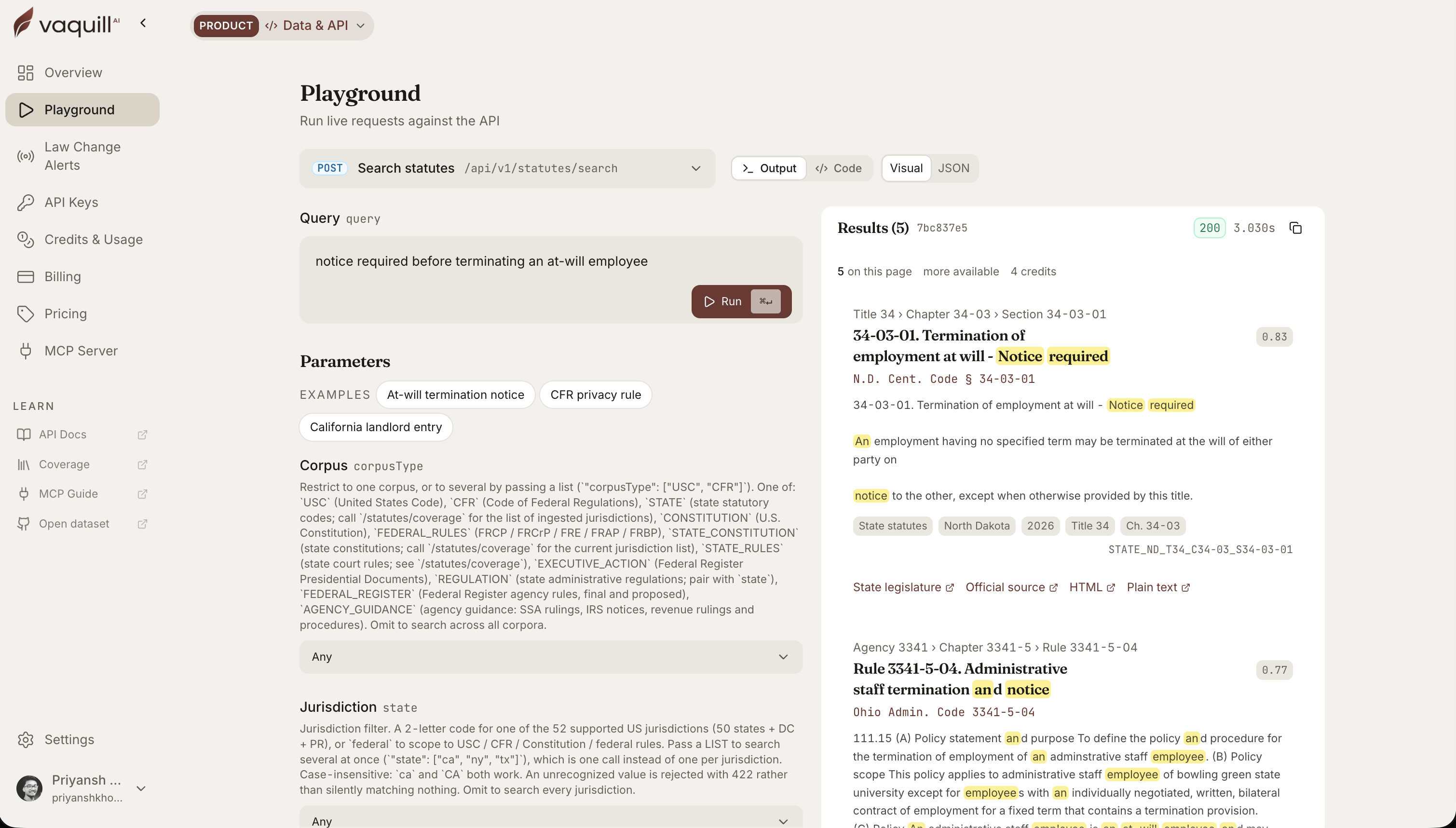 The same corpus behind this article, queried live. Every result carries its citation and a link to the official source.
Contract review. Clause-by-clause review against your standards, NDA triage in minutes, a risk view, and compliance flags. This is the highest-volume in-house job, and the in-house contract review playbook walks through how to systematize it.
What "review the deliverable" should look like, not a chat summary: the tool reads a vendor MSA, finds the clause, names the position it breaks, and writes the flag you can act on in one line.
| Clause in the vendor paper | Your position | The flag |
|---|---|---|
| "Vendor's aggregate liability shall not exceed the fees paid in the prior 12 months." | Cap should be 24 months for a data-processing vendor. | High: liability cap below playbook floor for vendors touching PII. |
| "Either party may assign this Agreement without consent." | No assignment without our written consent. | High: open assignment clause; add consent gate. |
| "Governed by the laws of the State of Delaware." (no venue clause) | Governing law fine, venue missing. | Medium: add exclusive venue to match governing law. |
That is the artifact. A tool that hands you the table above saves the hour; a tool that hands you "here are some things to consider" does not.
Redlining. The part most tools fake. You want a real Microsoft Word track-changes export you can send to the counterparty, not a chat summary of suggested edits. See AI document comparison and redline.
Matter management. Every matter, business unit, and document in one workspace, with status, email-to-matter, and research attached where it belongs. This is the seam where point tools fail: they go dark after the signature. See matters and workspaces and what matter management actually means.
Compliance and privacy. Clause-level gap analysis against CCPA, GDPR, HIPAA, SOX, and more, plus structured DPA review and an AI governance policy for your own team.
Playbooks. Encode your preferred clauses, fallbacks, and escalation triggers once, then have the tool draft and review against them. See negotiation playbooks.
Portfolio review. Pull the same terms across hundreds of contracts for a repaper or diligence pass with a document matrix.
Research. Yes, it is in there. Vaquill AI includes US case-law and statute research across all 50 states and federal sources. But for an in-house team it is one tool on the bench, not the reason you buy.
How to evaluate legal AI for an in-house team
Four criteria decide the purchase. None of them show up in a demo, so ask directly.
1. Data posture (privilege). Your documents are privileged and often contain PII. Ask: is PII anonymized before anything reaches a model? Is there a zero-data-retention agreement with the model provider? US data residency? Is a BAA available? Does the vendor train on your data?
In 2026 the in-house procurement question moved from "can this make us faster" to "can this survive scrutiny if it gets challenged." Ethical and data-privacy concern is the joint-top barrier to AI adoption (39 percent) in the Wolters Kluwer Future Ready Lawyer 2026 report, so you are not the only buyer asking. Use the vendor security questionnaire before you sign.
2. Workflow fit. Is your week 70 percent contracts or 30 percent research? Buy for the bigger number, and buy in the matching category. A research-first tool with a thin contract feature will lose you an hour a day in workarounds.
3. Procurement friction. Can you start today with a card, or is it a sales call, a custom quote, and a quarter of legal review on the vendor's own paper? For a in-house team, friction is a real cost.
4. Price, honestly. Get the per-seat number and the seat minimum before the demo. If it is gated, that tells you the answer is "more than you want."
Red flags that should kill a deal
The four criteria tell you what to look for. These are the signals that should end an evaluation early, before you sink a quarter into a pilot:
- No published per-seat price. A demo that opens with "let's talk about your budget" means the price is set by what they think you will pay, not by the product. For a in-house team that is a non-starter.
- A law-firm tool wearing an in-house badge. If the outputs are calibrated for a court filing and the workflow centers on matter codes and billable hours, it was retrofitted. Ask to see the contract-review and matter views, not the research demo.
- Redlines that are chat summaries, not Word track changes. If the tool cannot export real Microsoft Word track changes you can send to the counterparty, redlining is a slideshow, not a deliverable.
- Vague data answers. "We take security seriously" is not a zero-data-retention agreement. If the rep cannot tell you whether PII is anonymized before model calls or whether they train on your data, the answer is no.
- A sixty-day onboarding for a two-person team. Enterprise implementation timelines are a tax you pay in your own hours. Self-serve tools reach a real deliverable in days.
If you are weighing whether to buy any of this versus standing up your own internal copilot, the build versus buy decision for in-house legal AI runs the math; for most in-house teams, buy wins on time-to-value.
A suite beats a stack of point tools
The instinct is to buy the best tool for each job: one for review, one for redline, one for matters. For a 50-lawyer department with legal ops, fine. For a solo or fractional GC, it is a trap.
The work crosses tools constantly: a review produces a redline, a redline belongs to a matter, a matter needs the compliance check. Five vendors means five logins, five data postures to vet, five renewals, and integration work you have no time to do.
A suite keeps the matter intact from intake to signature and after. That is the structural reason point tools that live inside Word go dark once the document is signed: the institutional memory has nowhere to live.
We break down the trade-off in Vaquill AI vs Spellbook and Vaquill AI vs Ivo.
How the workbench sits in your stack
A workbench does not have to replace everything you run today. Most in-house teams already own one or two tools, and the question is how the AI sits next to them, not whether you rip and replace. Three common cases:
You already run a CLM. Contract lifecycle management (the repository, approvals, e-sign, and renewals) is the system of record. The workbench is where the drafting and review work happens before a contract lands in the CLM, and where redlines get produced during a negotiation.
Let the CLM keep being the filing cabinet. Let the workbench be the desk. The handoff is the signed document and its metadata going into the CLM. If you do not have a CLM yet and you are small, a workbench with matter management may delay the need for one.
You already pay for legal research. If you keep Westlaw, Lexis, or Bloomberg Law for deep primary-law work, the workbench handles the contract-and-matter 85 percent and you keep the research seat for the 15 percent that genuinely needs it.
The two do not fight; they cover different parts of the week. Buying a research-first platform and hoping it also runs your contracts is the failure mode, not the reverse.
You only have general-purpose AI. If today's "legal AI" is a ChatGPT or Copilot seat, the workbench is the upgrade that adds legal grounding, Word-native redlines, and matter context. Keep the general model for non-legal drafting and brainstorming; move the privileged, deliverable-producing work onto the grounded tool.
The principle is the same in all three: the workbench owns the recurring legal deliverables, the systems around it own storage, billing, and deep research. Map your existing tools to those roles before you buy, so you are filling a gap, not duplicating a seat.
What legal AI should cost an in-house team
Enterprise legal AI is priced for departments with budget and procurement runway. GC AI publishes $500 per seat per month. Harvey is $1,200 to $2,000+ per user per month and Legora is $300 to $800 per user per month, both bundled products where the tier and per-feature add-ons set the per-seat price, both with a pay-as-you-go credit-metered plan alongside.
That math does not fit the solo GC or the in-house team carrying the load at most US companies.
Look for transparent, self-serve pricing with no seat minimum. Vaquill AI is self-serve with a 7-day trial and no per-feature gating. The legal AI seat-cost buyer guide breaks down what you are actually paying for per seat and where the hidden add-ons hide.
For the full ranked field with per-tool pricing, see the legal AI tools for in-house counsel. For individual vendors, read the honest GC AI review, the Harvey alternatives roundup, and the Legora alternatives roundup.
What to measure after you buy
A demo proves nothing and a press release proves less. The only thing that settles whether the tool was worth it is what changes in your numbers after thirty, sixty, and ninety days.
Track these four:
- Hours saved per week. Pick two or three recurring jobs (NDA triage, first-pass MSA review) and time them before and after. The Wolters Kluwer Future Ready Lawyer 2026 report found 62 percent of users save 6 to 20 percent of the workweek, averaging close to 10 percent. If you are not seeing time back inside a month, the tool is not fitting your week.
- Outside-counsel spend on routine work. The clearest ROI line. Every first-pass review or standard draft you keep in-house is a line item that does not go to a firm. Watch the spend on the formulaic matters, not the bet-the-company ones.
- Time to value. How long from sign-up to the first real deliverable you trusted enough to send. Self-serve tools should hit this in days. If onboarding stretches into months, that cost belongs in the comparison.
- Accuracy and rework. Track how often you accept the AI's output as-is versus how often you rework it, and watch for fabricated citations or missed clauses. A tool that saves an hour but adds a verification tax is not saving an hour. Adoption depth, not the headline adoption rate, is what the Bloomberg Law State of Practice 2026 numbers suggest most teams are still chasing.
By industry
The core jobs are the same everywhere, but the regulatory overlay is not. If you sit in a regulated vertical, start with the version written for it:
- SaaS in-house counsel: customer MSAs, vendor DPAs, sub-processor sprawl, AI governance.
- Fintech in-house counsel: SEC, FINRA, OFAC, and the 50-state overlay.
- Healthcare in-house counsel: HIPAA, BAAs, and vendor risk.
- Biotech and pharma in-house counsel: FDA, patents, and CDA volume.
- Manufacturing in-house counsel: supply chain, tariffs, UFLPA, and export controls.
- Media and entertainment in-house counsel: copyright, AI-training rights, and talent deals.
Rolling it out
Start narrow and let adoption pull. The teams that scale AI and the teams that stall split on one thing: the ones that scale ran a ring-fenced pilot on one real job and measured it, the ones that stall bought a broad license and waited for adoption that never came.
A sequence that works for a in-house team:
- Pick one high-volume job. Usually contract review or NDA triage. Run a real week of work through it, not test documents.
- Set the data posture before the first upload. Anonymization, retention, training, residency, all in writing in the MSA, not after.
- Encode one playbook. Your top clauses, fallbacks, and escalation triggers, so the tool drafts and reviews against your positions, not generic ones.
- Move matters in as you touch them. Not in a big migration; the workspace fills itself as you work.
- Measure against a baseline. Time the job before you switch the tool on, so the thirty-day numbers mean something.
The matter intake and triage workflow is a good first process to standardize, and outside counsel guidelines are a good second, because they compound: every dollar of work you keep in-house is a dollar off the outside-counsel spend you can reduce with AI. If you are the first lawyer at the company, building the in-house function with AI from day one covers the order to stand things up.
For the full sequence, see rolling out legal AI to your team.
FAQ
What is legal AI for in-house counsel?
It is software that does the recurring in-house legal jobs end to end: drafting, contract review, Word-native redlining, matter management, and compliance checks, with research as a supporting tool rather than the main act.
The strongest fit for a in-house team is a workbench that covers the whole week in one place, not a single point tool or a research engine with an assistant bolted on.
Is legal AI safe for privileged documents?
It can be, if the vendor is built for it: PII anonymized before model calls, zero data retention with the model provider, US data residency, no training on your data, and a BAA where you need one.
Get those in writing in the MSA, not in a marketing FAQ. Ethical and data-privacy concern is the joint-top adoption barrier in the Wolters Kluwer Future Ready Lawyer 2026 report, so press on it. See the vendor security questionnaire.
How much does legal AI for in-house counsel cost?
Enterprise tools run $500 per seat per month and up, usually sales-gated. Accessible options like Vaquill AI are self-serve, with no seat minimum. Price to your real volume, not the brand.
Do I need a separate tool for contract review, redlining, and matters?
For a small team, no, and you probably should not. The jobs feed each other, and running separate vendors multiplies cost, logins, and data-posture reviews. A suite keeps the matter intact. For a 50-lawyer department with legal ops, a stack of specialists can make sense.
How does legal AI fit with my existing CLM and research tools?
The workbench owns the drafting, review, and redline work; your CLM stays the system of record for storage, approvals, and renewals; your research seat covers the deep primary-law questions. Map each tool to a role before you buy so you fill a gap instead of paying twice for the same job. The stack model above walks through the three common setups.
Does in-house legal AI replace outside counsel?
No, it reduces spend on the routine, formulaic work (first-pass review, NDA triage, standard drafting) so outside counsel is reserved for the genuinely hard questions. That is where the ROI shows up, and outside-counsel spend on routine matters is the number to track.
How accurate is legal AI, and does it hallucinate?
General-purpose models hallucinate often on legal questions, and even paid legal research tools have measurable error rates, which is why every output needs a human check. A grounded, in-house-built tool reduces the risk but does not remove your duty to verify. Measure your own rework rate in the first month and treat fabricated citations as a hard fail.
What is the difference between law-firm AI and in-house legal AI?
Law-firm AI centers on the partner-associate workflow: high-volume document review, matter codes, billable-hour capture, and outputs written for a court. In-house legal AI centers on the corporate-legal week: contract drafting and review, Word-native redlines for counterparties, matter management that survives past signature, and outputs written for the business (the CFO, the CRO, the board). A firm tool retrofitted for in-house use tends to do the contract-and-matter work worst, which is exactly the 85 percent of the in-house week.
What is the best legal AI for in-house counsel?
There is no single best; the right pick depends on which job owns the biggest share of your week and how big your team is. A solo or fractional GC is usually best served by a self-serve workbench with transparent pricing; a 50-lawyer department with legal ops can run a stack of specialists. The ranked roundup of legal AI tools for in-house counsel maps each named product to its category and team size.
Related guides
This is the hub for our in-house coverage. Adjacent reads: the in-house counsel topic hub, the ranked legal AI tools for in-house counsel roundup, the in-house contract review playbook, matter management explained, and the full set of Vaquill AI vs competitor comparisons. Newer in this series: will AI replace in-house lawyers, how AI is transforming in-house legal teams, 100 generative AI prompts for in-house lawyers, why law-firm AI does not fit in-house teams, top AI tools for general counsel, and the 19 best AI tools for lawyers. Ready to try the workbench? See pricing or the in-house counsel solution.
New legal AI guides, weekly.
Further Reading
- How to Run a Legal AI Pilot in 30 Days (2026)
- In-House Legal Software: A 2026 Buyer's Guide for In-House Teams
- Build vs Buy: Legal AI for In-House Teams (2026)
- 12 Best Legal AI Tools for In-House Counsel (2026)
- Legal AI for Chief Legal Officers (CLOs) in 2026
- AI Compliance Check: CCPA, GDPR, and SOX for In-House Teams (2026)

Co-Founder & CEO · Attorney
Arshita leads product and strategy at Vaquill AI, the US primary law data API. As an attorney, she decides which law we carry, how each section is sourced and cited, and what legal AI and compliance teams need from the data.