The Vaquill AI add-in brings contract review, grounded redlining, drafting, and US legal research into Microsoft Word, working on the document you already have open. There is no upload step and no copy-paste into a separate tab. It reads the open file, calls the backend, and writes results back as native Word tracked changes, comments, and content controls. For a GC or in-house lawyer, that means the work happens where the document already lives.
This post walks through what the add-in does across its four tabs, the artifacts each one produces, and where a lawyer still has to do the deciding. For how it stacks up against Harvey, CoCounsel, Spellbook, Claude for Word, and the rest, see legal AI Word add-ins compared.
Short answer: The add-in adds a task pane to Word with four surfaces. The Assistant answers questions about the open document and turns plain-English instructions into tracked-change redlines. Review runs a structured, playbook-based redline with severity, fallback positions, a sign-off gate, and citation verification against a real US case-law corpus. Draft generates a first-draft agreement from a brief. Tools finalizes and QAs the document. Everything applies as native Word changes, and every answer carries checkable sources.
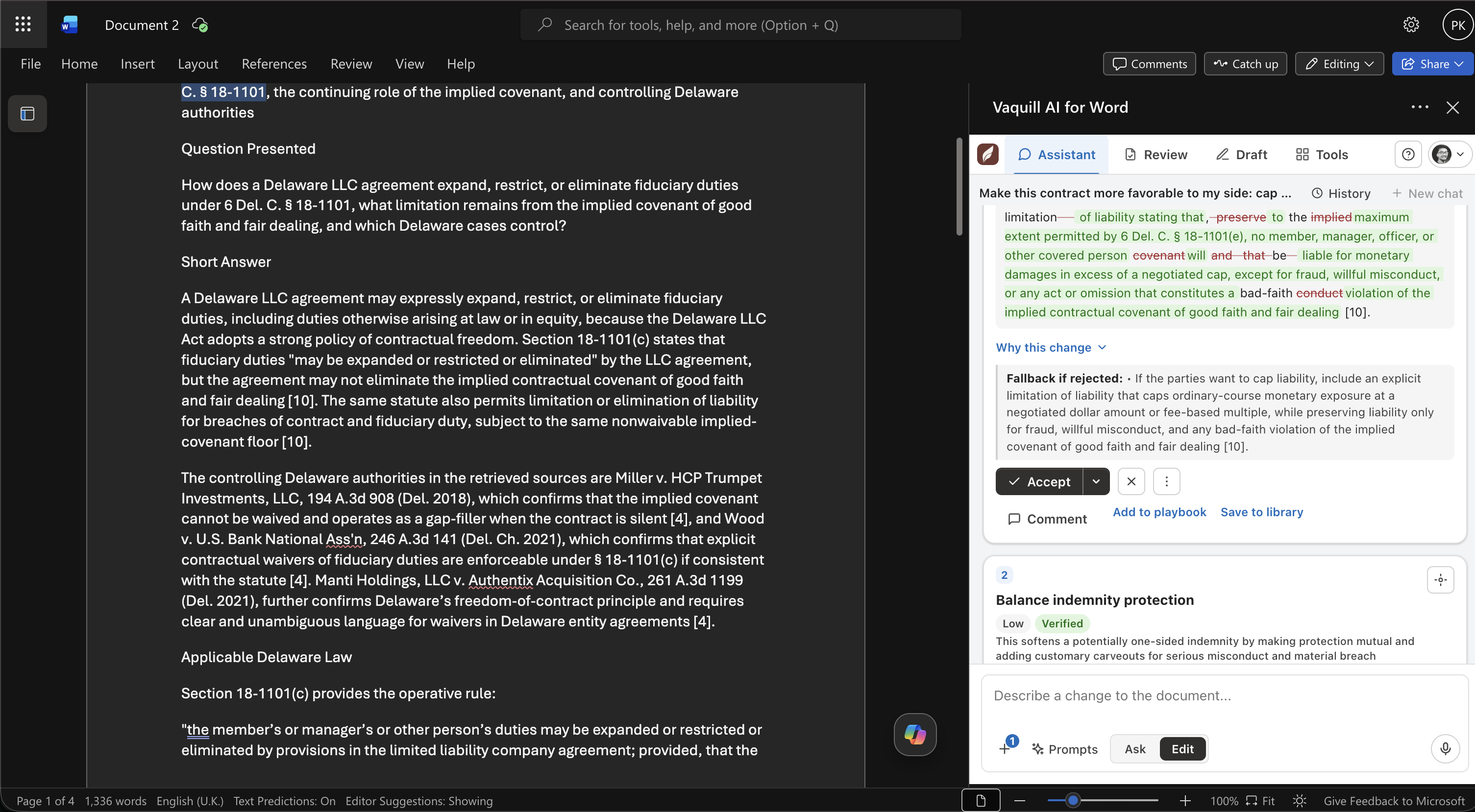
The Vaquill AI add-in inside Microsoft Word: the Assistant turns a plain-English instruction into a tracked-change redline, with the reason and a fallback position, on the open document.
TL;DR
- It works on the open document. No upload, no paste. The add-in reads the file in Word and applies changes as native tracked changes, comments, and content controls.
- Two modes in one composer. Ask questions grounded in the document (with checkable sources), or describe a change in plain English and get tracked-change redlines you accept or reject.
- Review is playbook-driven and governed. Redlines carry severity, the reason, and a fallback if rejected, plus a manager/partner/GC sign-off gate and deal-breaker flags that tell you what needs approval before sending.
- Citations get verified against a real US corpus. Inside Word, every case citation can be checked against a US case-law corpus, so a fabricated cite gets flagged before it leaves your desk.
- It runs across Word on Windows, Mac, and the web with a Microsoft 365 account, is open source under Apache 2.0, and cross-links back to your matters, playbooks, and templates.
What makes the add-in's citation check different from a typical AI-in-Word tool?
How this was written: the capabilities below match the shipped Vaquill AI Word add-in. Example redlines, citations, and clause language are illustrative of the format the add-in produces, not a real client file. The US case citation used as an example is real and checkable.
Why put this in Word at all
Most legal AI lives in a separate web app. You export a contract, upload it, work on it there, then bring the result back and reconcile it with the Word file the other side actually edits. Every hop is a place for a version to drift.
The add-in removes the hops. The document you are negotiating stays in Word the whole time, and the AI acts on it in place. That matters for a specific, unglamorous reason: counterparties work in Word with tracked changes, and a redline that arrives as native Word revisions is one the other side can accept or reject in their own copy. Anything else creates reconciliation work.
How AI redlining in Word actually works, and where it breaks
Applying an AI edit as a real tracked change is harder than it looks, and knowing why explains a few of the design choices below.
An add-in reads and writes the document through the Office JavaScript API. To turn "cap the term at three years" into a tracked revision, it has to find the exact text to change, then replace it in place. If the model paraphrases the clause instead of quoting it word for word, the search misses, and the edit lands in the wrong spot or not at all. That is the reason grounded edits quote the current language verbatim: the quote is the anchor.
Native tracked changes matter for a duller reason: reconciliation. Work a contract in a separate app and paste the result back, and every round of the negotiation is a manual merge between two files. Keep it in Word, and the revisions travel with the document the counterparty already edits. Over a five-round negotiation, that is the difference between five clean redlines and five merge headaches.
The limits are worth stating too. The add-in needs a recent enough version of Word (it targets a modern Office.js floor), so a very old desktop build will not run it. And a redline is only as good as the playbook behind it: point it at generic standards and you get generic flags. The tool moves the document; your positions still have to be yours.
The Assistant: ask, then edit, without leaving the page
The Assistant is the default tab and the most flexible. One composer, two modes.
Ask: grounded answers with sources
Ask answers questions about the open contract, grounded in the document itself and, when you turn it on, the US legal corpus and your matter's files. Every answer carries checkable sources. A numbered source list, where citation [N] maps to source N, and inline citations you can hover to preview or click to scroll to what the claim rests on. You are reading a sourced answer, not a paragraph you have to take on faith.
A few things make it usable on real work:
- Add context menu. Choose what the answer draws on: US case law and statutes, your matter's documents, and web search as an off-by-default option.
- Focus control. Answer about the whole document or just the text you selected.
- Copy and Insert. Copy pastes formatted into Word (clean text elsewhere), and Insert drops the answer into the document as a tracked change.
- Multi-turn memory and a prompt library, so follow-ups keep context and your good prompts are reusable.
Edit: plain English becomes tracked redlines
Switch the composer to Edit, describe the change ("cap the confidentiality term at three years and add the standard carve-outs"), and the add-in returns redlines across the whole document.
Each edit quotes the current language verbatim, so it anchors to real text and applies as a tracked change, not a vague suggestion. Here is the shape of one card:
Clause 8.2, Confidential Information. Current: "the receiving party shall hold Confidential Information in confidence for a period of five (5) years." Change: reduce the term to three years and add public-domain, prior-knowledge, and independent-development carve-outs. Why: your standard confidentiality term is three years; the carve-outs prevent the clause from sweeping in information you already hold. Fallback if rejected: hold at five years but keep the carve-outs.
The set is agentic and conversational. A dynamic overview explains what it understood and did, each card carries a rationale and a fallback, and a closing summary tells you what to double-check. A follow-up refines the current set ("make those stronger", "drop number 2", "also cap liability") instead of starting over, and your accept and reject decisions carry across refinements.
Edits are gated two ways: against your document-type playbook for approval level and deal-breaker flags, and against an anti-hallucination grounding check, so a proposed redline has to tie back to real language in the document.
Selection tools
Highlight any passage and act on it: rewrite, explain, plain-English, risk assessment, or compliance check. The Assistant can also route a chat message into a document action (redline, jump to a clause, add a comment, accept all changes, make a clean copy), always behind an explicit confirm so nothing changes your file by surprise.
Review: a structured, governed redline
The Review tab turns the open contract into a structured set of grounded redlines. It auto-detects the contract type and your side (both adjustable), then runs against your playbook.
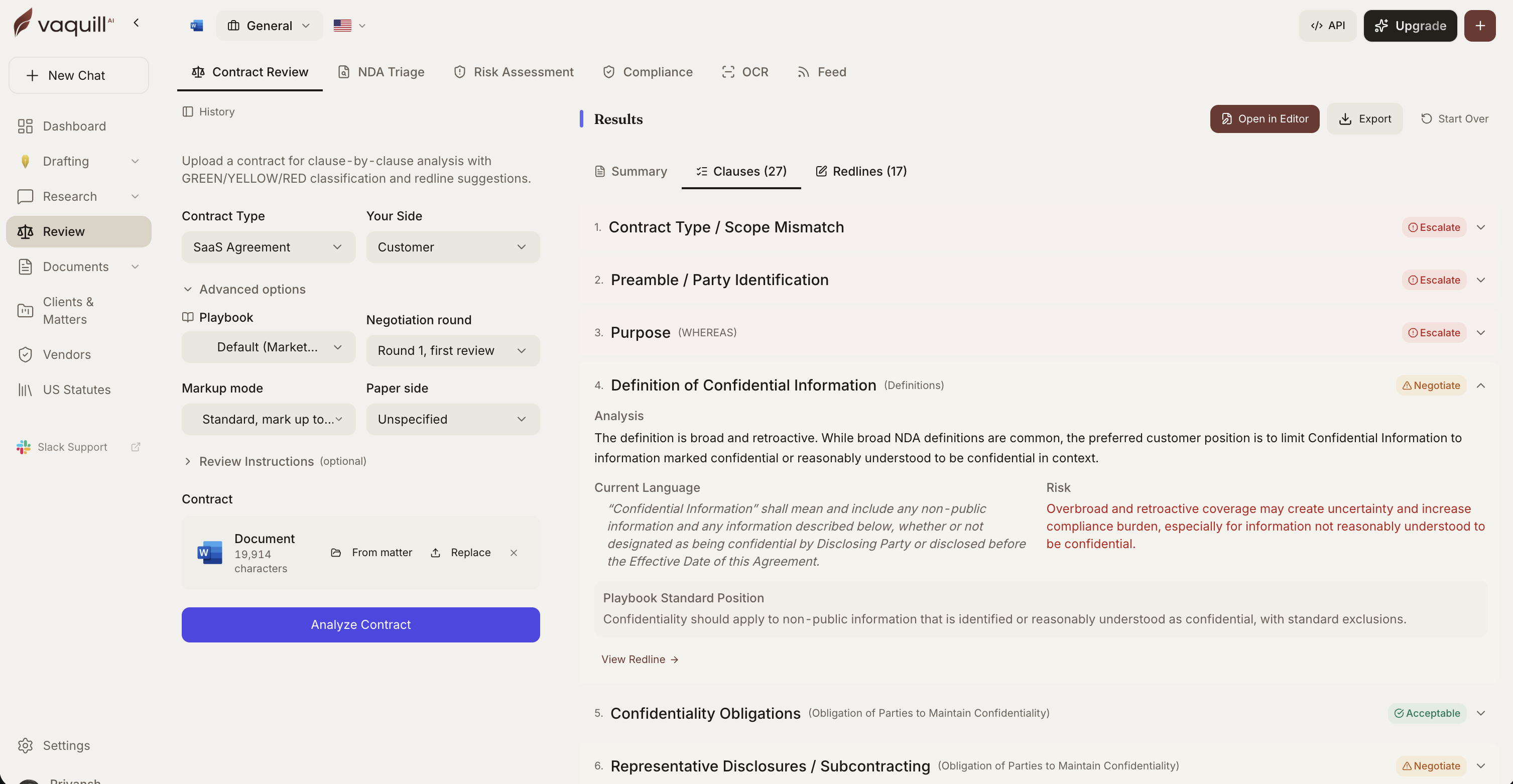
The review surface the add-in brings into Word: severity, an inline diff, the reason, and a fallback for each redline.
Each redline shows four things a reviewer needs in one pass:
| Field | What it gives you |
|---|---|
| Severity | High, medium, or low, so the spine of the review rises to the top |
| Inline diff | The exact change, with a Redline / Final toggle |
| The why | The reason the clause is flagged, tied to your position |
| Fallback if rejected | The next rung to fall to if the counterparty pushes back |
Two capabilities carry the review.
The sign-off gate. A server-computed gate rates whether a change needs manager, partner, or GC approval, and deal-breaker flags mark the clauses that cannot go out without sign-off. A junior can run the review, and the tool itself says "this uncapped indemnity is a deal-breaker, GC approval required," before the draft is sent.
Citation verification. A dedicated sub-tab checks every case citation in the document against a real US case-law corpus. Each cite comes back with a verdict:
| Verdict | What it means | What you do |
|---|---|---|
| Verified | Real case, name and reporter match (for example, Bell Atlantic Corp. v. Twombly, 550 U.S. 544) | Quote it |
| Not found | No matching case in the corpus, possible hallucination | Do not rely on it, ask for a correct cite |
| Superseded | Real case, but later authority changed the law | Check the newer authority before citing |
This is the check that keeps a fabricated case out of a brief or memo, and it runs inside Word. A corpus lookup needs a corpus behind it, which is why a contract tool that only points a citation back into the document cannot do it. The mechanics are in the citation verification explainer.
Review also carries sub-tabs for the rest of the redline lifecycle:
- Changes: triage the counterparty's tracked changes and comments, with per-author bulk accept and reject.
- Compare: diff two versions, with a hidden-revision detector that catches changes someone tried to bury.
- Playbooks: the standard positions the review runs against.
And per clause, a draft a stronger fix action runs an agentic diagnose, draft, validate, critique loop to propose better language, which you apply as a tracked change or export as a corrected .docx with the changes and comments baked in.
Draft: a first draft from a brief
The Draft tab generates a first-draft agreement from a plain-English brief and inserts it as formatted content, template-constrained to reduce hallucination. You can reuse saved templates and drafts, so a common agreement starts from your paper, not a blank page. The broader drafting method, and where verification fits, is in the AI legal drafting guide and the drafting feature.
Tools: finalize and QA before it leaves your desk
The Tools tab is the finalize step, the checks you run before a document goes out.
- Clean copy: accept all changes and remove comments in one action.
- Defined-term consistency: catch a term defined one way and used another.
- Cross-reference check: find a "Section 9.2" that points at the wrong section.
- Send-ready check: a last pass before the document goes out.
- Redaction and document formatting for the finish.
These are the checks a careful lawyer does by hand at 6pm, compressed into a pass you can run in a minute.
In the document, and back to the platform
The add-in also works natively inside the Word document: highlight issues, push rationales as native comments, bookmark clauses for durable navigation, tag key fields as content controls, and jump around through a clause outline.
Because it is part of the wider suite, it cross-links back to the platform: save a review or draft to a matter, save as a template, add to the vendor registry, push a clause to a playbook, or save an answer as a note. A review you run in Word does not vanish when you close the file; it lands in the matter it belongs to.
How the pieces fit in one pass
One document, four surfaces, and a finalize step. The file never leaves Word.
What this changes for a GC or in-house lawyer
AI does not do the lawyering here. What changes is smaller and more real: the mechanical parts of a contract turn shrink, and the judgment parts get better inputs.
- The redline arrives in the right format. Native tracked changes mean the counterparty accepts or rejects in their copy, with no reconciliation.
- Juniors can run more, safely. The sign-off gate and deal-breaker flags mean a first pass by a junior surfaces what needs a GC, instead of a GC reading every line from scratch.
- A hallucinated cite dies in Word. The authority check catches a fabricated or superseded case before a brief or memo goes out, the failure mode that has drawn sanctions in the last two years.
- Context stays put. Because the work is in Word and saves back to the matter, the file, the redlines, and the reasoning stay together.
Put a number on it, carefully. A first-pass NDA review that runs 30 to 40 minutes by hand becomes a five-minute triage plus your judgment on the flags. That is a practitioner estimate, not a benchmark, and it holds only when the playbook behind the review is yours. The time you save is the reading; the time you keep is the deciding.
Requirements and availability
The add-in runs inside Microsoft Word on Windows desktop, Mac desktop, and Word on the web, with a Microsoft 365 account. It operates on the document you have open, and it connects to the Vaquill AI backend for the legal intelligence, corpus, and grounding checks.
The add-in is open source under the Apache 2.0 license, with the code on GitHub. You can read what the task pane does with your document. A self-hostable, bring-your-own-key edition is in development for teams that want to run it against their own model.
FAQ
Does Vaquill AI work inside Microsoft Word?
Yes. The add-in adds a task pane to Word and works on the document you have open, applying results as native tracked changes, comments, and content controls. It runs on Word for Windows, Mac, and the web with a Microsoft 365 account.
What can the Word add-in do?
It answers questions about the open contract with checkable sources, turns plain-English instructions into tracked-change redlines, runs a structured playbook review with severity and fallback positions, verifies citations, drafts new documents from a brief, and finalizes with clean-copy, defined-term, cross-reference, and send-ready checks.
Do I need to upload my document?
No. The add-in reads the document you already have open in Word. There is no separate upload or copy-paste step, so the file never leaves Word.
Does it apply changes as Word tracked changes?
Yes. Redlines and inserted answers apply as native Word tracked changes, so the counterparty can accept or reject them in their own copy, with comments and content controls where relevant.
Can it verify legal citations inside Word?
Yes. The Review tab has a citations check that verifies each case citation against a real US case-law corpus. A real cite verifies and a fabricated or superseded one is flagged, before the document leaves your desk.
Do I need a Westlaw or LexisNexis login to use the research?
No. The grounding and citation checks run against a real US case-law and statute corpus through the add-in, so you do not need a separate research subscription to check authority inside Word.
What is the sign-off gate?
It is a server-computed check that rates whether a change needs manager, partner, or GC approval, plus deal-breaker flags for clauses that cannot go out without sign-off. It lets a junior run a review while making sure the risky items get routed to the right approver.
Does it draft new agreements in Word?
Yes. The Draft tab generates a first-draft agreement from a plain-English brief and inserts it as formatted content, template-constrained to reduce hallucination, and you can reuse saved templates and drafts.
Is my document data used to train AI models?
No. Vaquill AI does not train on your documents, prompts, or outputs unless you request it in writing. The add-in operates on the open document and connects to the backend over an authenticated session.
Which versions of Word does it support?
Word on Windows desktop, Mac desktop, and Word on the web, with a Microsoft 365 account.
Is the Word add-in open source?
Yes. The add-in is released under the Apache 2.0 license, and the code is on GitHub at github.com/Vaquill-AI/ms-word-addin. A self-hostable, bring-your-own-key community edition is in development for teams that want to run it against their own infrastructure.
Sources
- Bell Atlantic Corp. v. Twombly, 550 U.S. 544 (2007), used as a real, checkable citation example.
- Feature descriptions reflect the shipped Vaquill AI Word add-in; example redlines, clause language, and citations are illustrative of the format the add-in produces.
New legal AI guides, weekly.
Further Reading
How Legal AI Memory Works: Stop Re-Explaining Yourself Every Session
Read postWhat a Legal AI Agent Actually Does: One In-House Task, Start to Finish
Read postBuilt-In Legal AI Skills: Which One to Run for Each Task
Read postHow to Build a Litigation Chronology From Documents With AI
Read postAI Contract Negotiation (2026): How In-House Teams Negotiate Faster
Read post100 Generative AI Prompts for In-House Lawyers (2026)
Read post
Co-Founder & CEO · Attorney
Arshita leads product and strategy at Vaquill AI, the US primary law data API. As an attorney, she decides which law we carry, how each section is sourced and cited, and what legal AI and compliance teams need from the data.