A legal AI agent is not a smarter chatbox. It is a worker that reads your task and writes itself a plan. Then it runs a chain of tools (search a case, pull a statute, screen a company, check a contract against your playbook) until the task is done, and hands you a result to sign off on. The difference matters most on the boring multi-step jobs an in-house lawyer does fifty times a quarter.
This post follows one such job end to end: a vendor sends back a redlined services agreement, and you have an afternoon to turn it around. I will show the actual steps an agent takes, the real artifacts it produces at each one, and the exact place a human still has to stay in the loop.
Short answer: An agent chains research, review, and drafting in one run instead of one question at a time. It plans the task, calls tools in parallel (statute lookup, case verification, counterparty screen, playbook review), reads what comes back, and loops until it has a draft answer. You still verify before it leaves your desk. The win is bounded autonomy, not hands-off delegation.
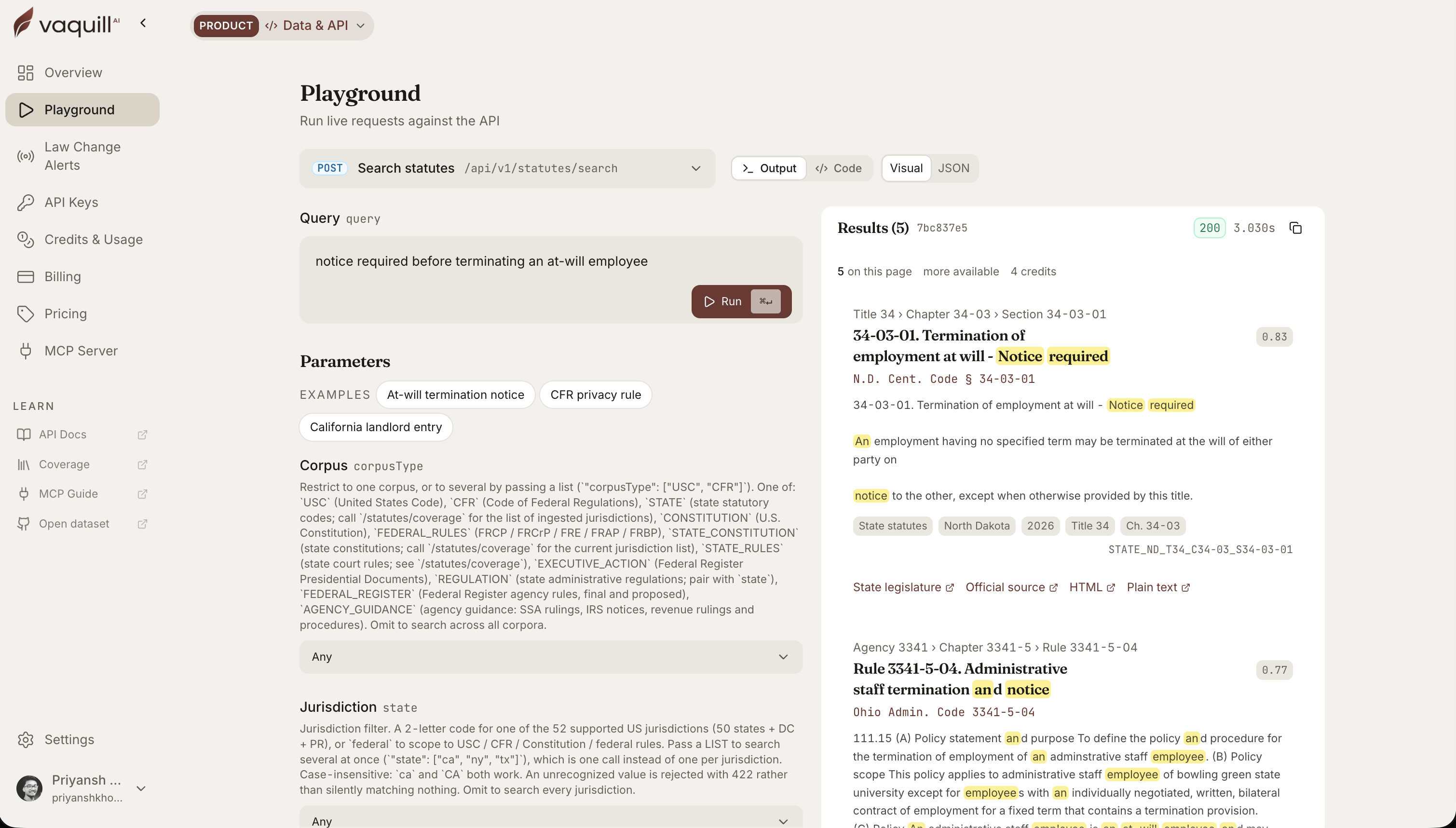 The same corpus behind this article, queried live. Every result carries its citation and a link to the official source.
TL;DR
- A legal AI agent runs a loop, not a single answer. Plan, call a tool, read the result, decide the next step, repeat, then stop and ask you to verify.
- The real value is the multi-step in-house job, not the one-line question: reviewing a contract against your positions, sweeping a folder for auto-renewals, screening a new vendor before signing.
- It calls tools in parallel and stops itself when it starts repeating, so a five-step job runs in one pass instead of five copy-paste round trips.
- Citations get a deterministic check, not a vibe. A reporter cite is either valid against the source or it is flagged, before it reaches your draft.
- You stay at the gate. Legal work is graded all-pass, so the agent gathers and drafts; a lawyer signs. That boundary is the product, not a limitation to engineer away.
What is the single job an AI legal agent should NOT do on its own?
How this was written: the walkthrough steps and tool behavior below match how agent mode actually runs an in-house task. Contract language and playbook positions are illustrative examples an in-house lawyer would recognize, not a real client file. Statute and case citations are real and checkable.
How a legal AI agent differs from a workflow or a chatbot
A legal AI agent is easy to confuse with three things it is not. The line between them is who decides the next step.
| Capability | RAG chatbot | Fixed workflow | Plain automation | Legal AI agent |
|---|---|---|---|---|
| Plans the task | No, one turn | No, author sets steps | No, hard-coded | Yes, writes its own plan |
| Calls tools | One retrieval | Preset sequence | Preset script | Picks tools as needed, in parallel |
| Keeps state across steps | Thread only | Passes outputs | Passes outputs | Reads matter facts and prior results |
| Stopping rule | End of turn | End of sequence | End of script | Stops when done or when it repeats |
| Who verifies | You | You | You | You, always |
| Best legal task | Quick lookups | Repeatable pipelines | Bulk moves | Multi-step, judgment-light errands |
Rule of thumb: reach for an agent on bounded, repeatable errands that have clear evidence, a clear playbook, and a clear stopping point. Do not reach for one on open-ended judgment, negotiation strategy, or anything filed without a human read. The moment the task needs a lawyer's call, the agent's job is to tee it up, not to make it.
The setup: one contract, five sub-tasks
Here is the job. A vendor returned your services agreement with three changes: a shorter liability cap, a new mutual-indemnity clause, and a data-processing addendum you have not seen. You need to know what moved, whether it clears your standard positions, whether the vendor is safe to sign, and what to write back.
Done by hand, that is five separate errands across four tools. An agent treats it as one task and decomposes it.
The agent runs the middle four steps on its own and returns a draft. The first box is your instruction; the last box is you.
Here is what one run looks like as a trace, one row per step: the tool it called, what went in, what came back, what it decided, and where you check it.
| Step | Tool called | Input | Evidence returned | Agent decision | Human check |
|---|---|---|---|---|---|
| 1 | Counterparty screen | "Northwind Data Services" | 1 open SLA suit, 2 resolved privacy complaints | Flag SLA suit, risk low-medium | Confirm before agreeing uptime terms |
| 2 | Playbook review | services agreement | 4 clause deviations, 3 rated High | Draft pushback on each | Confirm the flags match your positions |
| 3 | Obligation extract | services agreement | 60-day auto-renewal, 72-hour breach notice | Diary both dates | Add to the matter calendar |
| 4 | Citation check | vendor's cited case | cite not matched in source | Mark unverified | Do not rely on it |
Step 1: it plans, then screens the counterparty
The agent starts by writing its own plan, then acts on the first branch it can run without you: a pre-signing screen of the vendor. It runs a multi-angle web search for sanctions and watchlist hits, litigation, regulatory actions, and adverse media, then synthesizes the signals into a short risk note.
The output is not a link dump. It reads like this:
Counterparty: Northwind Data Services LLC (a fictional example). No sanctions or watchlist matches. One open contract dispute (breach of SLA, filed 2025, N.D. Cal.). Two consumer-privacy complaints resolved 2024. No adverse ownership signals found. Risk: low-medium, note the SLA suit before agreeing to their uptime terms.
That last clause is the point. A screen that ends in "here are 40 results" is homework. A screen that ends in "note the SLA suit before you agree to their uptime terms" is a decision you can act on.
Step 2: it reviews the redline against your playbook
Now the substantive part. The agent pulls your standard positions and walks the vendor's clauses one at a time, flagging every deviation with the contract's current language, your standard, and why the gap matters. This is where showing the artifact beats describing it.
| Clause | Vendor's language | Your standard position | Flag |
|---|---|---|---|
| Limitation of liability | Cap = fees paid in prior 12 months | Cap = fees paid in prior 24 months, carve-outs for data breach | High: cap too low, breach not carved out |
| Indemnity | Mutual, capped at the liability cap | One-way (vendor indemnifies), IP and breach uncapped | High: you should not indemnify a data vendor for their processing |
| Governing law | Vendor's home state | Your home state or Delaware | Medium: negotiable, not a deal-breaker |
| Data processing | New DPA attached, sub-processors not listed | Named sub-processor list, 30-day change notice | High: missing sub-processor transparency |
Four flags, three of them High, each with the specific fix. A lawyer can act on that grid in one read, which is the whole reason to structure review findings by severity instead of prose. If you want the deeper version of that DPA flag, the DPA review field guide walks the sub-processor and audit terms in detail.
Step 3: it sweeps the obligations and deadlines
Before you reply, you want the calendar risk. The agent extracts every obligation and deadline from the agreement: duties, renewal and termination-notice windows, payment and reporting dates, each with the responsible party, the trigger, and the source clause.
| Obligation | Party | Trigger | Deadline |
|---|---|---|---|
| Auto-renewal | Both | Anniversary of effective date | Opt out 60 days prior |
| Breach notice | Vendor | Security incident | Within 72 hours |
| Fee escalation | You | Renewal | Up to 7% per year |
The 60-day auto-renewal window is the kind of line that quietly costs a company a year of spend when nobody diaries it. Pulling it now, before signing, is worth more than pulling it later during a portfolio audit. For the batch version of this same move across a whole folder, see multi-step legal AI workflows.
Step 4: it checks any authority before it quotes it
Say the vendor's counsel wrote "your indemnity demand is unenforceable under controlling law" and cited a case. The agent does not take the cite on faith. It runs a deterministic validity check against the source of record: the citation is either real and correctly named, or it is flagged as unverified.
This is the step that keeps a fabricated citation out of your reply. In Mata v. Avianca (2023), a lawyer filed a brief with six cases that a chatbot had invented, and the court sanctioned him. The fix is not "trust a better model." The fix is a check that runs on every cite before it ships. A real one passes cleanly, for example 29 C.F.R. section 825.110 (FMLA eligibility) or 550 U.S. 544 (Bell Atlantic v. Twombly); an invented reporter number comes back flagged.
The check returns structured fields, not a yes or no. For the vendor's cited case, it looked like this:
| Field | Value |
|---|---|
| Input cite | "857 F.4th 267" (from the vendor's brief) |
| Source matched | no |
| Case name matched | no |
| Status | unverified |
| Lawyer action | do not rely, ask for a correct cite |
One caveat worth saying plainly: a valid citation only means the case exists and is named correctly. It does not mean the case is still good law, or that it supports the point it was cited for. Those two reads stay with the lawyer. Vendors know this gap is real: when Harvey published its Legal Agent Benchmark (LAB) in 2026, grading agent tasks against expert-written rubrics, its authors declined to post a leaderboard, on the logic that a report catching eight of ten risks is not eighty percent useful.
Step 5: it drafts the reply, you send it
With the screen, the flagged clauses, the deadline sweep, and the verified authority all in hand, the agent drafts the redline response: accept the governing-law change, push back on the liability cap with your 24-month fallback, reject the mutual indemnity with a one-line rationale, and request the named sub-processor list.
You read it, fix the tone, confirm the flags, and send. The afternoon job took one pass instead of five, and the part that needed a lawyer (the judgment about what to concede) is still yours. That division of labor is the honest version of an agentic legal suite: the agent removes the errands, not the lawyering.
What agent mode does not do
Three honest limits, because a review that only lists strengths is an ad.
- It does not own verification. It flags a cite as unverified; it does not decide the cite is fine. You do.
- It is not hands-off. Long-horizon runs can carry an early wrong assumption all the way to a confident final answer, and the run looks clean the whole way. The sign-off catches that; nothing else does.
- It is bounded by what you give it. No playbook means generic positions. No matter documents means it is working from the four corners of one file. Garbage in still applies.
The lesson in one line: a legal AI agent earns its keep exactly where the errand is bounded and the evidence is checkable, and it gets dangerous exactly where you stop reading its output. Keep it on the errands, keep yourself at the gate, and the afternoon contract job stops eating your afternoon.
FAQ
What is a legal AI agent?
It is an AI that runs a task as a multi-step loop instead of a single answer. It plans the work, calls tools (statute lookup, case verification, counterparty screen, playbook review, contract analysis), reads each result, and keeps going until it has a draft, then hands it to a lawyer to verify.
How is agent mode different from just asking a chatbot?
A chatbot answers one question at a time and waits for your next prompt. An agent decomposes a whole task, runs several tools in one pass (often in parallel), and returns a finished draft. For a five-step job, that is one run instead of five copy-paste round trips.
Can an AI legal agent review a contract against my own standards?
Yes. It compares the contract clause by clause against your configured playbook positions and flags each deviation with the current language, your standard, and the fix. With no playbook set, it falls back to market-standard positions, which are more generic.
Does the agent check its own citations?
It runs a deterministic validity check on reporter and statute citations against the source of record before they reach your draft. A real cite passes; an invented one is flagged as unverified. A human still confirms before anything is filed.
Is agent mode safe to use on privileged documents?
Vaquill AI is built for in-house work with a written no-training-on-your-data commitment, and matter documents stay scoped to your workspace. As with any tool, keep the human sign-off on anything that leaves your desk.
What tasks is a legal AI agent best at?
Multi-step, repeatable jobs: reviewing a redline against your positions, sweeping a folder of contracts for auto-renewals or uncapped liability, screening a counterparty before signing, and pulling obligations and deadlines. It is weakest at final judgment calls, which stay with the lawyer.
Does the agent run forever if it gets stuck?
No. It works in bounded rounds and stops itself when it starts repeating the same step, then returns whatever it has. That prevents a stuck run from looping and keeps the result in front of a human quickly.
Do I still need to verify the output?
Yes, always. Legal deliverables are graded all-pass, not partial credit. The agent's job is to gather and draft; the lawyer's job is to verify the flags and own what goes out.
Sources
- Mata v. Avianca, Inc., No. 22-cv-1461 (S.D.N.Y. 2023), the sanctions order on fabricated AI citations.
- 29 C.F.R. section 825.110 (FMLA eligibility) and Bell Atlantic Corp. v. Twombly, 550 U.S. 544 (2007), used as real, checkable citation examples.
New legal AI guides, weekly.
Further Reading
Legal AI in Microsoft Word: Contract Review, Redlining, and Research in a Word Add-In
Read postHow Legal AI Memory Works: Stop Re-Explaining Yourself Every Session
Read postBuilt-In Legal AI Skills: Which One to Run for Each Task
Read postHow to Build a Litigation Chronology From Documents With AI
Read postAI Contract Negotiation (2026): How In-House Teams Negotiate Faster
Read post100 Generative AI Prompts for In-House Lawyers (2026)
Read post
Co-Founder & CEO · Attorney
Arshita leads product and strategy at Vaquill AI, the US primary law data API. As an attorney, she decides which law we carry, how each section is sourced and cited, and what legal AI and compliance teams need from the data.