Watch a lawyer use the first generation of legal AI and you will see the same motion every time. Drag one contract into the box. Ask it a question. Read the answer. Drag the next contract in. Ask the same question again.
It looks productive. It demos beautifully. And it is, in practice, almost useless for the work that actually eats a legal team's week.
Because lawyers do not have one weird contract. They have eighty near-identical ones, and the job is to find the three that deviate.
That is the gap a document matrix fills. Instead of holding the document constant and asking it a hundred questions, you hold the questions constant and run them across the whole stack.
Rows are documents. Columns are the fields you care about: governing law, liability cap, auto-renewal notice window, indemnity scope. The output is not a conversation. It is a grid you can sort, filter, and scan for outliers.
That shift, from chat to grid, is where AI stops being a parlor trick and starts replacing the most expensive line item in legal operations: bulk human review.
Short answer: A document matrix is a table where each document is a row and each field you want extracted is a column, applied identically to every document in the set, with each cell citing the source clause. It turns a stack of contracts into a sortable grid so deviations surface on their own. A contract review matrix is the same idea pointed at a contract set: governing law, liability cap, and renewal terms down the columns, one contract per row.
One naming note before we go further. The word carries two older legal senses worth setting aside. The first is the original, authoritative version of a document, the master copy every other version derives from. The second, common in bankruptcy, is the creditor matrix: the list a debtor files of every party it owes, with each creditor's name, address, and amount (LSD.Law's definition of matrix covers both). Neither is what this post is about. This post is the review artifact: the field-by-document grid that modern contract-review tools produce.
TL;DR
- A document matrix is a table where each row is a document and each column is the same extracted field, applied identically across every document in the set.
- The first wave of legal AI optimized the wrong axis. Single-doc chat is great for the one contract you are negotiating and terrible for the eighty you need to triage.
- The real unlock is comparison and outlier detection across documents, not a prettier summary of one document.
- The hard engineering is not the chat. It is consistent field definitions, per-cell citations back to source text, and correctly distinguishing "the field is absent" from "the model missed it."
- It is not an M&A-only tool. Lease portfolios, NDA stacks, and statutory compliance sweeps (think auto-renewal notice rules) all live naturally in a grid.
- The category leaders already ship it this way. CoCounsel outputs review tables; Legora's whole pitch is the spreadsheet view. The grid is the product, not a feature.
Part of our document tools, redline, and matrix guide series.
For related document-tools coverage, see Document Matrix vs Document Comparison: Grid vs Redline, How to Build a Document Matrix to Compare Contracts, Leases, and Filings, and Reviewing 50 Contracts at Once: Bulk Clause Extraction With a Document Matrix.
What is a document matrix?
The single-document trap
The dirty secret of the 2023-2024 legal-AI wave is that most of it was a chat window with a PDF attached. You uploaded a document, the system embedded it, and you asked questions against that one document. Retrieval-augmented generation, applied to a single file. (If you want the mechanics of how that retrieval actually works, we wrote a plain-English explainer on RAG for legal research.)
For some tasks that is exactly right. If you are deep in a single high-stakes agreement, negotiating clause by clause, a focused conversation about that one document is the correct interface. Nobody should put a bespoke joint-venture agreement into a grid.
But that is not where the hours go. The hours go to volume. A mid-size company running 500 vendor agreements a year burns roughly 1,250 lawyer hours on review alone, more than half a full-time lawyer just reading redlines, a figure we walked through in our guide to AI contract review.
The painful part of that work is almost never comprehension of one document. It is the repetition. It is reading the forty-third NDA and asking, for the forty-third time, "what's the survival period, and is the carve-out language standard?"
Single-doc chat does nothing for that. It just makes each of the forty-three conversations slightly faster. You are still doing forty-three conversations, manually transcribing each answer into a spreadsheet someone else built. The interface fights the task.
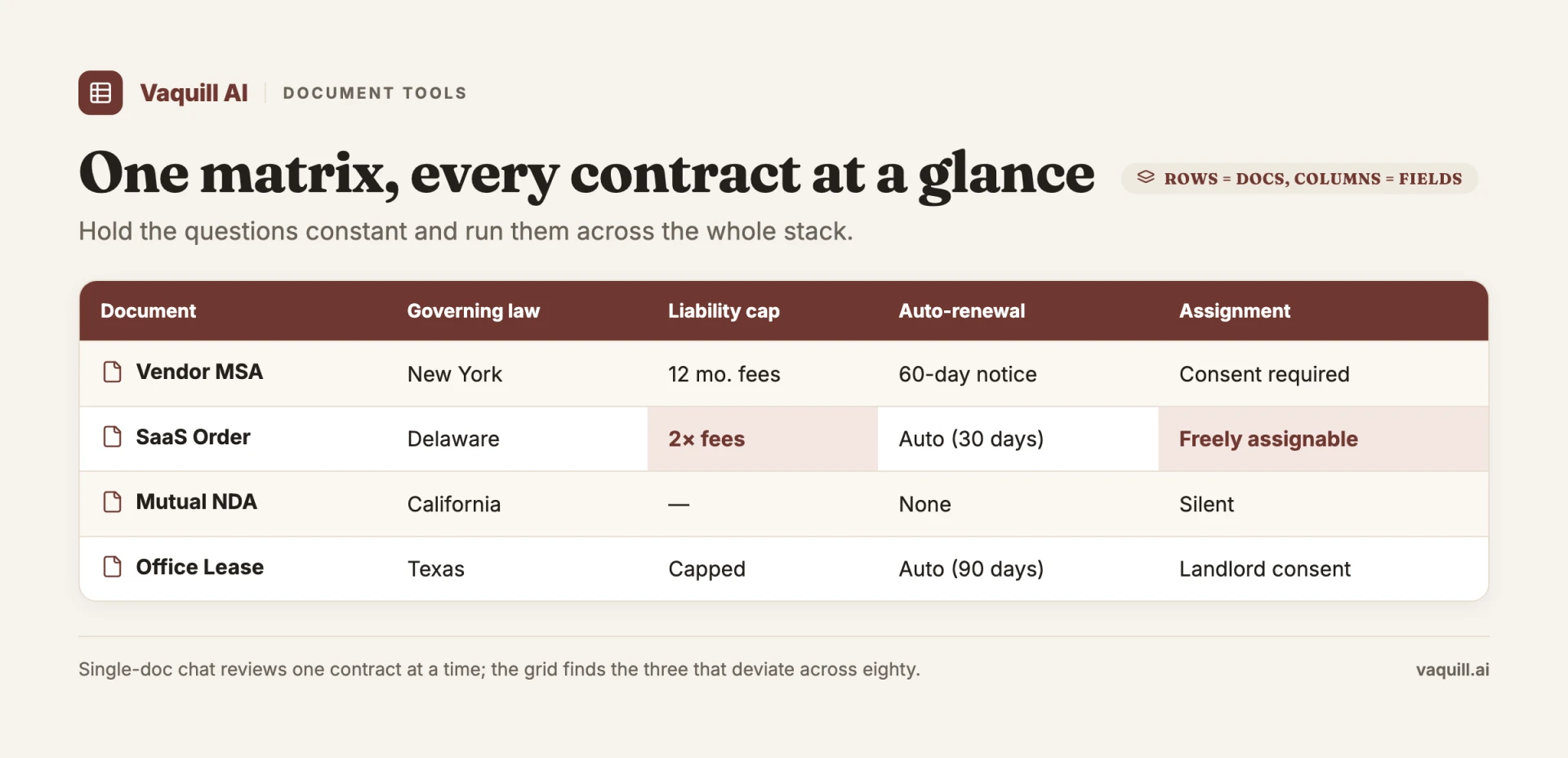
Rows are documents, columns are the fields you care about; every cell links back to its source.
What a document matrix actually is
Flip the axis. In a matrix, the documents are the rows and the questions become permanent columns. You define a column once ("Governing law jurisdiction"), and the system applies that exact definition to every document in the set, returning one cell per document.
The result is a structured dataset, not prose. And structure is the whole point, because structure is sortable.
| Document | Governing law | Liability cap | Auto-renewal notice |
|---|---|---|---|
| Acme MSA | New York | 12 months fees | 30 days |
| Beacon SaaS | Delaware | Uncapped | None stated |
| CorteX vendor | New York | $250,000 | 60 days |
Three rows in, the Beacon row already jumps out: uncapped liability and no renewal notice. That is the move. You are not reading three contracts. You are scanning a column and letting the outlier surface itself.
Run the same grid across eighty rows and the workflow holds: the deviations are visually obvious, and everything that conforms can be cleared in one pass.
This is not a new invention. It is how the category already ships. Thomson Reuters' CoCounsel review documentation describes feeding it up to 200 files at once, with output "best captured in a table format," custom column headers, and an export to Excel.
Legora built its entire differentiation around the tabular review surface: drop a couple hundred contracts into a spreadsheet view and run the same questions down every row. We covered both products and what they charge for it in our breakdown of Harvey, Legora, and CoCounsel pricing.
The biggest firms build on the same shape. A&O Shearman's contract-review platform is named, literally, ContractMatrix; its Analyze module runs each contract against a client's predefined playbook and reports "accuracy levels exceeding 95% when using expert-developed playbooks" (A&O Shearman, 2026). That is the grid with one more column bolted on. The columns still ask what does this contract say. The playbook adds a second question: where does it deviate from our approved position.
| Tool | How it ships the grid | Notable spec |
|---|---|---|
| CoCounsel (Thomson Reuters) | Review table, custom column headers, Excel export | Up to 200 files per run (TR docs) |
| Legora | Spreadsheet view as the primary review surface | Hundreds of contracts, same questions per row |
| ContractMatrix (A&O Shearman) | Grid plus playbook-deviation flagging | 95%+ accuracy with expert playbooks (A&O Shearman, 2026) |
The pattern across all of them is the same. The serious tools converged on the grid because the grid matches the work.
A worked example: the auto-renewal sweep
Abstractions are easy to nod along to and hard to feel. So here is a real one.
New York General Obligations Law § 5-903 says that an automatic-renewal clause in a service contract is unenforceable against the customer unless the service provider gave written notice of the renewal, generally between 15 and 30 days before the deadline to cancel. It is a statute that quietly voids a lot of evergreen contracts, and most companies have no idea which of their vendor agreements are exposed.
Now picture the actual task. Counsel for a New York company wants to know, across the full vendor stack, every contract that auto-renews and whether the renewal mechanism could survive a § 5-903 challenge.
In a chat tool, that is eighty separate sessions, eighty manually logged answers, and zero confidence you applied the same standard to contract eighty as to contract one.
In a matrix, it is four columns:
- Auto-renews? (yes / no)
- Notice window stated in contract (e.g., "30 days," "none")
- Cancellation deadline
- § 5-903 risk flag (a derived column: does the stated notice mechanism plausibly satisfy the statute)
Run it once. Sort by the risk flag. The contracts that need a lawyer's eyes float to the top, and the ones with a clean 30-day notice clause drop out of scope. You have turned an open-ended research project into a triage you can finish before lunch.
This is also where the statute side of the toolchain matters. The "what does § 5-903 require" half of that question is a legislation lookup: the actual text of a state code section, current as of today. A neutral statutes and legislation API covering U.S. Code, CFR, and all fifty state codes is what anchors the compliance column in your grid to the real rule rather than a model's vague memory of it.
The matrix tells you what your contracts say. The statute lookup tells you what the law requires. The flag is where the two meet.
What most people get wrong about it
Mistake one: thinking a matrix is just a nicer summary. It is not a formatting upgrade. A summary compresses one document. A matrix enables comparison across documents, which is a categorically different capability. The value is not in any single cell. It is in the column, where conformity and deviation become visible at a glance. If your "matrix" can only really tell you about one document at a time, you bought a summary with extra steps.
Mistake two: assuming it is RAG chat wearing a table. This is the one that trips up engineers more than lawyers. Putting answers in a grid is the easy 20%. The hard 80% is everything that makes the grid trustworthy:
- Consistent extraction. "Liability cap" has to mean the same thing in row 3 and row 73. If the model interprets the column header slightly differently per document, the column is noise. Holding a definition constant across heterogeneous documents is genuinely hard.
- Per-cell citations. Every cell needs to point back to the exact clause it came from, so a reviewer can click and verify in seconds. A cell you cannot trace is a cell you cannot trust, and in legal work an unverifiable answer is worse than no answer. The 2023 Mata v. Avianca sanctions, where lawyers filed a brief full of AI-hallucinated cases, are the permanent reminder of what unverifiable model output costs.
- Absence versus error. The single most underrated requirement. When a contract simply has no indemnity clause, the cell must say "not present," not invent one and not silently leave a blank that looks like a processing failure. Distinguishing "the document does not contain this" from "the model could not find this" is the difference between a tool a lawyer can rely on and one they have to double-check by hand, which defeats the entire purpose.
Mistake three: filing it under M&A diligence only. Yes, the matrix was born in the data room, where deal teams have always built closing checklists as grids. But the shape generalizes anywhere you have document-type homogeneity and volume.
Lease portfolios. Employment agreements across a workforce. A stack of inbound NDAs you need to clear against your playbook (a problem we dug into separately in our piece on NDA triage and how to evaluate it). Compliance sweeps against a specific statute, like the § 5-903 example above.
The common denominator is not the practice area. It is the question "are these all consistent, and which ones are not?"
Why this is the layer after chat
There is a tidy way to see the progression of legal AI, and the matrix is the next rung on it.
The first layer was search: find me the relevant case or clause. The second layer was chat: let me ask a document questions in natural language. Both are document-singular. Both keep a human as the integrator, the person who runs the same query against thing after thing and assembles the results in their head or in a spreadsheet they maintain by hand.
The matrix removes the human as the integrator. The system runs the consistent query across the set and returns the assembled, comparable result directly. That is not a feature bump. It is a change in what the tool is for.
Chat makes one lawyer faster at one document. A matrix makes the document set itself legible, which is the thing review-at-scale has always actually needed.
It also reframes where AI creates value. Vendors love to point at headline numbers about how many documents their platforms have chewed through (you will see "millions of documents reviewed" claims floating around, often with no primary source behind them, so treat the specific figures as marketing until someone shows you the audit).
The defensible claim is narrower and more useful: the bottleneck in volume review was never reading any single document. It was the integration step. The matrix is the first interface that targets the integration step head-on.
How to tell a real matrix from a demo
If you are evaluating tools, the grid view is table stakes. Everyone has one now. The questions that actually separate a production tool from a slide are these:
- Can I click any cell and land on the exact source clause? If not, every cell is a thing you have to re-verify, and the time savings evaporate.
- Does it tell me when a field is genuinely missing, rather than guessing or going blank? Test this deliberately by feeding it a document you know lacks a given clause.
- Can I define my own columns in plain language and trust that the same definition is applied to every row, including the messy ones?
- Does it handle the heterogeneity of a real stack, where document fifty is a scanned PDF with a different clause order than document one?
- Can I export the grid and trace the provenance after it leaves the tool?
Run a tool against a stack you already know cold, ideally one a junior associate has already reviewed by hand. The deviations the tool surfaces should match the ones the human found, and the citations should land where the human looked. If they do, you have a matrix. If the grid is pretty but the cells do not hold up to a click, you have a demo.
The industry spent two years selling the conversation. The work was always the comparison.
The teams that figure out which is which will spend their hours on the three contracts that deviate, not the seventy-seven that do not.
When to use a document matrix (and when not to)
The matrix earns its keep when you have many documents of the same type and one repeated question. It is the wrong tool when you have one document and many questions.
Reach for a matrix when:
- You are triaging a stack of similar agreements (NDA inbox, vendor renewals, a lease portfolio) and need to find the outliers.
- You are running a compliance sweep against a single rule, like the auto-renewal example above, across every contract that could be exposed.
- You are doing M&A or financing diligence and need the same closing-checklist fields pulled from every target contract.
- You need an exportable, citable record that another reviewer can audit later.
Skip the matrix and use single-doc chat or full review when:
- You are negotiating one bespoke, high-stakes agreement clause by clause.
- The documents have nothing in common, so there are no shared columns worth defining.
- The question is open-ended ("what should I worry about here?") rather than a fixed field.
If you want the redline-versus-grid distinction in detail, that is the subject of Document Matrix vs Document Comparison.
FAQ
What is a document matrix in simple terms?
It is a grid where each row is a document and each column is a field you want pulled from every document, such as governing law or renewal date. Instead of reading each document end to end, you scan a column and the documents that deviate stand out. Each cell should link back to the clause it came from.
What is a contract review matrix?
A contract review matrix is a document matrix built for contracts. The rows are contracts and the columns are the terms you care about: liability cap, indemnity scope, auto-renewal notice, governing law. It lets you compare a whole contract set on the same terms at once rather than one agreement at a time.
How is a document matrix different from document comparison?
Document comparison (redlining) shows the word-for-word changes between two versions of the same document. A document matrix extracts the same fields across many different documents so you can compare them side by side. Comparison is two versions, one document; a matrix is one question, many documents. The longer breakdown is in Document Matrix vs Document Comparison.
Is a contract review matrix the same as a playbook review?
They overlap but are not identical. A matrix extracts the same fields across a set and lets you spot outliers by eye. A playbook review adds a fixed reference position for each field ("liability should cap at 12 months fees") and flags where a contract deviates from it. In practice the two converge: tools like A&O Shearman's ContractMatrix run the grid and the playbook comparison in one pass, so the deviation column is computed rather than eyeballed. The matrix is the surface; the playbook is a rule set you can layer onto it.
Is a document matrix only for M&A due diligence?
No. Due diligence is where the format started, but the shape works anywhere you have similar documents and volume: NDA stacks, lease portfolios, employment agreements, and statutory compliance sweeps. The common thread is the question "are these all consistent, and which ones are not?"
How do I build a document matrix?
Define your columns as plain-language questions, point them at your document set, and run the extraction so each row returns one cell per column with a citation. The detailed walkthrough, including column design and handling messy scans, is in How to Build a Document Matrix.
What makes a document matrix trustworthy versus a demo?
Three things: consistent extraction (a column means the same thing in row 3 and row 73), per-cell citations you can click to verify, and an honest "not present" when a field is genuinely missing rather than a guess or a silent blank. Test it by feeding it a document you know lacks a clause and seeing what the cell says.
Can a document matrix handle hundreds of documents at once?
Yes. Thomson Reuters' CoCounsel review documentation describes feeding it up to 200 files at a time with output captured as a table and exported to Excel. The practical limit is less the document count and more whether the extraction stays consistent across a heterogeneous stack.
Where Vaquill AI fits
We build Vaquill AI's document matrix on exactly the principles above: per-cell citations back to the source clause, an explicit "not present" instead of a guess, and columns you define in plain language. The compliance columns can lean on a neutral statutes and legislation lookup for U.S. Code, CFR, and all fifty state codes, so a flag like the § 5-903 example is anchored to the current text of the rule.
New legal AI guides, weekly.
Further Reading
Can AI Analyze Legal Documents? Extraction Across 50 Contracts at Once
Read postDocument Matrix vs Document Comparison: Grid vs Redline
Read postTop 12 Legal Redline Software Tools (2026)
Read postHow to Build an NDA Playbook Your AI Can Actually Enforce
Read postLegal AI Workflows: How Law Firms Chain Multi-Step AI Tasks in 2026
Read postLegal Research Agent: What Agentic AI Agent Mode Actually Does (and Where It Breaks)
Read post
Product & Content
The US primary law data API: statutes, regulations, constitutions, court rules, executive orders and agency guidance across 53 US jurisdictions, each section cited and linked to its official source, via REST, MCP or SQL.