The deal that taught me what a document matrix is for had 214 commercial leases in the data room and a Friday close. Two associates had spent three days reading them one at a time, asking each PDF the same five questions in a chat window, copying answers into a spreadsheet by hand.
By lease 200 the answers had quietly drifted. "Change of control" in lease 14 meant a clean assignment clause flagged green. By lease 188 the same phrase was getting summarized three different ways because whoever was prompting that afternoon worded the question slightly differently.
Nobody noticed until the partner asked, "How many of these have a landlord consent trigger?" and got three different counts from three different people.
That is the problem a document matrix solves, and it is why learning how to create a document matrix is the single highest-leverage skill in modern diligence. A matrix is not a smarter chat window. It is the inverse of single-document AI.
Instead of asking one document a hundred questions, you ask one hundred documents the same question, so the answers line up in a grid you can sort, filter, diff, and audit. The unit of value is not cleverness. It is consistency.
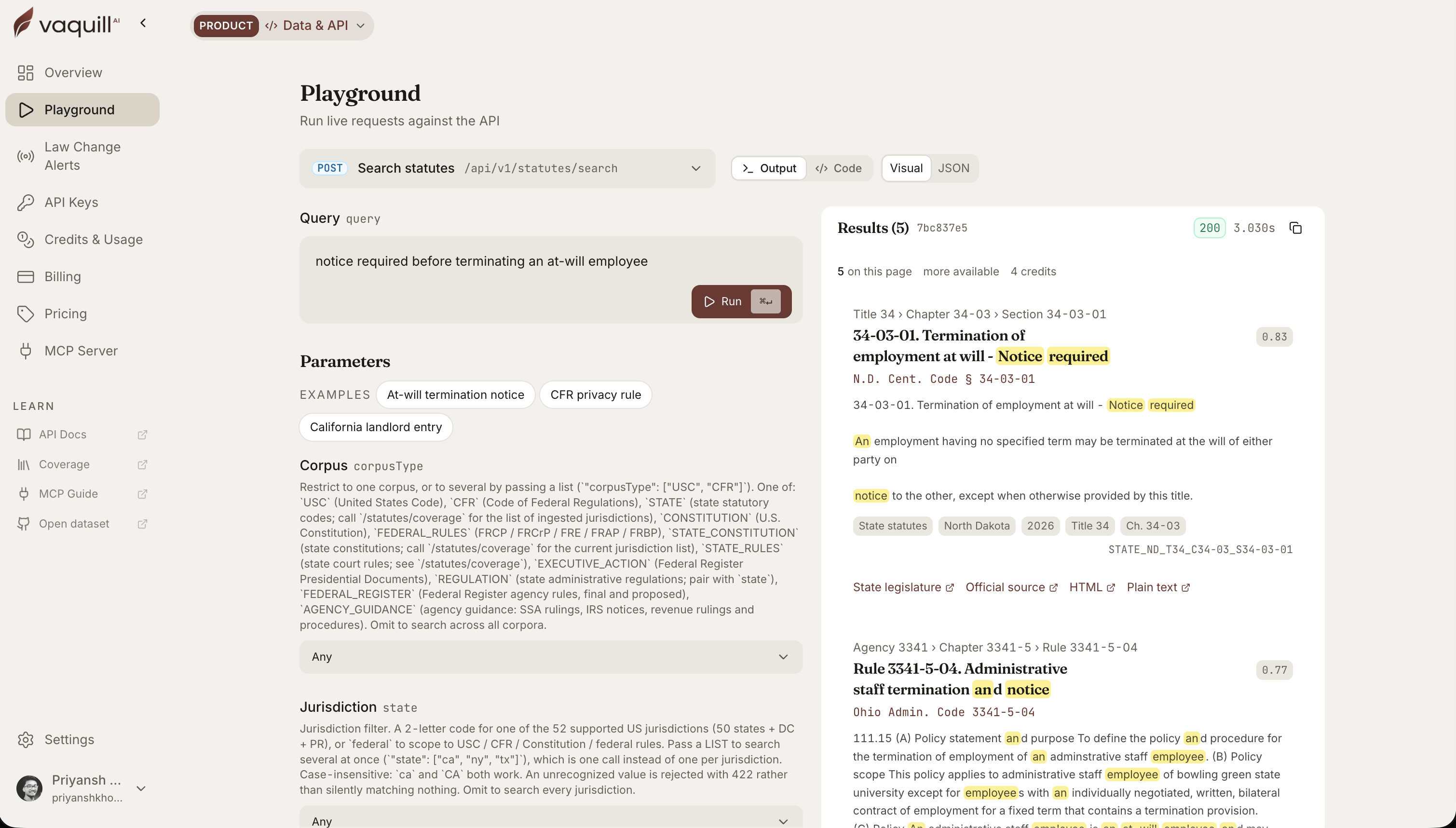 The same corpus behind this article, queried live. Every result carries its citation and a link to the official source.
Short answer: To build a document matrix, list each contract as a row and each question you need answered as a column, then extract the same fields from every document so the answers line up in one grid you can sort and filter. The five steps: pick your fields (with a type and allowed values), extract them across the set, normalize the values, flag the deviations, then verify each cell against its source clause and the governing statute. A contract comparison spreadsheet is the same idea, built by hand instead of by a tool.
TL;DR
- A document matrix flips single-doc AI on its head: same question, every document, answers in a grid (rows = documents, columns = fields).
- The discipline lives in the schema, not the model. Define your fields before you run anything, or you get a wall of unsortable free text.
- The named industry pattern is real: Legora ships it as "Tabular Review," and M&A teams use the same row/column model to apply one analytical framework across a whole data room.
- The differentiator in 2026 is no longer "can it extract." Kira, Luminance, and others solved extraction years ago. It is "can you trust the grid."
- Every cell must link back to the clause it came from. An unverifiable extraction is worse than no extraction. That is the Mata v. Avianca lesson applied to diligence.
- Five-step build: pick fields, extract across the set, normalize the values, flag deviations, then verify every legal cell against actual statute. A worked, populated example matrix is below.
- A contract comparison spreadsheet built by hand gets you the same grid; the tradeoff is normalization and provenance, which is where manual matrices quietly break.
According to the post, what is the real unit of value in a document matrix?
Part of our document tools, redline, and matrix guide series.
For related document-tools coverage, see What Is a Document Matrix? Extract the Same Fields Across Dozens of Docs and Reviewing 50 Contracts at Once: Bulk Clause Extraction With a Document Matrix.
Why the grid beats the chat window
Single-document review is where most "AI contract review" demos win. You drop in one NDA, ask twelve sharp questions, and the model dazzles. That demo is honest about exactly one thing: how the tool performs on document number one.
Diligence does not die on document one. It dies on document two hundred, where the model's answer drifts a few degrees and nobody is looking closely enough to catch it.
The grid makes drift visible. When 213 leases say "30 days written notice" and one says "10 business days," that outlier jumps out of the column the way a typo jumps out of a clean paragraph.
You cannot see that pattern in a chat transcript. You can only see it when every answer to the same question sits in the same column, formatted the same way, ready to be sorted. The structure is the insight.
This is also why a matrix is the workflow that comes after triage, not instead of it. If you are evaluating a single agreement clause by clause, that is single-document contract review, and a focused tool does it well.
If you are sorting a pile of inbound NDAs into "sign as-is," "negotiate," and "escalate," that is NDA triage. The matrix is what you reach for when triage is done and you now need to compare what survived against everything else in the set. Different job, different tool.
The pattern is mature, which changes the question
It helps to know this is not a novel idea someone invented last quarter. Legora calls it Tabular Review: "each document becomes a row and AI-generated prompts correspond to columns," built for "extraction of key data, clause comparison, and identification of inconsistencies at scale, whether analyzing hundreds or thousands of documents."
Harvey's M&A teams describe the same mental model from the value side, applying "the same analytical framework to each document" for a "consistent level of analysis across the full dataset," and report figures like 15 to 20 percent time savings on standard workflows, up to 75 percent on messy data rooms.
Treat those percentages as reported vendor numbers, not gospel, but the framing is the part worth keeping: consistency, not speed, is the point.
Go back further and Kira (now part of Litera) and Luminance built their entire reputations on grid extraction across diligence sets. The technology has been good enough to pull a governing-law clause out of a lease for the better part of a decade.
So the interesting question in 2026 is not "can the AI extract the field." It can. The question is "can you trust the grid it produced." That is where most of the work actually is, and where most of the failures hide.
Step 1: Define the fields before you run anything
Here is the single most common mistake, and I have watched smart people make it under deadline pressure every time. They upload the documents, type a vague prompt like "summarize the key terms," hit run on all 214, and get back a grid where every cell is a paragraph of free text.
It looks productive. It is useless. You cannot sort a column of paragraphs. You cannot diff them. You cannot answer "how many have a consent trigger" because the answer is buried in prose that reads differently in every row.
Define the schema first. For a commercial lease diligence grid, give every column a type and, where you can, a fixed set of allowed values:
| Field | Type | Allowed values | Why it earns a column |
|---|---|---|---|
| Tenant / Landlord | Text | Exact party names | Identifies the row; catches misfiled docs |
| Commencement date | Date | YYYY-MM-DD | Sortable timeline of the portfolio |
| Expiration date | Date | YYYY-MM-DD | Surfaces near-term rollovers |
| Base rent | Currency | Monthly amount | Comparable economics across leases |
| Renewal option | Enum | yes / no (+ term) | Counts optionality at a glance |
| Assignment / change-of-control | Enum | freely assignable / landlord consent required / prohibited | The deal-blocking column you sort first |
| Notice period for default | Number | days | Outlier notice periods jump out |
| Governing law | Enum | US state | Routes the statute-verification step |
| Termination for convenience | Enum | yes / no | Flags walk-away rights |
Notice what these have in common. Each field has a type and, where possible, a constrained set of answers. "Landlord consent required" as one of three allowed values is sortable and countable. "The lease contains certain provisions relating to assignment that may require..." is not.
The schema is doing the same job a database column type does: it forces the model's output into a shape you can actually compute over.
The fields are also the place to encode your real legal question. You are not building a grid because grids are nice. You are building it because the partner asked how many leases have a consent trigger, or because the buyer needs to know which contracts evaporate on a change of control.
Write the columns that answer the question you were actually asked. Everything else is noise that makes the grid harder to read.
If your matrix work is recurring (the same lease fields every deal, the same vendor-contract fields every quarter), this is exactly where a saved workflow earns its keep: the schema becomes a reusable template instead of something you rebuild from memory under deadline.
Step 2: Run the grid
With the schema defined, running it is the easy part, and that is the point. The tool reads each document, fills each column for that row, and you end up with a table that is 214 rows tall and 9 columns wide.
This is the step every vendor demos because it is the step that looks like magic. In a mature tool it is the least interesting step, because the quality of the output was already determined by how well you defined the columns.
A few things to watch while it runs:
- Empty cells are signal, not noise. A blank "renewal option" cell usually means the lease is silent on renewal, which is itself a finding. Do not let the tool guess to fill the blank. A confident guess in a diligence grid is a landmine.
- Normalize as you go. If "governing law" comes back as "New York," "NY," and "State of New York" across three rows, the column is not yet sortable. Good matrix tools normalize to a canonical value. If yours does not, fix it before you analyze, not after.
- Sort by the outlier column first. The fastest way to find what matters is to sort the constrained columns. Sort assignment by "prohibited" and you instantly have the list of leases that will block the deal. That is the entire value proposition in one click.
A purpose-built document matrix is engineered around this exact loop: define fields, run extraction across dozens of documents, get a tabular grid rather than a stack of chat threads.
Step 3: Export, then verify every cell against source
This is the step people skip, and it is the step that keeps you out of trouble.
The lesson of Mata v. Avianca, where lawyers filed a brief full of cases ChatGPT invented, is usually told as a story about hallucinated citations. The deeper lesson is about unverifiable output. The sanctioned lawyers could not check the cases because the tool gave them no way to.
A diligence grid has the same failure mode. A cell that says "landlord consent required" is worthless if you cannot click it and land on the exact clause in the exact lease that supports it.
An extraction you cannot trace is worse than no extraction, because it carries false confidence into a closing memo.
So the non-negotiable feature of any matrix tool is cell-level provenance. Every value links back to the span of text it came from.
When you export the grid to share with the deal team, that linkage has to survive the export, or the reviewer two desks over inherits a spreadsheet of claims with no way to check them.
Then verify the legal cells against the actual law, not just against the document. This is where extraction meets external reality. Suppose your change-of-control column flags a government-contract counterparty or a telecom asset.
The contract language is only half the picture, because assignment may be constrained by statute regardless of what the contract says. In Nevada, for example, a public contract "may not be assigned... without the consent of the governing body" under that state's procurement code. For an FCC-regulated asset, 47 C.F.R. 63.24 requires prior Commission approval before certain transfers and assignments.
The contract might be silent or even permissive, and the statute still governs. A grid cell that only reflects the four corners of the document quietly misses that.
This is the one place a statutes lookup belongs in the workflow. A public statutes and regulations API that covers the U.S. Code, the CFR, and all fifty state codes lets the "verify the legal field against actual law" step run programmatically rather than as a manual trip to a separate database.
To be precise about scope: that public API is statutes and legislation only. It is not a case-law search or a citation engine. For the matrix workflow, statutes are exactly the right scope, because the question you are answering ("does the law constrain this assignment") lives in the codes, not in the case reporters.
A worked example: the change-of-control sweep
Put it together on the scenario that started this post. The buyer is acquiring a company whose value is mostly its commercial leases and a handful of regulated contracts.
The deal dies if too many agreements terminate or require third-party consent on change of control.
- Define fields. Counterparty, agreement type, change-of-control treatment (freely assignable / consent required / terminates), notice period, governing law, regulated counterparty (yes / no).
- Run the grid across all 214 documents. Twenty minutes of compute replaces three days of associate copy-paste, and more importantly it replaces the inconsistency, because every row was asked the identical question. A slice of the populated grid:
| Counterparty | Type | Change-of-control | Notice | Governing law | Regulated? |
|---|---|---|---|---|---|
| Maple Tower LP | Lease | landlord consent required | 30 days | New York | no |
| Cedar Logistics Inc | Lease | freely assignable | 30 days | Texas | no |
| Statewide Roads Auth | Public works | freely assignable | 10 business days | Nevada | yes |
| Northstar Telecom LLC | Service | consent required | 60 days | Delaware | yes |
| Birch Retail Partners | Lease | terminates on change of control | 90 days | California | no |
Read it as a grid, not as five contracts. The Nevada row says "freely assignable," the Birch row is the only "terminates," and one notice period is in business days, not calendar days. Those three reads took seconds because the columns are constrained. In a stack of 214 PDFs they would have taken days, and the business-days outlier would likely have been missed.
- Sort by change-of-control treatment. The "terminates" rows are your dealbreakers. The "consent required" rows are your task list of consents to chase before close.
- Verify the cells. Click each "consent required" cell, confirm the clause says what the grid claims. For the regulated rows, check the relevant statute or regulation: a public-contract counterparty against the state procurement code, a telecom asset against 47 C.F.R. 63.24. Two of your "freely assignable" rows turn out to be constrained by statute the contract never mentioned. Those are exactly the surprises that blow up a closing if the grid had been the final word.
- Export the verified grid, with source links intact, into the closing memo.
The associates in my opening story eventually got there. They just got there by hand, with drift baked in, and the partner did not trust the count.
The grid removes the drift and, done right, makes the count auditable. That is the whole game.
Contract comparison spreadsheet by hand vs an AI grid
You can build the same matrix in Excel or Google Sheets. The vendor-comparison guides that rank for this topic, like Ramp's vendor comparison matrix (Ramp, 2026), teach a weighted-scoring version of this: criteria down the side, options across the top, scores in the cells. That structure is fine for picking a vendor. It is the wrong shape for diligence, where each cell holds an extracted fact like "landlord consent required" rather than a 1-to-5 score.
The honest contrast for a contract comparison spreadsheet built by hand:
| Step | Manual spreadsheet | AI document matrix |
|---|---|---|
| Pick fields | You write the column headers | You write the column prompts (same discipline) |
| Extract | Read each PDF, type each cell | Tool fills each row from the source |
| Consistency | Drifts as different people, or the same tired person, word the question differently | Every row asked the identical question |
| Normalize | Manual find-and-replace ("NY" vs "New York") | Tool normalizes to a canonical value, or you still fix it |
| Flag deviations | Eyeball the columns | Sort the constrained columns; outliers surface |
| Provenance | A page reference you typed, if you remembered | Cell links to the exact source span |
The manual version works at 10 documents. It breaks at 200, and it breaks in the two places that matter most: consistency and provenance. The cell you typed three days ago has no link back to the clause, so the reviewer who inherits your sheet cannot check it. Exporting contract data to a spreadsheet is a common move (Concord documents extracting contract conditions to Excel, Concord, 2026), but an export is only as trustworthy as the extraction behind it.
This is not an argument that manual is wrong. It is an argument about scale. Below a couple of dozen documents, a clean spreadsheet and a careful associate beat the setup cost of a tool. Above that, the grid earns its place.
Where the matrix sits in the bigger workflow
A document matrix is a pre-deal, point-in-time extraction. It tells you what is true across a set of documents right now. It does not manage those obligations going forward.
Once the deal closes and those consents need tracking, renewal dates need calendaring, and obligations need monitoring, you are in contract lifecycle management territory, a different tool for a different phase. The clean handoff is: matrix to find and verify, CLM to manage what you found.
For teams that would rather assemble this from parts than buy a single suite, the build-it-yourself stack is real and worth understanding. You can wire a foundation model to a structured-output schema and a statutes API and get most of the way to a matrix, which is the same logic behind replacing a premium suite with a Claude-plus-API stack.
The thing you cannot skip, whether you build or buy, is the discipline: fields first, provenance always, verify the legal cells against the law. The model is the easy part. The schema is where the work lives.
If your practice is contract-heavy diligence, this workflow is foundational to corporate legal work, and it is worth getting the muscle memory before the next data room lands on a Friday.
FAQ
How do you build a document matrix?
List each document as a row and each question you need answered as a column, then extract the same fields from every document. The five steps are: pick your fields (each with a type and, where possible, a fixed set of allowed values), extract them across the whole set, normalize the values so a column is sortable, flag the deviations, then verify every cell against its source clause. Define the columns before you run anything; that is where the work lives.
What fields should a contract comparison matrix include?
Start from the question you were actually asked, then add the fields that answer it. For a lease set that usually means parties, commencement and expiration dates, base rent, renewal option, assignment or change-of-control treatment, default notice period, governing law, and termination for convenience. Give each field a type (date, currency, enum) and constrain the answers to a fixed set where you can, because a column of three allowed values is countable and a column of free-text paragraphs is not.
How do you compare contracts in a matrix?
Put one analytical framework across every document so the answers sit in the same column, formatted the same way. Then sort the constrained columns to surface outliers: sort assignment by "prohibited" and you get the list of deals that block, sort notice period and an oddball "10 business days" jumps out. The structure is what makes the comparison possible; you are reading a grid, not 200 separate contracts.
Can I build a contract comparison spreadsheet by hand instead of using AI?
Yes, and below roughly two dozen documents a clean spreadsheet and a careful reviewer beat the setup cost of a tool. The manual version breaks at scale in two places: consistency (different people word the same question differently, so answers drift) and provenance (a typed page reference has no link back to the clause). An AI grid is worth it once the volume is high enough that those two failures start to cost you.
What is the difference between a document matrix and contract comparison software?
A document matrix is the row-and-column model itself: same question, every document, one grid. Contract comparison software often means redline or version-diff tools that show how one agreement changed between drafts. The matrix is a many-documents extraction; a diff tool is a two-versions comparison. See What Is a Document Matrix? for the concept and single-document comparison for the diff side.
How do I check a document matrix for errors?
Run a five-document smoke test before you trust a 200-document grid: click a cell at random and confirm it lands on the exact clause that supports the value, then export to CSV and check that the source links survive. Treat empty cells as findings, not noise, and never let the tool guess to fill a blank. For legal fields, verify against the governing statute, not just the contract, because the law can constrain an assignment the contract never mentions.
How long does it take to review 200 contracts in a matrix?
The extraction itself is minutes of compute once the schema is set. The real time goes into defining the fields up front and verifying the cells afterward, which is the work that keeps you out of trouble. Plan for the verification pass to take longer than the run; a grid you cannot trust is worse than no grid.
New legal AI guides, weekly.
Further Reading
Top 12 Legal Redline Software Tools (2026)
Read postHow to Build an NDA Playbook Your AI Can Actually Enforce
Read postLegal AI Workflows: How Law Firms Chain Multi-Step AI Tasks in 2026
Read postHow to Compare Documents and Export Clean Redlines (Step-by-Step)
Read postBulk Contract Review: How to Review Many Contracts at Once With a Document Matrix
Read postLegal Document Version Control: Which Platforms Track Versions
Read post
Product & Content
The US primary law data API: statutes, regulations, constitutions, court rules, executive orders and agency guidance across 53 US jurisdictions, each section cited and linked to its official source, via REST, MCP or SQL.